Recent Content

Is anybody else completely dissatisfied with this new forum?
This used to be a robust forum, lots of new questions everyday and, most impotantly, lots of responses. This new forum is clunky and time consuming to navigate. Nobody seems interested anymore. I used to check-in everyday to see what's new. Not any more.42KViews15likes119Comments
Repeat of a Questa License Issue
Questa licenses generated since approximately January 29 (the last date I was able to help a student configure a properly generated license) have contained the following message in place of what I presume is the normal license key: ################################################################################ # FEATURE START # This is license file for Questasim*-Intel FPGA Starter Edition # Number of seat licenses is 1 # License Expires 02-Feb-2027 300 Your license version is outside the range of the contract. # FEATURE END ################################################################################ # End of Intel Corporation Software and/or Intellectual Property License File. Issued 02/02/2026 This appears to be the same thing that happened in December 2025, and may be a sign that the licensing site is down or suffering some issue. Questa License Issue | Altera Community - 247818 Any advice would be appreciated.1.3KViews8likes24Comments
OMG. What did you think?
As there doesn't seem to be any dedicated feedback forum for forum issues anymore, I post here to express my complete dissatisfaction with the new 'solution': Although the old Altera forums weren't especially fast and user friendly, the new one appears to me as huge quantum leap. Backwards. It's awfully slow, apparently buggy (messages about Javascript blocking the browser everywhere), pages constantly displaying busy indicators. Long story short: I consider it completely useless in it's current state. If you want to get rid of your trusty Altera customers, this is a perfect way to do so...9KViews8likes32Comments
Intel® FPGA AI Suite melds with OpenVINO™ toolkit to generate heterogeneous inferencing systems
3 MIN READ The Intel® FPGA AI Suite enables FPGA designers, machine learning engineers, and software developers to efficiently create and optimize AI inferencing platforms to meet best-in-class performance, power, and cost goals.8.1KViews6likes0Comments
Why do I unexpectedly observe intermittent DDM Errors?
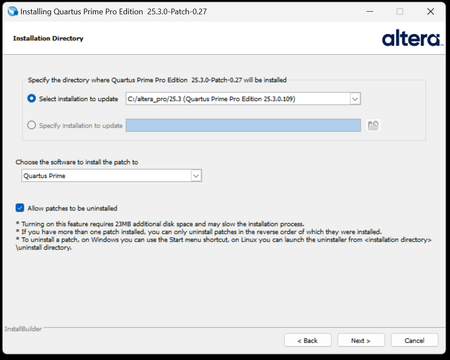
Description Beginning January 10, 2026, executing commands in the terminal or GUI of Quartus® Prime Pro Edition software, Quartus Embedded Edition software or select standalone tools may cause the software or tool to crash with an error similar to the crash signature shown below. This error affects: Quartus Prime Pro Software versions v23.3 through v25.3.1 Standalone Quartus Prime Pro Programmer v23.3 through v25.3.1 Standalone Quartus Prime Pro Embedded Edition v25.3 and v25.3.1 Standalone Quartus Prime Pro Power Thermal Analyzer v25.3 through v25.3.1 This issue is not observed in Quartus Prime Pro Edition versions 23.2 or prior or Quartus Prime Standard Edition. Crash Signature: Error (22912): Unhandled exception: Fatal Error: Assertion failed tools/cpp/ddm/ddm_assessor.cpp:53: DDM_T::verify_token(token) : Cannot identify the client from function assertion_error in tools/cpp/ddm_report/ddm_report_msg.cpp@465 *** Fatal Error: Program termination requested *** *** Below is the stack trace at the time the error occurred. *** The lines beginning "Err Handler" represent frames relating *** to generating this report. *** The point at which the error occurred is somewhere after these lines. *** There may be a few frames representing standard/library code *** before the Quartus frames begin. *** The search for the error should begin with the Quartus frames. *** Unwinder: libunwind *** Stack depth: 15 Quartus 0x24e67: err_terminator() + 0x1bc (ccl_err) Quartus 0xb036a: __cxxabiv1::__terminate(void (*)()) + 0xa (stdc++) Quartus 0xb03d5: (stdc++) Quartus 0xb0628: (stdc++) Quartus 0x1680d: void ddm_throw<DDM_RUNTIME_ERROR>(std::__cxx11::basic_string<char, std::char_traits<char>, std::allocator<char> > const&) + 0x26d (ddm_report) Quartus 0x13fae: DDM_REPORT::DDM_ASSERTION_HANDLER::assertion_error(std::__cxx11::basic_string<char, std::char_traits<char>, std::allocator<char> >) const + 0xde (ddm_report) Quartus 0x12a52: DDM_REPORT::ASSERTION_HANDLER::error(std::__cxx11::basic_string<char, std::char_traits<char>, std::allocator<char> >) + 0x72 (ddm_report) Quartus 0x13e64: DDM_REPORT::detail::assert_at_line(char const*, char const*, int, char const*, ...) + 0x1b4 (ddm_report) Quartus 0x205fb0: ddm_set_lassessor(DDM_T_ASSESSOR*, std::__cxx11::basic_string<char, std::char_traits<char>, std::allocator<char> > const&) + 0x60 (ddm) Quartus 0xf4445: DMS_MANAGER::DMS_MANAGER() + 0x5c5 (dni_dms) Quartus 0xf45b2: DMS_MANAGER::get() + 0x7a (dni_dms) Quartus 0xf6db4: _GLOBAL__sub_I_dms_manager.cpp + 0x58 (dni_dms) Quartus 0x647e: (ld-linux-x86-64) Quartus 0x6568: (ld-linux-x86-64) Quartus 0x202ca: (ld-linux-x86-64) Resolution To work around this problem: For Windows machines Download and unzip the Quartus Prime Pro version zip file that matches your Quartus Prime Pro version from this KDB. Double click on the executable ending in “windows.exe”. When the GUI pops up, press Next. Note that the GUI may look slightly different depending on the version of Quartus you are using. Accept the license agreement Specify the directory where the patch needs to be applied which may be a different location than Quartus install if you have standalone tools in a different directory from your Quartus Prime Pro software installation. Keep “Allow Patch to be uninstalled” selected. Select the software in which to install the patch: The patch will install in the directory of the software or tool you have selected. You will see an uninstall directory for the patch in your software or tool folder where patch is installed; it will contain an executable to uninstall the patch if required for any reason. To confirm patch is installed, you can run quartus_sh -v or corresponding version command for your tool via command line. Alternatively, you can Open Quartus in the GUI and select Help → About Quartus Prime in the main menu. If you are opening up a standalone tool you will navigate to Help-> About <tool_name>. For the Command Line Implementation of the patch in Windows, use the following command: <patch_filename.exe> --mode unattended --installdir <your_install_directory> --accept_eula 1 --patch_to [quartus|qprogrammer|qemb|pta] # An example to patch Quartus Prime Pro Edition Software v25.3: quartus-25.3-0.27-windows.exe --mode unattended --installdir /tmp/altera_pro/25.3 --accept_eula 1 # An example to patch the Standalone Programmer for Quartus Prime Pro Software v25.3: quartus-25.3-0.27-windows.exe --mode unattended --installdir /tmp/altera_pro/25.3 --accept_eula 1 --patch_to qprogrammer For Linux machines: Download and unzip the Quartus Prime Pro version zip file that matches your Quartus Prime Pro version from this KDB. Ensure you run chmod +x on the file ending with linux.run. Run in the command line: ./<installation_patch_run_file>. When GUI pops up, press Next. Note that the GUI may look slightly different depending on the version of Quartus you are using. Accept the license agreement Specify the directory where the patch needs to be applied which may be a different location than Quartus install if you have standalone tools in a different directory from your Quartus Prime Pro software installation. Keep “Allow Patch to be uninstalled” selected. Select the software in which to install the patch: The patch will install in the directory of the software or tool you have selected. You will see an uninstall directory for the patch in your software or tool folder where patch installed; it will contain an executable to uninstall the patch if required for any reason. To confirm patch is installed, you can run ./quartus_sh -v or corresponding version command for your tool via command line. Alternatively, you can Open Quartus in the GUI and select Help → About Quartus Prime in the main menu. If you are opening up a standalone tool you will navigate to Help-> About <tool_name>. For the Command Line Implementation of the patch in Linux, use the following command: ./<patch_filename.run> --mode unattended --installdir <your_install_directory> --accept_eula 1 --patch_to [quartus|qprogrammer|qemb|pta] # An example to patch Quartus Prime Pro Edition v25.3: ./quartus-25.3-0.27-linux.run --mode unattended --installdir /tmp/altera_pro/25.3 --accept_eula 1 # An example to patch the Standalone Programmer for Quartus Prime Pro Software v25.3: ./quartus-25.3-0.27-linux.run --mode unattended --installdir /tmp/altera_pro/25.3 --accept_eula 1 --patch_to qprogrammer This problem has been fixed in Quartus® Prime Pro Edition Software version 26.1. The below table lists the patches that are available and the associated patch number. The patch zip files are attached to the KDB below: Quartus Prime Pro Edition Version Patch Number 23.3 0.52 23.4 0.70 23.4.1 1.01 24.1 0.52 24.2 0.64 24.3 0.35 24.3.1 1.29 25.1 0.36 25.1.1 1.31 25.3 0.27 25.3.1 1.02Quartus Pro 25.3 crash using rhel7/8
Hello everybody I'm working on an Agilex-5 project since fex months on our internal couputer farm using Quartus Pro 25.3. To generate the final bitstream, a bash script is used to execute all the steps. Until now, we have no specific issue using this script with Quartus. But since few days, we're unable to generate the project because Quartus Pro returns strange errors (see attachments). We also tried to use latest 23.5.1 version on an Ubuntu host under WSL and we also saw the same errors. Running Quartus GUI may also end with same error. (see quartus_4.png) Has anyone already experienced this issue? Thanks a lot BenjaminSolved2.7KViews5likes22CommentsQuartus programmer for Linux ARM / ARM64
Hi Intel, Would it be possible to support the quartus programmer on linux for arm and arm64 platforms? In our lab we have several raspberrypi's for remote debugging of systems. We use them for serial consoles, power cycling devices or simple digital IO. This makes remote debugging and testing possible from behind our desk while the physical hardware is in the lab. The only thing we are missing is the possiblity to hookup a USB-blaster to get access to signaltap instances or use the nios debugger. We can use a regular PC in the lab and connect to the Jtag-server running on it, but this is not as flexible as a small single board computer like the raspberrypi is. Would it be an idea to support the arm / arm64 architecture for the quartus programmer, or just the jtag-server? Kind regards, Rienk de Jong8.2KViews5likes7Comments
Is https://fpgasoftware.intel.com down?
Hi, I am trying to access https://fpgasoftware.intel.com, in order to download a version of Quartus. Nevertheless, I am not able to do so as it seems that the site is down. I tried using my account from 2 different browsers, Firefox and Safari. Is this the case or is it only from my side? Thanks, Nassos2KViews5likes5Comments
* Error (suppressible): (vsim-12110) The -novopt option has no effect on this product
# ** Error (suppressible): (vsim-12110) The -novopt option has no effect on this product. -novopt option is now deprecated and will be removed in future releases. # Error loading design Error loading design46KViews5likes8CommentsCan't download Quartus II Lite
So I've been tasked with updating a MAX V CPLD design. So I attempt to download Quartus II, and I'm getting a "Our apologies.. the server is unable to process your request" error. See attached image. I've tried Firefox and Chrome, tried downloading different versions, cleared my browser cookies, no luck. Even the MAX II/V driver pack won't download - same error every time. I click a link, it asks me to log in again (I'm already logged in) and I get the error. I entered a support ticket on the website already to report the website issue, and they asked me to create a forum account and ask my question here instead. Well here you go. Since the website doesn't work, is there a FTP site or some other place I can download this? Thanks.Solved3.8KViews5likes12Comments

Featured Places
Community Resources
Check out the support articles on personalizing your community account, contributing to the community, and providing community feedback directly to the admin team!Tags
- troubleshooting10,401 Topics
- fpga dev tools quartus® prime software pro4,353 Topics
- FPGA Dev Tools Quartus II Software3,131 Topics
- stratix® 10 fpgas and socs1,552 Topics
- agilex® 7 fpgas and socs1,546 Topics
- arria® 10 fpgas and socs1,381 Topics
- stratix® v fpgas1,315 Topics
- arria® v fpgas and socs1,229 Topics
- Configuration1,095 Topics
- cyclone® v fpgas and socs1,058 Topics
Recent Blogs
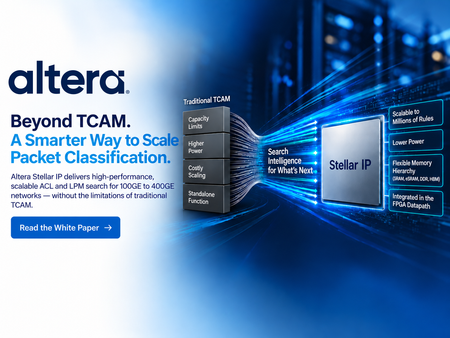
PACKET CLASSIFICATION | FPGA | NETWORKING + SECURITY Every packet decision starts with classification. Routers, firewalls, SmartNICs, security gateways, and service-edge platforms must determine which policy applies before traffic can be forwarded, blocked, inspected, redirected, or prioritized. TCAM earned its place in these systems because it provides predictable lookup behavior and native ternary matching for ACL and LPM workloads. But as policy databases grow, search keys widen, and rules change more frequently, the traditional approach of scaling specialized ternary memory creates tougher tradeoffs in capacity, power, resource utilization, and system integration. Altera Stellar solutions takes a different approach. Instead of scaling packet classification by building ever-larger ternary-memory structures, Stellar turns classification into an optimized search problem that runs on configurable FPGA resources. The result is an FPGA-native path for large, dynamic packet-classification tables without giving up the policy semantics that made TCAM useful in the first place. TCAM scales through memory expansion. Stellar scales through search intelligence. Keep the TCAM semantics. Change the scaling model. Stellar preserves the intent of ACL, LPM, and multi-field classification, but changes how those rules are represented and searched. The Stellar Software Stack organizes policies into optimized graph structures, partitions the rule database, and continuously manages those search structures as the database evolves. The hardware then executes the search using configurable FPGA search engines while rule information is stored in conventional memory resources. Depending on the configuration, Stellar can use on-chip M20K memory, eSRAM, DDR, or HBM. That gives architects more freedom to balance throughput, capacity, latency, power, and FPGA resource use around the needs of the actual system. Use dense memory where it makes sense, and intelligence where it matters A traditional TCAM combines storage and comparison circuitry inside specialized ternary-memory arrays. That architecture delivers deterministic matching, but scaling the table means scaling the specialized comparison structure as well. Stellar separates rule storage from search execution. Ternary information can be represented as value-and-mask data in conventional memory, while graph organization and software-managed optimization direct each search toward the relevant parts of the database. As tables grow from thousands of entries toward hundreds of thousands or millions, this creates a different path for scaling capacity and power. The white paper goes deeper into why this matters, including the tradeoffs between TCAM and Stellar, the role of memory hierarchy, and a set of Stellar configurations spanning different key widths, capacities, memory resources, and projected five-tuple performance. Bring classification into the programmable datapath The value is bigger than the lookup engine itself. Stellar is designed to operate inside the FPGA alongside packet parsing, telemetry, encryption, traffic management, host-interface logic, and customer packet-processing RTL. For system architects, that means classification can become part of the same programmable platform already handling the datapath. A firewall can pair large, dynamic ACL processing with the rest of its traffic pipeline. A router can combine LPM and policy enforcement with programmable networking functions. A SmartNIC can integrate flow classification with offload and customer-specific acceleration. That system-level flexibility is especially relevant for 100GE to 400GE designs where classification must scale without consuming the platform that surrounds it. Read the full whitepaper! The full Altera white paper, Altera TCAM Alternative Solutions Scale Packet Classification to Millions of Rules for Networking Equipment, explains the architecture behind Stellar and the design choices that make it different. It covers TCAM fundamentals and scaling limits, Stellar graph-based search and software partitioning, memory-hierarchy options, configuration examples, quantitative architectural comparisons, dynamic updates, and deployment use cases across networking and security. Read the white paper See how Stellar uses search intelligence, configurable FPGA resources, and a flexible memory hierarchy to create a scalable alternative for large ACL and LPM workloads.
18 days ago0likes
4 MIN READ
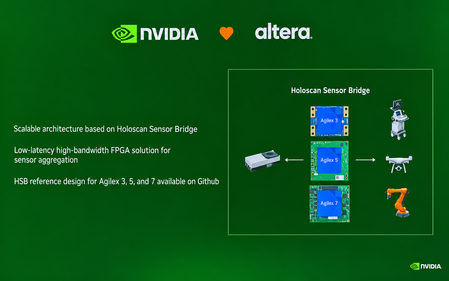
September 28, 2026 The next generation of embedded systems will not be defined by compute alone. It will depend on how quickly, reliably, and intelligently systems can move data from the physical world into AI engines and turn insights back into action. That message came through clearly at Embedded World North America 2026, held September 22–24 at the Anaheim Convention Center. For Altera, the show provided an opportunity to highlight a growing collaboration with NVIDIA and demonstrate the role of FPGAs in high-performance edge AI architectures. Connecting sensors to AI with flexibility and determinism At the center of the story was NVIDIA Holoscan Sensor Bridge technology. The solution creates a high-bandwidth, low-latency path between real-world sensors and GPU-based AI processing, an increasingly important capability for robotics, industrial automation, intelligent video, medical systems, and other physical AI applications. FPGAs are well suited to this role because they can provide deterministic processing, flexible I/O, and protocol adaptation close to the sensor. Rather than forcing every application into the same hardware configuration, FPGA-based designs can be tailored to performance, connectivity, and latency requirements of a specific system. In the show’s keynote, NVIDIA Vice President Deepu Talla described the value of this flexibility: “You can select any of the Altera FPGAs depending on the application and pair them with any of the NVIDIA frameworks.” Altera’s post noted that Altera offers Holoscan Sensor Bridge solutions spanning 10G to 100G, where 25G and 100G offer significantly more bandwidth compared to other Holoscan ecosystem partners, helping developers scale connectivity for demanding edge workloads. The result is a practical sensor-to-compute architecture: Altera FPGAs handle the flexible, deterministic front end, while NVIDIA platforms provide the accelerated environment for AI and robotics workloads. An ecosystem approach to accelerating development The demonstrations also underscored that successful edge AI deployments require more than individual components. Developers need reference designs, production-ready boards, and partners that help bridge the gap between evaluation and deployment. Altera’s growing Holoscan ecosystem includes more than 10 reference designs and partner boards. These building blocks can help teams reduce integration effort and move faster from proof of concept to a real-time AI product. One example was on display at Altera partner Critical Link’s booth. Critical Link was recognized as a Best in Show Award winner in the AI & Machine Learning category at the show. Visitors to the booth could see a live demonstration of a 5-camera Holoscan Sensor Bridge solution, using Critical Link’s MitySOM-A5E as the featured Agilex® 5 FPGA hardware platform. The demonstration showed how an Agilex 5 FPGA-based system can help bring sensor data into an NVIDIA-powered AI pipeline while preserving the low-latency, high-bandwidth behavior required by edge applications. From 10G to 100G: Building the data plane for edge AI Altera’s Holoscan Sensor Bridge solutions are designed to make the sensor-to-GPU path faster and more adaptable. A recent Altera technical blog describes 10G, 25G, and 100G reference designs, including a 25G design on Agilex 5 SoC FPGAs for multi-camera sensor data flow and accelerated processing at the edge. In this architecture, the FPGA serves as the data plane: connecting to diverse sensors, aggregating streams, adapting protocols, and preprocessing data before it reaches the NVIDIA GPU. That division of labor helps reduce data-movement bottlenecks while preserving deterministic timing and giving developers room to evolve the system as sensor interfaces and AI workloads change. Altera Technical Holoscan blog for Robotics: Altera Pushes the Boundaries of Edge AI with New Holoscan Sensor Bridge Solutions | Altera Community - 355665 Watch the 25G Holoscan demo video: YouTube/Altera Why the sensor-to-compute path matters As AI moves into physical environments, system designers are balancing several competing requirements: Real-time response: Applications such as robotics and industrial inspection cannot always afford the delay of sending raw sensor data to a remote system. High-bandwidth data movement: Modern sensors generate increasingly rich data streams that must be transported without creating a bottleneck. Deterministic behavior: Safety-critical and industrial systems need predictable timing and consistent performance. Design flexibility: Product teams must support different sensors, interfaces, and deployment conditions without redesigning the entire platform. Faster development: Reference designs and ecosystem partnerships can shorten the path from concept to production. The Altera and NVIDIA approach addresses these needs by combining FPGA-based connectivity and processing with GPU-accelerated AI. It gives developers a modular foundation for building systems that can adapt as sensors, models, and application requirements evolve. Building what comes next at the edge The conversation at Embedded World North America 2026 pointed toward a broader shift in embedded design. Edge systems are becoming intelligent, connected, and increasingly autonomous, but their performance still depends on the data path that feeds them. By pairing Altera FPGAs with NVIDIA platforms and collaborating with partners such as Critical Link, developers gain more options for designing that path. The combination of flexible hardware, high-speed connectivity, and accelerated AI can help transform raw sensor input into timely decisions at the point where data is created. For teams developing the next generation of robotics, industrial automation, intelligent vision, and physical AI systems, this is the opportunity: Build a sensor-to-compute architecture that is fast enough for today’s workloads, flexible enough for tomorrow’s requirements, and ready to scale from demonstration to deployment. Learn more about Altera’s Physical AI-related Solutions: Holoscan: https://www.altera.com/fpga-solutions/sensory-interfaces Robotics: https://www.altera.com/fpga-solutions/robotics-solutions-stack Video: https://www.altera.com/fpga-solutions/video-solutions-stack
18 days ago0likes
1 MIN READ
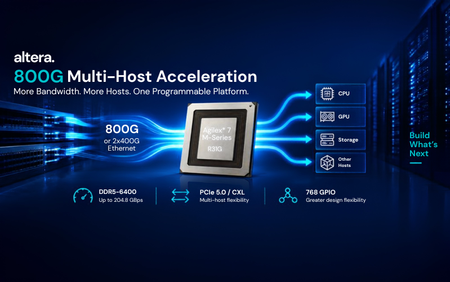
Altera has begun shipping the new Agilex® 7 M-Series R31G multi-host acceleration package, giving customers a new way to build high-bandwidth systems that connect more hosts while moving more data through the network and memory subsystem. R31G is designed for architectures where data must move quickly between the network, memory, and multiple CPUs, GPUs, or other hosts. By bringing 800G or 2x400G Ethernet together with expanded PCIe 5.0/CXL host connectivity, the package opens new possibilities for AI NICs, storage acceleration, cloud acceleration, and other high-throughput platforms. What R31G enables More network bandwidth: 800G or 2x400G Ethernet capability for high-throughput data paths. More host connectivity: Two PCIe 5.0 x16 host interfaces, or up to four independent PCIe 5.0 x8 connections, with CXL support for flexible multi-host architectures. More memory bandwidth and I/O: DDR5-6400 and LPDDR5-6400 support, up to 204.8 GBps of memory bandwidth, and 768 GPIO in a compact 56 x 45 mm package. The result is a programmable platform that can connect, accelerate, and adapt as infrastructure requirements evolve, while keeping high-speed networking, host connectivity, and memory bandwidth tightly integrated. More network bandwidth. More hosts. More memory bandwidth. One programmable platform. Learn more in the Agilex® 7 M-Series product site.
25 days ago0likes
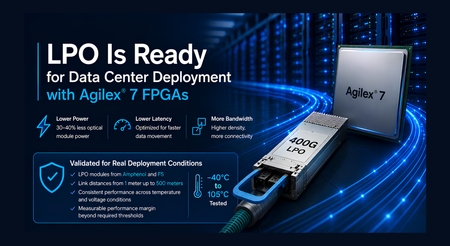
As AI, cloud, and high-performance computing systems continue to scale, data center operators need more bandwidth within increasingly constrained power and thermal envelopes. Linear Pluggable Optics (LPO) offers an important path forward by simplifying optical modules, reducing power consumption, and lowering latency. LPO places signal-conditioning responsibilities in the host device, allowing the optical module to operate without the DSP used in traditional retimed optics. This architecture can reduce optical module power by 30% to 40%, helping data center designers increase connectivity density while simplifying cooling and thermal management. Altera Brings LPO to the FPGA Market Altera is the first FPGA provider to publicly demonstrate Linear Pluggable Optics interoperability using production FPGA devices. Continued validation with LPO modules from Amphenol and FS further demonstrates the breadth of the emerging ecosystem supported by Altera. Agilex® 7 FPGAs and SoCs bring the power and latency advantages of LPO to programmable platforms used in SmartNICs, data processing units, AI accelerators, and custom infrastructure. The initial public demonstration established that Agilex 7 devices could successfully interoperate with 400G LPO modules. The latest validation advances that milestone by confirming that the implementation meets the performance requirements expected for deployment in demanding data center environments. Validated for Real Deployment Conditions Comprehensive testing confirms that Agilex 7 F-Tile transceivers meet the electrical and link-performance requirements defined by the 100G-DR-LPO specification. The validation demonstrated: Compliance with the required transmit, receive, and link-performance criteria Successful interoperability with LPO modules from Amphenol and FS Successful LPO connectivity across distances from 1 meter to 500 meters Consistent performance across temperature and voltage conditions Measurable performance margin beyond required thresholds Testing covered demanding signal conditions, voltage variation, and temperatures ranging from minus 40 degrees Celsius to 105 degrees Celsius for electrical characterization. Functional link testing included a 1-meter LPO connection, a 100-meter active optical cable, and 500-meter LPO modules from Amphenol and FS. The results demonstrate robust, repeatable operation across multiple module suppliers and link distances, with measurable margin relative to the required performance limits. For customers, this validation provides confidence that Agilex® 7 support for LPO is ready for real-world deployment. Following the industry’s first public FPGA interoperability demonstration, the solution has now been evaluated against LPO performance requirements using modules from multiple suppliers and over link distances up to 500 meters. Together, these results demonstrate a practical foundation for deploying LPO connectivity in next-generation data center systems. More Efficient Connectivity for AI and Cloud Infrastructure The value of LPO grows as data centers deploy more high-speed optical connections. Eliminating the DSP from each optical module can reduce power across thousands of links, simplify optical module design, ease thermal pressure at the front panel, and support lower-latency data movement. Agilex 7 FPGAs add programmability to this more efficient optical architecture. Customers can combine LPO connectivity with packet processing, acceleration, security, telemetry, and evolving protocol support on a single adaptable platform. This flexibility is especially valuable for AI clusters and cloud infrastructure, where workloads, network architectures, and connectivity standards continue to evolve. Validation with multiple module vendors also gives system designers greater flexibility as the LPO supplier ecosystem continues to develop. Ready for the Next Generation of Data Centers The combination of public interoperability and comprehensive validation marks a major step for LPO in the FPGA market. Altera has demonstrated that LPO works with production Agilex 7 devices and validated that the solution meets key LPO requirements with measurable operating margin. This gives customers a proven foundation for evaluating and deploying lower-power, lower-latency optical connectivity in real data center environments. With Agilex® 7 FPGAs, LPO is ready for real-world data center deployment.
2 months ago0likes
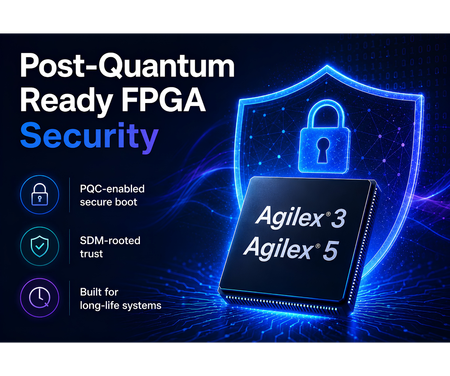
Security requirements are entering a new phase. Systems being designed today may remain deployed for many years, while regulatory expectations, cryptographic standards, and threat models continue to evolve. For designs in industrial, communications, infrastructure, aerospace, defense, and embedded applications, long-term security is becoming a core platform requirement. FPGA-based designs allow designs to meet today’s security needs and evolve with tomorrow’s requirements. Altera is now offering Agilex® 3 and Agilex® 5 devices with PQC-enabled secure boot and configuration support, helping customers prepare for the next generation of security requirements. With the Quartus® Prime Pro Edition 26.1.1 release, customers can begin using a PQC flow that works with Agilex 3 and Agilex 5 based hardware. This milestone extends the security architecture already built into the Agilex platform. Agilex devices use the Secure Device Manager as a hardware root of trust for secure configuration and device management. By combining PQC-capable devices with Quartus software enablement, Altera is helping customers strengthen the FPGA chain of trust as post-quantum requirements move from planning to implementation. The value is immediate and practical. Customers can start designing with supported devices today, while using Quartus 26.1.1 to take advantage of the current software flow. This gives teams a path to address emerging compliance and security expectations without needing a future platform redesign. The same hardware foundation also allows for additional security enhancements over time. Customers designing with PQC-capable Agilex 3 and Agilex 5 devices can benefit from planned software and firmware improvements enabled by the underlying hardware, with no further FPGA hardware upgrade required for those enhancements. Agilex 3 devices bring this capability to power- and cost-optimized FPGA and SoC designs used in embedded, edge, industrial, control, and platform-management applications. Agilex 5 devices extend the same security direction into mid-range FPGA and SoC designs that require higher performance, greater integration, and broader system capability. Post-quantum readiness will continue to advance, and Altera is building that evolution into the Agilex platform roadmap. With PQC-capable Agilex 3 and Agilex 5 devices and Quartus 26.1.1 software enablement, customers have a practical starting point today and a scalable foundation for future security enhancements.
2 months ago0likes