acceleration
92 Topics
Introducing the Altera Community AI Responder — Beta
Altera is introducing the AI Responder, an assistant built into the Altera Community to help provide faster, context-aware guidance for Altera product questions. It uses relevant public Altera documentation and Knowledge Database content, with coverage continuing to expand. The AI Responder may provide source references and can hand off complex or out-of-scope questions to an Altera subject-matter expert. As a beta feature, responses may contain errors or omissions, so please review the sources and verify technical guidance against official Altera documentation before implementation. If the response does not fully address your question, add more context and tag ai_responder to continue the discussion. We welcome your feedback as we improve the Community experience.35Views0likes1CommentHow does the FPGA AI Suite utilize Agilex 5 DSP Blocks?
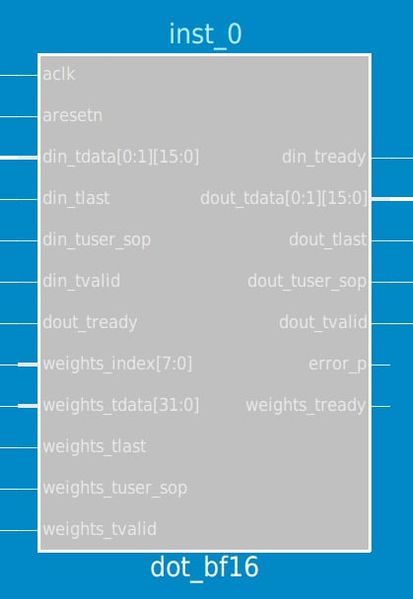
Hello Altera Community. I have a module called "dot_bf16" that uses the bf16 floating point format to calculate dot product and I am wondering if it uses the Agilex5 AI optimized DSP blocks to do this. I can't myself see how the DSP blocks are configured because they are all encrypted. 1. Agilex™ 5 Variable Precision DSP Blocks Overview • Variable Precision DSP Blocks User Guide Agilex™ 5 FPGAs and SoCs • Altera Documentation and Resources Center This document states that there are 3 operational modes for tensor mode: 1. Tensor float point mode 2. Tensor fixed point mode 3. Tensor accumulation mode Does the FPGA AI Suite utilize any of these? I also noticed the module uses a FSM and controller.Solved130Views0likes1Comment
Agilex 7 FPGA Starter Kit with oneAPI Toolkit flow not detected over PCIe
Hello, I’m trying to use a Terasic Agilex 7 FPGA Starter Kit (A7SK, rev.A) with the Intel oneAPI toolkit, following Terasic’s official A7SK oneAPI manual. The ASP image appears to load successfully, but after reboot the host does not detect the board as a PCIe device. The system behaves as if no PCIe card were present. The board is powered correctly, SW4 is set for x8, and the USB/JTAG side is visible, but the PCIe endpoint never enumerates. Has anyone here successfully made the Terasic A7SK work with oneAPI? Has anyone seen a similar issue where the board never appears over PCIe after reboot? Any experience, confirmation, or suggestions would be very helpful. Thanks.81Views0likes1Comment
MCTP over PCIe VDM routing to PMCI in OFS N6000 FIM configuration and datapath clarification
Hi Team, I am working on implementing PLDM over MCTP over PCIe VDM on the Intel N6000 platform OFS PCIe Attach FIM. I have referred the following documents: 1. OFS Linux MCTP driver documentation: https://github.com/OFS/linux-dfl/blob/2014c95afecee3e76ca4a56956a936e23283f05b/Documentation/networking/mctp.rst 2. OFS Agilex PCIe Attach FIM architecture guide: https://ofs.github.io/ofs-2025.1-1/hw/n6001/dev_guides/fim_dev/ug_dev_fim_ofs_n6001/#1211-top-level From my understanding, the PMCI module inside the FIM contains the MCTP over VDM controller which transmits MCTP payloads containing PLDM commands to the MAX10 BMC. The BMC communicates with PMCI via SPI. The host can access PMCI CSRs through PCIe MMIO and this is working in our setup using the intel-m10-bmc driver. However, the datapath for MCTP over PCIe VDM from the host is unclear. I have the following questions: 1. How are PCIe VDM packets generated from the host routed to the PMCI MCTP controller inside the FIM? 2. Is there any specific configuration or enablement required in the PCIe subsystem or FIM fabric to allow VDM packets to reach PMCI? 3. What is the role of the MCTP Management Interface or MCTP VDM controller IP in the OFS FIM design? 4. Is this a custom IP responsible for filtering or routing VDM packets? How is this block exposed to the host? 5. Are there any registers, BAR mappings, or configuration steps required to enable this datapath? Does the Linux MCTP stack directly interact with PMCI, or is routing handled entirely in hardware? Currently, we are able to generate PCIe VDM packets from the host, but they are not observed at the PMCI or BMC side. This suggests that the ingress path may not be enabled or packets are being filtered before reaching PMCI. Any clarification on the expected datapath and required configuration for enabling host to PCIe VDM to PMCI to BMC communication would be very helpful. Thanks and regards, Nafiah Siddiqha172Views0likes4Comments
AI Suite System Throughput Issue
When using AI Suite, we are seeing a significant gap between IP throughput and achieved system throughput on Agilex 5. I am using the following: Hardware: Agilex™ 5 FPGA and SoC E-Series Modular Development Kit (ES silicon) Software: Quartus Prime Pro + AI Suite 25.3.1 SD Image: agx5_soc_s2m coredla-image-agilex5_mk_a5e065bb32aes1.wic Architecture and Bitstream: AGX5_Performance Using MobileNetV2 (Open Model Zoo 2024.6.0) compiled using AGX5_Performance architecture gives the following results through dla_benchmark IP throughput per instance: ~151 FPS Estimated throughput (200 MHz): ~178 FPS System throughput: nireq=1 → 41 FPS nireq=4 → 54 FPS Why is there such a big delta between IP Performance and System Throughput and how can we improve the system throughput? For more details please see the append log showing the commands that I run to do the benchmark Any pointers or help would be highly appreciated. Thanks ===================================================================== 1. Using mobilenet v2 from model zoo ===================================================================== Commands used to download and compile model: git clone https://github.com/openvinotoolkit/open_model_zoo.git cd open_model_zoo git checkout 2024.6.0 omz_downloader --list omz_downloader --name mobilenet-v2-pytorch --output_dir $COREDLA_WORK/demo/models/ omz_converter --name mobilenet-v2-pytorch --download_dir ../demo/models/ --output_dir ../demo/models/ cd $COREDLA_WORK/demo/models/public/mobilenet-v2-pytorch/FP32 dla_compiler --march $COREDLA_ROOT/example_architectures/AGX5_Performance.arch --network-file ./mobilenet-v2-pytorch.xml --foutput-format=open_vino_hetero --o $COREDLA_WORK/demo/mobilenet-v2-pytorch_dla.bin --batch-size=1 --fanalyze-performance --fassumed-fmax-core 200 Executing performance estimate ---------------------------------------------------------------- main_graph_0 reported throughput: 178.617 fps TOTAL DDR SPACE REQUIRED = 16.9756 MB DDR INPUT & OUTPUT BUFFER SIZE = 0.781738 MB DDR CONFIG BUFFER SIZE = 0.0986328 MB DDR FILTER BUFFER SIZE = 15.3296 MB DDR INTERMEDIATE BUFFER SIZE = 0.765625 MB NOTE: THIS ESTIMATE ASSUMES 1x I/O BUFFER. THE COREDLA RUNTIME DEFAULTS TO 5 TOTAL DDR TRANSFERS REQUIRED = 18.7003 MB DDR FILTER READS REQUIRED = 16.2124 MB DDR FEATURE READS REQUIRED = 1.62164 MB DDR FEATURE WRITES REQUIRED = 0.767578 MB NUMBER OF DDR FEATURE READS = 9 MINIMUM AVERAGE DDR BANDWIDTH REQUIRED = 3340.19 MB/s ASSUMED DDR BANDWIDTH PER IP INSTANCE = 6400 MB/s ---------------------------------------------------------------- Performance Estimator Throughput Breakdown Arch: kvec64xcvec32_i12x1_fp12agx_sb32768_xbark32_actk32_poolk4 Number of DLA instances = 1 Number of DDR Banks per DLA instance = 1 CoreDLA Target Fmax = 200 MHz PE Target Fmax = 200 MHz Batch Size = 1 PE-only Conv Throughput No DDR = 186 fps PE-only Conv Throughput = 185 fps Overall Throughput Inf PE Buf Depth (zero MPBW) = 185 fps Overall Throughput Zero PE Buf Depth (zero MPBW) = 183 fps Overall Throughput Inf PE Buf Depth = 184 fps Overall Throughput Zero PE Buf Depth = 182 fps ---------------------------------------------------------------- FINAL THROUGHPUT = 178.617 fps FINAL THROUGHPUT PER FMAX (CoreDLA) = 0.893086 fps/MHz FINAL THROUGHPUT PER FMAX (PE) = 0.893086 fps/MHz Running the model on dev kit: ./dla_benchmark -b=1 -cm $compiled_model -d=HETERO:FPGA,CPU -i $imgdir -niter=8 -plugins ./plugins.xml -arch_file $archfile -api=async -groundtruth_loc $imgdir/ground_truth.txt -perf_est -nireq=1 -bgr -nthreads=1 [Step 11/12] Dumping statistics report count: 8 iterations system duration: 191.3784 ms IP duration: 52.7551 ms latency: 23.4076 ms system throughput: 41.8020 FPS number of hardware instances: 1 number of network instances: 1 IP throughput per instance: 151.6441 FPS IP throughput per fmax per instance: 0.7582 FPS/MHz IP clock frequency measurement: 200.0000 MHz estimated IP throughput per instance: 178.6172 FPS (200 MHz assumed) estimated IP throughput per fmax per instance: 0.8931 FPS/MHz ./dla_benchmark -b=1 -cm $compiled_model -d=HETERO:FPGA,CPU -i $imgdir -niter=8 -plugins ./plugins.xml -arch_file $archfile -api=async -groundtruth_loc $imgdir/ground_truth.txt -perf_est -nireq=4 -bgr -nthreads=4 [Step 11/12] Dumping statistics report count: 8 iterations system duration: 147.8426 ms IP duration: 52.7619 ms latency: 69.8254 ms system throughput: 54.1116 FPS number of hardware instances: 1 number of network instances: 1 IP throughput per instance: 151.6246 FPS IP throughput per fmax per instance: 0.7581 FPS/MHz IP clock frequency measurement: 200.0000 MHz estimated IP throughput per instance: 178.6172 FPS (200 MHz assumed) estimated IP throughput per fmax per instance: 0.8931 FPS/MHz228Views0likes5Comments
See the Next Wave of EW & Radar Technology
We’re gearing up for AOC 2025! From December 9–11, we’ll be at the Gaylord National Resort & Convention Center in National Harbor, Maryland for AOC2025—one of North America’s premier events dedicated to electronic warfare and radar. Visit us at booth #505 to discover the latest innovations in our Agilex™ 9 Direct RF and Agilex™ 5 product families. What to Expect at Altera’s Booth #505: 1. Wideband and Agility Demo using Agilex 9: Overview: Discover the power of frequency hopping with Altera’s Direct RF FPGA, enhancing system resilience and adaptability. Key Features: Demonstrates swift frequency changes and wideband monitoring. 2. Wideband Channelizer Demo using Agilex 9: Overview: Wideband Channelizer features polyphase filter and 65 phases FFT blocks with variable channel support. Key Features: Demonstrates sampling rate that supports 64 GSPS with 32GHz instantaneous bandwidth. 3. Direction of Arrival Demo using Agilex 5: Overview: Explore Direction of Arriaval estimation and signal detection using AI-based approach with deployment of neural networks. Key Features: Demonstrates neural networks implementation using DSP Builder Advanced Blockset (DSPBA), showcasing end-to-end operation running real time inference. 4. Altera COTS Partner Showcase: Come see our Agilex based COTS boards from partners including Annapolis Microsystems, CAES, Hitek, iWave Global, Mercury Systems, & Spectrum Controls. We are hosting customer meetings at the event, contact your local Altera salesperson to schedule a slot.191Views0likes0CommentsCreating PCB based on 10M08 Evaluation Board but with other MAX10 FPGA
Hello everyone, for a school project, I want to design a PCB for / around the MAX 10 FPGA. As I'm trying to make my life easier, I am using this (https://www.intel.com/content/www/us/en/products/details/fpga/development-kits/max/10m08-evaluation-kit.html) Intel Evaluation Board as a starting point. the FPGA used in the design is the 10M08SAE144C8G. However, it has only 8000 LE, which will not be enough, therefore I'm planning to use 10M16SAE144C8G as a (hopefully) drop in replacement. I think that this will work, why shouldn't it? All it really is, is a PCB which uses the same layout, but with more of the available GPIOs broken out and preferable the mentioned 10M16SAE144C8G (or even 10M25SAE144C8G). I checked the pinout of both FPGAs and they are the same. Also programming should be the same as far as i know. Thanks for reading!1.3KViews0likes1Comment
writing and reading max10 ufm
hii i have the neek dev kit , and i did a project to write and read the max10 ufm i see in the signal tap in my project that i can write the data and read successfully i programmed the board with the pof so that my firmware is inside the board , but when i turn off the board and turn it on again , and read the data from ufm i see that the data is all zeros meaning that the data didn't get saved in the ufm , and i know that the ufm is non volatile memory . i am using the on chip flash ip , i expect the data to be saved in the ufm . when i program the pof and perform the write and the do the read while the board under power everything is ok , data get written and read . but the problem start when i turn the power down do i need to do a special thing in order to commit the data to the ufm and save so i can read it after power up ???2KViews0likes4CommentsRequesting detailed information about Stratix 10 NX's Tensor Blocks
We have been using Stratix 10 NX(1SN21BHU2F53E2VG) to develop AI accelerator for a while, but always failed to find some detailed information about the special AI Tensor Blocks including the fmax under different speed grades, the public user guide of this IP and (maybe) the example design. Where can I find these support docs for the AI Tensor Block?Solved3.1KViews0likes5Comments