Recent Content

QPP 26.1.1 Cyclone 10 GX Device File missing?
Hello, I'm not finding the Cyclone 10 GX device file with the individual files for the 26.1.1 QPP installation. The general installer always hangs for this particular PC, so we install using individual files. Please advise on how to get past this one when installing 26.1.1. Thank you, https://www.altera.com/downloads/fpga-development-tools/quartus-prime-pro-edition-design-software-version-26-1-1-windows22Views0likes6Comments
Quartus 16.1: Seven no_clock buried registers in cyclonev_jtag — timing model clarification
I would like clarification on seven buried registers reported as having no clock in the cyclonev_jtag timing model. Environment: Quartus Prime 16.1 Standard Edition, Build 196. Device: 5CSXFC6D6F31C6. Board: Terasic DE10-Standard. The design includes a generated JTAG-to-Avalon Master and SLD hub. After running create_timing_netlist, read_sdc, and update_timing_netlist, check_timing reports these seven nodes under “No Clock”: altera_internal_jtag~FF_36 altera_internal_jtag~FF_38 altera_internal_jtag~FF_39 altera_internal_jtag~FF_32 altera_internal_jtag~FF_33 altera_internal_jtag~FF_5 altera_internal_jtag~FF_1 The reported reason is: “No clock feeds this register's clock port.” Tcl queries confirm that all seven nodes belong to cell altera_internal_jtag, with WYSIWYG type cyclonev_jtag. This cell contains 30 buried registers: 23 have clock_edges, while the seven listed above do not. The following direct arcs were identified: FF_36 → tmsutap FF_38 → tckutap FF_39 → tdiutap FF_32 and FF_33 → tdo tdi → FF_5 tms → FF_1 For comparison, the same atom also contains these arcs: tck → FF_4, and tdi → FF_4 tck → FF_0, and tms → FF_0 All pin names above belong to altera_internal_jtag. The altera_reserved_tck clock is already defined by the generated SLD constraints. Could you please clarify: What functions do these seven buried nodes represent in the timing model? Is this a known behavior or limitation of the Cyclone V JTAG timing model in Quartus 16.1? Are additional constraints required? If timing exceptions are appropriate, please provide the supported syntax, exact scope, and applicable documentation. If this is a tool issue, is there a patch or a later version that resolves it? I have not added clocks directly to these buried registers or applied false-path exceptions to suppress the diagnostics. The attached console transcript contains the queries and results. It also includes some initial Tcl query errors, followed by the corrected commands and successful results. These query errors are separate from the no_clock diagnostics. Thank you for your assistance.22Views0likes3Comments
Cyclone IV GX (EP4CGX30CF23C7) Flash Issue
Dear Altera Support Team, We are currently using the Cyclone IV GX FPGA (EP4CGX30CF23C7) on our production board, configured via Active Serial (AS) mode using a 16Mb SPI Flash. We are encountering functional failure and Checksum mismatch when attempting to migrate our flash memory from the old part to a new part. Could you please help verify if this new part is officially supported or if there are any known configuration issues? Flash Comparison & Details: Original Part (Working): Macronix MX25L1606EM2I-12G Size : 200040h Checksum: 13F8B518h New Part (Failing / Function Abnormal): Macronix MX25V1606FM2I03 Size: 200000h Checksum: 13F87558h Observed Symptoms: After programming the new MX25V1606FM2I03, the FPGA fails to configure successfully (AS configuration error / LED status fails to initialize). We noticed a discrepancy in the binary size (200040h vs 200000h) and Checksum between the two programming files generated or read back. Questions for AE: Is the MX25V1606FM2I03 fully compatible with Cyclone IV GX Active Serial (AS) configuration requirements? (Considering it's a 2.5V/3V or different revision series from the 'L' version). Why does the generated image size show an extra 40h offset (200040h) on the original MX25L1606E, and how does this affect the Cyclone IV configuration loader? Could the slight electrical specification or command set difference (e.g., Read/Write ID or timing parameters) between the MX25L1606E and MX25V1606FM2I03 cause the FPGA configuration failure? Any guidance or documentation references would be greatly appreciated. Thank you for your support!37Views0likes2CommentsTrouble Programming a 10M02
Using Quartus Prime Lite 24.1 Custom Board that is a new version of an older board that worked (using Quartus Prime 18.1) and no noticeable board differences. Exact Device PN: 10M02SCE144A7G Using a .pof file. Auto Detect works. JTAG Debugger says all is well. It just won't program the device. We get a generic error message with no additional help. (I'll upload a screenshot once the tech sends it to me) I noticed a case that said QP 20.1 had a problem with 10M02 and .pof files, but it said it would be fixed. Was it not fixed by 24.1?!?!? We are in process of downloading Quartus Prime 18.1 which is what we used originally to program it back in 2020. Maybe it will still do the programming. Any suggestions? Is there any way to get more info on the error in the transcript? I'm under the gun to get this board working, but your tools aren't helping much.585Views0likes3CommentsSOPC Builder reports missing DB9000 Avalon components, but Quartus compilation does not
I am troubleshooting a legacy FPGA design in Quartus II 12.1 SP1 using SOPC Builder.During SOPC Builder system generation, I receive the following errors: db9000avln_mstr_0: Component db9000avln_mstr 1.0 not found or could not be instantiated db9000avln_slv_0: Component db9000avln_slv 1.0 not found or could not be instantiated Additional errors report that the custom Avalon master has no waitrequest signal, cannot be connected to an SDRAM slave that supports backpressure, has a data-width mismatch, and has missing or invalid address-unit settings (SYMBOLS / WORDS). I have located the generated db9000avln.vqm file and copies of the component PTF files. One important observation: although SOPC Builder reports these errors, the Quartus FPGA compilation flow does not report the same component-discovery and Avalon interface errors. I would like to understand the reason for this difference and the correct way to resolve it. My questions are: Why does SOPC Builder report that these components cannot be found or instantiated? Is this typically caused by missing component registration/metadata, an incompatible component definition, or something else? Why can Quartus compilation proceed without reporting these errors? Could it be because the generated db9000avln.vqm netlist is already available and included directly in the Quartus project, allowing Quartus to compile the existing hardware implementation without regenerating the SOPC system? If that is the case, does successful Quartus compilation mean the existing DB9000 logic is being compiled from the .vqm, while SOPC Builder is failing only when it tries to reconstruct or regenerate the system? What is the correct way to restore SOPC Builder generation so that these components can be discovered and their Avalon interfaces validated? How can I determine whether the reported waitrequest, data-width and address-unit errors reflect a genuine hardware-interface incompatibility or only incorrect/missing component metadata? I want to preserve the existing hardware behavior and avoid unnecessary changes to the Avalon interfaces or generated netlist. So can I ignore the SOPC builder issues and move ahead with compilation and programming file generation in Quartus, will that have the functionality of the DB9000 IP implemented. Thank you for your help.
Mailbox Client HAL API: Erroneous behavior in flash erase boundary checks (Agilex 3 / Nios V)
Hi, I am currently working on an Agilex 3 platform using the Nios V in Quartus Prime Pro 25.3. I discovered unexpected behavior in the Mailbox Client HAL API when trying to erase 32K blocks of flash. In the file intel_mailbox_client_flash.c in function mailbox_client_flash_erase_block: The function receives a dynamic block_size as an argument but ignores it during the boundary check, relying instead on the global dev_info->region_info.block_size. Because it checks against the maximum hardware block_size (i.e., 64K) instead of the actual block_size parameter passed to the function, it mistakenly blocks legitimate erase commands at the final sectors of the region. Below is the code snippet: int mailbox_client_flash_erase_block(intel_mailbox_client* fd, int block_offset, int block_size) { if(block_offset < 0 || block_offset > dev_info->region_info.region_size - dev_info->region_info.block_size || (block_offset & (SZ_4K - 1)) != 0) { return -EINVAL; } } I suggest changing the boundary check to use the local block_size parameter that was explicitly passed to the function: if(block_offset < 0 || block_offset > dev_info->region_info.region_size - block_size || (block_offset & (SZ_4K - 1)) != 0) { return -EINVAL; } A similar logic flaw exists in the caller function mailbox_client_flash_erase. The input validation check uses the static hardware block size (dev_info->region_info.block_size) instead of taking the requested length into account. I suppose this check should prevent out-of-bounds erases in the first place, so checking if there is one 64K block left in the flash is actually pointless. int mailbox_client_flash_erase(intel_mailbox_client* fd, int offset, int length) { if(offset < 0 || offset > dev_info->region_info.region_size - dev_info->region_info.block_size) { return -EINVAL; } } I suggest using: if(offset < 0 || offset > dev_info->region_info.region_size - length) { return -EINVAL; } Any feedback on this behavior would be appreciated. Thanks!69Views1like3CommentsUSB-Blaster II malfunction
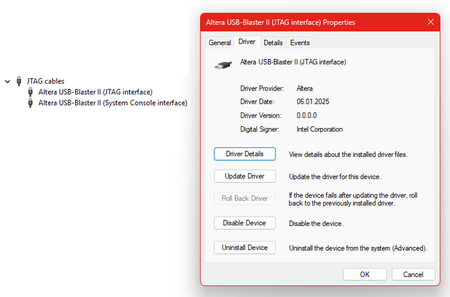
I’m unable to get a new Altera USB-Blaster II cable working. My setup comprises the Altera 10M08 Evaluation Kit, a Altera USB-Blaster II cable, and Quartus Prime Programmer (Version 25.1std). The USB-Blaster II cable is properly detected by the operating system (Windows 11 Enterprise, Version 25H2). The default JTAG clock frequency is set to 24 MHz. With this setting, the attached evaluation board cannot be detected using Programmer GUI → Auto Detect. After lowering the JTAG clock frequency to 6 MHz and disabling the JtagClockAutoAdjust feature using jtagconfig --debug --setparam 1 JtagClockAutoAdjust 0 jtagconfig --setparam 1 JtagClock 6000000 the MAX 10 FPGA is detected. Programming the FPGA using the Programmer GUI still fails. The programming process is interrupted at random and never completes, even after multiple retries. However, programming is successful when initiated using the following console command: quartus_pgm -c USB-BlasterII -m jtag -o "P;demo10m08.pof" How can I fix this problem? Programming works perfectly when using an Altera USB Blaster or a TERASIC Blaster.507Views0likes14CommentsGTS SDI II IP System PLL Frequency Issue in Quartus Prime Pro Edition 26.1.1
Hello, I would like to confirm an issue regarding the System PLL frequency of the GTS SDI II IP. According to the KDB article “Synthesis Critical Violation: IPC-40026 - System clock frequency mismatch,” there is a known issue in Quartus Prime Pro Edition 25.3 where IPC-40026 occurs when the System PLL frequency is set to a value other than 700 MHz. The article also states that this issue is planned to be fixed in a future release. https://community.altera.com/kb/knowledge-base/synthesis-critical-violation-ipc-40026---system-clock-frequency-mismatch/353567 However, we have confirmed that the same issue still occurs in Quartus Prime Pro Edition 26.1.1. If the version in which this issue is planned to be fixed has been determined, could you please let us know? Best regards,307Views0likes3CommentsAbout Single Event Upset (SEU)
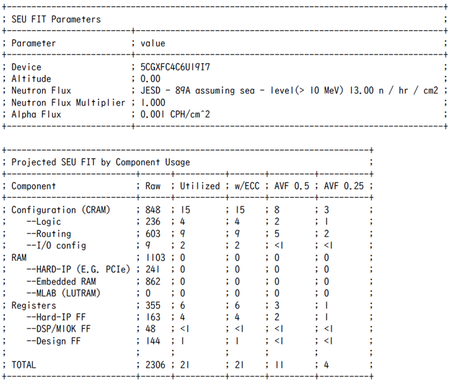
The target devices are MAX 10, Cyclone 10 LP, Cyclone V, and Agilex 3. I would like to confirm the details about SEU for these devices. Question 1: Please explain how the FIT value shown in the "Projected SEU FIT" report for a project in Quartus is calculated. We are being asked, “What is the basis and condition under which this number is derived?” Since our competitors provide this information, we would like Altera to present it as well. I have the following publicly available documents, but since they do not mention any specific calculation formulas, we are making this inquiry. https://docs.altera.com/r/docs/683869/current/an-866-mitigating-and-debugging-single-event-upsets-in-quartus-prime-standard-edition/quartus-prime-software-seu-fit-reports Question 2: Please provide information on the device structure and supporting data (numerical values) regarding SEU tolerance. Since both AMD (Xilinx) and Lattice have disclosed such information, we would like Altera to present it as well. Best Regards19Views0likes3Comments
Featured Places
Community Resources
Check out the support articles on personalizing your community account, contributing to the community, and providing community feedback directly to the admin team!Tags
- troubleshooting10,408 Topics
- fpga dev tools quartus® prime software pro4,358 Topics
- FPGA Dev Tools Quartus II Software3,131 Topics
- stratix® 10 fpgas and socs1,553 Topics
- agilex® 7 fpgas and socs1,548 Topics
- arria® 10 fpgas and socs1,382 Topics
- stratix® v fpgas1,315 Topics
- arria® v fpgas and socs1,229 Topics
- Configuration1,096 Topics
- cyclone® v fpgas and socs1,058 Topics
Recent Blogs
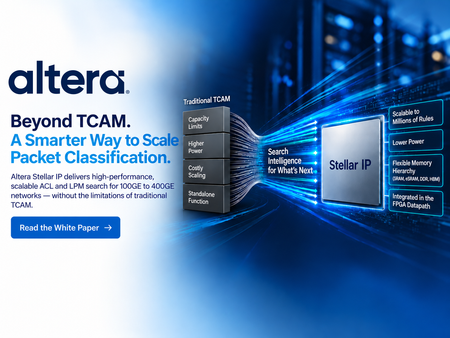
PACKET CLASSIFICATION | FPGA | NETWORKING + SECURITY Every packet decision starts with classification. Routers, firewalls, SmartNICs, security gateways, and service-edge platforms must determine which policy applies before traffic can be forwarded, blocked, inspected, redirected, or prioritized. TCAM earned its place in these systems because it provides predictable lookup behavior and native ternary matching for ACL and LPM workloads. But as policy databases grow, search keys widen, and rules change more frequently, the traditional approach of scaling specialized ternary memory creates tougher tradeoffs in capacity, power, resource utilization, and system integration. Altera Stellar solutions takes a different approach. Instead of scaling packet classification by building ever-larger ternary-memory structures, Stellar turns classification into an optimized search problem that runs on configurable FPGA resources. The result is an FPGA-native path for large, dynamic packet-classification tables without giving up the policy semantics that made TCAM useful in the first place. TCAM scales through memory expansion. Stellar scales through search intelligence. Keep the TCAM semantics. Change the scaling model. Stellar preserves the intent of ACL, LPM, and multi-field classification, but changes how those rules are represented and searched. The Stellar Software Stack organizes policies into optimized graph structures, partitions the rule database, and continuously manages those search structures as the database evolves. The hardware then executes the search using configurable FPGA search engines while rule information is stored in conventional memory resources. Depending on the configuration, Stellar can use on-chip M20K memory, eSRAM, DDR, or HBM. That gives architects more freedom to balance throughput, capacity, latency, power, and FPGA resource use around the needs of the actual system. Use dense memory where it makes sense, and intelligence where it matters A traditional TCAM combines storage and comparison circuitry inside specialized ternary-memory arrays. That architecture delivers deterministic matching, but scaling the table means scaling the specialized comparison structure as well. Stellar separates rule storage from search execution. Ternary information can be represented as value-and-mask data in conventional memory, while graph organization and software-managed optimization direct each search toward the relevant parts of the database. As tables grow from thousands of entries toward hundreds of thousands or millions, this creates a different path for scaling capacity and power. The white paper goes deeper into why this matters, including the tradeoffs between TCAM and Stellar, the role of memory hierarchy, and a set of Stellar configurations spanning different key widths, capacities, memory resources, and projected five-tuple performance. Bring classification into the programmable datapath The value is bigger than the lookup engine itself. Stellar is designed to operate inside the FPGA alongside packet parsing, telemetry, encryption, traffic management, host-interface logic, and customer packet-processing RTL. For system architects, that means classification can become part of the same programmable platform already handling the datapath. A firewall can pair large, dynamic ACL processing with the rest of its traffic pipeline. A router can combine LPM and policy enforcement with programmable networking functions. A SmartNIC can integrate flow classification with offload and customer-specific acceleration. That system-level flexibility is especially relevant for 100GE to 400GE designs where classification must scale without consuming the platform that surrounds it. Read the full whitepaper! The full Altera white paper, Altera TCAM Alternative Solutions Scale Packet Classification to Millions of Rules for Networking Equipment, explains the architecture behind Stellar and the design choices that make it different. It covers TCAM fundamentals and scaling limits, Stellar graph-based search and software partitioning, memory-hierarchy options, configuration examples, quantitative architectural comparisons, dynamic updates, and deployment use cases across networking and security. Read the white paper See how Stellar uses search intelligence, configurable FPGA resources, and a flexible memory hierarchy to create a scalable alternative for large ACL and LPM workloads.
28 days ago0likes
4 MIN READ
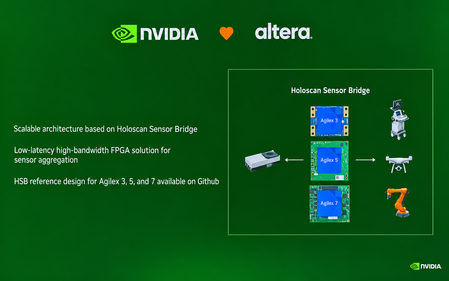
September 28, 2026 The next generation of embedded systems will not be defined by compute alone. It will depend on how quickly, reliably, and intelligently systems can move data from the physical world into AI engines and turn insights back into action. That message came through clearly at Embedded World North America 2026, held September 22–24 at the Anaheim Convention Center. For Altera, the show provided an opportunity to highlight a growing collaboration with NVIDIA and demonstrate the role of FPGAs in high-performance edge AI architectures. Connecting sensors to AI with flexibility and determinism At the center of the story was NVIDIA Holoscan Sensor Bridge technology. The solution creates a high-bandwidth, low-latency path between real-world sensors and GPU-based AI processing, an increasingly important capability for robotics, industrial automation, intelligent video, medical systems, and other physical AI applications. FPGAs are well suited to this role because they can provide deterministic processing, flexible I/O, and protocol adaptation close to the sensor. Rather than forcing every application into the same hardware configuration, FPGA-based designs can be tailored to performance, connectivity, and latency requirements of a specific system. In the show’s keynote, NVIDIA Vice President Deepu Talla described the value of this flexibility: “You can select any of the Altera FPGAs depending on the application and pair them with any of the NVIDIA frameworks.” Altera’s post noted that Altera offers Holoscan Sensor Bridge solutions spanning 10G to 100G, where 25G and 100G offer significantly more bandwidth compared to other Holoscan ecosystem partners, helping developers scale connectivity for demanding edge workloads. The result is a practical sensor-to-compute architecture: Altera FPGAs handle the flexible, deterministic front end, while NVIDIA platforms provide the accelerated environment for AI and robotics workloads. An ecosystem approach to accelerating development The demonstrations also underscored that successful edge AI deployments require more than individual components. Developers need reference designs, production-ready boards, and partners that help bridge the gap between evaluation and deployment. Altera’s growing Holoscan ecosystem includes more than 10 reference designs and partner boards. These building blocks can help teams reduce integration effort and move faster from proof of concept to a real-time AI product. One example was on display at Altera partner Critical Link’s booth. Critical Link was recognized as a Best in Show Award winner in the AI & Machine Learning category at the show. Visitors to the booth could see a live demonstration of a 5-camera Holoscan Sensor Bridge solution, using Critical Link’s MitySOM-A5E as the featured Agilex® 5 FPGA hardware platform. The demonstration showed how an Agilex 5 FPGA-based system can help bring sensor data into an NVIDIA-powered AI pipeline while preserving the low-latency, high-bandwidth behavior required by edge applications. From 10G to 100G: Building the data plane for edge AI Altera’s Holoscan Sensor Bridge solutions are designed to make the sensor-to-GPU path faster and more adaptable. A recent Altera technical blog describes 10G, 25G, and 100G reference designs, including a 25G design on Agilex 5 SoC FPGAs for multi-camera sensor data flow and accelerated processing at the edge. In this architecture, the FPGA serves as the data plane: connecting to diverse sensors, aggregating streams, adapting protocols, and preprocessing data before it reaches the NVIDIA GPU. That division of labor helps reduce data-movement bottlenecks while preserving deterministic timing and giving developers room to evolve the system as sensor interfaces and AI workloads change. Altera Technical Holoscan blog for Robotics: Altera Pushes the Boundaries of Edge AI with New Holoscan Sensor Bridge Solutions | Altera Community - 355665 Watch the 25G Holoscan demo video: YouTube/Altera Why the sensor-to-compute path matters As AI moves into physical environments, system designers are balancing several competing requirements: Real-time response: Applications such as robotics and industrial inspection cannot always afford the delay of sending raw sensor data to a remote system. High-bandwidth data movement: Modern sensors generate increasingly rich data streams that must be transported without creating a bottleneck. Deterministic behavior: Safety-critical and industrial systems need predictable timing and consistent performance. Design flexibility: Product teams must support different sensors, interfaces, and deployment conditions without redesigning the entire platform. Faster development: Reference designs and ecosystem partnerships can shorten the path from concept to production. The Altera and NVIDIA approach addresses these needs by combining FPGA-based connectivity and processing with GPU-accelerated AI. It gives developers a modular foundation for building systems that can adapt as sensors, models, and application requirements evolve. Building what comes next at the edge The conversation at Embedded World North America 2026 pointed toward a broader shift in embedded design. Edge systems are becoming intelligent, connected, and increasingly autonomous, but their performance still depends on the data path that feeds them. By pairing Altera FPGAs with NVIDIA platforms and collaborating with partners such as Critical Link, developers gain more options for designing that path. The combination of flexible hardware, high-speed connectivity, and accelerated AI can help transform raw sensor input into timely decisions at the point where data is created. For teams developing the next generation of robotics, industrial automation, intelligent vision, and physical AI systems, this is the opportunity: Build a sensor-to-compute architecture that is fast enough for today’s workloads, flexible enough for tomorrow’s requirements, and ready to scale from demonstration to deployment. Learn more about Altera’s Physical AI-related Solutions: Holoscan: https://www.altera.com/fpga-solutions/sensory-interfaces Robotics: https://www.altera.com/fpga-solutions/robotics-solutions-stack Video: https://www.altera.com/fpga-solutions/video-solutions-stack
28 days ago0likes
1 MIN READ
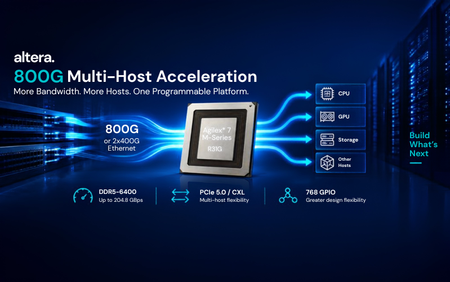
Altera has begun shipping the new Agilex® 7 M-Series R31G multi-host acceleration package, giving customers a new way to build high-bandwidth systems that connect more hosts while moving more data through the network and memory subsystem. R31G is designed for architectures where data must move quickly between the network, memory, and multiple CPUs, GPUs, or other hosts. By bringing 800G or 2x400G Ethernet together with expanded PCIe 5.0/CXL host connectivity, the package opens new possibilities for AI NICs, storage acceleration, cloud acceleration, and other high-throughput platforms. What R31G enables More network bandwidth: 800G or 2x400G Ethernet capability for high-throughput data paths. More host connectivity: Two PCIe 5.0 x16 host interfaces, or up to four independent PCIe 5.0 x8 connections, with CXL support for flexible multi-host architectures. More memory bandwidth and I/O: DDR5-6400 and LPDDR5-6400 support, up to 204.8 GBps of memory bandwidth, and 768 GPIO in a compact 56 x 45 mm package. The result is a programmable platform that can connect, accelerate, and adapt as infrastructure requirements evolve, while keeping high-speed networking, host connectivity, and memory bandwidth tightly integrated. More network bandwidth. More hosts. More memory bandwidth. One programmable platform. Learn more in the Agilex® 7 M-Series product site.
1 month ago0likes
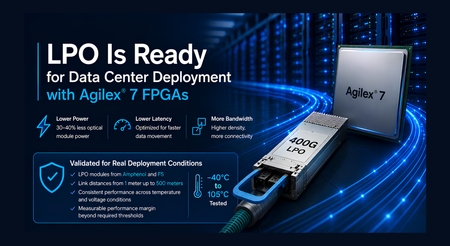
As AI, cloud, and high-performance computing systems continue to scale, data center operators need more bandwidth within increasingly constrained power and thermal envelopes. Linear Pluggable Optics (LPO) offers an important path forward by simplifying optical modules, reducing power consumption, and lowering latency. LPO places signal-conditioning responsibilities in the host device, allowing the optical module to operate without the DSP used in traditional retimed optics. This architecture can reduce optical module power by 30% to 40%, helping data center designers increase connectivity density while simplifying cooling and thermal management. Altera Brings LPO to the FPGA Market Altera is the first FPGA provider to publicly demonstrate Linear Pluggable Optics interoperability using production FPGA devices. Continued validation with LPO modules from Amphenol and FS further demonstrates the breadth of the emerging ecosystem supported by Altera. Agilex® 7 FPGAs and SoCs bring the power and latency advantages of LPO to programmable platforms used in SmartNICs, data processing units, AI accelerators, and custom infrastructure. The initial public demonstration established that Agilex 7 devices could successfully interoperate with 400G LPO modules. The latest validation advances that milestone by confirming that the implementation meets the performance requirements expected for deployment in demanding data center environments. Validated for Real Deployment Conditions Comprehensive testing confirms that Agilex 7 F-Tile transceivers meet the electrical and link-performance requirements defined by the 100G-DR-LPO specification. The validation demonstrated: Compliance with the required transmit, receive, and link-performance criteria Successful interoperability with LPO modules from Amphenol and FS Successful LPO connectivity across distances from 1 meter to 500 meters Consistent performance across temperature and voltage conditions Measurable performance margin beyond required thresholds Testing covered demanding signal conditions, voltage variation, and temperatures ranging from minus 40 degrees Celsius to 105 degrees Celsius for electrical characterization. Functional link testing included a 1-meter LPO connection, a 100-meter active optical cable, and 500-meter LPO modules from Amphenol and FS. The results demonstrate robust, repeatable operation across multiple module suppliers and link distances, with measurable margin relative to the required performance limits. For customers, this validation provides confidence that Agilex® 7 support for LPO is ready for real-world deployment. Following the industry’s first public FPGA interoperability demonstration, the solution has now been evaluated against LPO performance requirements using modules from multiple suppliers and over link distances up to 500 meters. Together, these results demonstrate a practical foundation for deploying LPO connectivity in next-generation data center systems. More Efficient Connectivity for AI and Cloud Infrastructure The value of LPO grows as data centers deploy more high-speed optical connections. Eliminating the DSP from each optical module can reduce power across thousands of links, simplify optical module design, ease thermal pressure at the front panel, and support lower-latency data movement. Agilex 7 FPGAs add programmability to this more efficient optical architecture. Customers can combine LPO connectivity with packet processing, acceleration, security, telemetry, and evolving protocol support on a single adaptable platform. This flexibility is especially valuable for AI clusters and cloud infrastructure, where workloads, network architectures, and connectivity standards continue to evolve. Validation with multiple module vendors also gives system designers greater flexibility as the LPO supplier ecosystem continues to develop. Ready for the Next Generation of Data Centers The combination of public interoperability and comprehensive validation marks a major step for LPO in the FPGA market. Altera has demonstrated that LPO works with production Agilex 7 devices and validated that the solution meets key LPO requirements with measurable operating margin. This gives customers a proven foundation for evaluating and deploying lower-power, lower-latency optical connectivity in real data center environments. With Agilex® 7 FPGAs, LPO is ready for real-world data center deployment.
2 months ago0likes
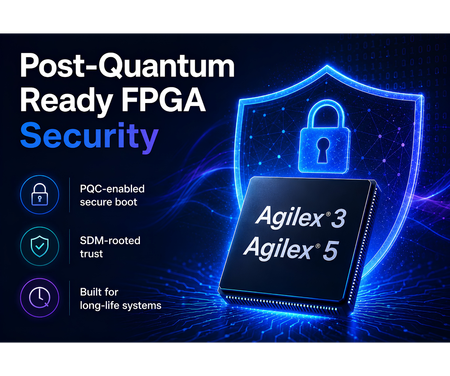
Security requirements are entering a new phase. Systems being designed today may remain deployed for many years, while regulatory expectations, cryptographic standards, and threat models continue to evolve. For designs in industrial, communications, infrastructure, aerospace, defense, and embedded applications, long-term security is becoming a core platform requirement. FPGA-based designs allow designs to meet today’s security needs and evolve with tomorrow’s requirements. Altera is now offering Agilex® 3 and Agilex® 5 devices with PQC-enabled secure boot and configuration support, helping customers prepare for the next generation of security requirements. With the Quartus® Prime Pro Edition 26.1.1 release, customers can begin using a PQC flow that works with Agilex 3 and Agilex 5 based hardware. This milestone extends the security architecture already built into the Agilex platform. Agilex devices use the Secure Device Manager as a hardware root of trust for secure configuration and device management. By combining PQC-capable devices with Quartus software enablement, Altera is helping customers strengthen the FPGA chain of trust as post-quantum requirements move from planning to implementation. The value is immediate and practical. Customers can start designing with supported devices today, while using Quartus 26.1.1 to take advantage of the current software flow. This gives teams a path to address emerging compliance and security expectations without needing a future platform redesign. The same hardware foundation also allows for additional security enhancements over time. Customers designing with PQC-capable Agilex 3 and Agilex 5 devices can benefit from planned software and firmware improvements enabled by the underlying hardware, with no further FPGA hardware upgrade required for those enhancements. Agilex 3 devices bring this capability to power- and cost-optimized FPGA and SoC designs used in embedded, edge, industrial, control, and platform-management applications. Agilex 5 devices extend the same security direction into mid-range FPGA and SoC designs that require higher performance, greater integration, and broader system capability. Post-quantum readiness will continue to advance, and Altera is building that evolution into the Agilex platform roadmap. With PQC-capable Agilex 3 and Agilex 5 devices and Quartus 26.1.1 software enablement, customers have a practical starting point today and a scalable foundation for future security enhancements.
2 months ago0likes