Why is there an "unrecognized device" error when using quartus_jli to configure or program a JAM file for flash devices of 2 GB or larger?
Description In any versions of Altera® Quartus® Prime Pro Edition Software, the quartus_jli command may report an “unrecognized device” error when a JAM file targets a flash device that is 2 GB or larger. This behavior is specific to JAM files used with large flash devices and does not occur with smaller flash sizes. Resolution Use the following workaround to avoid the error: Run the jtagconfig command to detect the connected JTAG hardware. After the hardware is detected, run quartus_jli to configure or program the JAM file. There is currently no plan to fix this behavior in a future Quartus® Prime release.11Views0likes0CommentsWhy are my high fanout cells not duplicated?
Description Due to an problem in the Quartus® Prime Pro Edition Software versions 24.3 and later, duplication of cells with high fanout is prevented even when duplication assignments such as DUPLICATE_REGISTER or DUPLICATE_SYNC_FANIN are defined explicitly. This behavior affects cells that have a driver in a different partition, including both signals and clocks. For example, a register in partition A that has its clock coming from the root partition will not be duplicated despite having the appropriate assignment. Resolution To work around this problem, remove the partitions or ensure that the affected cells are not driven by other cells in different partitions. If removing partitions from your design is not feasible, patches are available to work around this problem. Download and unzip the zip file that matches your Quartus® Prime Pro version and operating system from this KDB. Quartus® Prime Pro Edition Version Patch number 24.3 [0.36|^quartus-24.3-0.36.zip] 24.3.1 [1.30|^quartus-24.3.1-1.30.zip] 25.1 [0.38|^quartus-25.1-0.38.zip] 25.1.1 [1.29|^quartus-25.1.1-1.29.zip] 25.3 [0.28|^quartus-25.3-0.28.zip] 25.3.1 [1.07|^quartus-25.3.1-1.07.zip] Patches for versions 25.3 and 25.3.1 also address additional problems; refer to the README files for more information. This problem is fixed beginning with the Quartus® Prime pro Edition Software version 26.1.14Views0likes0CommentsError(23098): One or more blocks are configured incorrectly and will not have the desired functionality. --BCM instance name: pio_1_2
Description Due to a problem in the Quartus® Prime Pro Edition Software version 26.1 and earlier, you might see the error above when using the I/O PLL Parameterizable Macro (ipm_iopll). The error only occurs when using non-integer values for the VCO Clocks and Output Clocks in the I/O PLL Parameterizable Macro. Resolution To work around this problem, use non‑integer values for the VCO Clocks and Output Clocks in the IOPLL IP. This problem is scheduled to be fixed in a future release of the Quartus® Prime Pro Edition Software.10Views0likes0Commentsdrivers/src/altera_s10_mailbox_client.c:32:59: error: 'OS_FLAG_SET' undeclared (first use in this function); did you mean 'ALT_FLAG_SET'?
Description Due to a problem Quartus® Prime Pro Edition Software, you might see an error when compiling Nios® V software with the mailbox Client IP and FreeRTOS because the driver software of the IP doesn't support FreeRTOS. Resolution The driver software supports Hardware Abstraction Layer(HAL) and uCOS-II. Please select one of them when generating Nios® V BSP.20Views0likes0Comments
What is the latest device firmware for the Agilex® FPGA and Stratix®10 FPGAs?
Description Altera® recommends using the latest version of the Quartus® Prime Pro Edition Software and the latest available device firmware. Please also see the following user guides: - Updating the SDM Firmware in the Agilex™ FPGA Configuration User Guide - Updating the SDM Firmware in the Stratix® 10 FPGA Configuration User Guide Resolution The latest device firmware available for the Quartus® Prime Pro Edition Software can be downloaded from the following links: Quartus Prime Pro Edition Software version 24.1 - What is the latest device firmware available for the Quartus® Prime Pro Edition Software version 24.1? Quartus Prime Pro Edition Software version 23.4 - What is the latest device firmware available for the Quartus® Prime Pro Edition Software version 23.4? Quartus Prime Pro Edition Software version 23.3 - What is the latest device firmware available for the Quartus® Prime Pro Edition Software version 23.3? Quartus Prime Pro Edition Software version 23.2 - What is the latest device firmware available for the Quartus® Prime Pro Edition Software version 23.2? Quartus Prime Pro Edition Software version 23.1 - What is the latest device firmware available for the Quartus® Prime Pro Edition Software version 23.1? Quartus Prime Pro Edition Software version 22.4 - What is the latest device firmware available for the Quartus® Prime Pro Edition Software version 22.4? Quartus Prime Pro Edition Software version 22.3 - What is the latest device firmware available for the Quartus® Prime Pro Edition Software version 22.3? Quartus Prime Pro Edition Software version 22.2 - What is the latest device firmware available for the Quartus® Prime Pro Edition Software version 22.2? Quartus Prime Pro Edition Software version 22.1 - What is the latest device firmware available for the Quartus® Prime Pro Edition Software version 22.1? Quartus Prime Pro Edition Software version 21.4 - What is the latest device firmware available for the Quartus® Prime Pro Edition Software version 21.4? Quartus Prime Pro Edition Software version 21.3 - What is the latest device firmware available for the Quartus® Prime Pro Edition Software version 21.3? Quartus Prime Pro Edition Software version 21.2 -What is the latest device firmware available for the Quartus® Prime Pro Edition Software version 21.2? Quartus Prime Pro Edition Software version 21.1 -What is the latest device firmware available for the Quartus® Prime Pro Edition Software version 21.1? Quartus Prime Pro Edition Software version 20.3 -What is the latest device firmware available for the Quartus® Prime Pro Edition Software version 20.3?209Views0likes0Comments
Why is there a fitter failure when using reference clock from HVIO System PLL for FABRIC_USE_CASE in the Agilex™ 3/ Agilex™ 5 FPGA GTS System PLL Clocks IP?
Description Due to a problem in the Quartus® Prime Pro Edition software version 25.3.1 and earlier, user will encounter fitter failure when they are using HVIO Reference Clock for Fabric_Use_Case. Resolution For a workaround, you need to set location assignment based on your selected devices in QSF assignment: Agilex™ 5 Family and Series Density Device Group Package Code Location Assignment A5E 013 A/B B23A/B32A/ M16A For Bank: 1A [SMHSSIPLLWRAP_X0_Y7_N1956] A5E 028 A/B B23A/B23A/ M16A For Bank: 1A [SMHSSIPLLWRAP_X0_Y7_N1956] 1B [SMHSSIPLLWRAP_X0_Y54_N1956] 4A [SMHSSIPLLWRAP_X121_Y7_N1956] A5E 065 A/B B23A/B32A 1A: [SMHSSIPLLWRAP_X121_Y7_N1956] 1B: [SMHSSIPLLWRAP_X0_Y54_N1956] 1C: [SMHSSIPLLWRAP_X0_Y101_N1956] 4A: [SMHSSIPLLWRAP_X185_Y7_N1956] 4B [SMHSSIPLLWRAP_X185_Y54_N1956] 4C [SMHSSIPLLWRAP_X185_Y101_N1956] A5D 064 A/B B32A 1A [SMHSSIPLLWRAP_X0_Y7_N2406] 1B [SMHSSIPLLWRAP_X0_Y15_N2406] 1C [SMHSSIPLLWRAP_X0_Y99_N2406] 1D [SMHSSIPLLWRAP_X0_Y107_N2406] 4A [SMHSSIPLLWRAP_X159_Y7_N2406] 4B [SMHSSIPLLWRAP_X159_Y15_N2406] 4C [SMHSSIPLLWRAP_X159_Y99_N2406] 4D [SMHSSIPLLWRAP_X159_Y107_N2406] The problem has been fixed starting with Quartus® Prime Pro Edition software version 26.1.39Views0likes0CommentsError: Logic Generation failed to load results from Design Analysis and cannot get the list of IPs in the design
Description Due to a problem in the Quartus® Prime Pro Edition Software version 26.1 or earlier, you might see this error message during the Support-Logic Generation stage when compiling a design on the Windows* Operating System. This error occurs when Windows* long path support is disabled. Windows* limits the combined length of a file name and its path to 260 characters. If the project path exceeds this limit, the Quartus® Software cannot access required IP or design files. Resolution To work around this problem, enable Windows* long path support by updating the registry: a) Open Registry Editor: Press Windows Key + R, type regedit, and press Enter. b) Navigate to HKEY_LOCAL_MACHINE\SYSTEM\CurrentControlSet\Control\FileSystem c) Find LongPathsEnabled. Double-click it and set "Value data" to 1. If the LongPathsEnabled doesn't exist, right-click, select New > DWORD (32-bit) Value, and name it LongPathsEnabled. d) Restart your computer. This error message will be enhanced in a future release of the Quartus ® Prime Pro Edition Software.20Views0likes0CommentsInternal Error: Sub-system: STA, File: /quartus/tsm/sta/sta_traversal_manager.cpp, Line: 2769
Description Due to a problem in the Quartus® Prime Pro Edition Software version 24.3 to 25.3.1, you might see this internal error at the Fitter Finalize stage when the design contains combinational loops. Static Timing Analysis analyzes timing graphs without loops. When a combinational loop is detected, Timing Analyzer replaces the loop with bypass edges whose delays represent the longest path through the loop. When new timing corners are added later in the finalize stage, the bypass edge delays may not be computed for all corners, causing an internal consistency check to fail and resulting in an internal error. Resolution This problem is fixed beginning with the Quartus® Prime Pro Edition Software version 26.1.18Views0likes0CommentsWhy does the MIPI DSI‑2 FPGA IP design example fail when programming the FPGA on the Agilex® 3 FPGA and SoC C‑Series Development Kit?
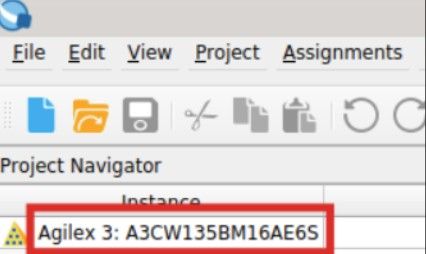
Description Due to an issue in Quartus® Prime Pro Edition software version 26.1, users may encounter a failure when programming the FPGA with the .sof file generated by the MIPI DSI‑2 IP Design Example for the Agilex® 3 FPGA and SoC C‑Series Development Kit. This issue occurs because the design example generation script incorrectly maps the selected Agilex 3 development kit to an unintended target board. When configuring the FPGA using the Quartus Programmer, the following error may be reported: Error(18952): Error status: The device chain in Programmer does not match physical device chain. Expected JTAG ID code 0xXX Additionally, the FPGA part number shown in the generated example design may not match the FPGA device on the selected development kit. Resolution To work around this issue in Quartus® Prime Pro Edition software version 26.1, follow the steps below to generate the MIPI DSI‑2 IP Design Example for the correct Agilex® 3 FPGA device. 1. Open the Design Example Tab In the Quartus Prime Pro Edition software, open the MIPI DSI‑2 IP. Navigate to the Parameters window and ensure that the Design Example tab is selected at the top of the MIPI DSI‑2 IP GUI. 2. Select the Correct Target Board In the Target Development Kit section, open the Select Board drop‑down menu and choose the option that corresponds to your development kit, as shown in the table below: Development Kit Kit Part Number FPGA Part Number Target Board Option to Select Agilex® 3 FPGA and SoC C‑Series Development Kit DK‑A3W135BM16AEA A3CW135BM16AE6S Agilex® 3 FPGA C‑Series Development Kit Agilex® 3 FPGA C‑Series Development Kit DK‑A3Y135BM16AEA A3CY135BM16AE6S Agilex® 3 SoC C‑Series Development Kit Ensure that the selected target board option matches your development kit. 3. Generate the Design Example After selecting the correct target board option, click Generate Example Design and allow Quartus to complete the generation process. 4. Verify the FPGA Device Open the generated Quartus project and locate the device OPN in the Project Navigator. Verify that the device OPN (for example, A3CW135BM16AE6S) matches the FPGA part number listed for your development kit in the table above. If the device OPN matches, the design example has been generated correctly and can be programmed onto the FPGA. This problem affects only the target board selection mapping during design example generation for the Agilex® 3 FPGA and SoC C‑Series Development Kit. The MIPI DSI‑2 IP core and generated design examples are otherwise fully functional. This problem is scheduled to be fixed in a future release of the Quartus Prime Pro Edition software.48Views0likes0CommentsWhy do I see rx_ready not asserting, or incorrect TX data rates in Agilex® 7 F‑Tile or Agilex® 5/3 FPGA GTS device transceiver simulations using the Quartus® Prime Pro 25.3.1 or earlier software with Siemens QuestaSim® Altera Edition software?
Description Due to a bug in the Quartus® Prime Pro 25.3.1 and earlier software for Agilex® 7 F‑Tile or Agilex ® 5/3 FPGA GTS devices, you may see the rx_ready signal not asserting, or incorrect TX data rates when simulating with the Siemens QuestaSim* Altera® Edition software. Resolution To work around this problem, you can update your design to the Quartus Prime Pro software version 26.1 and create a script that sets the following environment variables and then calls the Quartus Prime Pro software generated msim_setup.tcl file. set QUARTUS_SIM_LIB_DIR <quartus_installation>/quartus/eda/sim_lib2 set DEVICES_SIM_LIB_DIR <quartus_installation>/devices/sim_lib2 set ENABLE_QE_LIBRARY_COMPILATION "true" source msim_setup.tcl This problem will be fixed in a future version of the Quartus Prime Pro software.37Views0likes0Comments