What is the latest device firmware for the Quartus® Prime Pro Edition Software version 25.1.1?
Description The latest device firmware for the Quartus® Prime Pro Edition Software version 25.1.1 can be downloaded from the following links. Fixes for the following problems are included in the latest release (The newest release contains all prior fixes and supersedes earlier device firmware releases). Change Log Firmware version 1.33fw: Fixed race condition in handling SHA isr and resumption of FPGA data blocks.Drain DMA post a configuration/PR to flush out left over data if any. Firmware version 1.22fw: Enabled 85 Ohm Rx Termination for PCIe designs. Resolved problem related to Ethernet Auto-Negotiation and Link Training (AN/LT) designs on F-Tile FGT having link up issue Resolved problem related to IEEE 802.3-2022 50GBASE-KR compliance testing marginality during Link Training (LT). Resolved problem related to FGT transceivers using certain FGT Attribute Access method sequence hanging. Firmware version 1.15fw: Added Safe SEU error injection mailbox command. Please also see the following links: Updating the SDM Firmware in the Agilex® FPGA Configuration User Guide Updating the SDM Firmware in the Stratix® 10 FPGA Configuration User Guide Resolution Download the latest device firmware below. Note: Patches must be applied to the Quartus® Prime Pro Edition Software and the Quartus® Prime Pro Edition Software Programmer and Tools. Recompilation is not required. All programming files should be recreated. Re-run the programming file generation or conversion using the Quartus® Prime Software programming file generator.15Views0likes0CommentsWhy do I see permission denied error in Windows (64-bit) when using ModelSim*- Altera® FPGA to simulate Agilex® 7 CPRI PHY IP Example Design on the Quartus® Prime Pro Edition software version 21.4?
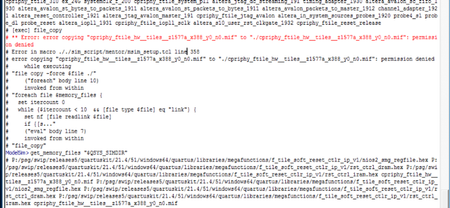
Description The issue occurs when using ModelSim®–Altera FPGA to simulate the Agilex® 7 CPRI PHY IP Example Design on a Windows (64-bit) system. This problem does not occur when running the same simulation on a Linux system. Resolution To work around this problem: Create a new folder called temp under example testbench. Copy the MIF file into it. In the script ./example_testbench/sim_script/common/modelsim_files.tcl, revise the MIF path. lappend memory_files "[normalize_path "$QSYS_SIMDIR/../temp/cpriphy_ftile_hw__tiles__z1577a_x388_y0_n0.mif"]" Alternative: In the script ./example_testbench/sim_script/mentor/msim_setup.tcl, revise as follow. Line 188: file copy -force $file ./ ----> catch { file copy -force $file ./ } This problem is fixed beginning with the Quartus® Prime Pro Edition software version 22.2.9Views0likes0CommentsWhy do I see a simulation failure with the F-Tile Multi Channel DMA IP for PCI Express* Design Example using the Quartus® Prime Pro Edition Software version 26.1?
Description Due to a problem in the Quartus® Prime Pro Edition Software version 26.1, you may encounter simulation errors with the F-Tile Multi Channel DMA IP for PCI Express* Design Example. Synopsys VCS/VCS-MX : Error-[SE] Syntax error Following verilog source has syntax error : "./../..//pcie_ed_sim_tb.v", 2015: token is ')'... Error-[TMENF-IL] Top Module/Entity not found Top module/entity/config "pcie_ed_sim_tb.pcie_ed_sim_tb" is not found in library "PCIE_ED_SIM_TB". Error-[NM] No modules defined No modules defined in current design file(s). Siemens QuestaSim: ** Error: /mentor/questasim/2025.3/linux64/linux_x86_64/qrun failed. Error in macro ./run_msim_setup.tcl line 52 Cadence Xcelium: xmelab: *E,NOUNIT: Unable to find a unit named 'pcie_ed_sim_tb.pcie_ed_sim_tb' in the libraries. xmsim: *F,NOSNAP: Snapshot 'pcie_ed_sim_tb.pcie_ed_sim_tb' does not exist in the libraries. Aldec Riviera-Pro: Error: VCP2000 .../pcie_ed_sim_tb/pcie_ed_sim_tb/sim/pcie_ed_sim_tb.v : (1951, 6): Syntax error. Unexpected token: ). This problem is attributed to a limitation in the provided simulation testbench within this software release. It is important to note that this behavior is confined to the simulation environment and does not impact the functionality or performance of the design on hardware. Resolution This problem is scheduled to be fixed in a future release of the Quartus Prime Pro Edition Software.8Views0likes0CommentsFatal Error: hipi_ok, BSYN_QI_LABMGR::sync_lchip_lab + fitter_bsyn
Description Due to a problem in the Quartus® Prime Pro Edition Software version 26.1, you might encounter this error while compiling a Partial Reconfiguration (PR) Implementation Revision design. Resolution This problem will be fixed in Quartus® Prime Pro Edition Software version 26.1.1 release onwards. No fix is planned in Quartus® Prime Pro Edition Software version 26.1. If you encounter this Quartus IE, file a service ticket through Altera Premier Support (APS) system for a software patch.8Views0likes0Comments
When using the R-Tile Avalon Streaming IP for PCI Express* how should the CPL Always Grant option be used?
Description CPL Always Grant is a new option in the GUI for the R-Tile Avalon Streaming IP for PCI Express. If the parameter is turned on, internally generated TLPs (completion and message) will check for available credits at the link partner (i.e., total credit) and will not be limited to the locally allocated credit of 1, 4, or 16, depending on the scale factor used. If the parameter is turned off, which is the default: Consider that there are 100 completion credits available and we allocated 4 credits for internally generated completions. After 4 config reads are received and after the Hard IP has sent 4 completions in response, the 5th config read received will not result in a completion being transmitted by the Hard IP until a credit update is received from the Root Port, even though the Hard IP still has 96 credits available for completions. This behaviour applies only to configuration requests which require completions to be generated by the PCIe Hard IP. Internally generated messages are posted and do not require completions to be generated. The FC_Update check is not bypassed when the CPL Always Grant option is turned on. The Hard IP keeps track of available credits at the link partner and prevents any TLPs (internal or user- generated) from being transmitted through the link enough credits are not available. For header and data, the credits reserved for internal IP usage are 1, 4, and 16 for scaling factors of 1, 4, and 16 respectively. Header credits and data credits have their own allocation. For new designs targeting an interoperable vendor-neutral system architecture, Altera recommends that this option be enabled. Resolution This information is scheduled to be included in a future release of the R-Tile Avalon Streaming IP for PCI Express User Guide.15Views0likes0Comments
What is the latest device firmware for the Agilex® FPGA and Stratix®10 FPGAs?
Description Altera® recommends using the latest version of the Quartus® Prime Pro Edition Software and the latest available device firmware. Please also see the following user guides: Updating the SDM Firmware in the Agilex® 7 FPGA Configuration User Guide Updating the SDM Firmware in the Stratix® 10 FPGA Configuration User Guide Resolution The latest device firmware available for the Quartus® Prime Pro Edition Software can be downloaded from the following links: Quartus Prime Pro Edition Software version 25.3 What is the latest device firmware for the Quartus® Prime Pro Edition Software version 25.3? Quartus Prime Pro Edition Software version 25.1 What is the latest device firmware for the Quartus® Prime Pro Edition Software version 25.1? Quartus Prime Pro Edition Software version 24.3.1 What is the latest device firmware for the Quartus® Prime Pro Edition Software version 24.3.1? Quartus Prime Pro Edition Software version 24.3 What is the latest device firmware for the Quartus® Prime Pro Edition Software version 24.3? Quartus Prime Pro Edition Software version 24.2 What is the latest device firmware for the Quartus® Prime Pro Edition Software version 24.2? Quartus Prime Pro Edition Software version 24.1 What is the latest device firmware for the Quartus® Prime Pro Edition Software version 24.1? Quartus Prime Pro Edition Software version 23.4 What is the latest device firmware available for the Quartus® Prime Pro Edition Software version 23.4? Quartus Prime Pro Edition Software version 23.3 What is the latest device firmware available for the Quartus® Prime Pro Edition Software version 23.3? Quartus Prime Pro Edition Software version 23.2 What is the latest device firmware available for the Quartus® Prime Pro Edition Software version 23.2? Quartus Prime Pro Edition Software version 23.1 What is the latest device firmware available for the Quartus® Prime Pro Edition Software version 23.1? Quartus Prime Pro Edition Software version 22.4 What is the latest device firmware available for the Quartus® Prime Pro Edition Software version 22.4? Quartus Prime Pro Edition Software version 22.3 What is the latest device firmware available for the Quartus® Prime Pro Edition Software version 22.3? Quartus Prime Pro Edition Software version 22.2 What is the latest device firmware available for the Quartus® Prime Pro Edition Software version 22.2? Quartus Prime Pro Edition Software version 22.1 What is the latest device firmware available for the Quartus® Prime Pro Edition Software version 22.1? Quartus Prime Pro Edition Software version 21.4 What is the latest device firmware available for the Quartus® Prime Pro Edition Software version 21.4? Quartus Prime Pro Edition Software version 21.3 What is the latest device firmware available for the Quartus® Prime Pro Edition Software version 21.3? Quartus Prime Pro Edition Software version 21.2 What is the latest device firmware available for the Quartus® Prime Pro Edition Software version 21.2? Quartus Prime Pro Edition Software version 21.1 What is the latest device firmware available for the Quartus® Prime Pro Edition Software version 21.1? Quartus Prime Pro Edition Software version 20.3 What is the latest device firmware available for the Quartus® Prime Pro Edition Software version 20.3?234Views0likes0CommentsWhy is there an "unrecognized device" error when using quartus_jli to configure or program a JAM file for flash devices of 2 GB or larger?
Description In any versions of Altera® Quartus® Prime Pro Edition Software, the quartus_jli command may report an “unrecognized device” error when a JAM file targets a flash device that is 2 GB or larger. This behavior is specific to JAM files used with large flash devices and does not occur with smaller flash sizes. Resolution Use the following workaround to avoid the error: Run the jtagconfig command to detect the connected JTAG hardware. After the hardware is detected, run quartus_jli to configure or program the JAM file. There is currently no plan to fix this behavior in a future Quartus® Prime release.22Views0likes0CommentsWhy are my high fanout cells not duplicated?
Description Due to an problem in the Quartus® Prime Pro Edition Software versions 24.3 and later, duplication of cells with high fanout is prevented even when duplication assignments such as DUPLICATE_REGISTER or DUPLICATE_SYNC_FANIN are defined explicitly. This behavior affects cells that have a driver in a different partition, including both signals and clocks. For example, a register in partition A that has its clock coming from the root partition will not be duplicated despite having the appropriate assignment. Resolution To work around this problem, remove the partitions or ensure that the affected cells are not driven by other cells in different partitions. If removing partitions from your design is not feasible, patches are available to work around this problem. Download and unzip the zip file that matches your Quartus® Prime Pro version and operating system from this KDB. Quartus® Prime Pro Edition Version Patch number 24.3 [0.36|^quartus-24.3-0.36.zip] 24.3.1 [1.30|^quartus-24.3.1-1.30.zip] 25.1 [0.38|^quartus-25.1-0.38.zip] 25.1.1 [1.29|^quartus-25.1.1-1.29.zip] 25.3 [0.28|^quartus-25.3-0.28.zip] 25.3.1 [1.07|^quartus-25.3.1-1.07.zip] Patches for versions 25.3 and 25.3.1 also address additional problems; refer to the README files for more information. This problem is fixed beginning with the Quartus® Prime pro Edition Software version 26.1.25Views0likes0CommentsError(23098): One or more blocks are configured incorrectly and will not have the desired functionality. --BCM instance name: pio_1_2
Description Due to a problem in the Quartus® Prime Pro Edition Software version 26.1 and earlier, you might see the error above when using the I/O PLL Parameterizable Macro (ipm_iopll). The error only occurs when using non-integer values for the VCO Clocks and Output Clocks in the I/O PLL Parameterizable Macro. Resolution To work around this problem, use non‑integer values for the VCO Clocks and Output Clocks in the IOPLL IP. This problem is scheduled to be fixed in a future release of the Quartus® Prime Pro Edition Software.22Views0likes0Commentsdrivers/src/altera_s10_mailbox_client.c:32:59: error: 'OS_FLAG_SET' undeclared (first use in this function); did you mean 'ALT_FLAG_SET'?
Description Due to a problem Quartus® Prime Pro Edition Software, you might see an error when compiling Nios® V software with the mailbox Client IP and FreeRTOS because the driver software of the IP doesn't support FreeRTOS. Resolution The driver software supports Hardware Abstraction Layer(HAL) and uCOS-II. Please select one of them when generating Nios® V BSP.41Views0likes0Comments