User Profile

NikoR
 Occasional Contributor
Joined 8 years ago


User Widgets
Contributions
Installer Package for DK-DEV-10AX115S-B
The Obsolete Arria® 10 GX FPGA Development Kit | Altera revision -A came with an Installer package: The Arria® 10 GX FPGA Development Kit | Altera revision -B is missing this: Can you please provide similar resources? Best regards, Nikolay20Views0likes1CommentRe: "Avalon I2C (Master) IP" is missing from IP Catalog on some 26.1 installations
Sorry, that is too much trouble in this case. I will wait for 26.1.1 and 26.3 versions. Turning off security software is not an option on corporate laptops. There has been an APS case where a workaround is to use Platform Designer instead. It shows up there on my computer in this case.62Views0likes1Comment"Avalon I2C (Master) IP" is missing from IP Catalog on some 26.1 installations
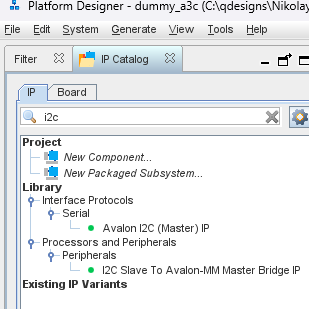
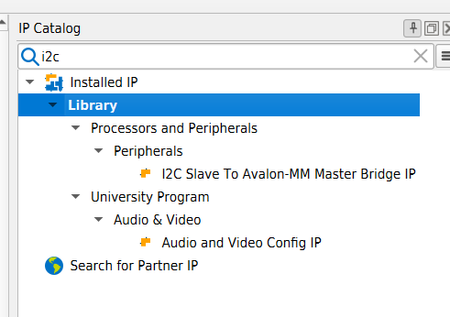
Our group of Quartus users has encountered some scenarios where the "Avalon I2C (Master) IP" is missing from the IP Catalog of Quartus 26.1 on Windows machines. It is working well on other Windows machines and Linux machines in the same network. A Windows machine missing the IP: A Linux machine where it works; Installing Patch 0.11 did not solve the issue. All relevant environment variables seem to be equal on both working and non-working machines. Any ideas?Solved152Views0likes3CommentsWhy does PTA show zero W for F-tiles in Hierarchical Design Editor
Why is there no power shown in the Hierarchical Design Editor(25.3: Current Level Dynamic Power, 26.1: Self Dynamic Power) when adding a fully utilized F-tile? The Total Power does however show the expected power. Is it a bug or a feature?92Views0likes2CommentsRe: Multiple Eclipse installations - How to control which one?
Problem was for some reason suddenly solved... After uninstalling the "normal" Eclipse, the NiosII Eclipse still did not show the Templates. However after digging down into File -> New -> Others the NiosII Templates could be found. After this, the Templates are now also visible under the File -> New section. Something "hi-jacked" the view, and was restored by some coincident... Can't explain it, but considering this case closed! 😉 /Nikolay1.6KViews0likes0CommentsRe: Multiple Eclipse installations - How to control which one?
Hi. The question is not which one I want to use... Eclipse does support to have multiple versions installed: https://stackoverflow.com/questions/16764625/is-it-possible-to-have-multiple-eclipse-installs-on-one-computer The question is why Nios II Software Build Tools for Eclipse starts without the NiosII plugins like "NiosII Application and BSP for Template" even after the generic Eclipse was uninstalled? Best regards Nikolay1.6KViews0likes0CommentsNiosV Ashling GDB "Debugger disconnected, closed connection to 127.0.0.1 on port ..."
I got this message when trying to Run or Debug a NiosV from Ashling Eclipse tools. Ashling GDB Server for RISC-V (ash-riscv-gdb-server). v22.3.2, 19-Aug-2022, (c)Ashling Microsystems Ltd 2022. Initializing connection ... Checking for an active debug connection using the selected debug probe (SN: 1): Cannot set the JTAG frequency, continuing with auto adjust mode Connected to target device "" using USB-Blaster-2 (1) via JTAG at 15.00MHz. Info : Active Harts Detected : 1 Info : [0] System architecture : RV32 Info : [0] Number of hardware breakpoints available : 1 Info : [0] Number of program buffers: 8 Info : [0] Number of data registers: 2 Info : [0] Memory Access -> Program buffer Info : [0] Memory Access -> Abstract access memory Info : [0] CSR & FP Register Access -> Abstract commands Waiting for debugger connection on port 50991 for core 0. Press 'Q' to Quit. Got a debugger connection from 127.0.0.1 on port 50991. [0x10000] Internal error. Abstract command execution failed: An abstract command is currently being executed. Debugger disconnected, closed connection to 127.0.0.1 on port 50991. Quitting (Ctrl + C)... It turned out to be that the FPGA clock source to the NiosV debug port was lower than the JTAG_CLOCK frequency. (Same problems would apply to JTAG UART and other things connected via the SLD TAP(SystemLevelDebug TestAccessPort)) Solutions: - Increase Clock source in your FPGA design - Lower JTAG_CLOCK speed on the PC2KViews0likes2Comments