general
226 Topics
My signaltap test has some problem
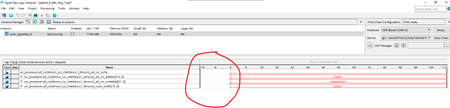
When I use signaltap, sometimes it has a problem, there's a blank gap at the beginning and the signals can't be triggered(please see two examples in below pictures). It's not the code or design problem, I just create another signaltap file, make some random signal changes or adjust the sample depth, the issue may disappear with no special reason. This doesn't happen very often, but when it happens, it really bothers me, sometimes I have to try several times to randomly adjust the signals to make it work. It looks like a quartus bug, any one has any idea about this? thanks.67Views0likes4Comments
USB Blaster III and Cyclone III
ai_responder Hi, Cyclone III is supposed to be supported by USB Blaster III. I was wondering which Quartus version would be needed? Last Quartus version for Cyclone III is 13,1 as far as I know. Is USB Blaster III working with 13.1? best regards Ben37Views0likes1Comment
USB-Blaster II malfunction
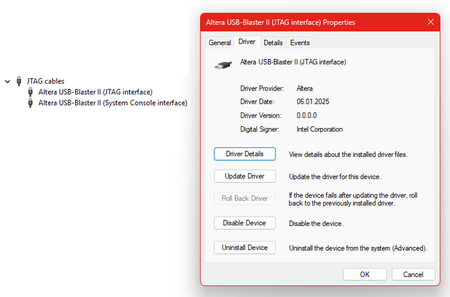
I’m unable to get a new Altera USB-Blaster II cable working. My setup comprises the Altera 10M08 Evaluation Kit, a Altera USB-Blaster II cable, and Quartus Prime Programmer (Version 25.1std). The USB-Blaster II cable is properly detected by the operating system (Windows 11 Enterprise, Version 25H2). The default JTAG clock frequency is set to 24 MHz. With this setting, the attached evaluation board cannot be detected using Programmer GUI → Auto Detect. After lowering the JTAG clock frequency to 6 MHz and disabling the JtagClockAutoAdjust feature using jtagconfig --debug --setparam 1 JtagClockAutoAdjust 0 jtagconfig --setparam 1 JtagClock 6000000 the MAX 10 FPGA is detected. Programming the FPGA using the Programmer GUI still fails. The programming process is interrupted at random and never completes, even after multiple retries. However, programming is successful when initiated using the following console command: quartus_pgm -c USB-BlasterII -m jtag -o "P;demo10m08.pof" How can I fix this problem? Programming works perfectly when using an Altera USB Blaster or a TERASIC Blaster.38Views0likes1Comment
Workaround for TCK frq. limitations on USB-Blaster I/II/III & Clones (fixing "JTAG chain broken")
Workaround for TCK frequency limitations on USB-Blaster I/II/III and clones (fixing "JTAG chain broken") Hi everyone, I'd like to share a practical workaround for a problem many of us run into when programming Altera FPGAs through test fixtures, level shifters or long ribbon cables. **The problem** In these setups, "JTAG chain broken" or "Unable to scan device chain" errors are common. They are usually caused by signal reflections and poor termination on custom boards and long extensions. Lowering the TCK frequency is the standard remedy, but the options are limited: - USB-Blaster I (and most low-cost clones) runs at a fixed TCK of about 6 MHz. Quartus offers no way to change it. - USB-Blaster II can be set to 6/16/24 MHz via `jtagconfig --setparam <cable> JtagClock <freq>`, but nothing below 6 MHz. In practice this setting is also unreliable: it is not persistent and can fall back to the 24 MHz default (see Altera KB: "Why does the TCK frequency setting of the USB-Blaster II download cable revert to the default value of 24 MHz after being changed?"). In our experience it is a constant source of trouble, especially in production where it has to be set again and again. For really marginal lines, 6 MHz is often still too fast. **The workaround** Disclosure: I'm the developer of the tool described below, so please take this as information from the vendor. Quintus Programmer (by Dution) drives the JTAG lines of the USB-Blaster in bit-bang mode instead of using the adapter's fixed shift clock. This lets you choose the TCK frequency freely, e.g. down to 100 kHz, with the same USB-Blaster I/II/III or clones you already have. With a lower TCK, programming and verification become stable again on long or poorly terminated lines without any hardware changes. The standard USB-Blaster driver stays in place, and Quintus only replaces the programming step. **Before reaching for software, check the hardware basics** The recommendations from the Altera Knowledge Base still apply and often fix the problem on their own: - TCK pull-down 1 kΩ to GND, TMS/TDI pull-up 10 kΩ to VCCIO - a small capacitor (10–22 pF) at TCK near the FPGA against ringing edges - a TCK buffer on long or noisy lines If the layout can't be changed, a lower TCK is a practical way out. More info: search for "Quintus Programmer Dution". Happy to answer technical questions here.171Views0likes2Comments
Introducing the Altera Community AI Responder — Beta
Altera is introducing the AI Responder, an assistant built into the Altera Community to help provide faster, context-aware guidance for Altera product questions. It uses relevant public Altera documentation and Knowledge Database content, with coverage continuing to expand. The AI Responder may provide source references and can hand off complex or out-of-scope questions to an Altera subject-matter expert. As a beta feature, responses may contain errors or omissions, so please review the sources and verify technical guidance against official Altera documentation before implementation. If the response does not fully address your question, add more context and tag ai_responder to continue the discussion. We welcome your feedback as we improve the Community experience.35Views0likes1CommentIntroducing the Altera Community AI Responder — Beta
Altera is introducing the AI Responder, an assistant built into the Altera Community to help provide faster, context-aware guidance for Altera product questions. It uses relevant public Altera documentation and Knowledge Database content, with coverage continuing to expand. The AI Responder may provide source references and can hand off complex or out-of-scope questions to an Altera subject-matter expert. As a beta feature, responses may contain errors or omissions, so please review the sources and verify technical guidance against official Altera documentation before implementation. If the response does not fully address your question, add more context and tag ai_responder to continue the discussion. We welcome your feedback as we improve the Community experience.73Views0likes1CommentIntroducing the Altera Community AI Responder — Beta
Altera is introducing the AI Responder, an assistant built into the Altera Community to help provide faster, context-aware guidance for Altera product questions. It uses relevant public Altera documentation and Knowledge Database content, with coverage continuing to expand. The AI Responder may provide source references and can hand off complex or out-of-scope questions to an Altera subject-matter expert. As a beta feature, responses may contain errors or omissions, so please review the sources and verify technical guidance against official Altera documentation before implementation. If the response does not fully address your question, add more context and tag ai_responder to continue the discussion. We welcome your feedback as we improve the Community experience.19Views0likes0CommentsIntroducing the Altera Community AI Responder — Beta
Altera is introducing the AI Responder, an assistant built into the Altera Community to help provide faster, context-aware guidance for Altera product questions. It uses relevant public Altera documentation and Knowledge Database content, with coverage continuing to expand. The AI Responder may provide source references and can hand off complex or out-of-scope questions to an Altera subject-matter expert. As a beta feature, responses may contain errors or omissions, so please review the sources and verify technical guidance against official Altera documentation before implementation. If the response does not fully address your question, add more context and tag ai_responder to continue the discussion. We welcome your feedback as we improve the Community experience.18Views0likes0CommentsIntroducing the Altera Community AI Responder — Beta
Altera is introducing the AI Responder, an assistant built into the Altera Community to help provide faster, context-aware guidance for Altera product questions. It uses relevant public Altera documentation and Knowledge Database content, with coverage continuing to expand. The AI Responder may provide source references and can hand off complex or out-of-scope questions to an Altera subject-matter expert. As a beta feature, responses may contain errors or omissions, so please review the sources and verify technical guidance against official Altera documentation before implementation. If the response does not fully address your question, add more context and tag ai_responder to continue the discussion. We welcome your feedback as we improve the Community experience.19Views0likes0CommentsIntroducing the Altera Community AI Responder — Beta
Altera is introducing the AI Responder, an assistant built into the Altera Community to help provide faster, context-aware guidance for Altera product questions. It uses relevant public Altera documentation and Knowledge Database content, with coverage continuing to expand. The AI Responder may provide source references and can hand off complex or out-of-scope questions to an Altera subject-matter expert. As a beta feature, responses may contain errors or omissions, so please review the sources and verify technical guidance against official Altera documentation before implementation. If the response does not fully address your question, add more context and tag ai_responder to continue the discussion. We welcome your feedback as we improve the Community experience.22Views0likes0Comments