general
226 Topics
PCIe configuration/capability list
Hi, So we've been testing a custom hardware card connected to a server with Ice Lake CPUs, and found it's been disconnecting over the PCIe connection. This is compared to an identical configuration but with Cascade Lake CPUs, where it managed to work. This was done using CentOS 8 Stream. I was wondering if there've been any changes to the PCIe capabilities, or anything else relevant that could help explain this. I'll also include an error message that might help, on sending a command to the hardware that causes it to fail: Hardware error from APEI Generic Hardware Error Source: 5 event severity: recoverable Error 0, type: fatal section_type: PCIe error port_type: 4, root port version: 3.0 command: 0x0547, status: 0x4010 device_id: 0000:b0:04.0 slot: 4 secondary_bus: 0xb1 vendor_id: 0x8086, device_id: 0x347c class_code: 000406 bridge: secondary_status: 0x2000, control: 0x0003 aer_uncor_status: 0x00004000, aer_uncor_mask: 0x01310000 aer_uncor_severity: 0x044ef030 TLP Header: 00000001 fc22fe01 dbc04000 00000000 Thanks, Matthew3.4KViews0likes5Comments
How can I port RTL module into oneAPI FPGA programming ?
Hi there, I have been using oneAPI for FPGA programming for a while. I am now trying to port my well-defined RTL module into my oneAPI implementation. I do read and understand the specification documents provided in oneAPI websites also the openCL SDK development. However, one of these have pointed a very clear way to interact with RTL module using oneAPI. I am successfully runing a combinational vector-add sample myself, but have no idea how to interact with the sythesized modules from oneAPI with clock driven capability and Avalon-ST interface. Have anyone done such a tryout before ? Best.2.5KViews0likes7Comments
IFFT
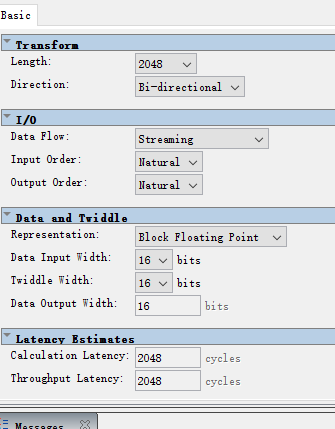
Dear sir, I encountered the following problems when using FFT IP core to simulate My FFT IP core configuration is as follows.I configure it as IFFT. In the case of entering the same data, Sometimes, I can get the right results, as shown in the following figure: But sometimes, I always get wrong results, as shown in the following figure: What may be the cause of this abnormal output? We are looking forward to your reply.2.3KViews0likes5Comments
Cannot send information to education registration support
Re: Information Required: Intel® FPGA Academic Program Membership Application L-013561 ref : 00Q7V00001wsNV2UAM Joseph Gabbay <[email protected]> 8:42 AM (9 minutes ago) to FPGA Hello I am trying to answer but the email bounces back. Here is another trial, let's hope this time it is OK, Is this link good enough? Joseph Gabbay | Afeka College - higher engineering studies in Tel Aviv Attached pictures: the first is taken from the WWW (you have a link), The other is taken from Afeka's intranet system (may be limited to staff members as it requires authentication) It is written in Hebrew, you can still verify my phone number as well... Thank you Regards, Joseph Gabbay1.8KViews0likes6Comments
The design is right, but the execution is wrong
Good evening and Happy New Year everyone.. Implemented this equation: Attached is a picture with the file Bit depth: from 8 to 28 Algorithm type: The process of multiplying the highest digits of the multiplier begins with a fixed sum of the partial product and shifts the multiplier to the right by one digit per turn. The multiplier shifts to the left This build is on Quartus II 9.1sp2 Web Edition But when executing, the error appears Error: Illegal name "A[27]" -- pin name already exists Error: Illegal name "A[27]" -- pin name already exists Error: Illegal name "A[27]" -- pin name already exists Error: Can't elaborate top-level user hierarchy Error: Quartus II Analysis & Synthesis was unsuccessful. 4 errors, 1 warning Error: Peak virtual memory: 235 megabytes Error: Processing ended: Sun Jan 01 19:56:31 2023 Error: Elapsed time: 00:00:00 Error: Total CPU time (on all processors): 00:00:01 Error: Quartus II Full Compilation was unsuccessful. 6 errors, 1 warning1.8KViews0likes4Comments
rsu_client failing to write to slot
Hello, I am trying to exercise the rsu_client (from Intel's remote system update feature) by erasing a partition on the flash and writing a new file and loading that on the next reboot. This feature works but very very occasionally I encounter an issue where the writing portion fails and the only way that I know to recover from this is to rewrite the flash with the JIC file. I am wondering if someone can advise on how/why this could happen? The feature works robustly most of the time but the said error would require a manual intervention by connecting the JTAG cable. also is it possible to recover from this using the existing rsu_client? I have attached some of the output of the rsu_client for your reference. I do not see any specific message when running `dmesg` on HPS or by inspecting the log in u-boot related to the SPTs/CPBs or QSPI read failure. Note that I do not think this is related to the Flash being worn-out from 1000s of write cycles, the Flash is new and I am seeing this issue on multiple different boards. root@stratix10:~# rsu_client --log VERSION: 0x00000202 STATE: 0x00000000 CURRENT IMAGE: 0x0000000001000000 FAIL IMAGE: 0x0000000000000000 ERROR LOC: 0x00000000 ERROR DETAILS: 0x00000000 RETRY COUNTER: 0x00000000 Operation completed root@stratix10:~# rsu_client --list 0 NAME: P1 OFFSET: 0x0000000001000000 SIZE: 0x01000000 PRIORITY: 1 Operation completed root@stratix10:~# rsu_client --list 1 NAME: P2 OFFSET: 0x0000000002000000 SIZE: 0x01000000 PRIORITY: [disabled] Operation completed root@stratix10:~# rsu_client --list 2 NAME: P3 OFFSET: 0x0000000003000000 SIZE: 0x01000000 PRIORITY: [disabled] Operation completed root@stratix10:~# rsu_client -y DCMF0: OK DCMF1: OK DCMF2: OK DCMF3: OK Operation completed root@stratix10:~# rsu_client -m DCMF0 version = 23.1.0 DCMF1 version = 23.1.0 DCMF2 version = 23.1.0 DCMF3 version = 23.1.0 Operation completed root@stratix10:~# rsu_client --erase 1 Operation completed root@stratix10:~#rsu_client --add application.hps.rpd --slot 1 librsu: priority_add(): Compressing CPB [MED] librsu: erase_dev(): error: Erase length 32768 not erase block aligned [LOW] librsu: writeback_cpb(): error: Unable to ease CPBx [LOW] ERROR: Failed to enable slot Thank you!Solved1.8KViews0likes8Comments