general
226 Topics
My signaltap test has some problem
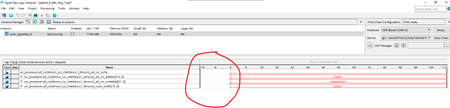
When I use signaltap, sometimes it has a problem, there's a blank gap at the beginning and the signals can't be triggered(please see two examples in below pictures). It's not the code or design problem, I just create another signaltap file, make some random signal changes or adjust the sample depth, the issue may disappear with no special reason. This doesn't happen very often, but when it happens, it really bothers me, sometimes I have to try several times to randomly adjust the signals to make it work. It looks like a quartus bug, any one has any idea about this? thanks.67Views0likes4Comments
HyperRAM Hyperbus options for Agilex
In migrating a Xilinx design : We are looking to use a A5E A 007 B23B device with a NIOS-V or other RISCV soft core. Because we need to use the HSIO pins for ~ 20 pairs of LVDS, and the entireHSIO bank (96 wide) having to be at 1.3V to support LVDS mean that we cannot use the internal LPDDR4 memory controller. Please confirm my understanding - that although the 96 wide I/O bank can be split into two functional sub banks (2A, 2B etc) (to support say, LPDDR4(16 bit), and something else , that we CANNOT split the VCCIO-BANK between the two sub banks ? (to have 1.1V for LPDDR4 and 1.3V for LVDS) The projects do not need much memory- a 64 Mbit HyperRAM device hanging from 1.8V HVIO would do the job (perhaps max clock 125 MHz on HVIO ?) What instantiable cores do ALtera have in the war chest for HyperRAM? There is a 3rd party Hyperbus controller IP but we wont want to spend $10,000 on it, as moving from a cheaper Xilinx device to a less competitive Altera device is already a big job and we do not think it deserves having that much more money spent on it. (Efinix have a free Hyperbus core, Xilinx have a free Hyperbus core....) Regards Glen.Solved116Views0likes4CommentsQuesta-ModelSim UI scaling problems in Linux
Hello Has anybody been able to solve the issue of UI of Questa not scaling correctly on linux with wayland? I am using Ubuntu 26.04 with wayland and UI is just tiny, icons, are so small i cannot read any text. When opening a new project, file explorer is also tiny. Fonts i could change in the config file but icons, menus and everything else is just extremely small. Problem is even worse on high resolution displays. Regards, Haris755Views0likes14Comments
Board Test System Download Package – Stratix 10 TX Signal Integrity Development Kit
Hello, I am currently working with the Stratix 10 TX Signal Integrity Development Kit on a Windows PC and would like to use the Board Test System (BTS) to verify the functionality of the board. According to the Stratix 10 TX Transceiver Signal Integrity Development Kit User Guide, the BTS application should be included in the development kit package under: <package_dir>\examples\board_test_system\BoardTestSystem.exe However, I have not been able to locate the appropriate BTS package or download containing the BoardTestSystem.exe application. Could someone from Altera please provide the current download link or the appropriate installer/ZIP package containing the BTS application and its associated test designs (.sof files)? I would also appreciate confirmation of the recommended Quartus Prime version and any required dependencies for running the BTS on Windows. Board: Stratix 10 TX Signal Integrity Development Kit Development Kit: DKSI1STXEA Host OS: Windows Thank you for your assistance.543Views0likes8Comments
USB Blaster III and Cyclone III
ai_responder Hi, Cyclone III is supposed to be supported by USB Blaster III. I was wondering which Quartus version would be needed? Last Quartus version for Cyclone III is 13,1 as far as I know. Is USB Blaster III working with 13.1? best regards Ben37Views0likes1Comment
USB-Blaster II malfunction
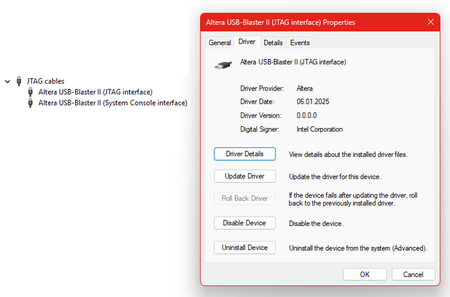
I’m unable to get a new Altera USB-Blaster II cable working. My setup comprises the Altera 10M08 Evaluation Kit, a Altera USB-Blaster II cable, and Quartus Prime Programmer (Version 25.1std). The USB-Blaster II cable is properly detected by the operating system (Windows 11 Enterprise, Version 25H2). The default JTAG clock frequency is set to 24 MHz. With this setting, the attached evaluation board cannot be detected using Programmer GUI → Auto Detect. After lowering the JTAG clock frequency to 6 MHz and disabling the JtagClockAutoAdjust feature using jtagconfig --debug --setparam 1 JtagClockAutoAdjust 0 jtagconfig --setparam 1 JtagClock 6000000 the MAX 10 FPGA is detected. Programming the FPGA using the Programmer GUI still fails. The programming process is interrupted at random and never completes, even after multiple retries. However, programming is successful when initiated using the following console command: quartus_pgm -c USB-BlasterII -m jtag -o "P;demo10m08.pof" How can I fix this problem? Programming works perfectly when using an Altera USB Blaster or a TERASIC Blaster.38Views0likes1CommentSystem Console master_read_memory fails above 7688 bytes on Agilex 5 (AXE5-Eagle)
A single master_read_memory of 7689 bytes or more never completes on an Agilex 5. It returns nothing, times out after 60 seconds, and leaves the JTAG channel closed so the next command fails too. 7688 bytes on the same master and the same address returns all 7688 values in under 0.1 second. The boundary is byte exact and repeats every time. I can reproduce this entirely with an unmodified example bitstream published by Arrow, so no design of mine is involved and there is nothing for me to send you. SETUP Board: Arrow AXE5-Eagle, device A5ED065BB32AE4SR0, IDCODE 0364F0DD Bitstream: axe5_eagle_voltage_temp.sof from https://github.com/ArrowElectronics/Agilex-5, path images/promo3/, md5 b391b9cd5226fe92fd2068ddc66f8442 That bitstream was built with Quartus Prime Pro 24.3 and reports "HPS present: FALSE", so it configures straight over JTAG with no bootloader merge and no HPS involvement. It exposes a Nios V node and a JTAG PHY master. Tools: Quartus Prime Pro 26.1.1 build 130, System Console from the same installation, Windows 10 Enterprise LTSC 21H2 Cable: Arrow USB Blaster ARA39943-TEI0004, JTAG clock pinned to 6 MHz, Altera JTAG Server running as a Windows service STEPS 1. Program the board over JTAG: quartus_pgm -c "Arrow-USB-Blaster [ARA39943-TEI0004]" -m jtag -o "p;axe5_eagle_voltage_temp.sof@1" 2. In System Console, open the JTAG PHY master and read: set m [lindex [get_service_paths master] 0] open_service master $m master_read_memory $m 0x0 7688 master_read_memory $m 0x0 7689 RESULT master_read_memory 7688 bytes -> 7688 values in 0 master_read_memory 7689 bytes -> nothing, 60.0 s, then: master_read_memory: This transaction did not complete e is giving up. After the failure the channel is closed and the next command reports "Channel closed" until the service is reopened. Recovering costs 20 to 60 seconds. WHAT I HAVE ALREADY RULED OUT Not the address. Identical behaviour reading from 0x0, 0x1000, 0x10000000 and 0x20000000, and shifting the base by 1, 2, 4 or 4092 bytes at a fixed size changes nothing. Only the requested byte count Not a timeout. Reads return in 0.0 s right up to 7688, then the very next byte fails. A timeout would show times rising as the limit approached, not an instant success becoming an outright fa Not the size of the reply. master_read_32 hands back a 45055 character answer without trouble, while master_read_memory fails while producing a 39044 character one. Not the design. The same byte boundary appears on two other unrelated bitstreams on this board, one with an HPS and one without, built with different Quartus versions. The Arrow example above is simy. master_read_32 IS NOT AFFECTED, AND HAS NO COMP On the same master and the same bitstream, master_read_32 was run at increasing sizes. Every one returned the full count, correctly, with no timeout and no channel closure: master_read_32 $m 0x0 4096 -> 4096 words, 16 kB spanned, 0.5 s master_read_32 $m 0x0 8192 -> 8192 words, 32 kB master_read_32 $m 0x0 16384 -> 16384 words, 64 kB spanned, 2.2 s master_read_32 $m 0x0 32768 -> 32768 words, 128 kB master_read_32 $m 0x0 65536 -> 65536 words, 256 kB spanned, 9.8 s That last one spans 262144 bytes, which is 34 times theead_memory cannot deliver, and it scales linearly at about0.15 ms per word with no sign of a ceiling. If the JTAG link, the Avalon bridge or the reply channel were the constraint, master_read_32 would degrade somewhere across that range. It does not. master_read_32 is therefore a usable workaround, but a slow one: master_read_memory returns 7688 bytes in under 0.05 s, roughly 150 kB/s, where master_read_32 sustains about 26 kB/s. Around 6 times slowp> QUESTIONS Is 7688 bytes an intended limit for master_read_memory on Agilex 5? If so, where is it documented, and does it vary by device family? The same tool version against Arria V hardware is rock solid and sh Whatever the limit is, could an oversized request return an error immediately instead of hanging for 60 seconds and closing the channel? The silent 60 second stall is far more expensive than a reject Happy to run any additional test on this board if neede183Views0likes6Comments
Workaround for TCK frq. limitations on USB-Blaster I/II/III & Clones (fixing "JTAG chain broken")
Workaround for TCK frequency limitations on USB-Blaster I/II/III and clones (fixing "JTAG chain broken") Hi everyone, I'd like to share a practical workaround for a problem many of us run into when programming Altera FPGAs through test fixtures, level shifters or long ribbon cables. **The problem** In these setups, "JTAG chain broken" or "Unable to scan device chain" errors are common. They are usually caused by signal reflections and poor termination on custom boards and long extensions. Lowering the TCK frequency is the standard remedy, but the options are limited: - USB-Blaster I (and most low-cost clones) runs at a fixed TCK of about 6 MHz. Quartus offers no way to change it. - USB-Blaster II can be set to 6/16/24 MHz via `jtagconfig --setparam <cable> JtagClock <freq>`, but nothing below 6 MHz. In practice this setting is also unreliable: it is not persistent and can fall back to the 24 MHz default (see Altera KB: "Why does the TCK frequency setting of the USB-Blaster II download cable revert to the default value of 24 MHz after being changed?"). In our experience it is a constant source of trouble, especially in production where it has to be set again and again. For really marginal lines, 6 MHz is often still too fast. **The workaround** Disclosure: I'm the developer of the tool described below, so please take this as information from the vendor. Quintus Programmer (by Dution) drives the JTAG lines of the USB-Blaster in bit-bang mode instead of using the adapter's fixed shift clock. This lets you choose the TCK frequency freely, e.g. down to 100 kHz, with the same USB-Blaster I/II/III or clones you already have. With a lower TCK, programming and verification become stable again on long or poorly terminated lines without any hardware changes. The standard USB-Blaster driver stays in place, and Quintus only replaces the programming step. **Before reaching for software, check the hardware basics** The recommendations from the Altera Knowledge Base still apply and often fix the problem on their own: - TCK pull-down 1 kΩ to GND, TMS/TDI pull-up 10 kΩ to VCCIO - a small capacitor (10–22 pF) at TCK near the FPGA against ringing edges - a TCK buffer on long or noisy lines If the layout can't be changed, a lower TCK is a practical way out. More info: search for "Quintus Programmer Dution". Happy to answer technical questions here.171Views0likes2Comments
Introducing the Altera Community AI Responder — Beta
Altera is introducing the AI Responder, an assistant built into the Altera Community to help provide faster, context-aware guidance for Altera product questions. It uses relevant public Altera documentation and Knowledge Database content, with coverage continuing to expand. The AI Responder may provide source references and can hand off complex or out-of-scope questions to an Altera subject-matter expert. As a beta feature, responses may contain errors or omissions, so please review the sources and verify technical guidance against official Altera documentation before implementation. If the response does not fully address your question, add more context and tag ai_responder to continue the discussion. We welcome your feedback as we improve the Community experience.73Views0likes1Comment