Forum Discussion

 New Contributor
How to set clock controller in BTS (board_test_system) for 32G (NRZ) MXP BTS example
Dear support:
We expect the Agilex 7 FPGA I-Series F-Tile. All four channels can run at 32G NRZ and 58G PMA4.
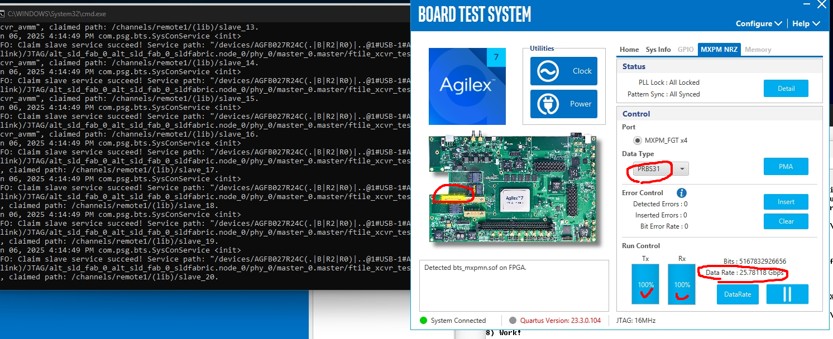
Currently, we use the factory default setting, and MXPM can run at 25.78118G without errors.
The setup background is as follows, please guide us on how to setup BTS to run 32G NRZ application.
Thanks.
//------------------------
device: Agilex 7 FPGA I-Series Transceiver-SoC Development Kit (Power Solution 1
Board)
software: Quartus prime pro 23.3 / BTS
conditions: (1) use Factory Default Switch Settings.
(2) image file: bts_mxpmn.so
Regards,
Ming
13 Replies
 Ash_R_Altera
Regular Contributor
As the recommendations has been provided, I am setting the case to closure. However, it will still be open for the community members to comment on.
Regards
- Ash_R_Altera
Hi,
As I mentioned in one of my previous comment that the design for MXPM should be modified by the user as per the data rate required.
We do not have a direct example for 32Gbps, but as per the datasheet the device does support it.
Please refer to the F-tile User Guide: 1. F-Tile Overview
Regards
- Ash_R_Altera
Hi,
For the version that you are referring to, please find the Quartus design in following path:
<installation_package>\examples\bts_xcvr\bts_xcvr_nrz\bts_xcvr_mxpm_25.78125gbps_nrz.zip\
Regards
 ming001
Hi Hi Ash_R:
It works at 25.78125G, however we want to have 32G data rate.
Please let me know the path where we can have an example for 32G data rate.
Thank you very munch.
Regards,
Ming
- Ash_R_Altera
Hi,
The provided .sof file might have been generated only to support that data rate.
To achieve the data rate of 32Gbps, you will be required to change the F-tile DPHY and system PLL IP settings accordingly.
The related Quartus project can be found in following directory of the installer package:
<installation_package>\examples\bts_xcvr_nrz\MXPM\bts_xcvr_mxpm_nrz_224.zip\bts_xcvr_mxpm_nrz_224
Refer to 3. Implementing the F-Tile PMA/FEC Direct PHY Intel® FPGA IP and 4. Implementing the F-Tile Reference and System PLL Clocks Intel®...
Regards,
Ashlesha
- ming001
Hi Ash_R:
Thanks for laying out the details so clearly.
Based on our current installer version "agilex-agib027r31b1e1vb-si-nen-revc-v25-1b124-v1-0",
and the missing bts_xcvr_nrz example directory (with only bts_xcvf present), so we cannot see the below path
"<installation_package>\examples\bts_xcvr_nrz\MXPM\bts_xcvr_mxpm_nrz_224.zip\bts_xcvr_mxpm_nrz_224
I cannot find the correct version of installer package from Intel web site.
Could you please let us know the link about the correct version of installer package?
Thanks a lot.
Regards,
Ming
- ming001
Hi Ash_R:
I provide more information as follows
1. The current BTS (board test system) has been configured as MXPM_FGT x4
(25.78118Gbps) , and the loopback function works well.
2. if we change the clock rate using the clock controller (ex. OUT2156.25MHz-->148.5MHz (or 184.32MHz) ), the system hangs.
How to change the clock for MXPM_FGT x4 32Gbps ?
Thanks.
Regards,
Ming
- ming001
Hi Ash_R:
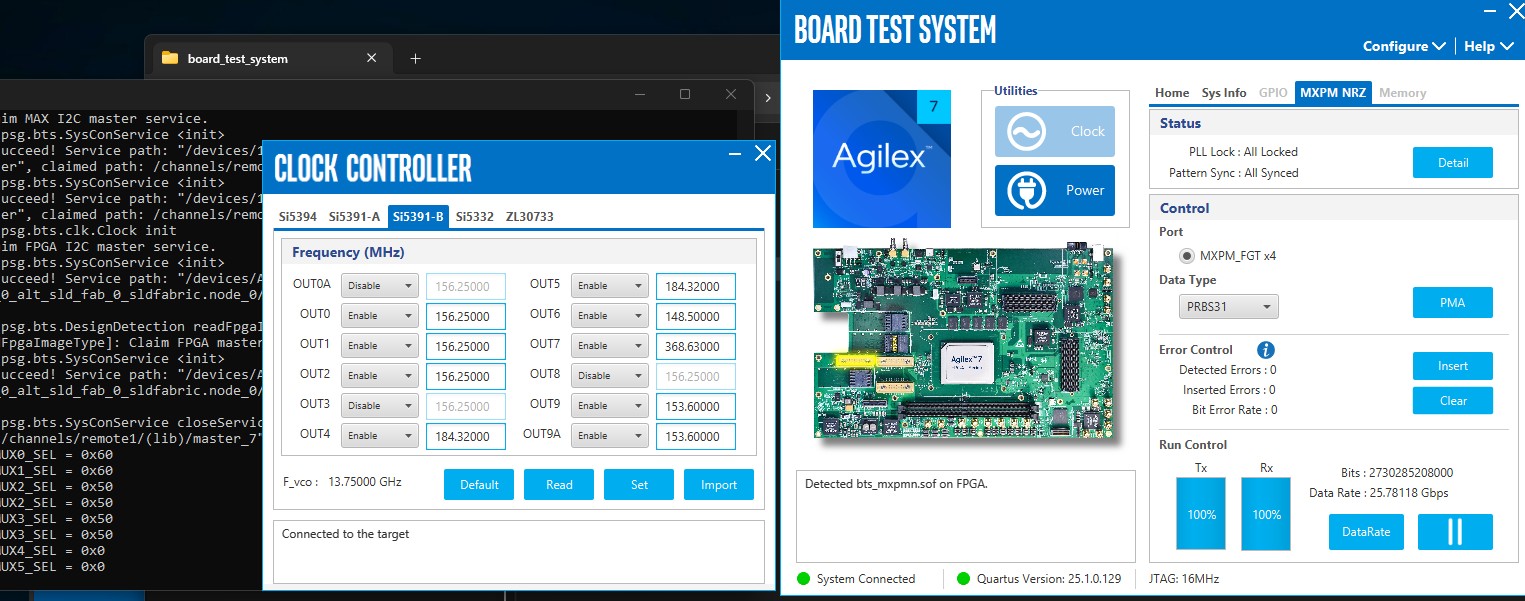
We have updated the sequence to setup the clock (out2 set 184.32MHz) by configuring the "clock controller" first, setting OUT2 to 184.32MHz. (see attached file)
Next, we upload the "*.sof" (bts_mxpmn.sof) file to configure the FPGA for MXPM application.
The FPGA is currently operating at a 30.41274Gbps data rate right now, however we are unsure how to configure
the clock and achieve a 32Gbps data rate. it is very important for our application.
Could you please advise us on how to resolve this issue?
Thanks.
Regards,
Ming
- ming001
Hi Ash_R:
We still cannot figure out the solution to achieve a 32Gbps data rate.
Could you kindly take a look at this issue?
Really appreciate.
Regards,
Ming
- ming001
Hi Ash_R:
Thanks for your support, it has been helpful.
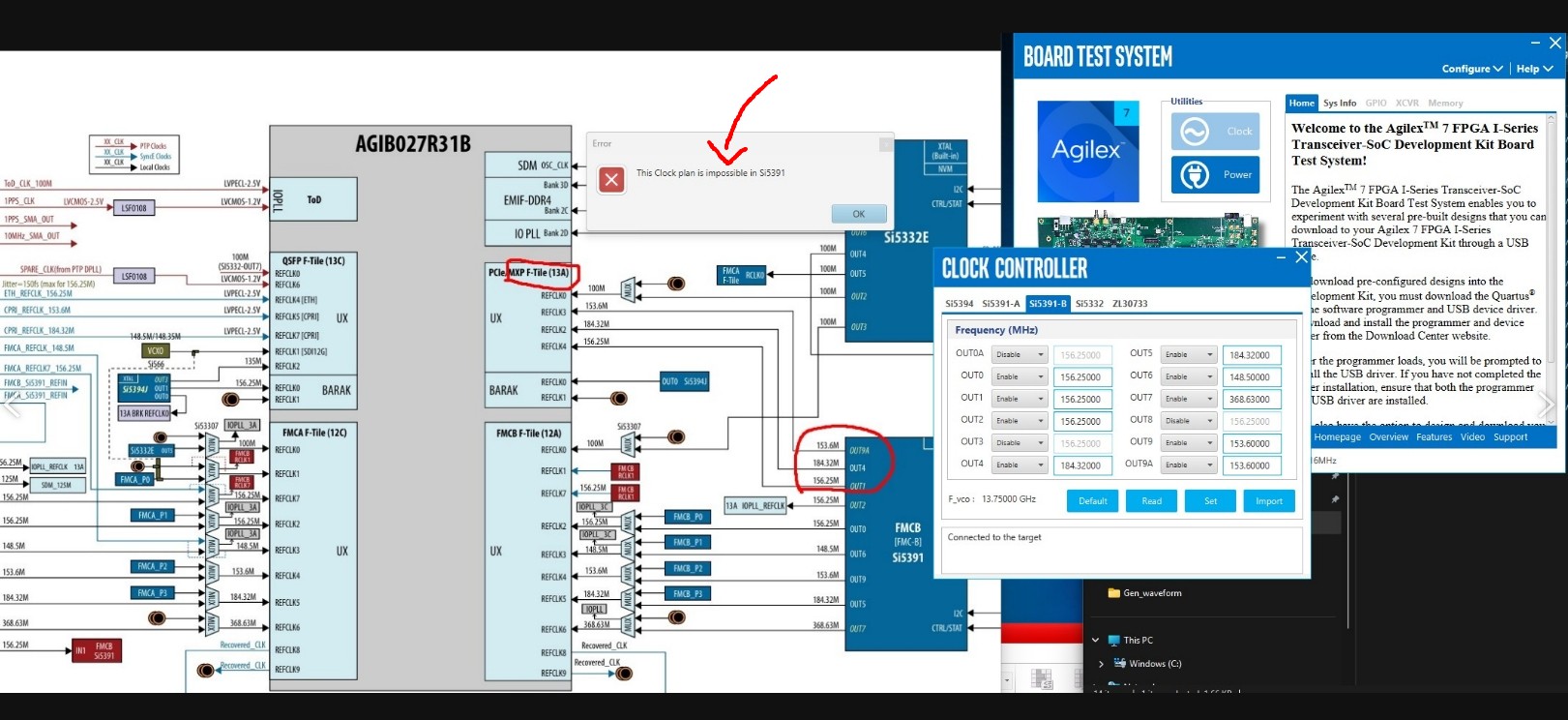
We are unable to change the frequency to 32G configured in the F-tile using clock utilities.
as the system is rejecting our updated values.
Please refer the attached file.
I have a few questions as follows.
The default clock setting, it can run at 25.78118G Hz.
What reference clock values would allow the SerDes run at 32GHz?
Could you provide any refer documents for different data rate applications ?
Are there any constrains or limitations on setting the clock values?
Thanks again for your assistance.
Regards,
Ming
- Ash_R_Altera
Hi,
First of all, you have to change the IP configuration of F-tile DPHY and the system PLL IPs in the design. Usually the complete Quartus project is for the example .sof files is provided in the 'examples' folder.
If you have already done those changes in your custom design then the sequence would be:
1) Understand the refclk pin used for the driving the channels from the Schematics. I believe these are F-tile FHT channel XCVR pins.
2) Trace the refclk pin to its source. It must be connected to one of the OUT pins of the clock source. Example: Si5394 (U118) OUT0.
3) Click on the "Clock" button under Utilities box on the BTS home page.
4) Locate the source IC (Si5394) from the multiple tabs: 4.3. Control On-Board Clock through Clock Controller GUI
5) Change to the required frequency for 32G configured in the F-tile system PLL IP.
6) Make sure that the input data rate at the XCVR pin is as per the configuration in the F-tile DPHY IP.
Hope this helps.
Regards
- ming001
Dear support:
Please help me clarify this issue.
Thanks.
Regards,
Ming
- ming001
Dear All:
Does anyone have experience changing the clock rate using BTS?
How can I change the clock rate for a 32G NRZ application?
Thanks.
Regards,
Ming