programmable logic device
453 Topics
Cyclone IV drop in replacement confirmations
Dear Altera, If the BANK VCCIO is 1.8V and the same package but with different LE # FPGA is drop in replace. Where the original pin is a VCCA while different LE size same pin is a IO. With 1.8V on VCCIO and input fixed to VCCA aka 2.5V do this introduce any issue? As we can see the datasheet mentioned the DC input accept 3.6 or below. -> Table 1–4. Recommended Operating Conditions for Cyclone IV GX Devices (Part 2 of 2) So the C4 device have a protection forward diode to clamp the voltage when IO is set to input? As long as that pin is fixed to input state do this condition function properly? Thanks, BrianSolved308Views0likes13Comments
Investigation of HIGH-Level Voltage Fluctuations on MAX 10 3.3 V LVTTL Output Signals
We are investigating the cause of fluctuations in the HIGH-level voltage of a 3.3 V LVTTL output signal from the MAX 10 FPGA. Device Part Number: 10M08DCF256I7G HIGH-Level Voltage: 2.8 V to 3.3 V 1.Verification of BANK Power Supply Stability We compared the BANK power supply voltage with the signal voltage and confirmed that the power supply voltage remains stable even when fluctuations occur in the signal voltage. 2.Relationship with the Connected Device (Under Investigation) Connection: MAX 10 → [3.3 V LVTTL, 8 mA] → DS90CR287 ・Changing the damping resistor from 22 Ω to 0 Ω did not affect the issue. Could you please advise us on the possible causes of this issue and any additional aspects we should investigate?21Views0likes2Comments
Schematics/layout for TerasIC SoCKit rev. D with Cyclone V
Greetings! I am working with an ALTERA/TerasIC SoCKit development board for Cyclone V. I've downloaded the "SoCKit CD-ROM ( rev. D Hardware )" archive from www.terasic.com.tw, but it does not contain schematics or PCB layout files. What I want to do is access ~8 GPIO pins on the board, but it does not have a GPIO header. So I can either solder to the mysterious "AD-DA HDR" connector plus some LEDs/switches, or connect to one of the 3 groups of pins on the wide HSMC (one has 20 differential pairs, the other two have 60 pins each) using a Samtek connector. To do that, I need to know how the pins on the SoCKit's PCB connectors map to the 5CSXFC6D6F31C6 IC's pads. BTW, I really appreciate the board having pads for an Altera JTAG connector pads: EthernetBlaster can be used with it! --A.123Views0likes6CommentsAgilex 3 PLL in Source Synchronous mode ?
Surprisingly, the compilation fails when we try to set a PLL in source synchronous mode in an Agilex 3, while this works as expected in Agilex 5. Compiles in "direct" mode. The pin assignment comes from the Atum A3-nano but we tried various dedicated clock inputs to no avail. The error messages are a bit puzzling too (I think there are 11 PLLs in the A3CZ135BB18AE7S ) : Error (14566): The Fitter cannot place 1 periphery component(s) due to conflicts with existing constraints (1 IOPLL(s)). Fix the errors described in the submessages, and then rerun the Fitter. The Intel FPGA Knowledge Database may also contain articles with information on how to resolve this periphery placement failure. Review the errors and then visit the Knowledge Database at https://www.intel.com/content/www/us/en/support/programmable/kdb-filter.html and search for this specific error message number. Error (175001): The Fitter cannot place 1 IOPLL, which is within IOPLL IP pll_altera_iopll_2110_hws7ggy. Info (14596): Information about the failing component(s): Info (175028): The IOPLL name(s): u_pll|iopll_0|tennm_ph2_iopll Error (16234): No legal location could be found out of 5 considered location(s). Reasons why each location could not be used are summarized below: Error (23527): No route for refclk connection from "CLOCK0_50~CLUSTER" to "u_pll|iopll_0|tennm_ph2_iopll". Promote refclk to a global clock or use a dedicated IOPLL refclk pin. (4 locations affected) Info (175029): IOPLL_X106_Y53_N346 Info (175029): IOPLL_X121_Y31_N846 Info (175029): IOPLL_X106_Y2_N346 Info (175029): IOPLL_X1_Y3_N346 Error (175006): There is no routing connectivity between the IOPLL and the IOPLL Error (175022): The IOPLL could not be placed in any location to satisfy its connectivity requirements Info (175029): 1 location affected Info (175029): IOPLL_X121_Y6_N846 Error (15307): Cannot apply project assignments to the design due to illegal or conflicting assignments. Refer to the other messages for corrective action. Error (16297): An error has occurred while trying to initialize the plan stage. Error: Quartus Prime Fitter was unsuccessful. 8 errors, 11 warnings -------------------------------------------- This is very annoying for source synchronous interfaces (like RGMII). Test case available indeed.285Views0likes14Comments
Cyclone 4 PS Configuration Timing Parameters
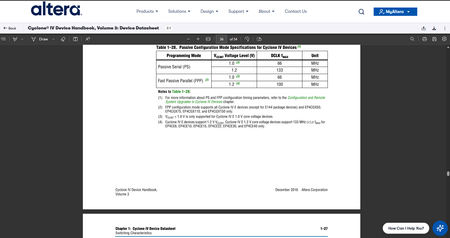
Hi, I would like to know the PS Configuration Timing Parameters for the FPGA cyclone 4 family. However, there are no indication in the datasheet: https://docs.altera.com/v/u/docs/654327/cyclone-iv-device-handbook-volume-3-device-datasheet In page 1-26 (36/54), the file sends to another file (see note 1): but that leads to a 404 error: https://www.altera.com/literature/hb/cyclone-iv/cyiv-51008.pdf Where could I find the information I require? Thank you in advance for your assistance, ChristopheSolved112Views0likes3Comments 328Views0likes6Comments
FPGA simulation and real HW behavior discrepancy
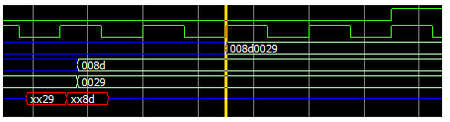
Dear Altera Quartus 18.1 sim lib could try 20.1 or newer but not sure this is due to Quartus version as it is sim lib. I am encounter an unexplainable experiment result that contradicts simulation and real HW. Background when interfacing a DQS DQ readout a IDDR with CCD sync flops are used. For these primitives, it should expected 1 + 2 and clock +ve edge should expect data push out. [A] This can simply considered as early push out but it should not act as such. With the use of "__ALTERA_STD__METASTABLE_SIM" we expected some metastable on the output. [B] Now things are more reasonable where 2 +ve clocks are expected. If we consider a full data w/o xx, things become unrecognizable. [C] The most interesting part when apply on real HW, it do produce correct data and the latencies do obeyed. altddio_in#( .intended_device_family ( "Cyclone IV E" ), .invert_input_clocks ( "ON" ), .lpm_hint ( "UNUSED" ), .lpm_type ( "altddio_in" ), .power_up_high ( "OFF" ), .width ( 8 ) )ddi_d_l( .aclr (reset), .datain (foo[7:0]), .inclock (bar[0]), .dataout_h (foobar_h[0+:8]), .dataout_l (foobar_l[0+:8]), .aset (1'b0), .inclocken (1'b1), .sclr (1'b0), .sset (1'b0) ); + altera_std_synchronizer_bundle#( .width (foobar_bw *2), .depth (2) )async_flops( .clk (clock), .reset_n (~reset), .din (foobar), .dout (foobar_ccd) );100Views0likes1Comment
Introducing the Altera Community AI Responder — Beta
Altera is introducing the AI Responder, an assistant built into the Altera Community to help provide faster, context-aware guidance for Altera product questions. It uses relevant public Altera documentation and Knowledge Database content, with coverage continuing to expand. The AI Responder may provide source references and can hand off complex or out-of-scope questions to an Altera subject-matter expert. As a beta feature, responses may contain errors or omissions, so please review the sources and verify technical guidance against official Altera documentation before implementation. If the response does not fully address your question, add more context and tag ai_responder to continue the discussion. We welcome your feedback as we improve the Community experience.27Views0likes0Comments
Quartus Programmer 21.1: JTAG Server Error Code 82 – Port 1309 Cannot Be Bound
Hello Altera Community, I am working on an FPGA project using a Cyclone IV FPGA development board and an Altera USB-Blaster. I am currently unable to program the FPGA because Quartus Programmer cannot access the JTAG server. System details: - OS: Windows 11 64-bit - Software: Quartus Programmer 21.1 - Installation path: C:\intelFPGA\21.1\qprogrammer - Programmer: Altera USB-Blaster - FPGA: Cyclone IV development board The USB-Blaster is detected by Windows Device Manager and the driver is installed. The USB-Blaster also powers on normally. However, Quartus Programmer gives: "Attempted to access JTAG server -- internal error code 82 occurred" When I run: jtagconfig I get: Error when scanning hardware - Server error Sometimes it also hangs at: Connecting to server(s) [...] I checked the JTAG server using: jtagserver --status It reports: Installed JTAG server is 'C:\intelFPGA\21.1\qprogrammer\bin64\jtagserver.exe' Server is stopped Remote clients are disabled I tried reinstalling the JTAG server: jtagserver --install jtagserver --start But the server immediately stops. I also tried: net start "Altera JTAG Server" The result was: The Altera JTAG Server service could not be started. The service did not report an error. NET HELPMSG 3534. I then ran: jtagserver.exe --foreground and received: Unable to bind changedetect socket: 10048 Can't bind to TCP port 1309 - exiting I checked the port using: netstat -ano | findstr 1309 and found that TCP port 1309 was being used/listened to by another process, for example PID 12888. I tried terminating the process using: taskkill /F /PID 12888 but Windows reported: ERROR: The process with PID 12888 could not be terminated. Reason: There is no running instance of the task. I also tried stopping the JTAG server, reinstalling it, and restarting it. In addition, I already tried the following: 1. Disabled PCI Express → Link State Power Management. 2. Disabled USB Root Hub power saving ("Allow the computer to turn off this device to save power"). 3. Stopped the Print Spooler service. 4. Closed Quartus/Programmer-related applications. 5. Reinstalled the JTAG Server. 6. Restarted the computer. 7. Tried starting the JTAG server manually. 8. Checked TCP port 1309 using netstat. The problem still remains. My main questions are: 1. Why is Quartus Programmer 21.1 unable to start the JTAG Server? 2. What is causing TCP port 1309 to remain occupied? 3. Is there a known issue with Quartus Programmer 21.1 and Windows 11? 4. Is there a recommended patch, driver, or newer Quartus Programmer version for this problem? 5. Is it possible to configure the JTAG server to use another TCP port? 6. What is the correct way to completely remove and reinstall the JTAG Server on Windows 11? 7. Is there anything else I should check before reinstalling Quartus Programmer? I would appreciate any guidance on how to get the JTAG Server running so that jtagconfig can detect my USB-Blaster and FPGA. Thank you.260Views0likes5Comments