Forum Discussion

 Occasional Contributor
Questasim FSE license setup
Hi,
I generated a fixed node license for
Questa*-Intel® FPGA Starter Edition SW-QUESTA
to enable my Questasim FSE (Quartus Prime 24.1) from intel self service license portal . The .dat license file send to my email was named LR-230041_License.dat , i changed its name to just "license.dat". Created system environment variable and restarted my pc to make it work.
But it says unable to checkout license.
Whats the issue ?
See files attached
Thanks,
Regards
You may delete the MGLS_LICENSE_FILE environment variable or update its value to point to your correct license path.
It looks like Questa is currently using MGLS_LICENSE_FILE, but the path specified is invalid or does not exist (as you stated).
This is likely the root cause of the issue.
The MGLS_LICENSE_FILE takes precedence over LM_LICENSE_FILE settings.
Regards,
Richard Tan

14 Replies
 Fpga_Egr_2025
Hi Can get some tip or support on how to make the Questasim work ???
Thanks
 paveetirrasrie_Altera
Frequent Contributor
Hello,
Good day.
Can you try to setup the license without renaming the original DAT file name?
Regards,
Pavee
- paveetirrasrie_Altera
You can refer to link on how to set environment variable.
To make this entry, you may perform a windows Search for "System Variables" and then click on "Edit the System Environment Variables" and then click "Environment Variables". Be aware that you must add the entry in System variables, not user variables.
Specifying the License for the Questa
- Fpga_Egr_2025
HI paveetirrasrie_Intel,
I did tried to run the Questasim after putting in place the original license with its file name "LR-230041_License.dat" at the location specified by environment variable , but no success.
Also i dont understand the install folder of Questasim does not have license folder "
MGLS_LICENSE_FILE (<Questa installation directory>/licenses/eda/license.dat)
See screen shot attcahed.
For MGLS_LICENSE_FILE do i have generate a new license ?
Thanks Regards,
- paveetirrasrie_Altera
Hello,
If you have geared Quartus license, there's no need to generate separate Questa license. It's included in Quartus license as well.
Here's the step to activate Questa. Are you following steps as below?
After you receive and save the license.dat file on your computer, follow these instructions:
Note: The Questa* Intel® FPGA Edition software license does not support Remote Desktop access with node-locked, uncounted licenses.
On Windows System
- Go to This PC, right-click, and select Properties.
- Click Advanced System Setting.
- In the Advanced tab, select Environment Variable.
- Under System variables, create a new variable with the name as LM_LICENSE_FILE and value as <license.dat file path>.
- Click OK and restart the Questa* Intel® FPGA Edition software.
https://www.intel.com/content/www/us/en/docs/programmable/691278/21-3/prerequisites.html
Regards,
Pavee
- Fpga_Egr_2025
 LicenseFromHell
New Contributor
I created a simple schematic in Quartus and have the same problem when I try to run a simulation using Questa.
See attachments for license configuration. I found a few posts on this, but no solutions that worked for me.
HELP!
I ran lmutil (before I renamed file to license.dat):
C:\licenses\flexlm>lmutil lmdiag -c LR-232439_License.dat
lmutil - Copyright (c) 1989-2022 Flexera. All Rights Reserved.
FlexNet diagnostics on Sat 5/3/2025 16:15
-----------------------------------------------------
License file: LR-232439_License.dat
-----------------------------------------------------
"quartus_nonvolatile_encryption" v2026.05, vendor: alterad, expiry: permanent(no expiration date)
uncounted nodelocked license, locked to ethernet address "c07cd1ff4ad1" no expiration date
TS_OK: Checkout permitted when client is using terminal client
This is the correct node for this node-locked license
-----------------------------------------------------------------
- paveetirrasrie_Altera
Hello,
Everything looks good to me.
I did found one Forum contributor posted a video on how to resolve similar issue. Below is the link:
https://www.youtube.com/watch?v=e5kHFiAVcRI
Can you check that out as well? And is the the Host NIC ID (Your computer) and the Quartus NIC ID is the same?
Regards,
Pavee
- RichardT_altera
Super Contributor
Can you search for intelqsimstarter feature in your license.dat file? Example:
If not, you will need to generate a Questa*- FPGA Starter Edition (License: SW-QUESTA) license file and add the license path in the environment variable setting. e.g. LM_LICENSE_FILE.
Regards,
Richard Tan- Fpga_Egr_2025
Yes i do see "intelqsimstarter" in my license file :
- Fpga_Egr_2025
HI,
I noticed that when i run / or try to run simulation is get this message :
If you see in the transcript terminal : i have highlighted it "Invalid license : C:\ProgramData\MentorGraphics\License\license.dat
I dont have any folder named "License" in my installed MentorGraphics ?? why it is looking there ?
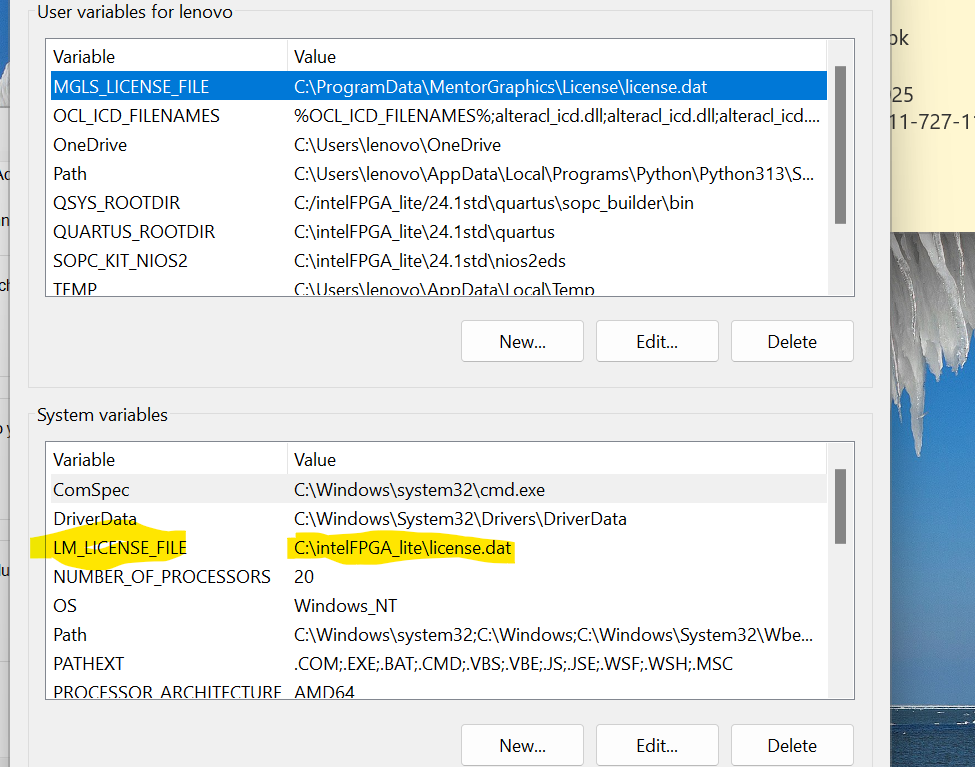
Although within my Quartus and in my windows 11 environment variables it is set as per guide lines:
and here again : i did not set the variable "MGLS_LICENSE_FILE " , should i delete this ?
- RichardT_altera
You may delete the MGLS_LICENSE_FILE environment variable or update its value to point to your correct license path.
It looks like Questa is currently using MGLS_LICENSE_FILE, but the path specified is invalid or does not exist (as you stated).
This is likely the root cause of the issue.
The MGLS_LICENSE_FILE takes precedence over LM_LICENSE_FILE settings.
Regards,
Richard Tan
- Fpga_Egr_2025
Thanks RichardTanSY_Intel , your solution worked
- paveetirrasrie_Altera
Thanks Richard for your support on this matter.
I’m glad that your question has been addressed, I now transition this thread to community support.
If you have a new question, feel free to open a new thread to get the support from Altera experts.
Otherwise, the community users will continue to help you on this thread.
Regards,
Pavee