Forum Discussion

 Occasional Contributor
Questasim FSE license setup
- 1 year ago
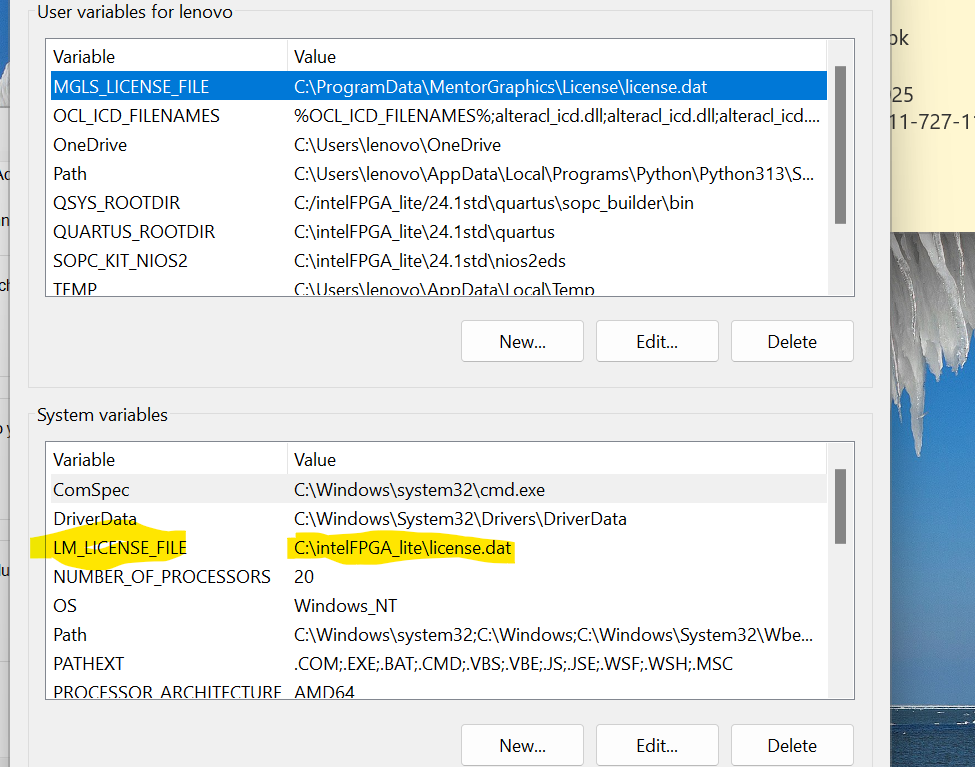
You may delete the MGLS_LICENSE_FILE environment variable or update its value to point to your correct license path.
It looks like Questa is currently using MGLS_LICENSE_FILE, but the path specified is invalid or does not exist (as you stated).
This is likely the root cause of the issue.
The MGLS_LICENSE_FILE takes precedence over LM_LICENSE_FILE settings.
Regards,
Richard Tan


 Frequent Contributor
Hello,
If you have geared Quartus license, there's no need to generate separate Questa license. It's included in Quartus license as well.
Here's the step to activate Questa. Are you following steps as below?
After you receive and save the license.dat file on your computer, follow these instructions:
Note: The Questa* Intel® FPGA Edition software license does not support Remote Desktop access with node-locked, uncounted licenses.
On Windows System
- Go to This PC, right-click, and select Properties.
- Click Advanced System Setting.
- In the Advanced tab, select Environment Variable.
- Under System variables, create a new variable with the name as LM_LICENSE_FILE and value as <license.dat file path>.
- Click OK and restart the Questa* Intel® FPGA Edition software.
https://www.intel.com/content/www/us/en/docs/programmable/691278/21-3/prerequisites.html
Regards,
Pavee