Forum Discussion

 Occasional Contributor
Questasim FSE license setup
- 1 year ago
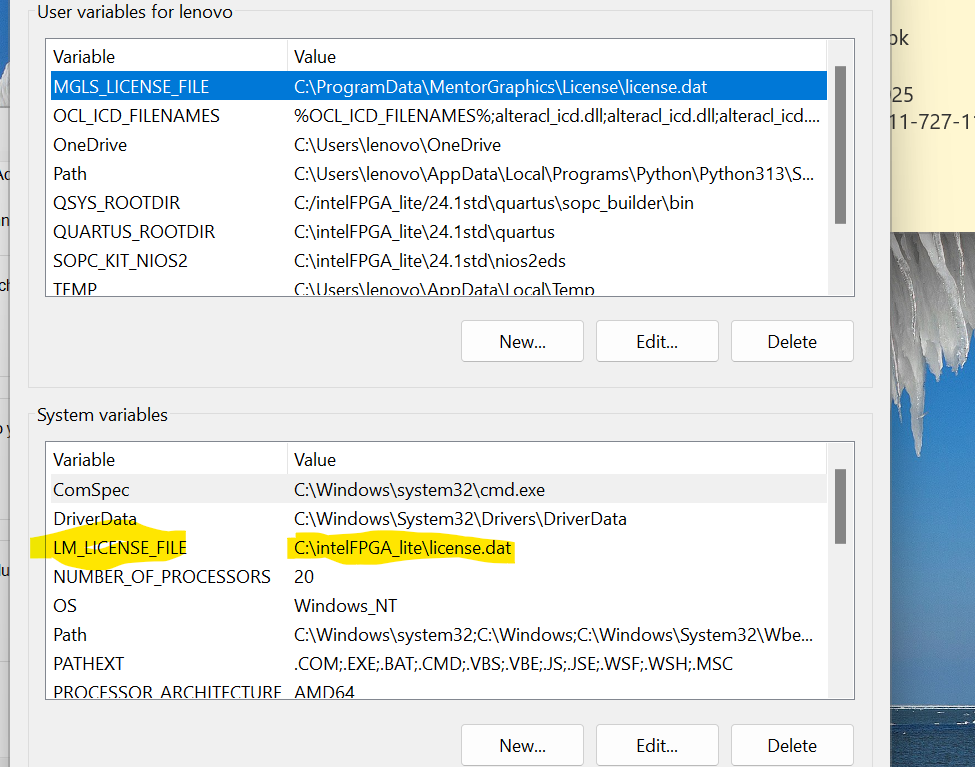
You may delete the MGLS_LICENSE_FILE environment variable or update its value to point to your correct license path.
It looks like Questa is currently using MGLS_LICENSE_FILE, but the path specified is invalid or does not exist (as you stated).
This is likely the root cause of the issue.
The MGLS_LICENSE_FILE takes precedence over LM_LICENSE_FILE settings.
Regards,
Richard Tan


 Frequent Contributor
You can refer to link on how to set environment variable.
To make this entry, you may perform a windows Search for "System Variables" and then click on "Edit the System Environment Variables" and then click "Environment Variables". Be aware that you must add the entry in System variables, not user variables.
Specifying the License for the Questa
 Fpga_Egr_20251 year ago
HI paveetirrasrie_Intel,
I did tried to run the Questasim after putting in place the original license with its file name "LR-230041_License.dat" at the location specified by environment variable , but no success.
Also i dont understand the install folder of Questasim does not have license folder "
MGLS_LICENSE_FILE (<Questa installation directory>/licenses/eda/license.dat)
See screen shot attcahed.
For MGLS_LICENSE_FILE do i have generate a new license ?
Thanks Regards,