Forum Discussion

 Occasional Contributor
Questasim FSE license setup
- 1 year ago
You may delete the MGLS_LICENSE_FILE environment variable or update its value to point to your correct license path.
It looks like Questa is currently using MGLS_LICENSE_FILE, but the path specified is invalid or does not exist (as you stated).
This is likely the root cause of the issue.
The MGLS_LICENSE_FILE takes precedence over LM_LICENSE_FILE settings.
Regards,
Richard Tan
 Occasional Contributor
HI,
I noticed that when i run / or try to run simulation is get this message :
If you see in the transcript terminal : i have highlighted it "Invalid license : C:\ProgramData\MentorGraphics\License\license.dat
I dont have any folder named "License" in my installed MentorGraphics ?? why it is looking there ?
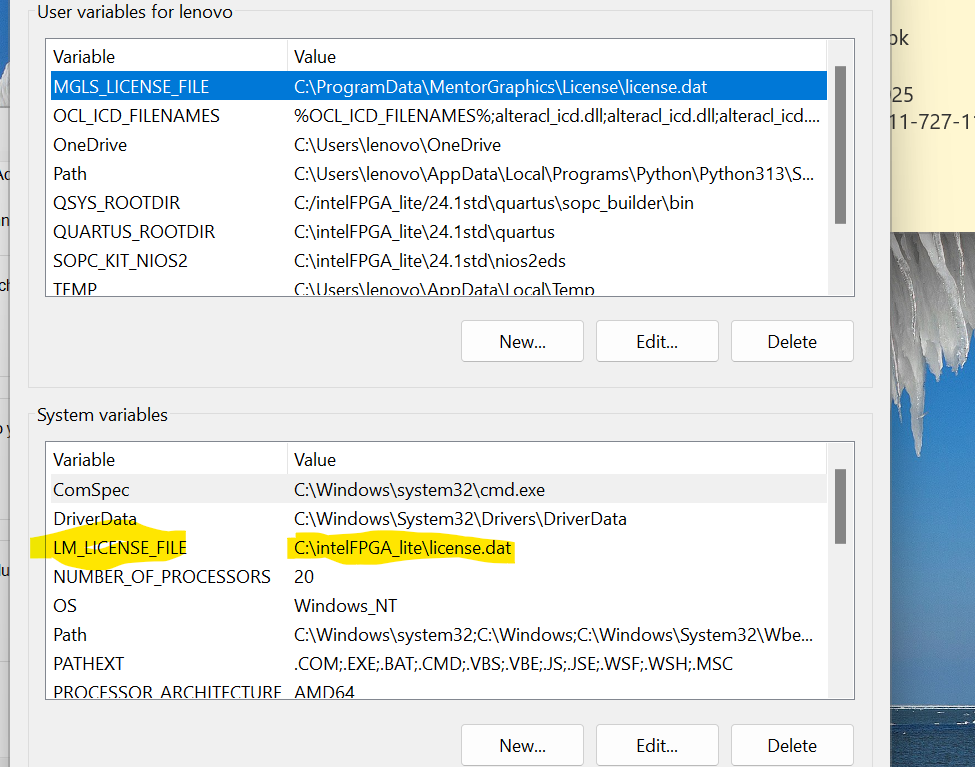
Although within my Quartus and in my windows 11 environment variables it is set as per guide lines:
and here again : i did not set the variable "MGLS_LICENSE_FILE " , should i delete this ?

 Super Contributor
You may delete the MGLS_LICENSE_FILE environment variable or update its value to point to your correct license path.
It looks like Questa is currently using MGLS_LICENSE_FILE, but the path specified is invalid or does not exist (as you stated).
This is likely the root cause of the issue.
The MGLS_LICENSE_FILE takes precedence over LM_LICENSE_FILE settings.
Regards,
Richard Tan