Forum Discussion

 New Contributor
NIOS ii/e clock frequency differ from real-time running frequency.
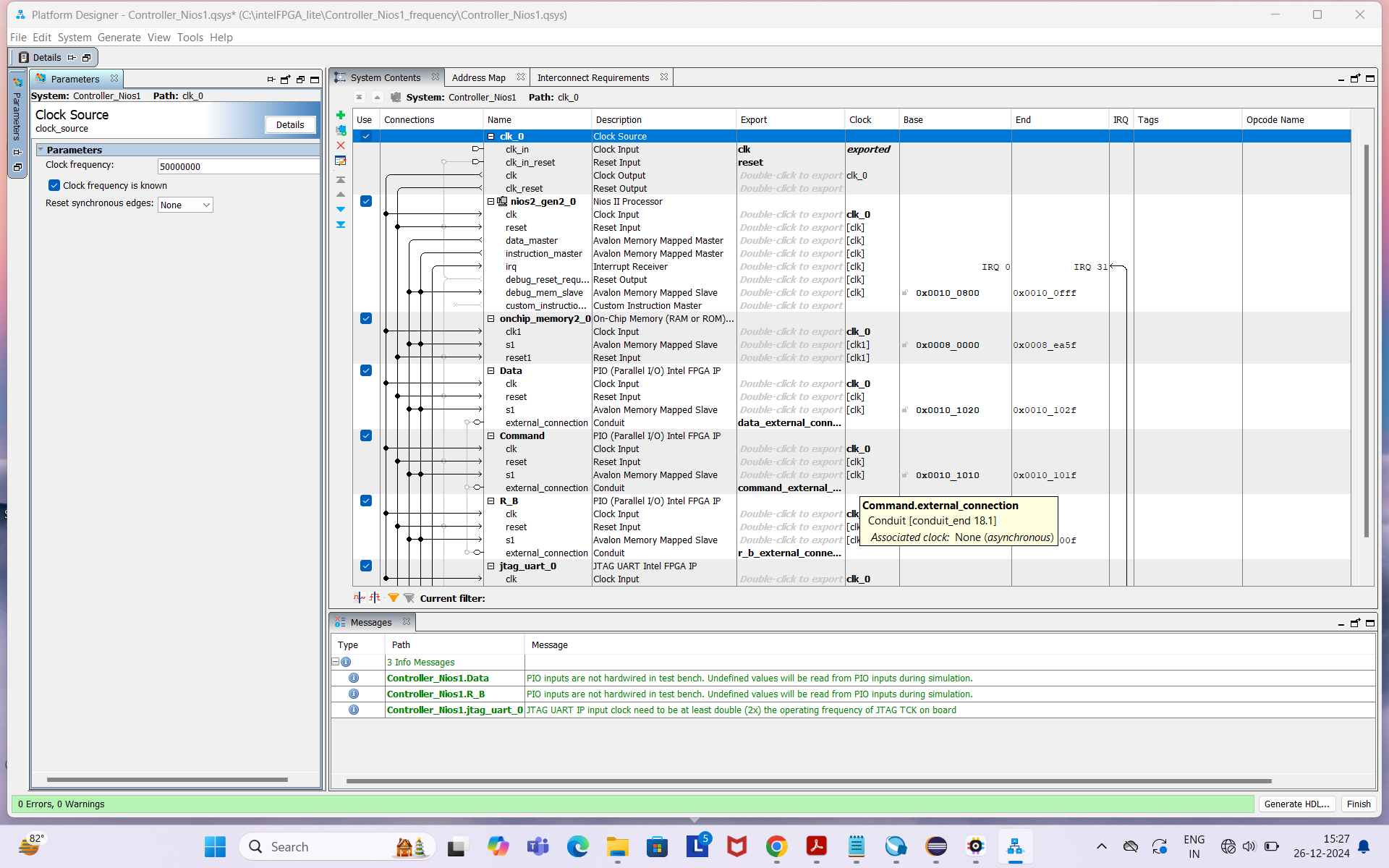
I have created a Qsys circuit using Nios II/e, with a clock frequency of 50 MHz. Other peripherals are also connected, as shown in the attached photo. I wrote a program in Eclipse, and when I checked the real-time toggling of the GPIO pin, I found the ON time to be 85 microseconds and the OFF time to be 86 microseconds. However, I specified an ON time and OFF time of 1 microsecond each in the program. Could you kindly help me understand why there is such a significant difference?
20 Replies
 sstrell
Super Contributor
What are you using as your reference clock source? Just because you specify a 50 MHz clock in Quartus doesn't mean it will work correctly unless you actually apply a 50 MHz clock. Where are you specifying the time? Do you mean your timing constraints (.sdc)? More detail needed.
 Asifa
Asifa- FvM
Hi,
the question is, which clock source is actually connected to qsys exported clk input port.
And also, how do you generate intended 1 us timing in your code? - Asifa
I am working on generating a precise 1 µs timing. Here are the steps I followed:
Here are the steps I followed:
- Made the connections: Nios II/e processor with the clock and other desired components(See attached picture).
- Compiled the project.
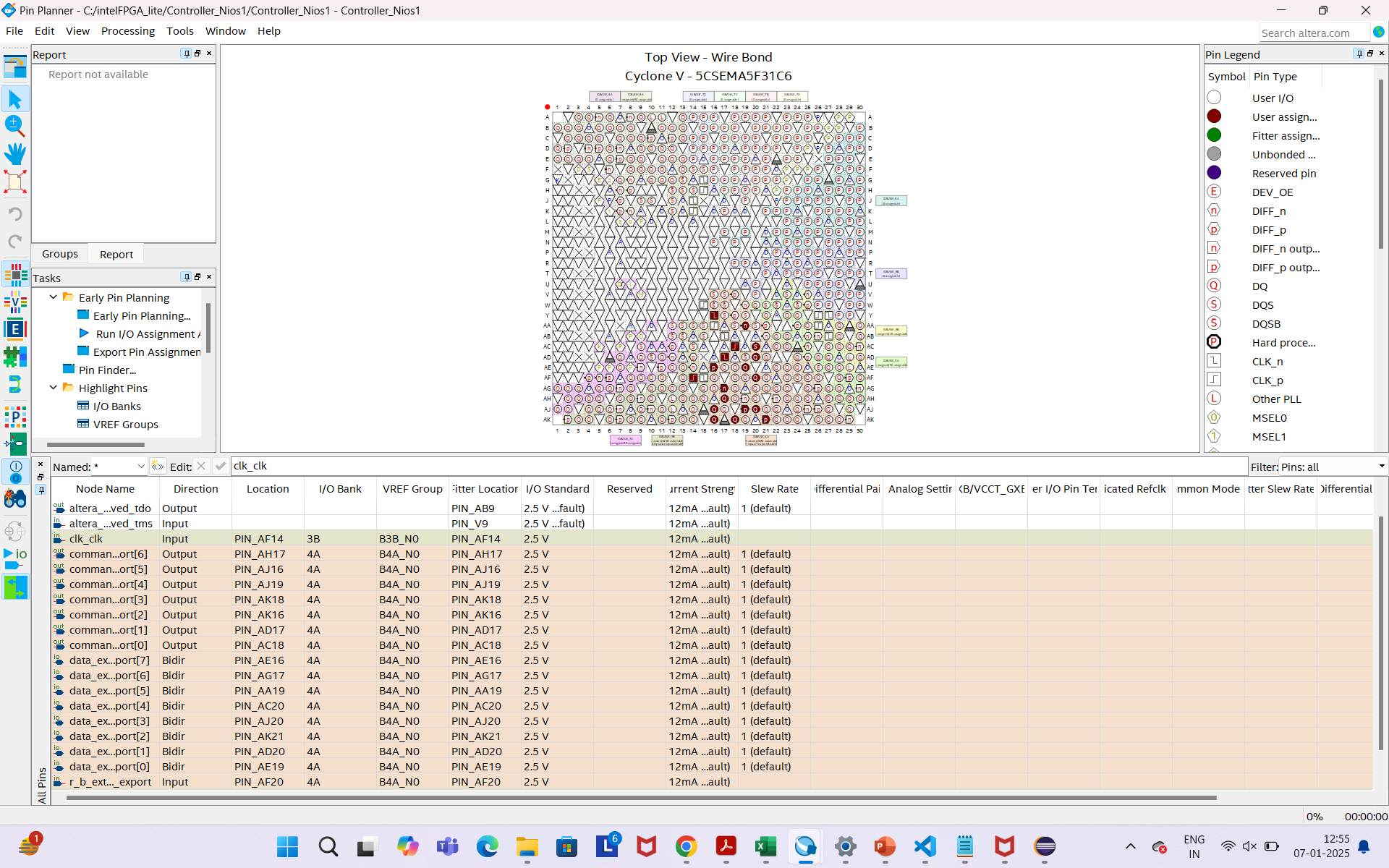
- Configured the Pin Planner.
- Recompiled the project.
- Uploaded the .sof file to the FPGA using the Programmer tool.
- Used the .sopcinfo file to write code in Eclipse.
However, when I run the code and check the toggling of the GPIO pins, I am not getting the desired output. I specified a 1 µs toggling of the pin in the program, but I am observing 85 µs instead.
Can you help me resolve this issue?
- sstrell
That's great but you still haven't explained how you are providing the 50MHz clock to the design in hardware or the code that you are using to help understand why this might be a software issue instead of a hardware issue. Just saying in Platform Designer "I'm using a 50 MHz clock" doesn't make it happen unless you are actually providing that in hardware.
- Asifa
- sstrell
OK, on your board (is it a custom board or a development kit?), you have a clock signal going into clock pin(s) on the FPGA coming from, typically, a clock oscillator or crystal. What is that clock source and can you verify that it is providing the 50 MHz clock to the FPGA device that you expect?
Just because you are working on some GPIO signals doesn't mean you can ignore the overall design of the FPGA, including how it is clocked.
 tehjingy_Altera
Regular Contributor
Hi
That is a huge difference in the delay.
Could you check if the actual clock that is supplying to the pin for clock is actually 50Mhz?
Even you are entering 50Mhz in the clock ip, does not mean that the clock is 50Mhz.
It would require an actual 50Mhz clock to the clock ip.
Regards
Jingyang, Teh
- Asifa
Hey,
Could you please tell me, how I can provide an actual 50Mhz clock to the clock ip?
- tehjingy_Altera
Hi Asifa
Happy New Year!
Usually in a board there will be clock circuity that will supply different clock output to the board.
A clock output will be connected to the FPGA. You would need to fin that pin that the clock is connected to and in the Quartus Pin Planner define that the pin the clock is connected to.
Regards
Jingyang, Teh
- Asifa
- sstrell
OK, so you have a top-level clock pin named clk_clk on pin AF14. Is that connected in your design somewhere to the clk_in interface of the Platform Designer system? Do you have a top-level design that instantiates the PD system or is the PD system itself your top-level design for the project?
- Asifa
- sstrell
The names don't seem to match (clk_clk in Pin Planner vs. clk_clk_in from the exported interface column in PD). Go to the Generate menu in PD and select Show Instantiation Template (even though you are not instantiating the system) to verify that the name for the signal is correct.
Also, instead of relying on a signal level for testing this in your code, you may want to count clock ticks in the processor (nticks). Nios software development documentation can help with this.
- Asifa