general
23 Topics
Introducing the Altera Community AI Responder — Beta
Altera is introducing the AI Responder, an assistant built into the Altera Community to help provide faster, context-aware guidance for Altera product questions. It uses relevant public Altera documentation and Knowledge Database content, with coverage continuing to expand. The AI Responder may provide source references and can hand off complex or out-of-scope questions to an Altera subject-matter expert. As a beta feature, responses may contain errors or omissions, so please review the sources and verify technical guidance against official Altera documentation before implementation. If the response does not fully address your question, add more context and tag ai_responder to continue the discussion. We welcome your feedback as we improve the Community experience.19Views0likes0Comments
Agilex 5E - PCIE PERST# pin - failing compilation
Hello! I'm using Critical Link MytiSom Dev Kit. It has the same FPGA as the Altera Dev Kit - A5ED065BB32AE6SR0. I'm adapting the PCIe Root Port example from Altera - I have assigned the PCIe Gen3x4 lanes to bank 4B. I have checked the pin assignments several times but I keep getting failed compilation with the error attached bellow. Any suggestions on what can cause the issue. I have also attached the pin assignments. Thank you310Views0likes6CommentsHow to Generate Altera HAL for HPS?
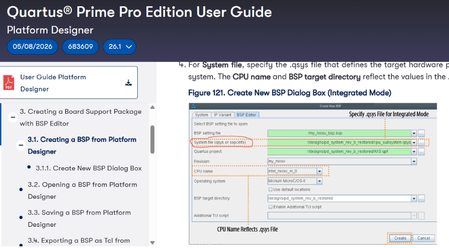
Hi, I am using Quartus 26.1 with the Agilex 5 Modular Development Kit (Device number: A5ED065BB32AE6SR0) and I have a few questions about BSP Generation for Hard Processor System (HPS). For reference I am following the Quartus Prime Pro Edition Version 26.1 User Guide. 1. How do I generate Altera HAL for HPS? When I use the BSP Editor in platform designer, I can only generate the system.h file that only has macros for EMIF, even though other peripherals are also connected to the HPS. How do I generate macros for the H2F bridges and HAL API Files for the HPS? 2. How do I input a SOPCINFO file into the BSP Editor? The Quartus Prime Pro Edition User Guide shows that I should be able to input SOPCINFO file as the system file (see above image) but Quartus only gives me the options of QSYS and IP file (see below image). Thank you for the help!Solved247Views0likes5Comments
Intermittent DE10-Standard error starting GDB server with quartus_hps
Hello, We have 15 DE10-Standard boards being used with Quartus 18.1 and the associated version of Altera Monitor Program on Ubuntu 24.04 (amd64). Generally the boards work without issue, however in the Monitor Program we occasionally see 'Download System - Partial Success: The system has successfully downloaded onto the board, but HPS components could not be configured.' Power cycling the board doesn't seem to resolve the error, nor does swapping the board to a different desktop. After a number of tries the error will go away. We haven't been able to isolate an exact pattern but issue doesn't appear random either, it will keep showing up for certain boards, and then go away, then show up on other boards. Another symptom we see is that when a board downloads the systems successfully, during the final step of the process the JTAG TX LED on the board appears to turn solid green. On the boards that hang and fail, the same LED flashes rapidly while the process hangs. The monitor program logs show the following commands are run before the error appears: $ /home/$USER/DE10/monitorprogramtutorial/ $ make clean # The board name in quotes below is variable and appears to be unique to each board or connection $ /opt/intelFPGA_lite/18.1/quartus/bin64/quartus_pgm -c "DE-SoC [1-10]" --auto $ quartus_pgm -c "DE-SoC [1-10]" -m jtag -o "P;/opt/intelFPGA_lite/18.1/University_Program/Computer_Systems/DE10-Standard/DE10-Standard_Computer/verilog/DE10_Standard_Computer.sof@2" $ quartus_hps --cable="DE-SoC [1-10]" -o GDBSERVER --gdbport0=3212 --preloader=/opt/intelFPGA_lite/18.1/University_Program/Monitor_Program/arm_tools/u-boot-spl.de10-standard.srec --preloaderaddr=0xffff14f0 Running these commands manually results in the final command either: 1. Starting a GDB server very quickly: >>Resetting HPS. >>Downloading preloader....... >>Program loaded. PC set to program entry (0xFFFF0000) >>Setting vector base address register to: 0xffff0000 >>Running preloader.. >>Preloader successfully run. Starting GDB Server. Listening on port 3212 for connection from GDB 2. Hanging for a long time when 'Downloading preloader.......' and then failing at the 'Running preloader...................' stage and hanging indefinitely. Ending the process with Ctrl+C shows: Error: Encounter JTAG AJI error while accessing HPS Error: send_access_data() error while accessing DP Register Error: Fail to select Access Port Error: Fail to access Bank 0x0 of Port 1 Error: Fail to READ ACCESS to the Physical Reg Error: AJI failed to send data Error: Encounter JTAG AJI error while accessing HPS Error: send_access_data() error while accessing DP Register Error: Fail to select Access Port Error: Fail to access Bank 0x0 of Port 1 Error: Fail to READ ACCESS to the Physical Reg Error: Fail to enable DEBUG feature Error: AJI failed to send data Error: Encounter JTAG AJI error while accessing HPS Error: send_access_data() error while accessing DP Register Error: Fail to select Access Port Error: Fail to access Bank 0x0 of Port 1 Error: Fail to READ ACCESS to the Physical Reg Error: Failed to load program. Error: AJI failed to send data Error: Encounter JTAG AJI error while accessing HPS Error: send_access_data() error while accessing DP Register Error: Encounter JTAG AJI error while reading Control/Status Register Error: AJI failed to send data Error: Encounter JTAG AJI error while accessing HPS Error: send_access_data() error while accessing DP Register Error: Fail to select Access Port Error: Fail to access Bank 0x0 of Port 0 Error: Fail to READ ACCESS to the Physical Reg Error: Fail to write to MPU Module Reset Register Error: Engine failed to set down the hardware Error: Quartus Prime Programmer was unsuccessful. 0 errors, 0 warnings Error: Peak virtual memory: 187 megabytes Error: Processing ended: Tue Aug 11 11:44:38 2026 Error: Elapsed time: 00:05:05 Error: Total CPU time (on all processors): 00:00:01 Any thoughts or suggestions are greatly appreciated.214Views0likes5Comments
TSE -> SGDMA -> SOC(through f2sdram)
Hi, I'm trying to transfer an old design with multiple TSEs / SGMDAs and a NIOS to a newer Agilex 5. We are also evaluating the use of the SOC instead of the NIOS in the design. I've made a minimized platform design for it but it fails during synthesis with the notorious error for the f2sdram bus: There is both a 'memory -> streaming' and 'streaming -> memory' sgdma in the design present, so both read and write port on the axi bus should be present. If I connect the SGDMA's to the fpga2hps bus the same error is generated. Are there settings in the SGDMAs that needs to be set to a certain value so that the correct read/write avalon MM/AXI interface is generated?174Views0likes4Comments
S10 hps fpga2sdram bridge low speed
Hello, i have some problems I have a project with stratix 10 with hps I need to use ddr4 with hps, so I enabled 3 fpga2sdram bridges with 128 bit width Via u-boot smc configured and enabled them, but measured speed is not enough. When I use onle one bridge my speed is approximately 32 gbit/s (bridge and master frequency 350 MHz) But when I use all 3 bridges it becomes 20 gbit/s I use avmm bridge to connect to axi fpga2sdram bridge with 128 bits width, max pending writes 16, max burst size 128, use only write to bridge ECC in emif (hmc) is disabled I tried to use QoS for bridges, set them to bypass P.S. If i use the same board with firmware without hps, i get 130 gbit/s (with disabled hps) Quartus Pro 21.4 Any help would be useful!343Views0likes10Comments
U-Boot "Synchronous Abort" boot failure on Terasic Atum A5 Rev B via Quartus 24.3 .jic generation
I am reaching out for technical assistance regarding a reproducible boot failure on the Terasic Atum A5 Rev B development board (Agilex 5) when using Quartus Prime Pro 24.3. I am attempting to compile a custom design that utilizes the Lightweight HPS-to-FPGA (lwhps2fpga) bus. My current workflow is as follows: Compile the project in Quartus 24.3 to generate the .sof file. Merge the .sof with the official Terasic FSBL .hex file. Use the Programming File Generator (PFG) to create a .jic file. Flash the .jic to the QSPI. The Issue: When flashing the .jic generated by this workflow, the boot process fails during the main U-Boot phase. The U-Boot SPL and ATF (BL31) load successfully. However, after U-Boot attempts to load the environment, the system crashes with a "Synchronous Abort" handler (esr 0x96000010, far 0x108d2000). This triggers a CPU reset with the message ### ERROR ### Please RESET the board ###. (I have attached the full UART terminal log of the boot sequence for reference). Isolation Testing: To isolate the issue from my custom logic, I applied this exact same compilation and .jic generation workflow to the official Terasic GHRD bundled with the board. The result was identical—the GHRD .jic generated by Quartus 24.3 crashes at the exact same U-Boot Synchronous Abort. Conversely, when I bypass compilation and simply flash the original, pre-compiled .jic provided in the Terasic resource package, the board boots into Linux flawlessly. This confirms the physical hardware is fully functional and the issue is strictly isolated to the .jic files being generated by the 24.3 workflow. Questions: Is there a known issue or missing step in the Quartus 24.3 workflow when merging the FSBL or configuring the .jic for the Agilex 5 that would cause U-Boot to encounter a Data Abort (likely when probing the AXI bridges)? What are the exact PFG parameters or required patches to successfully generate a booting .jic for this board under the 24.3 release? I look forward to your guidance on resolving this workflow issue306Views0likes8CommentsA topic explaining a problem with Cyclone V SoC - u-booting .rbf file failure - got rejected.
Hi Altera Comunity et al, I guess this is more of a question for the support and moderator people of this forum. The situation is I just posted a topic explaining a problem I am experiencing with Cyclone V SoC—U-boot failing to load the .rbf (FPGA load configuration ) file , during initial system bootup. I put a lot of information - attached files, links, etc. to give better context around the issue. But that post got flagged as Spam and got rejected. And I am just wondering what to do here. I tried editing that post (removing links and removing attached files) several times already, but it still stays flagged as spam. I don't know what to do further to fix this :( The original issue topic was : "Cyclone-V-SoC: U-Boot fails to fpga load .rbf file - Command 'load' failed: Error -6" Anyone, please advise. Thank you and Best Regards, - Monk M.Solved799Views0likes16CommentsAgilex5 HPS2FPGA usage
Hello, I have an Agilex 5E 065B devkit board with Part Number A5ED065BB32AE6SR0. I have created a design in quartus that uses HPS2FPGA communication. I tested the design extensively and now want to configure the FPGA. However, it is not clear to me how the workflow has to be in that case after reading the documentation: https://docs.altera.com/r/docs/814550/current/agilextm-5-fpga-e-series-065b-premium-development-kit-user-guide/overview . Below I list my worklfow (which was not working out): Phase 1: Resotre GSRD I have a compiling quartus design I download the official GSRD JIC from: https://releases.rocketboards.org/2024.05/gsrd/agilex5_dk_a5e065bb32aes1_gsrd/ghrd_a5ed065bb32ae6sr0.hps.jic.tar.gz In quartus I open the JTAG programmer and connect the device to my local machine. I power on the device with SW27 set to OFF-OFF-OFF-OFF. After clicking "auto-detect", I right click my FPGA device and click "change file" and select the freshly downloaded jic file. I click "start" and wait till process is completed sccessfully. I insert the HPS board's SD card into my local machine and download the GSRD SD image from: https://releases.rocketboards.org/2024.05/gsrd/agilex5_dk_a5e065bb32aes1_gsrd/sdimage.tar.gz I rename the .wic file to a .img file. Then I use Win32DiskImager to flash the image to the SD card. After completion I insert the SD card back into the HPS board. I connect the vertical HPS board pin to my local machine and open PUTTY to target the COM port. A window opens, which stays blank. I set SW27 to OFF-ON-ON-OFF and power on the board. In PUTTY I can see the linux boot logs. I can log in as root without password. Phase 2: I download the U-BOOT hex that matches my device from: https://releases.rocketboards.org/2024.05/gsrd/agilex5_dk_a5e065bb32aes1_gsrd/u-boot-spl-dtb.hex I open a NIOS shell and create a .jic file based on my designs rbf, by typing the command: quartus_pfg -c <my_project>.sof <my_project>.jic -o device=MT25QU128 -o flash_loader=A5ED065BB32AR0 -o hps_path=<hex_file_path> -o mode=ASX4 -o hps=1 This created a .hps.jic file. I set SW27 back to OFF-OFF-OFF-OFF and connect to my local machine and power on the board. In quartus I again configure my newly created jic to the board via JTAG chain. After completion I power off the board and set SW27 back to OFF-ON-ON-OFF. I open a PUTTY window and power on the board. However, this time the PUTTY window stays quiet even after several minutes. So I guess the boot is not happening correctly. I would like to know if there is a substantial error in my workflow or, if there might be a problem in my quartus settings maybe (I have set configuration order to HPS first). I would be very glad if someone could help me with that. Feel free to tell me if any kind of log or additional information is required for understanding the error.224Views0likes3Comments