User Profile

xingyunzhidi
 New Contributor
Joined 2 years ago


User Widgets
Contributions
A question about reading the configuration space of the R-Tile PCIe IP EP
Hello, Recently, I generated an EP device using the R-Tile PCIe IP, and I would like to access the configuration space of the EP device through the Hard IP Reconfiguration Interface. However, I found that the addresses of the configuration registers described in the R-Tile Avalon® Streaming FPGA IP for PCI Express* User Guide do not match those in the rtile-avst-ip-for-pcie-registermap.xlsx. For example, the User Guide mentions the address for the MSI-X Capability Structure for PF0 as 0x002100B0, while the .xlsx file states it is 0x000800B0. Shouldn't the PCIe configuration space be 4KB? Why are 16-bit address lines being used to access the configuration space? Given that the read data width is 8 bits, does a value of a configuration register (32 bits) need to be read four times to be obtained? If I want to know the bus number and device number of the EP device in the user logic, can I directly obtain these from the configuration registers? Thank you! Recently, I generated an EP device using the R-Tile PCIe IP. I would like to access the configuration space of the EP device through the Hard IP Reconfiguration Interface. However, I found that the addresses of the configuration registers described in the R-Tile Avalon® Streaming FPGA IP for PCI Express* User Guide do not match those in the rtile-avst-ip-for-pcie-registermap.xlsx. For example, the User Guide mentions the address for the MSI-X Capability Structure for PF0 is 0x002100B0, while the .xlsx file states it is 0x000800B0. Additionally, shouldn’t the PCIe configuration space be 4KB? Why are 16-bit address lines used to access the configuration space? Furthermore, if I want to know the bus number and device number of the EP device in the user logic, can I directly obtain them from the configuration registers? Thank you!202Views0likes5CommentsRe: The issue encountered during testing after programming the R-tile PCIe DMA Design Example on the Agi
Hello, my issue has been resolved, and I can now perform the DMA test normally. However, I’m a bit confused by the results. When testing with small data sizes (a few tens of KB), the measured bandwidth is less than 1GB/s. I also noticed that the test results in the Design Example User Guide are similar. What could be causing this? Also, is it possible to change the Qdepth value? If so, how can I modify it? Thanks!1.4KViews0likes0CommentsThe issue encountered during testing after programming the R-tile PCIe DMA Design Example on the Agi
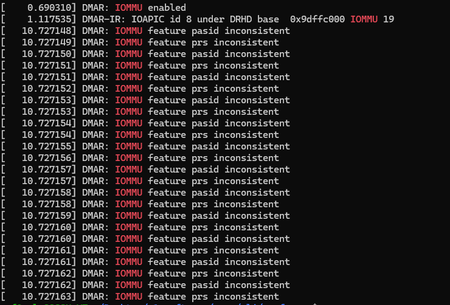
I followed the instructions in section 3.5 of the Multi Channel DMA Intel® FPGA IP for PCI Express* Design Example User Guide for configuration, but encountered issues during testing. Below are the configuration details and the test result image.1.8KViews0likes5CommentsRe: The issue encountered when programming the POF file into MAX10
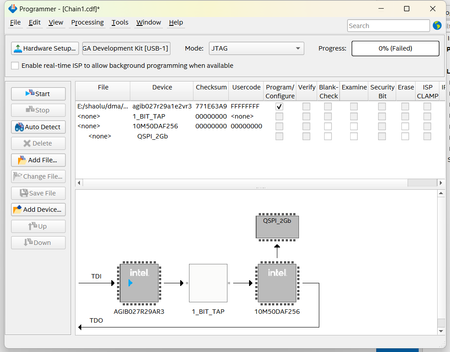
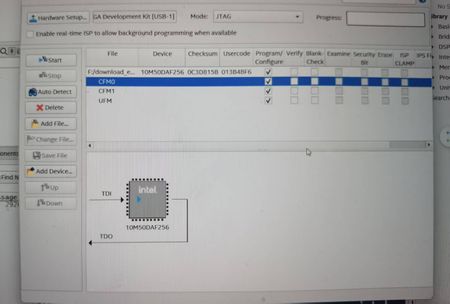
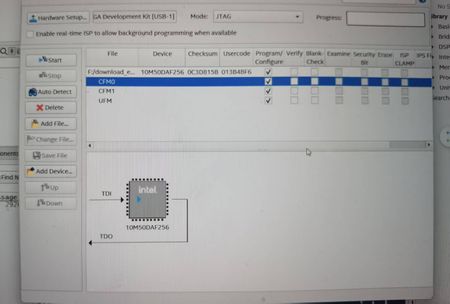
Hi Xiaoyan Actually, I have followed your description and replaced the VTAP10 with MAX10 as shown in the diagram, but I am still encountering this issue. Could you please help me understand why this is happening?1.1KViews0likes0CommentsThe issue encountered when programming the POF file into MAX10
After powering on my FPGA development board, the power status LED did not light up, so I checked it and found that the issue was with the MAX10 chip. I then planned to reprogram the MAX10 using the max10_bmc.pof file located in the factory_recovery/max10_recovery directory in BTS. However, during the programming process, Quartus reported the following error: Error(209015): Can't configure device. Expected JTAG ID code 0x031050DD for device 1, but found JTAG ID code 0x020D10DD. Make sure the location of the target device on the circuit board matches the device's location in the device chain in the Chain Description File (.cdf).428Views0likes1CommentThe issue encountered when programming the POF file into MAX10
After powering on my FPGA development board, the power status LED did not light up, so I checked it and found that the issue was with the MAX10 chip. I then planned to reprogram the MAX10 using the max10_bmc.pof file located in the factory_recovery/max10_recovery directory in BTS. However, during the programming process, Quartus reported the following error: Error(209015): Can't configure device. Expected JTAG ID code 0x031050DD for device 1, but found JTAG ID code 0x020D10DD. Make sure the location of the target device on the circuit board matches the device's location in the device chain in the Chain Description File (.cdf).1.3KViews0likes6Comments