User Profile

Sho2301
 New Contributor
Joined 2 years ago


User Widgets
Contributions
Dual Configuration Intel FPGA IP Core Signals
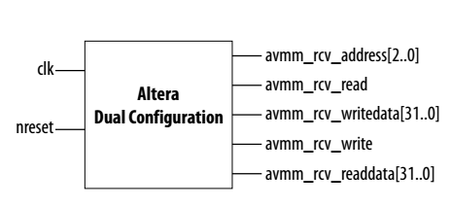
Hi, i have a few questions regarding the signals of this IP Core. Am i correct to assume that the avmm_rcv_address sets the Offset for the register i want to read and write from, so that with avmm_rcv_writedata i can then write in that offset register. For a example, would it be correct that if i wanted to enable the config_sel overwrite and set the config_sel to CFM 0 i would need to write the following: avmm_rcv_address <= "001"; avmm_rcv_writedata (1 down to 0) <= "01" avmm_rcv_writedata (31 down to 2) <= (others => '0'); I assume the avmm_rcv_read & avmm_rcv_write are used for write/read busy flags? Thank you for your assistance Regards, Sho592Views0likes3CommentsQuartus 21.1 crashing when using the Quartus Programmer to program external QSPI
Hi I'm having a problem where if try to program a .pof file into a external flash ,which was obtained by converting a .hex file in Quartus, containing the app code for a nios 2 porcessor Quartus repeadetly crashes. This is the problem report i'm getting: Problem Details Error: Internal Error: Sub-system: PGMWQ, File: /quartus/pgm/pgmwq/pgmwq_device_chain.cpp, Line: 2284 element->is_multiple_flash() Stack Trace: 0x597e2: PGMWQ_DEVICE_CHAIN::find_total_cfi_device + 0x2a2 (pgm_pgmwq) 0x7ca2a: PGMWQ_DEVICE_CHAIN::on_update_device_chain + 0x37a (pgm_pgmwq) 0x8802a: PGMWQ_DEVICE_CHAIN::qt_static_metacall + 0xca (pgm_pgmwq) 0x1fa79f: QMimeData::urls + 0x13af (Qt5Core) 0x8f51b: PGMWQ_MANAGER::set_device_chain + 0x5b (pgm_pgmwq) 0x41311: PGMWQ_DEVICE_TREE::change_file_confirm + 0x8a1 (pgm_pgmwq) 0x4090e: PGMWQ_DEVICE_TREE::change_file + 0x38e (pgm_pgmwq) 0x6f216: PGMWQ_FRAME_WND::on_change_file_action + 0x36 (pgm_pgmwq) 0x1fa79f: QMimeData::urls + 0x13af (Qt5Core) 0x7116: QAction::activate + 0x136 (Qt5Widgets) 0x161ee7: QMenu::actionGeometry + 0x457 (Qt5Widgets) 0x161d55: QMenu::actionGeometry + 0x2c5 (Qt5Widgets) 0x167348: QMenu::mouseReleaseEvent + 0xb8 (Qt5Widgets) 0x3a0a5: QWidget::event + 0x145 (Qt5Widgets) 0x1635bb: QMenu::event + 0x17b (Qt5Widgets) 0x179ec: QApplicationPrivate::notify_helper + 0x13c (Qt5Widgets) 0x156f0: QApplication::notify + 0x7d0 (Qt5Widgets) 0x1da558: QCoreApplication::notifyInternal2 + 0xb8 (Qt5Core) 0x18d51: QApplicationPrivate::sendMouseEvent + 0x331 (Qt5Widgets) 0x62022: QSizePolicy::QSizePolicy + 0x2792 (Qt5Widgets) 0x60276: QSizePolicy::QSizePolicy + 0x9e6 (Qt5Widgets) 0x179ec: QApplicationPrivate::notify_helper + 0x13c (Qt5Widgets) 0x1598e: QApplication::notify + 0xa6e (Qt5Widgets) 0x1da558: QCoreApplication::notifyInternal2 + 0xb8 (Qt5Core) 0x5b733: QGuiApplicationPrivate::processMouseEvent + 0x723 (Qt5Gui) 0x46e0a: QWindowSystemInterface::sendWindowSystemEvents + 0x9a (Qt5Gui) 0x2273bd: QEventDispatcherWin32::processEvents + 0xbd (Qt5Core) 0x59b48: qt_plugin_query_metadata + 0x1db8 (qwindows) 0x1d63b0: QEventLoop::exec + 0x1a0 (Qt5Core) 0x163af7: QMenu::exec + 0x1c7 (Qt5Widgets) 0x1638ea: QMenu::exec + 0x1a (Qt5Widgets) 0x4a1e6: PGMWQ_DEVICE_CHAIN::contextMenuEvent + 0xe6 (pgm_pgmwq) 0x2e1848: QGraphicsScene::event + 0xe8 (Qt5Widgets) 0x179ec: QApplicationPrivate::notify_helper + 0x13c (Qt5Widgets) 0x1598e: QApplication::notify + 0xa6e (Qt5Widgets) 0x1da558: QCoreApplication::notifyInternal2 + 0xb8 (Qt5Core) 0x2f88aa: QGraphicsView::contextMenuEvent + 0x16a (Qt5Widgets) 0x3a694: QWidget::event + 0x734 (Qt5Widgets) 0xdcf76: QFrame::event + 0x36 (Qt5Widgets) 0x302363: QGraphicsView::viewportEvent + 0xa3 (Qt5Widgets) 0x1dcf03: QCoreApplicationPrivate::sendThroughObjectEventFilters + 0xe3 (Qt5Core) 0x179d8: QApplicationPrivate::notify_helper + 0x128 (Qt5Widgets) 0x15f26: QApplication::notify + 0x1006 (Qt5Widgets) 0x1da558: QCoreApplication::notifyInternal2 + 0xb8 (Qt5Core) 0x6286e: QSizePolicy::QSizePolicy + 0x2fde (Qt5Widgets) 0x60276: QSizePolicy::QSizePolicy + 0x9e6 (Qt5Widgets) 0x179ec: QApplicationPrivate::notify_helper + 0x13c (Qt5Widgets) 0x1598e: QApplication::notify + 0xa6e (Qt5Widgets) 0x1da558: QCoreApplication::notifyInternal2 + 0xb8 (Qt5Core) 0x5b733: QGuiApplicationPrivate::processMouseEvent + 0x723 (Qt5Gui) 0x46e0a: QWindowSystemInterface::sendWindowSystemEvents + 0x9a (Qt5Gui) 0x2273bd: QEventDispatcherWin32::processEvents + 0xbd (Qt5Core) 0x59b48: qt_plugin_query_metadata + 0x1db8 (qwindows) 0x1d63b0: QEventLoop::exec + 0x1a0 (Qt5Core) 0x1d924a: QCoreApplication::exec + 0x14a (Qt5Core) 0x10bb: qgq_main + 0x8b (quartus) 0x13638: msg_main_thread + 0x18 (CCL_MSG) 0x1494e: msg_thread_wrapper + 0x6e (CCL_MSG) 0x18520: mem_thread_wrapper + 0x70 (ccl_mem) 0x12df1: msg_exe_main + 0xa1 (CCL_MSG) 0x20c6: WinMain + 0x156 (quartus) 0x16d2: __scrt_common_main_seh + 0x116 (quartus) 0x1257c: BaseThreadInitThunk + 0x1c (KERNEL32) 0x5af27: RtlUserThreadStart + 0x27 (ntdll) End-trace Executable: quartus Comment: None System Information Platform: windows64 OS name: Windows 10 OS version: 10.0 Quartus Prime Information Address bits: 64 Version: 21.1.0 Build: 842 Edition: Standard Edition Thanks1.1KViews0likes4CommentsExternal Flash not recognized by PFL and Quartus Programmer
Hi, i am trying to program an externl QSPI device with the help of the Parallel Flash Loader IP core and currently stuck on the problem that the flash is not recognized by Quaruts Programmer if i hit Auto Detect. The flash device i'm using is the Micron MT25QL256ABA8ESF with the PFl instatiated on a 10M08SAU169I7G MAX10 Device. Would appreciate any advice on how to program the external QSPI flash. I've attached my PFL project below. Thank you.520Views0likes2CommentsProgramming external QSPI Flash with PFL IP on MAX 10 FPGA
Hi, I am trying to boot the Nios 2 softcore processor from a external QSPI flash. I have followed all the steps detailed in the Embedded Developers Handbook Nios 2 from page 276 onwards but had a problem with the step where i was supposed to programm the .pof file converted from .hex file, containing the nios 2 application code, into the external qspi flash with Parallel Flash Loader. As the first i flashed the image containing the PFL into the FPGA. According to the Embedded Developers Handbook the QSPI Flash should then be recognized in the JTAG Chain if i hit the auto detect button in the quartus programmer, which isn't the case in my implementation. I've also tried to manually add the flash device into the JTAG chain via the attach flash file sub menu but am getting the error: "209012 Operation failed" which indicates that the flash device is not found. The Max 10 i'm using is the 10M08SAU169I7G and the external flash is the Micron MT25QL256ABA8ESF in the 256Mb variant which should be supported by the PFL according to the Intel documentation. https://www.intel.com/content/www/us/en/support/programmable/articles/000074565.html?wapkw=mt25q I've attached my PFL project and would greatly appreciate some help on this matter. Best regards1.3KViews0likes3Comments