interfaces communications
149 Topics
Why can't I connect two LVDS SERDES instances to one external PLL in Agilex™ 5 device?
Description When trying to implement the structure as shown in “Figure 40. I/O PLL Driving Mixed Receiver and Transmitter Channels in the Same Sub-Bank” of LVDS SERDES User Guide Agilex™ 5 FPGAs and SoCs with two separate LVDS SERDES IP instances and one external IOPLL IP instance, you will see the following fitter error similar to the followings: Error(14996): The Fitter failed to find a legal placement for all periphery components Error(14986): After placing as many components as possible, the following errors remain: Error(175001): The Fitter cannot place 1 CLKGEN, which is within LVDS SERDES IP lvds_serdes_tx_extpll_intel_lvds_2400_mqdyxqy. Error(16234): No legal location could be found out of 7 considered location(s). Reasons why each location could not be used are summarized below: Error(23276): Could not find usable path between source IOPLL: O_LOCK[0] and the CLKGEN: I_PLL_LOCK[0] Resolution For Agilex™ 5, the following rules restrict the LVDS SERDES IP instances placement described above: Each LVDS SERDES IP instance in the mode of TX, RX Non-DPA or RX DPA-FIFO uses one CLKGEN atom. One PLL can only fanout to one CLKGEN atom. Therefore, you cannot connect a single IOPLL to two LVDS IP instances if both of them are in the mode of TX, RX Non-DPA or RX DPA-FIFO. If TX and RX (DPA FIFO or Non-DPA) are sharing the same IOPLL, TX and RX must be generated from a single LVDS IP instance.92Views0likes0CommentsWhy am I seeing Deterministic Latency Accuracy problems when using Inter-protocol Designs in the GTS Dynamic Reconfiguration Controller IP?
Description Due to a problem in the Quartus® Prime Pro Edition software version 25.3 and earlier, you may inter-protocol GTS Ethernet Hard IP with PTP and GTS CPRI IP in GTS Dynamic Reconfiguration Controller IP designs. Resolution Currently, there is no workaround for this problem. This problem is scheduled to be fixed in the future release of the Quartus® Prime Pro Edition software. Related IP Core GTS Dynamic Reconfiguration Controller IP GTS Ethernet Hard IP with PTP GTS CPRI IP40Views0likes0CommentsWhy can’t I place the bytes of two LVDS SERDES IP instances (in TX or Non-DPA RX modes) to the same IO sub-bank on Agilex™ 5 in Quartus® Prime Pro Edition Design Software versions prior to 25.3?
Description Due to a problem in Quartus® Prime Pro Edition Design Software versions prior to 25.3, placing both LVDS SERDES IP instances within the same IO sub-bank may not be successful. If you attempt to put the bytes of both IP instances in the same IO sub-bank, you may encounter the following fitter error: Error(14996): The Fitter failed to find a legal placement for all periphery components. Resolution This problem has been fixed in the Quartus® Prime Pro Edition Design Software Version 25.3. Use the Quartus Prime Pro Edition Design Software Version 25.3 to generate the LVDS SERDES IP and compile the project. If you must use the Quartus Prime Pro Edition Design Software versions prior to 25.3, please contact Support with this KDB link. Related Articles Can I distribute the channels of an Agilex™ 5 FPGA LVDS SERDES IP in RX DPA-FIFO or Soft-CDR mode between two sub-banks? How many IOPLLs are used when implementing Agilex™ 5 FPGA LVDS SERDES IP in RX DPA-FIFO/Soft-CDR mode and distributing the channels between two sub-banks?62Views0likes0Comments
Error: niosv_g_dcache.sv: part-select direction is opposite from prefix index direction
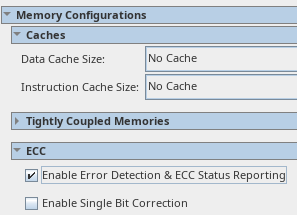
Description Due to a problem in the: Quartus® Prime Pro Edition Software versions 24.3.1, 25.1, and 25.1.1, and Quartus® Prime Standard Edition Software version 24.1. When the Nios® V/g processor is configured with No Data Cache and enabled with Error Detection and ECC Status Reporting, performing Analysis and Synthesis fails with the error "niosv_g_dcache.sv: part-select direction is opposite from prefix index direction". Note that this issue has no relationship with No Instruction Cache. Figure. Nios® V/g Processor Setting to Replicate the Error Resolution To work around this error, Select 1Kbytes Data Cache. Apply a Peripheral Region that covers the whole Nios® V processor’s data_manager address map Enable Error Detection and ECC Status Reporting. By implementing Peripheral Region, the above settings can emulate an ECC-enabled Nios® V processor system that operates without caches. Figure. Workaround (in this example, the whole Nios® V processor’s data_manager address map is 1GB) The problem has been fixed starting with Quartus® Prime Pro Edition software version 25.3 and Quartus® Prime Standard Edition software version 25.1.184Views0likes0CommentsWhy am I seeing the Error: pgm_q_inst_intel_niosv_g_0_platform_irq_rx_bfm_ip.pgm_q_inst_intel_niosv_g_0_platform_irq_rx_bfm: "Irq width" (AV_IRQ_W) 2048 is out of range: 1-32?
Description Due to a problem in the Quartus® Prime Pro Edition Software version 25.1 and Quartus® Prime Standard Edition Software 24.1, the error message might occur when generating a testbench system for Nios® V/g processor designs. As a result, the Quartus® Prime software fails to generate the testbench system. The error message occurs when ALL the following conditions are met: The processor implements CLIC interrupt mode with more than 32 platform interrupts (Number of Platform interrupt sources parameter). The processor’s interrupt receiver is exported to the top-level system (Double-click to export option). Selected Standard, BFMs for standard Platform Designer interfaces when generating testbench system (Generate Testbench System tools). This is because the maximum width of the Avalon Interrupt Source and Interrupt Sink BFMs is capped at 32 interrupts. Resolution To work around this problem in the Quartus® Prime software, you may proceed with any of the following options: Implements CLIC interrupt mode with fewer than 32 platform interrupts. Refrain from exporting the processor’s interrupt receiver. Selects Simple, BFM for clocks, and resets when generating the testbench system. Additional Information There is no workaround currently, and there is no plan to fix this problem. Related Articles Nios® V General Purpose Processor (Number of Platform interrupt sources Parameter) Quartus® Prime User Guide (Generating the Testbench System Tool) Avalon® Interrupt Source and Interrupt Sink BFMs (IRQ Width Parameter)107Views0likes0CommentsWhy does the Nios® V/g processor return inaccurate floating-point calculation results when the Floating-Point Unit is enabled?
Description Due to a problem in the Quartus® Prime Standard Edition Software version 24.1, the Nios® V/g processor might return inaccurate floating-point calculation results when the Floating-Point Unit (FPU) is enabled. This problem is found in MAX® 10 FPGA devices only. Other Altera® FPGA devices are not affected. This is because there is a problem in the FPU module, which generates spurious signals affecting the calculation results. Resolution A patch is available to fix this problem for the Quartus® Prime Standard Edition Software version 24.1. Download and install patch 0.03 from the following links: Quartus® Prime Standard Edition Software v24.1 Patch 0.03 The problem has been fixed starting with Quartus® Prime Standard Edition software version 25.3.169Views0likes0CommentsWhy does the Nios® V processor fail to generate HDL and report "Error: add_fileset_file" in the Quartus® Prime Standard Edition Software?
Description Due to a problem in the Quartus® Prime Standard Edition Software versions 22.1, 23.1, and 24.1, the Nios® V processor might fail to generate HDL with an error message about add_fileset_file. This problem is present only on Windows OS. Example error message: Error: add_fileset_file: No such file <Nios V processor SystemVerilog file> while executing “add_fileset_file $current_sim/<Nios V processor SystemVerilog file> SYSTEM_VERILOG PATH $current_sim/<Nios V processor SystemVerilog file> $attr” This is because the Nios® V processor hw.tcl calls add_fileset_file on a simulator, which is not supported in Windows OS. The simulators are Cadence Simulator, Synopsys VCS*, and VCS MX. For information on the simulators' supported platforms, refer to Quartus® Prime Standard Edition User Guide: Third-party Simulation - Supported Simulators. Resolution To work around this problem in the Quartus® Prime Standard Edition Software versions 22.1, 23.1, and 24.1, follow these steps: Navigate to the following hw.tcl files: <Quartus Std installation folder>/ip/altera/soft_processor/intel_niosv_common/intel_niosv_dbg_mod_hw.tcl <Quartus Std installation folder>/ip/altera/soft_processor/intel_niosv_common/intel_niosv_timer_msip_hw.tcl <Quartus Std installation folder>/ip/altera/soft_processor/intel_niosv_g/intel_niosv_g_unit_hw.tcl <Quartus Std installation folder>/ip/altera/soft_processor/intel_niosv_m/intel_niosv_m_unit_hw.tcl <Quartus Std installation folder>/ip/altera/soft_processor/intel_niosv_c/intel_niosv_c_unit_hw.tcl Inside each hw.tcl file, find set simulators [list ]. Modify the subsequent if-else statement to, set simulators [list ] if {$sim_synth == "sim" } { if { [file exists intelfpga] && [file isdirectory intelfpga] } { set simulators [list intelfpga] } elseif { $::tcl_platform(platform) == "windows" } { set simulators [list aldec mentor] } else { set simulators [list aldec cadence mentor synopsys] } } The problem has been fixed starting with Quartus® Prime Pro Edition software version 25.1.1 and Quartus® Prime Standard Edition software version 25.1.87Views0likes0CommentsWhy does the ECC Module of Nios® V processor IP not report ECC data corruption events in Arria® 10 FPGAs and Cyclone® 10 FPGAs?
Description Due to a problem in the Quartus® Prime Pro Edition Software version since 23.3, the Nios® V processor's ECC module cannot detect ECC data corruption events affecting any of the processor’s internal RAM blocks. This issue affects designs targeting Arria® 10 FPGAs and Cyclone® 10 FPGAs only. Resolution This problem is scheduled to be fixed in a future release of the Quartus® Prime Pro Edition Software version.86Views0likes0CommentsWhy does Nios® V Processor FPGA IP encounter Error(20327) when performing an IP upgrade?
Description This issue may be seen in the Quartus® Prime Pro Edition Software starting from software version 22.1 when running Nios® V Processor Intel® FPGA IP upgrade from designs created in earlier versions of Quartus® Prime Pro Edition Software. This is due to a problem in Platform Designer, which does not automatically update the Nios® V Processor FPGA IP during FPGA IP Upgrade. Error(20327) from processor update in software version 22.1: Error(20327): Error: cpu.cpu: "Reset Agent" (resetSlave) "ram.s1" is out of range: "Absolute" Error(20327): Error: cpu.cpu: "Exception Agent" (exceptionSlave) "ram.s1" is out of range: "Absolute" Error(20327): Error: sys: File cpu.ip declares port dbg_reset_reset which is missing in entity cpu Error(20327) from processor update in software version 23.3: Error(20327): Error: cpu declares port data_manager_awsize which is missing in file cpu.ip Error(20327): Error: cpu declares port instruction_manager_arsize which is missing in file cpu.ip Error(20327): Error: cpu declares port instruction_manager_awsize which is missing in file cpu.ip Error(20327): Error: cpu declares port data_manager_arsize which is missing in file cpu.ip Error(20327): Error: cpu declares port instruction_manager_wlast which is missing in file cpu.ip Error(20327): Error: cpu declares port data_manager_wlast which is missing in file cpu.ip Resolution To workaround this problem, follow the steps below: 1. Open the affected Platform Designer system and click Sync System Infos to upgrade the design to the latest IP version. 2. Right-click the Nios® V Processor and click the Replace option. 3. Replace the outdated processor core with the latest processor core. 4. Configure the same processor settings and interface connections. 5. Resolve any design errors after synchronizing the system component information. 6. Generate design HDL and exit the Platform Designer. 7. Proceed to relaunch the IP Upgrade Tool. 8. Remove the outdated IP file from the Project Navigation. 9. Compile the design. Note: In the Quartus® Prime Standard Edition Software, the processor core needs to be removed and re-instantiated manually. For more information, refer to the Nios® V Processor FPGA IP Release Notes and the Quartus® Prime Pro Edition Software Platform Designer User Guide.98Views0likes0CommentsWhy does the Nios® V processor force Configuration Scheme with Memory Initialization for MAX® 10 FPGA?
Description Due to a problem in the Quartus® Prime Standard Edition Software version 23.1 and 24.1, you may see an error below when using Dual Compressed Image as the Internal Configuration mode for Nios® V Processor Design on MAX® 10 FPGA, Error (16031): The current Internal Configuration mode does not support memory initialization or ROM. Select Internal Configuration mode with ERAM. Note: Assuming that memory initialization is disabled in every on-chip memory. Resolution To work around this problem, Download and install the patches below for the Quartus® Prime Standard Edition Software version 24.1. Quartus® Prime Stardand Edition Software v24.1 Patch 0.01std for Windows (.exe) Quartus® Prime Stardand Edition Software v24.1 Patch 0.01std for Linux (.run) Readme for Quartus® Prime Stardand Edition Software v24.1 Patch 0.01std (.txt) Download and install the patches below for the Quartus® Prime Standard Edition Software version 23.1. Quartus® Prime Stardand Edition Software v23.1 Patch 0.03std for Windows (.exe) Quartus® Prime Stardand Edition Software v23.1 Patch 0.03std for Linux (.run) Readme for Quartus® Prime Stardand Edition Software v23.1 Patch 0.03std (.txt) The problem has been fixed starting with Quartus® Prime Standard Edition software version 25.1,219Views0likes0Comments