installation & licensing
489 TopicsNew Computer can NOT generate free license
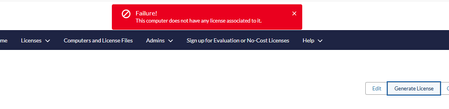
Hello, In June 2026, I have generated one license for the Questa-Intel FPGA Starter Edition 2023.2 on my old computer. And today I got a new computer and I have created a new Host with the new Computer Name, Computer Type, License Type, Primary Computer ID. When I clicked Generate License, I got this error : Is there anyone who knows how to solve this issue? Thank you very muchSolved66Views0likes5CommentsLicense for Questa Starter Edition will not work
I tried looking up other posts for this issue, but none of the answers people gave helped. This is the error that shows up after I downloaded the license and set SALT_LICENSE_SERVER to point to it. I tried creating and pointing LM_LICENSE_FILE and MGLS_LICENSE_FILE too. It didn't work either. The address is correct too. I don't know what is going onSolved106Views0likes9Comments"Avalon I2C (Master) IP" is missing from IP Catalog on some 26.1 installations
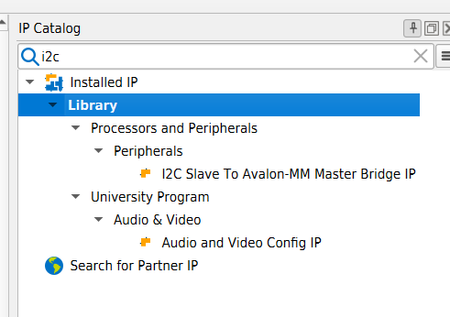
Our group of Quartus users has encountered some scenarios where the "Avalon I2C (Master) IP" is missing from the IP Catalog of Quartus 26.1 on Windows machines. It is working well on other Windows machines and Linux machines in the same network. A Windows machine missing the IP: A Linux machine where it works; Installing Patch 0.11 did not solve the issue. All relevant environment variables seem to be equal on both working and non-working machines. Any ideas?Solved103Views0likes3CommentsSOLVED: BSP Editor NullPointerException on Debian 13 Linux
SOLVED: BSP Editor "New BSP" menu command is grayed out, so can't make any new BSP's, and opening any existing one from another computer throws: SEVERE: Available BSP type values for the --type argument are: [] SEVERE: BSP type "hal2" unknown. SEVERE: NullPointerException Based on other forum posts with a similar error, it seems like this is because the BSP Editor couldn't locate some of its own files. That seems likely here too since this is the first time it's used on this computer. But there's no problematic install path etc since I used the default. THERE ARE NO SPACES IN THE INSTALL PATH NOR THE PROJECT PATH. Everything else is working already for the Max 10: I can generate with Platform Designer, synthesize with Quartus, program SRAM with SignalTap, debug Nios V with RiscFree. Details are: Quartus Prime Lite 25.1std.0 Build 1129 10/21/2025 SC Lite Patches: None OS: Debian 13. This is what Ubuntu is based on, so it's very similar. And like I said everything else already works. USB came online already, not too hard. All it took was the Altera udev rules file 92 as usual, and the correct LD_LIBRARY_PATH so jtagd could find its own shared libs. Installed quartus into regular user account, not whole system, not as root. This is offered as an option in the installer if I recall correctly. Install path is the installer's default: /home/myuser/altera_lite/25.1std The project files are irrelevant here, since BSP Editor is already off-track as soon as it launches. "New BSP" is grayed out. SOLVED: BSP Editor is unable to find its own files without Altera's environment vars, which are provided when running inside niosv-shell. That's nonsensical to me, since any brain-dead program off the street can detect where its own binary loaded from, on any OS, and walk up the path from there to find the rest of its files, as a default if no env vars were provided. That's the first line of every binary or Tcl script I've ever written. Quartus main GUI seems to do it exactly that way. Anyone else struggling with this inexplicable rough edge should make sure your desktop's launcher icon invokes niosv-shell first, like this: altera_lite/25.1std/niosv/bin/niosv-shell --run altera_lite/25.1std/niosv/bin/niosv-bsp-editor To Altera: if you're struggling to maintain or improve your software because it relies on Tcl, contact me through my forum account. I could clean up a whole mess of rough edges like this one, and some other much-needed improvements.8Views0likes0CommentsQuesta-ModelSim UI scaling problems in Linux
Hello Has anybody been able to solve the issue of UI of Questa not scaling correctly on linux with wayland? I am using Ubuntu 26.04 with wayland and UI is just tiny, icons, are so small i cannot read any text. When opening a new project, file explorer is also tiny. Fonts i could change in the config file but icons, menus and everything else is just extremely small. Problem is even worse on high resolution displays. Regards, Haris80Views0likes3CommentsLegacy 2011 Altera University Floating License SSLC cannot locate license
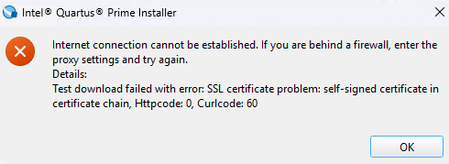
Hello, I am the Systems Analyst, Sr. for the College of Engineering at my University where they host a 2011 University Floating license to support Quartus Prime 18.0. The license is active and running an older server that is being decommissioned. The original license file includes Organization Name Original Server Name Original host ID (MAC) License Type: Quartus II Subscription Edition University Floating Seats: 50 Features: Maxplus2 and Quartus Perpetual license term The issue The license predates Intel's acquisition of Altera. The SSLC option 'Generate Legacy License" shows it only handles licenses prior to 2009. The original employee/account that obtained the original file is unable to be contacted and am in need of assistance generating this same license file/type with my account for the College of Engineering. I am trying to reach the Intel FGPA Licensing Team to help me with: Verifying ownership of this legacy license Transfer it to my intel account Rehost it to a new server NIC The support requests I've submitted tell me to seek assistance here. Any help would be appreciated. Thanks so much.108Views0likes13CommentsQuesta Starter Edition 25.1 - svverification license checkout fails (valid license per lmdiag)
Hi, I'm running Questa*-Altera FPGA Starter Edition 25.1std on Windows 10. My design compiles and elaborates successfully, but simulation fails when loading a testbench that uses SystemVerilog classes, randomize(), and covergroup: ** Error: Failure to checkout svverification license feature. ** Error: (vsim-1) Unable to checkout verification license - required for testbench features (randomize, randcase, randsequence, covergroup). License details: - License: SW-QUESTA (Non-Commercial Software SW-QUESTA), FIXED, NIC ID - Feature: intelqsimstarter, v2027.01 - Node-locked correctly to my machine's NIC ID (confirmed via lmutil lmdiag) - License Expires: 26-Jul-2027, currently active and valid lmutil lmdiag output confirms the license is valid and correctly bound: "intelqsimstarter" v2027.01, vendor: mgcld, expiry: 26-jul-2027 uncounted nodelocked license, locked to ethernet address "d053493e9348" starts: 26-jul-2026, expires: 26-jul-2027 This is the correct node for this node-locked license Both LM_LICENSE_FILE and SALT_LICENSE_SERVER are correctly set to the license file path (verified spelling, no typos, no spaces in path, full system restart performed). The GUI itself launches without any license error - the failure only occurs specifically when loading a design that uses randomize/covergroup. Is svverification/testbench verification simply not included under the free Starter Edition license (intelqsimstarter), or is there an additional configuration step needed to enable it? Any guidance appreciated.Solved82Views0likes1CommentQuartus Licensing Issue
Recent versions of Quartus (both Std & Pro) for WIndows introduced a new problem with the license management (for node-locked licenses) which is a pain to work around. In Tools > License Setup panel, "NIC ID", a lot of "ghost" adapters appear now, while the normal behavior was to see the MAC Addresses of the Ethernet Adapters that show up in the device manager and in ipconfig /all. This seems aggravated by the use of the "Get no-cost licenses" button that apparently generates a license file for a (or many !) new virtual adapter(s)... I call them "ghost" or virtual because they don't show up in the usual commands (getmac /v, ipconfig /all, lmhostid etc) and do not correspond to a physical peripheral (network card). To make things worse, Quartus can apparently only handle a maximum of 10 (ten) Ids. The consequence is that your "real" adapter may fall out of the list and a node-locked license for this adapter becomes unusable. The only work around I found was to use the device manager, display the hidden devices, and to disable the numerous Microsoft "WAN Miniport" in the Network cards category. This should reduce the list enough to see the "real" address used for your node-locked license. I proposed a solution : allow the manual editing of the NIC Ids list (save in quartus.ini or registry). But today it seems a bit hard to be heard...57Views0likes4CommentsQuesta License Problem
I am unable to do simulation in Quartus because of some License problem. I tried getting the certificate from the SSLC and changed the environment variables also but still i am getting the same error. Can anyone help me out where I could have gone wrong.71Views0likes5CommentsQuesta - license problem
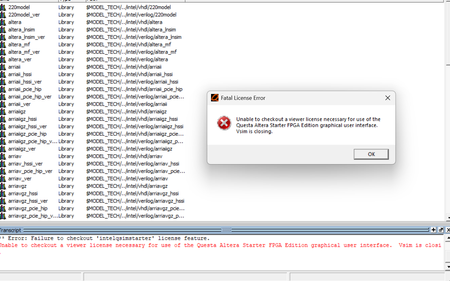
I have installed Questa Altera Starter 25.2. It works at home. But when I open this software at the university compound, I get the following error and can’t use it – “Unable to checkout a viewer license necessary for use of the Questa Altera Starter FPGA Edition graphical user interface. Vsim is closing.” Please find attached the screenshot of the problem.196Views0likes19Comments