USB blaster not detected in Quartus 24.1
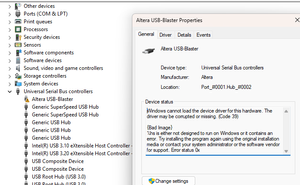
Hi, Recently updated from windows 10 to windows 11. Previously was using Quartus 19.1 and after upgrade USB blaster driver got corrupted. Below are the steps I did to debug the issue: Update driver via enforce driver disable in windows. Load usb blaster driver of quartus 24.1 Uninstall quartus 19.1 and USB blaster drivers. Installed Quartus 24.1 and USB blaster driver that came with it. Even after step 3, same issue. How can I solve it? Even though Quartus 24.1 USB blaster is supported in windows 11. Device Manager Error reporting when USB blaster is connected. Signal Tap doesn't recognize any hardware connected.50Views0likes6Comments
The correct way to install QUARTUS on UBUNUT 24.04 LTS?
Greetings QUARTUS experts, I have been trying (and failing!) to install QUARTUS Prime Pro on my UBUNUT 24.04 LTS LINUX machine. The QUARTUS documentation says that UBUNTU 24.04 LTS is a supported OS, so all should work fine ! Or Not ! After i have downloaded the installer, added the correct execute permissions, i run it and it appears to install everything. But the first problem i noticed is that it only takes a few seconds to run and then stops saying everything is installed. In comparison on my Windows 10 machine the installation process takes a couple of hours ! The next problem on Linux is that no QUARTUS Icons have been created in the UBUNTU applications area. And then when i try to run QUARTUS from the command line i just get a message saying of course it doesn't know where the heck Quartus is :) As expected really.... My question is then: What are the exact steps i need to take to get Quartus PRIME PRO to install correctly on my LINUX machine ? I do the usual steps before running the installer: $ sudo update & sudo upgrade etc.... Thanks for your help, Dr Barry H69Views0likes5CommentsAutomatic address range assignment ?
Hello Altera Experts, I have a question about IP address range assignments when using Platform Designer. When i add IP to my Platform is there a way to get the tool to automatically assign non-overlapping address ranges to each IP ? At the moment when i add different IPs to my Platform they all overlap and so i have to go in to the address tab and manually assign each IP address range to make sure they don't overlap and thus causes errors. Thanks for your help, BarrySolved28Views0likes6Comments
dut.p0_hip_status has no associated reset.
Hello Altera I am using Quartus Prime Pro 25.1.0 build 129 03/26/2025 SC Pro Edition. In my Agiliex 7 Design project, I have Intel R-Tile MCDMA for PCI Express intel_pcie_rtile_mcdma Version 5.3.1 Ip instantiated as "dut". in parameters settings I have enabled to have hip status interface. this interface is connected to a custom design QCP file. The QCP uses "app_clk" and "app_nreset_status" from dut ip as its clk and reset inputs. THey go through clock bridge and reset bridge. Clock and reser outputs from these bridges are used internally in QCP creation In platform designer as I connect "dut.p0_hip_status" and "custom_module_pcie_ep_hip_status_in" I get an error as following "Error: pcie_ed: Interfaces custom_module_pcie_ep_hip_status_in and dut.p0_hip_status must have matching associated resets, but dut.p0_hip_status has no associated reset." This Error does not make sense to me, as dut`s hip status interface and my qcp`s status interface ports shows correct clock and reset association in component instantiation tab; and my custom design uses same clock and reset to its clock and reset bridge inputs. can you please help me to understand what is this error about and how do i resolve it?12Views0likes1CommentHow to upgrade IP from Quartus 24.1 and add it to a Quartus 25.1 Project?
Hello ALTERA Quarts Experts, I have created and configured an ALT_PLL IP in Quartus Standard edition 24.1. Now i need to add that IP to a Quartus 25.1 Standard Edition project. I have tried this so far: added the IPs output files to my 25.1 project: readout_pll.qip, readout_pll.v, readout_pll_bb.v There is also a file called: readout_pll.ppf which appears to be an xml file. Not exactly sure what this is meant to do or if i also needed to add that? I then see the message from Quartus 25.1 asking me to do an auto IP upgrade, which id did and it was successful according to Quartus. But then i don't see the IP appear in the projects IP Catalogue even after i do an IP library refresh. Can anybody please tell me what else i need to do in order to be able to use the IP in my 25.1 Project ? I am having to do all this because the ALT_PLL symbol is all messed up and is unusable in Quartus Standard Edition 25.1. For That problem i have already created another post recently and have been assured this will be fixed. But for now until its fixed i need to do this IP upgrade. Thanks, Barry21Views0likes2Comments
The FIFO has no output waveform
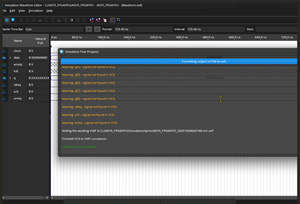
Hi, I am currently using Quartus Prime Lite 24.1 and the 10M02M153C8G device to implement an 8Kx9 SYNC FIFO. I generated the design directly using the IP CORE. Initially, my tests successfully produced output waveforms. However, I must have changed a setting unintentionally, as I am now unable to simulate the output. Even previous projects that worked before are no longer producing any waveforms. I subsequently observed the following messages in the Simulation flow progress: Warning: sclr - signal not found in VCD. Warning: wrreq - signal not found in VCD. These warnings are appearing for multiple signals, as shown in the image or attachment (referring to the image/attachment). I have already tried reinstalling the software and updating the license options, but the issue persists. Could you please advise on the cause of this problem and how to resolve it? Thank you for your assistance.94Views0likes10Comments
USB-BlasterII mounts as "USB-Blaster variant"
Hello! My company uses the USB-BlasterII pods with Quartus. Many times, when the Blaster is plugged in, it is detected by Quartus as "USB-Blaster variant" instead of "USB-BlasterII". When this happens, the JTAG clock frequency is not settable, and the pod will not operate correctly. The problem occurs equally with Quartus Prime 16.1 and Quartus Standard 24.1. I have not tried other versions of Quartus. This appears to be the same root issue that AdamLevine experienced in a previous Altera forum post: USB Blaster II | Altera Community. To answer the questions he was asked, Yes, we experience this issue on all the PCs we have tried the USB-BlasterII on. My company is running Windows 11. We tried numerous boards, but similar to Adam, the problem occurs whether a board is connected to the Blaster or not. The issue appears to be with the driver for the Blaster and how it is detected when it is connected to the PC. This problem has been occurring more lately than it used to, but we have had significant failure rates with this for the past two years almost. I know our JTAG pin connections are correct because the USB-BlasterII works perfectly IF AND ONLY IF it is detected with the correct device name but cannot work at all if it shows up with the wrong name in Quartus. Our conclusion is that the drivers for the USB-BlasterII have a problem. I suspect that the driver caches the Blaster devices that have been connected and encounters an error if the cache is not cleared by ejecting all the Blaster devices. Just a guess. Has anyone found the issues with the drivers? Is anyone from Intel available to look into this behavior? If not, would Intel supply my corporation with the driver source code so our engineers can fix it? Thanks!41Views0likes2Comments
Is there a specific driver for the USB Blaster III?
Is there a specific Linux driver or firmware which is required for the USB Blaster III (ArrowAXE5000)? It does not get detected when I run jtagconfig? # dmesg |grep 'USB Blaster III' -A1 [9415753.839630] usb 1-4.4: Product: USB Blaster III [9415753.839635] usb 1-4.4: Manufacturer: Altera # jtagconfig --version jtagconfig Version 25.1.0 Build 129 03/26/2025 SC Pro Edition Copyright (C) 2025 Altera Corporation. All rights reserved. # jtagconfig --enum No JTAG hardware available Does it require some specific firmware and software to load it?1.3KViews0likes7Comments
Modifying internal components Parameters in a Sub-System Package (QCP)
Hi I followed the instructions in online documents and youtube videos on how to add run_system_script for modifying internal components Parameters of a Sub-System Package (QCP) but so far I am not able to successfully modify it. I m hitting two main issues 1. "No Parameter Found" error when loading the QCP in QSYS. I am using internal parameter name but the system is not able to find it 2. load_component and save_component commands in the script is making the component fail to load in qsys. Any help will be appreciated Here is the subsystem package script package require -exact qsys 25.1 set_package_property NAME "rpss_ssd" set_package_property DISPLAY_NAME "rpss_ssd" set_package_property VERSION "1.5" set_package_property GROUP "" set_package_property DESCRIPTION "" set_package_property ELABORATION_CALLBACK elaboration_callback set_package_property EXTRACTION_CALLBACK extraction_callback set_package_property UNLOCKABLE true add_fileset synth_fileset QUARTUS_SYNTH fileset_callback "Quartus Synthesis Fileset" add_fileset sim_verilog_fileset SIM_VERILOG fileset_callback "Simulation Verilog Fileset" proc elaboration_callback {} { enable_all_instances run_system_script TEXT { package require -exact qsys 25.1 set args $__run_system_script_args_list__ set args_len [llength $args] for {set i 0} {$i < $args_len} {incr i} { set param [lindex $args $i] set val [lindex $args [incr i]] send_message "Info" "val: $val" load_component rpss_0 set_component_parameter_value QUEUE_MEM_BASE_ADDRESS $val save_component } auto_assign_system_base_addresses sync_sysinfo_parameters save_system } [ list ADDR 0x10000 ] # disable_instance clock_in # disable_instance reset_in # disable_instance rpss_0 # disable_instance rtile_dummy_0 } proc extraction_callback {} { extract_modules } proc fileset_callback { output_name } { generate_all_instances }3.7KViews0likes16Comments
compliance with IEC61508 for Quartus II
Hi All, Going over all the documentation I can find on this topic, I need to use version 17.0.2, which is not available to download. Therefore, I have versions: 17.0 and 17.1, which of these meets IEC61508 to do CPLD and FPGA development work on?718Views0likes5Comments