Forum Discussion

 Occasional Contributor
Platform Designer UI
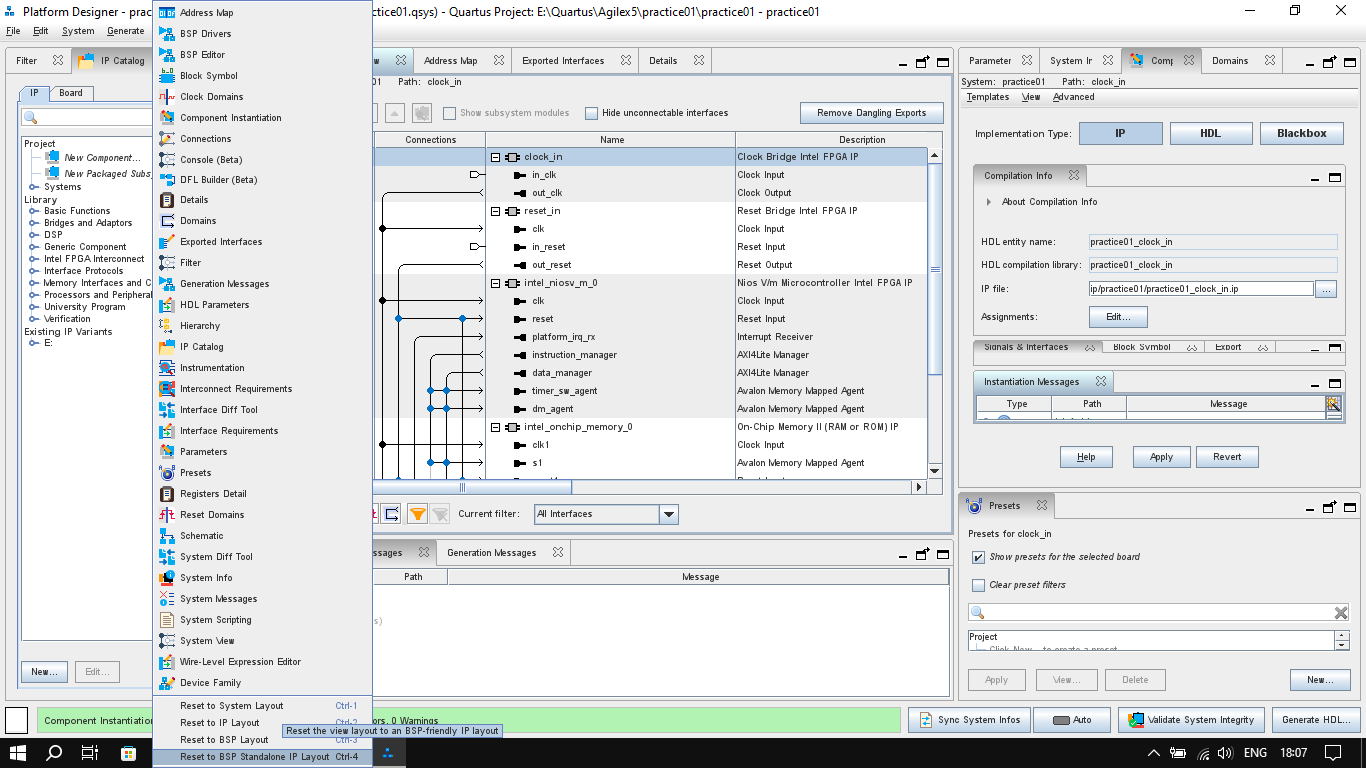
The Platform Designer UI in Quartus Prime Pro 25.1 has not been improved to scale appropriately to the screen in use. For a screen with max resolution of 1366x768, the "View" menu is too long, filling up the whole vertical span of the screen even for a font size of 9. I have to set a font of 8 or below, too small to work with, just to access my custom layouts. After doing this and going back to a larger font, the layout resets to the default. Cycling through the "Ctrl + x" options only gives the default layouts. The menus and submenus are also still very crowded and as a result, a lot of time is spent resizing menus to get to particular options eg the "Component Instantiation" tab.
The "System View" tab also falls victim. To avoid much scrolling through the design, the font size to be used is too small and quite some time is spent squinting at the screen. A good enough font size will require quite a bit of scrolling.
Is this an issue to be considered by reworking the whole UI because I feel it worked before but now with much more design settings added, just using the old UI by adding more area to it has reached a point of diminishing returns.
Thank you, Njoroge, for your valuable and constructive feedback.
We’ve taken your input into consideration, and it is planned to be incorporated into the next-generation Platform Designer.
While I don’t have visibility into the final implementation just yet, we look forward to seeing the improvements in 2026.
Hopefully, it will offer a significantly enhanced user experience.
Regards,
Richard Tan

16 Replies
 sstrell
Super Contributor
Yeah, time to go to a higher resolution screen I guess which isn't a great option, especially for a laptop. I have the same problem.
 Njoroge
A UI refresh is still inevitable, I think. The IPs keep increasing with each release and designing using the current system is too cumbersome Some Hard Processing System IPs for example can take up the whole screen whereas a schematic approach can have blocks with connections on two sides of an IP block which in my opinion would help give a smoother design process.
- RichardT_altera
The only solution I can think of to resolve your current issue is to try connecting to an external monitor with high resolution and change the display resolution.
I will provide feedback on this GUI issue to the engineering team and suggest improvements to the GUI design, perhaps with better categorization or a scrolling feature on the 'System View' menu.
Sorry for the inconvenience caused.
Regards,
Richard Tan
- Njoroge
I tried that and it worked only for the time when the project was open. When I returned to work in Platform Designer after closing it, the UI had reset itself. It feels like the tool is disconnected from the main Quartus software. In Quartus for example, customization actions like resizing the windows, closing or opening others, merging or seperating windows, stays as that even if I close Quartus and open it later. In Platform Designer however, any changes to the UI only work for that project at that time. Opening a new project, another existing project or going back to the same project at a later time in Platfrom Designer always resets to the default UI, so hence organizing the UI has to be done before setting to work on the actual design.
In the "IP Catalog" tab too for example, if I set that I want to "Show all IPs", and have them "organized by name rather than category", it will work at that time for that specific project. However, it will default to the "sort by category" and "show IP for current setting" if I open a new project, open an existing project or open the same project at a later time
I think that the issue is not caused by the screen resolution but rather the fact that Platform Designer doesn't seem to save the user layout customization actions.
- RichardT_altera
What is the display resolution you are using for the external monitor? This method is used so that you can view the full list in the 'View' menu.
I agree that the PD GUI uses a default UI and does not currently support saving customized layouts. I have submit a feature request to engineering; however, depending on available resources and effort required, it may or may not be implemented.
Regards,
Richard Tan
- RichardT_altera
Do let us know if you have any additional feedback or suggestion, on using Platform Designer or other software tools.
We appreciate your time and effort in providing this valuable feedback to us.
Thank you.
Regards,
Richard Tan
- RichardT_altera
The Platform Designer tool specialists will incorporate these feedback into the next-gen Platform Designer, which is currently planned to be implemented in 2026 (subject to change).
Unfortunately, there are no resources to make changes to the current Platform Designer, so we may need to stick to the current layout and its inflexibility until next year.
Sorry for the inconvenience caused, and thank you for the feedback provided.
Regards,
Richard Tan
- RichardT_altera
Since the feedback has been provided to the tool specialists and is planned to be incorporated into the future Platform Designer, I will transitioning this thread to community support.
If you have any further questions or concerns, please don't hesitate to reach out. Please login to https://supporttickets.intel.com/s/?language=en_US , view details of the desire request, and post a feed/response within the next 15 days to allow me to continue to support you. After 15 days, this thread will be transitioned to community support.
The community users will be able to help you on your follow-up questions.
Thank you and have a great day!
Best Regards,
Richard Tan
- Njoroge
While we're at it, I also would ask whether the whole Quartus software tool is up for a rework. From my point of view, the tools at the moment are still quite similar to those that were used when FPGAs were largely used for prototyping digital circuits and as such the design was more from an HDL approach than IPs. Now with increased FPGA/FPSoC applications like AI, compute acceleration, RF and more, doesn't that warrant a redesign of the entire software suite?
I am also of the opinion that the three seperate ways that Quartus is shipped might be stifling time and resource allocation into developing one software tool that works for all devices. That would enable that one software tool to be as perfect as possible since the software development team focuses all their resources and time on just the one. The hardware side of things, like the new Agilex devices, is looking like it's outpacing the software tools for it, case in point the Platform Designer being discussed.
All in all, thank you for the feedback provided to the development team on my behalf.
Njoroge.
- RichardT_altera
Now with increased FPGA/FPSoC applications like AI, compute acceleration, RF and more, doesn't that warrant a redesign of the entire software suite?
I’d like to further understand your concerns. Could you please share more details about the pain points you’re experiencing when using Quartus, as well as your expectations on how the software should be redesigned to better support FPGA/FPSoC applications?I am also of the opinion that the three separate ways that Quartus is shipped might be stifling time and resource allocation into developing one software tool that works for all devices.I assume the three versions you're referring to are Quartus Pro, Standard, and Lite. We previously discussed the possibility of consolidating these into a single software package that supports all devices. However, due to resource constraints, that idea was rejected, and it's unlikely we will see a unified Quartus software in the near future.
Additionally, the underlying tools used in the Pro version differ from those in the Standard/Lite versions. Integrating them into a single package could introduce potential bugs and compatibility issues. It would also significantly increase the disk space required for installation, which could be a concern for some customers who only use one device family and do not need the full software suite.
Regards,
Richard Tan
- KennyT_altera
case reopening
- RichardT_altera
Any update on this?
Regards,
Richard Tan
- RichardT_altera
Thank you, Njoroge, for your valuable and constructive feedback.
We’ve taken your input into consideration, and it is planned to be incorporated into the next-generation Platform Designer.
While I don’t have visibility into the final implementation just yet, we look forward to seeing the improvements in 2026.
Hopefully, it will offer a significantly enhanced user experience.
Regards,
Richard Tan


.png)
