Forum Discussion

 Occasional Contributor
Platform Designer UI
- 1 year ago
Thank you, Njoroge, for your valuable and constructive feedback.
We’ve taken your input into consideration, and it is planned to be incorporated into the next-generation Platform Designer.
While I don’t have visibility into the final implementation just yet, we look forward to seeing the improvements in 2026.
Hopefully, it will offer a significantly enhanced user experience.
Regards,
Richard Tan

 Super Contributor
The only solution I can think of to resolve your current issue is to try connecting to an external monitor with high resolution and change the display resolution.
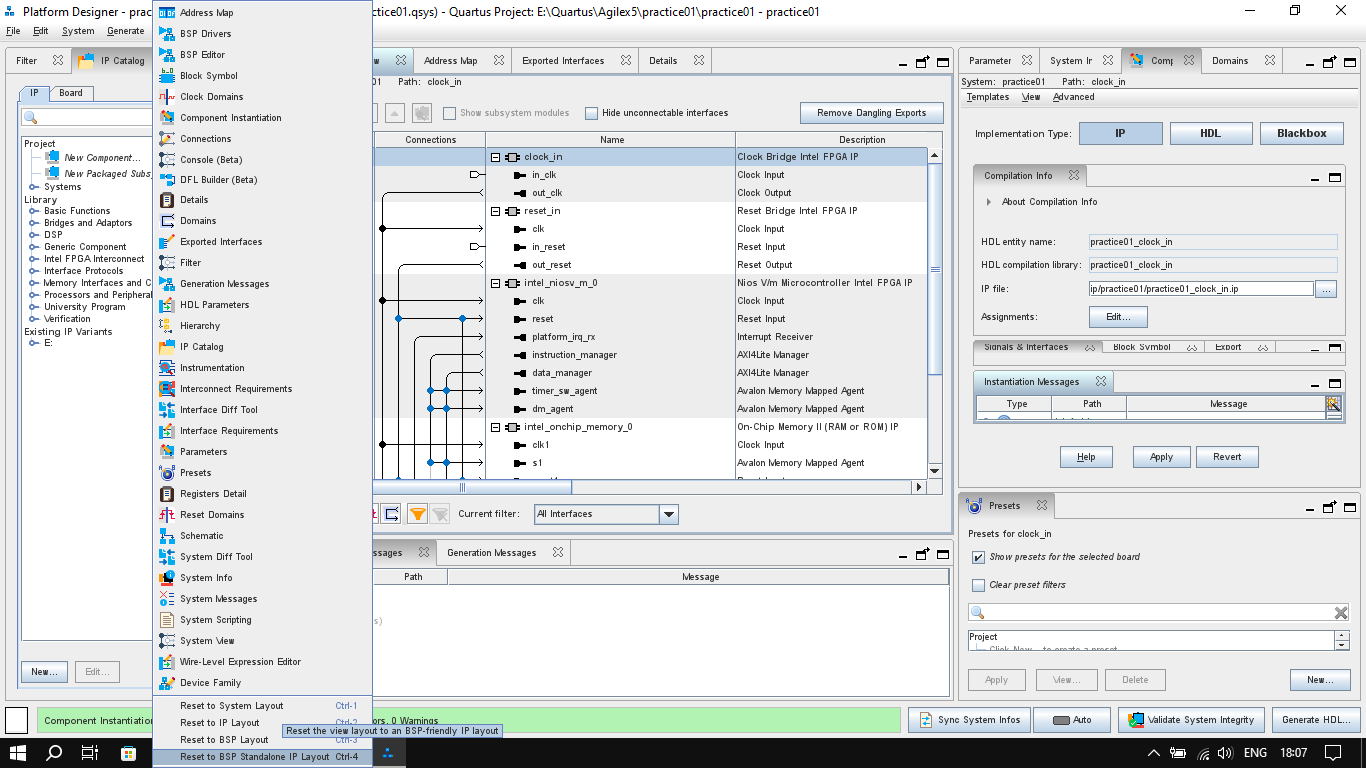
I will provide feedback on this GUI issue to the engineering team and suggest improvements to the GUI design, perhaps with better categorization or a scrolling feature on the 'System View' menu.
Sorry for the inconvenience caused.
Regards,
Richard Tan
 Njoroge1 year ago
I tried that and it worked only for the time when the project was open. When I returned to work in Platform Designer after closing it, the UI had reset itself. It feels like the tool is disconnected from the main Quartus software. In Quartus for example, customization actions like resizing the windows, closing or opening others, merging or seperating windows, stays as that even if I close Quartus and open it later. In Platform Designer however, any changes to the UI only work for that project at that time. Opening a new project, another existing project or going back to the same project at a later time in Platfrom Designer always resets to the default UI, so hence organizing the UI has to be done before setting to work on the actual design.
In the "IP Catalog" tab too for example, if I set that I want to "Show all IPs", and have them "organized by name rather than category", it will work at that time for that specific project. However, it will default to the "sort by category" and "show IP for current setting" if I open a new project, open an existing project or open the same project at a later time
I think that the issue is not caused by the screen resolution but rather the fact that Platform Designer doesn't seem to save the user layout customization actions.
- RichardT_altera1 year ago
What is the display resolution you are using for the external monitor? This method is used so that you can view the full list in the 'View' menu.
I agree that the PD GUI uses a default UI and does not currently support saving customized layouts. I have submit a feature request to engineering; however, depending on available resources and effort required, it may or may not be implemented.
Regards,
Richard Tan  sstrell1 year ago
In PD, you can save a .layout file from the very bottom of the View menu, but it unfortunately does not do this automatically.
- Njoroge1 year ago
If you save a layout and wish to switch to it, there's an option of using keyboard shortcuts. However, the shortcuts are the exact same ones for the defualt layouts shipped with Platform Designer. For example, if I save my first layout file, it will defualt to keyboard shortcut "ctrl + 1". This shortcut however is also the same for the "default IP layout" option so using that shortcut will switch to PD's default IP layout rather than my layout. The screen resolution was 1920 x 1080. I was able to switch to my layout by pointer but as I said that only works for that project at that time. Opening a new project, or existing project or closing Quartus and returning to it at a later time will have PD back to its default layout. I would also add that the fonts in PD scale worse in font size compared to those in Quartus. It's like PD is a completely isolated software from Quartus.


.png)
