Forum Discussion

 Honored Contributor
Custom ip: can't see IRQ number in system.h
Hello,
I'm trying to create a custom component which should generate an interrupt to the NIOS. My problem is that the BSP generate the system.h with no interruption for the component. Qsys plugged it to input 4, but BSP irq value is -1 as well as irq_interrrupt_controller_id I tried to follow several document from Altera literature but no success. The component has an Avalon MMSlave, a clock input, a reset input, an Interrupt Sender and several Conduit. in the _sw.tcl there is the isr_preemption_supported set to true and supported_interrupt_apis to "legacy_interrupt_api enhanced_interrupt_api". The driver code contains only the _regs.h file The vhdl skeleton of the device is created but not the full behaviour, I don't think that BSP generation check this level of detail. Can anyone help me with this issue? Thanks19 Replies
 Altera_Forum
Which version of the tools are you using? I remember running into this in the early days of Qsys but I thought these issues were fixed. -1 represents a disconnected interrupt number so assuming you have connected the interrupt sender to the receiver (Nios II) I would have expecting the interrupt number to be populated in system.h instead of -1. Often when I ran into this issue it was when I fed the interrupt through a bridge connection (often to drive it up or down the Qsys system heirarchy). So if you describe the connectivity more I might have a workaround that will work for your system.
- Altera_Forum
I use Quartus 13.1 and no bridge in the design. The sender is connected to the NIOSII receiver with automatically assigned numbers. This one is the 4 in Qsys. I checked others IRQ numbers from standard peripherals 0,1,2,3 and 5 are correctly populated in system.h
In one of the Altera's paper they recommend to get inspired with existing components such as jtag_uart which i did. I checked the qsys file and my irq is connected just like the 5 other - Altera_Forum
That's odd indeed. Did you use the component editor to create the custom core or did you write the hardware .tcl file from scratch? You might need to attach the tcl file to this post so that we can take a look.
- Altera_Forum
At first I used the component editor, then when it didn't generate what I was looking for, I started to change to mimic the irq part of the jtag_uart component
The tcl file is attached. Let me know if you find something in it. - Altera_Forum
The BSP generation show a warning: WARNING slave name not found system parameter 'associatedAddressablePoint' for the Interupt sender irq0
I just found the error: the parameter "associatedAddressablePoint" has to have the name of the Avalon interface, s0 in my case. - Altera_Forum--- Quote Start --- The BSP generation show a warning: WARNING slave name not found system parameter 'associatedAddressablePoint' for the Interupt sender irq0 I just found the error: the parameter "associatedAddressablePoint" has to have the name of the Avalon interface, s0 in my case. --- Quote End --- I have exactly the same problem using Qartus-II 13.1 (haven't tried with other versions though). As mentioned above, the solution is to set the value of 'associedAddressablePoint' in the sopcinfo file to the name of an avalon interface on the component. This looks like a bug to me, or is there another way to solve this than editing the sopcinfo file?? Thanks to vinc29 for pointing out the current solution!
- Altera_Forum
I don't know of a workaround but my suggestion is to submit a service request and attach the system and custom component to the SR so that the Qsys engineering team can take a look. This is the link to file a service request: http://www.altera.com/mysupport
If this issue started in a certain version you might be able to workaround it by requesting a different .tcl API by editing the .tcl file. Doing so may cause other things to break since the component was created with a newer component editor which used a newer .tcl API so make sure you backup the .tcl file first. - Altera_Forum
Was this issue ever fixed? I have the same problem, but cannot figure out how to implement a solution. I created a simple I2C slave device in HDL and plugged it into the nioss via qsys. Everything looks normal like the above situations, but when I do Nios II -> generate BSP in eclipse I get the -1 value in my system.h for IRQ and IRQ_INTERRUPT_CONTROLLER_ID.
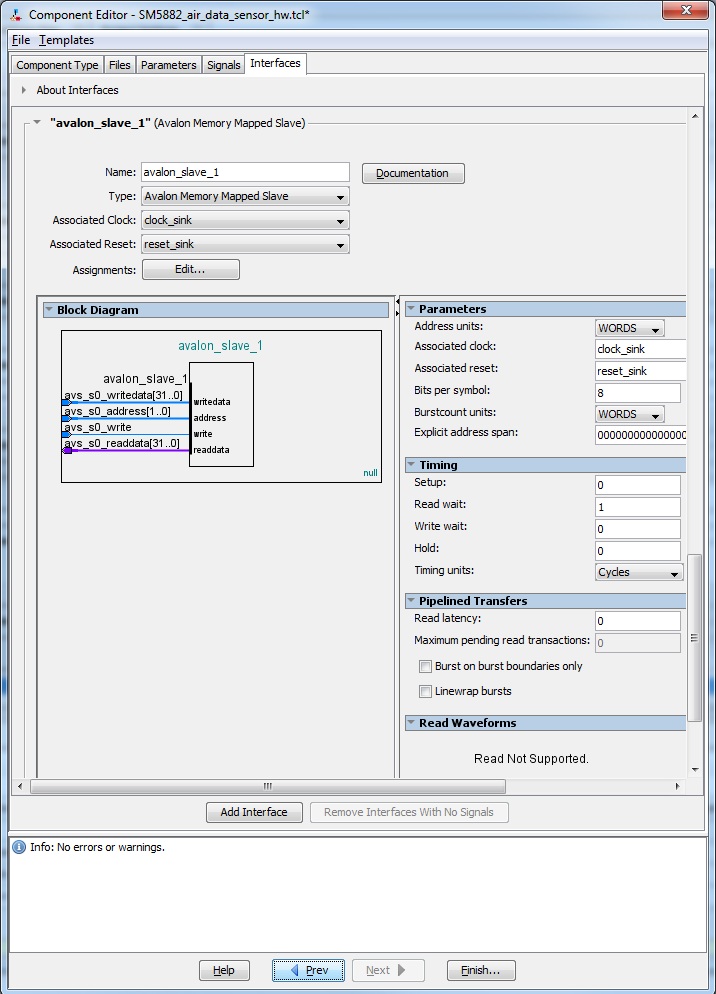
I'm using Qsys 13.1 Build 162 and Quartus 13.1.0 Build 162 web edition. Also, to fix this, where do I find associedAddressablePoint setting? Solved: -------- So the problem I had wasn't this bug, but sounded just like it. I had two custom avalon MM slave peripherals and each had a MM slave interface. If you go into the interfaces tab of the custom peripheral in Qsys (the ones that you made) you will see an interface for avalon_mm_slave or something like that. Here is a screenshot of one of mine. https://www.alteraforum.com/forum/attachment.php?attachmentid=9071 It turned out that both of these peripherals had the exact same name for this interface. This one (from screenshot) was the second one I built and when I generated my bsp/sopc file the component_name_hw.tcl file for this second peripheral did not get built correctly because of this leading to my system.h file in eclipse not having the correct interrupt and interrupt controller information. Instead of 5 and 0 (which was the interrupt number and int. controller number I was supposed to have) it just had -1, -1 respectively. after changing the interface name to something else on this second peripheral the *_hw.tcl file was built correctly and section of the system.h file in my eclipse C-side is now correct. I haven't tested the interrupt with an ISR yet, but at least it is building the system.h file correctly. Long story short, heads up on naming convention for this interface regarding custom peripherals. Don't name them the same thing. This is easy to do because Qsys defaults here to avalon_slave_0 as the default name for the interface. Another note. The component_name_hw.tcl file is in the main quartus directory. Hopefully this helps someone out. - Altera_Forum
I met the same problem.
And I try the way @m3atwad said: 'changing the interface name to something else on this second peripheral'. but it did not work. The attachment is my component's _hw.tcl~ , and here is part of system.h code generated by using the related sopcinfo# define alt_module_class_ezusb2nios_0 ezusb2nios
# define ezusb2nios_0_base 0x0
# define ezusb2nios_0_irq -1
# define ezusb2nios_0_irq_interrupt_controller_id -1
# define ezusb2nios_0_name "/dev/ezusb2nios_0"
# define ezusb2nios_0_span 1024
# define ezusb2nios_0_type "ezusb2nios"
You can see, the IRQ and IRQ_INTERRUPT_CONTROLLER_ID is still -1. I don't know why
- Altera_Forum
Hey billy,
1. Do you have two custom components? 2. Did you make sure (by using qsys and looking at the interfaces tab) you didn't violate the same thing I did? I think you wanna check the "Name" under your s0 module.