Forum Discussion

 Occasional Contributor
Cyclone 10 GX Development Kit factory recovery issue
Hello,
I am having some issues to perform Cyclone 10 GX Development Kit factory recovery. I follow the instructions to restore the factory build (see the attached readme file from the kit collateral downloaded from Intel website).
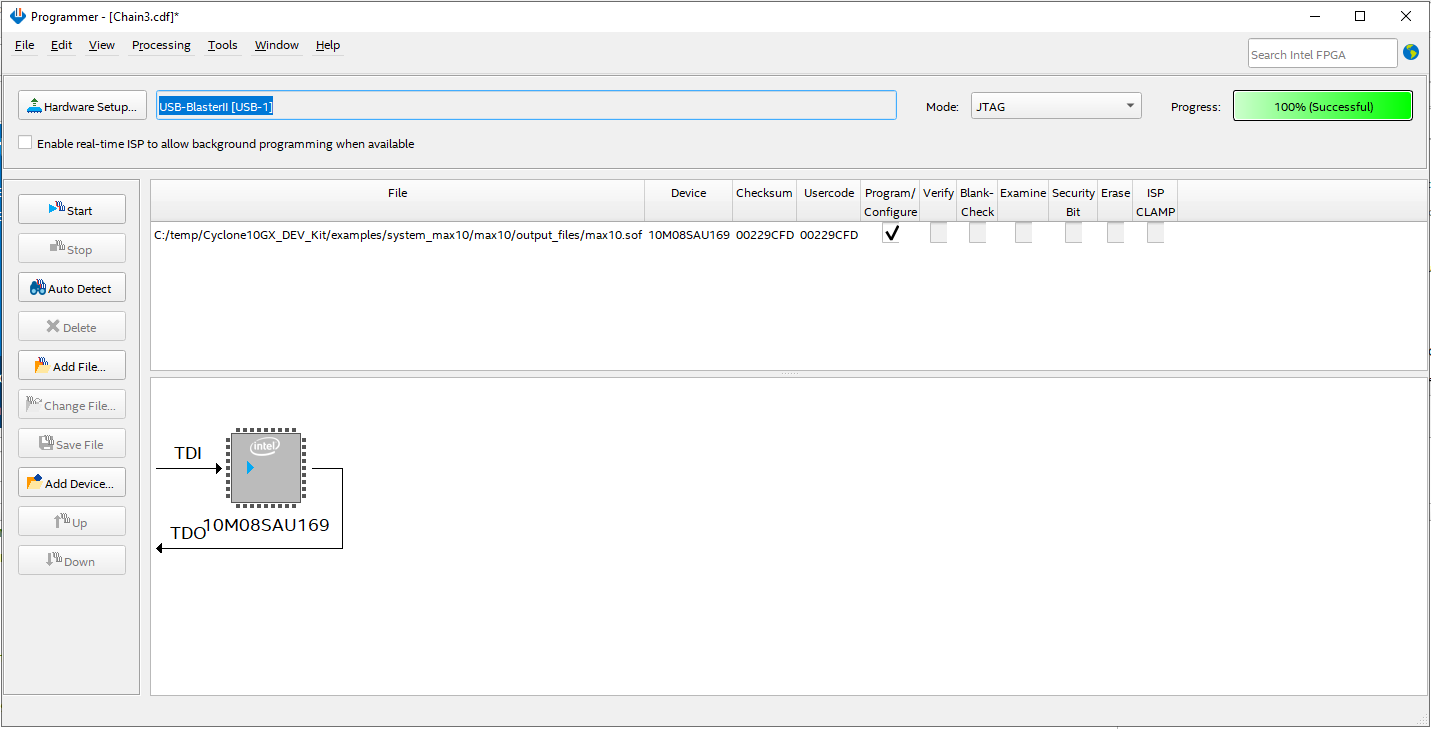
After I programmed max10.sof (from the kit collateral) via Quartus programmer. The LED D16 (green) and D13 (Red) are on, which indicates FPGA configuration failed. I am not sure if this is expected.
Then I execute BoardTestSystem GUI application. I got an error message "FPGA is not detected in the Jtag Chain.".
Can you please let me know what is wrong and how to solve the problem? Thanks!
The max10.sof and BoardTestSystem application are from the Kit Collateral Version A downloaded from Intel webpage:
Test screenshots are attached.
25 Replies
 KeeganJ
New Contributor
Hello, I unfortunately think I have the same problem.
I recently launched BoardTestSytem.exe and clicked on restore Max10 to make sure I was starting from a fresh state, but after re-programming it is not able to connect to the board anymore.
Is there any more information on how to recover or have I bricked my development board?
- KeeganJ
I was able to resolve by manually loading the Max10 system firmware through Quartus programmer. The procedure is to open Programmer, select USB-BlasterII (it is on-board dev kit), auto-detect devices (select 10M08SA then 10CS220Y in the prompts), right click 10M08SA and CHANGE file to devkit_collateral\examples\system_max10\max10.pof (be sure not to ADD file), at the top check Program/Configure next to the line with the file path, then hit START.
The instructions provided by Intel for factory reset are not very detailed hope this helps someone.
Still having issues with BTS but not related to this thread.
 AR_A_Intel
Super Contributor
You're welcome, it's been my pleasure helping you. Hope all is well. This thread will be transitioned to community support. If you have a new question, feel free to open a new thread to get the support from Intel experts. Otherwise, the community users will continue to help you on this thread. Thank you
- yong
Thanks again for your great help!
You can close this case now. I contacted Intel distributor - DigiKey as your instruction and working with them on RMA. I will contact you if there is any problem.
Thanks and have a good weekend!
- AR_A_Intel
Hello Sir
Thanks for your update and patience. We have opened a ticket regarding you issue. Contact local authorized Intel Distributors near you to request RMA together with the following information. Distributor link https://www.intel.com/content/www/us/en/partner/where-to-buy/overview.html
a) Development Kit S/N : 10CGX0001216
b) IPS ticket No. 00623727
- yong
Thank you very much for the great support!
- AR_A_Intel
Thanks for update. Please give me some time to check and open RMA request ticket.
- yong
Thanks for the help!
- AR_A_Intel
We send you a private message. Thanks
- yong
Thanks for reminding! I replied to the private message.
Thanks!
- AR_A_Intel
Hello,
We will be checking further with support/customer service team regarding the warranty. Thanks
- yong
Thanks! Please let me know if there is any update.
- AR_A_Intel
we send you a private message.
- yong
Thanks for the support!
Requested information and copy of purchase invoice are sent to you through private message. Please check.
Please let me know if you need any additional information.
Thanks!
- AR_A_Intel
Hi
Thanks for update. This most probably looks like board problem. We can help you to RMA the affected board. But before we do, we need to verify the board warranty first. Could you help provide the following for warranty checking?
Name:
Email Address:
Company/University Name:
Dev kit OPN :
Serial Number :
copy of invoice that shows time and date of purchase. And you can also reply/attach your file in private message.
- yong
Hi,
Thanks for help!
How can I send you private message? Is there an email address that I can send the requested information to?
Thanks!
- AR_A_Intel
Hi
Thanks for your input. May we know, did the dev kit board can program C10 GX successfully in the past or this is new board that can’t program C10 GX at all ?
- yong
Hi,
The dev kit board was working. I could program C10 GX successfully. C10 GX was able to be auto detected with Quartus Programmer tool. See the attached screenshot "auto_detect_success.png".
I was testing C10 GX ASx4 configuration from EPCQ Flash. After a test which possibly erased CFI flash attached to MAX10, (EPCQ flash was also erased intentionally for the test), then I am not able to program C10 GX anymore. Quartus Programmer tool can not auto detect C10 GX. Only MAX10 is auto detected. CFI flash attached to MAX10 is also not shown (which was shown before having the issue). See the screenshot "auto_detect_fail.png".
Then I am trying to perform factory recovery and come to the issue I reported on this thread.
You can also find some details on the other thread I posted earlier "Quartus Programmer fails to auto detect device on Cyclone10 GX Dev kit" at the link below:
- yong
Hello.
Any suggestion to move the debugging forward? Do you need any other information/details from me?
Thanks!
- AR_A_Intel
Hi
To narrow down the issue. Could you provide
1) error result screenshot
Could you also reconfirm again to Set the board switches to the factory default settings.
Thanks
- yong
Hello,
There is no error message in Quartus while programming .sof to MAX10. Everything seems ok (see the screenshots - pgm_MAX10_sof.png and pgm_MAX10_sof_msg.png). But LEDs on the dev board shows FPGA configured failed (D13 (red) is on) (see the attached pictures). Then when I execute BTS, a popup window shows "FPGA is not detected in the Jtag Chain".
Sometimes the first try fails (see screenshot - pgm_Max10_sof_err_msg.png, error message could be different, e.g., sometimes jtag chain error), but the 2nd try could succeed.
These are all I can observe.
I double checked the board switches are the factory default settings. However, for S3 setting, in the Dev Kit User Guide revision 20171218 (included in the collateral package) says default S3[2:1]=00; in the Dev Kit User Guide revision 20180815, it says default S3[2:1]=01. The physical board comes with S3[2:1]=01. I tried both, the results are the same.
Regard to JTAG TCK setting, I tested with 16M, 6M, 1M. The result are the same.