Forum Discussion

 Occasional Contributor
how to download configuration code to Cyclone 10 dev kit board for customer's power-up configuration
Hi,
I have a Cyclone 10 development kit board: DK-DEV-10CX220-A.
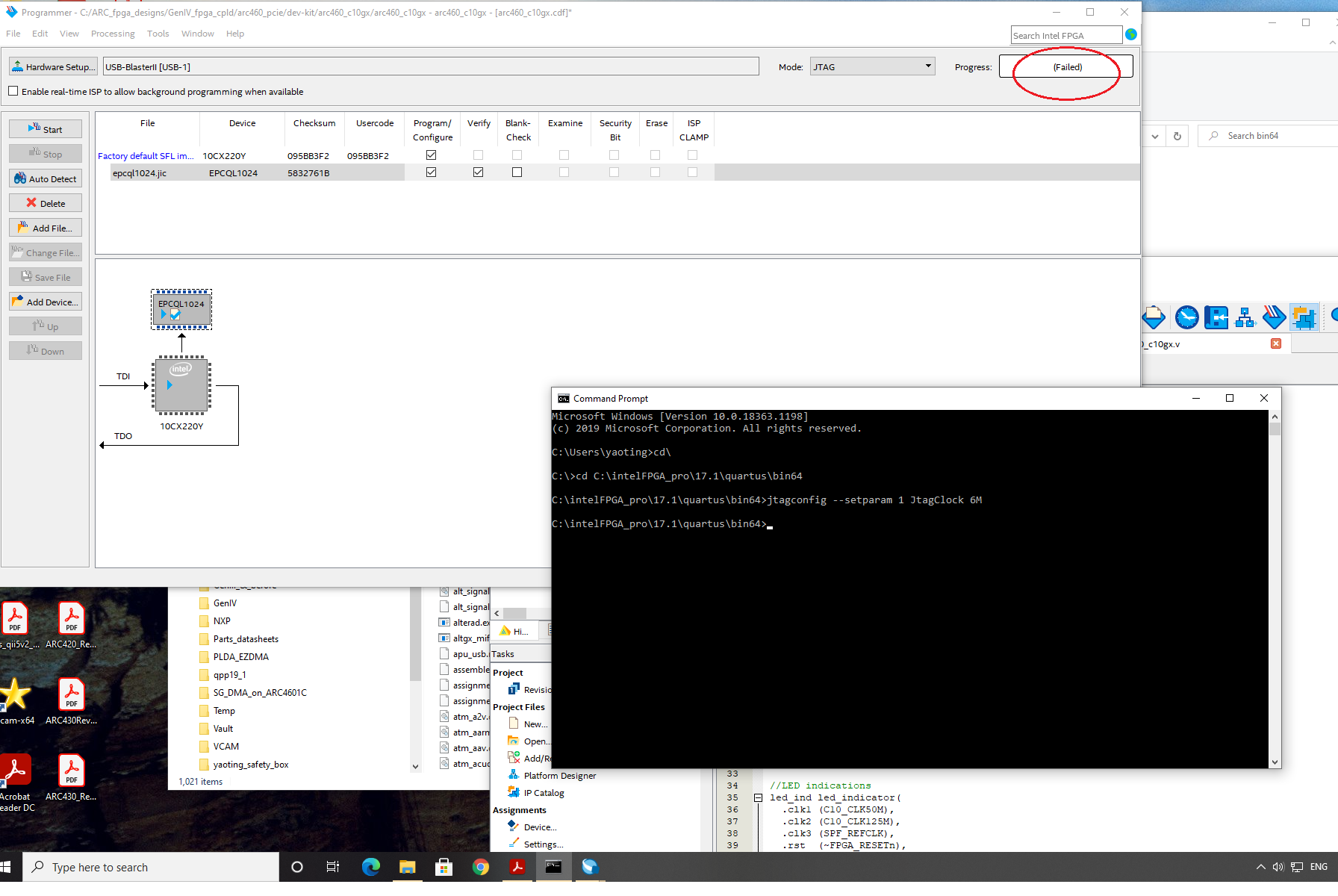
It works well with BTS. I need to download my own configuration code either to EPCQ-L(ASx4) or to the NOR flash memories on the board to boot up the FPGA at power up. I have tried the EPCQ-L programing but it fails. For the NOR-Flash, i don't know how to convert my sof file to the one fits the memory type. Is there any one who can help me? VERY Appriciated!!!
17 Replies
 NurAiman_M_Intel
Super Contributor
Hi,
Kindly share the screenshot of the error and also photo of the board as we will need to see if the switch was correctly set up.
You can also check the error if you are using Quartus pro, enter the error code and press enter:
Regards,
Aiman
- YYang79
- NurAiman_M_Intel
Hi,
Apologize for the delay in response.
JIC programming failure might be due to TCK frequency of the USB blaster II. Try to change it to 6MHz.
On top of that, please ensure to change switch to AS switches. Can refer userguide below:
Thanks.
Regards,
Aiman
- NurAiman_M_Intel
Hi,
You can refer to download cable II userguide below:
Regards,
Aiman
- YYang79
- NurAiman_M_Intel
Hi,
Please check if the device chose in the quartus->assignment->device->device/board is the correct device as per the dev kit.
Regards,
Aiman
- YYang79
Hi,
Yes, it is the same.
- NurAiman_M_Intel
Hi,
Perhaps you can try this steps:
- Auto detect device, right click the device and add bitstream into it
- Remove the empty device(just as I shown before in the red box)
- Hit program
On top of that, try to check whether SOF file can program or not to minimize the scope or error. If can, then there is possibility the JIC file has problem. Can try on the other version as well to check if it is version dependent.
Regards,
Aiman
- YYang79
Hi,
I did according to your suggestion. It did not work.
I can down load my code via JTAG by using SOF file to FPGA directly after power up. It tells us the code is working. The issue is just I could not permanently put it into the FLASH so as not to be able to boot the FPGA at power up.
I've tried revision of 17.1 and 19.1 of Quartus Prime Pro. Neither works.
- NurAiman_M_Intel
Hi,
Perhaps there is issue with JIC.
Is the flash device selected correct during JIC creation and have choose correct configuration scheme in quartus?
Regards,
Aiman
- YYang79
I generated it just following the manual. Is there any hidden point i should pay attention to? It's supposed to be very straightforward, right?
 yasuhito
New Contributor
Hi,
OnBoard USB Blaster of DK-DEV-10CX220-A has Two JTAG devices.
1st device is CFG MAX10(10M08SA) for PFL.
2nd device is Cyclone 10 GX(10CX220Y).
How to
(1) Open Programmer.
(2) Click "Auto Detect". You can find "10M08SA" and "10CX220Y".
(3) Select "10CX220Y"
(4) Click "Change File". and Open .jic file.
(5) Check "Program/Configure".
(6) Click "Start".
OK?
- NurAiman_M_Intel
Hi YYang79,
Is there any update for this case? Else, I will proceed to close this case.
Thanks.
Regards,
Aiman
- YYang79
Just let you know, this issue has not been solved yet. I have no idea why. The dev kit board to me is totally a garbage now! A big loss to me.