User Profile

Vladislav-Butko-bvo
 Occasional Contributor
Joined 3 years ago


User Widgets
Contributions
How to open the precompiled Quartus Prime project
I have precompiled (with db and incremental_db folders, so it have sof/pof files) Quartus Prime (22.1std.1 Build 917 02/14/2023 SC Lite Edition) project and want to open "Technology Map Viewer (Post-Fitting)" diagram without any changing in the project (in particular, whitout second compilation). I attempt to open this project in Quartus Prime 24.1std.0 Build 1077 03/04/2025 SC Lite Edition. While opening the project the follow warning is appearing: "Do you want to overwrite the database for revision ...?" If I click on "No" nothing more will happen. So, I click on "Yes". This operation updates precompiled db folder. That's why need to import database (Project -> Import database) from original (without updates) project folder copied in advance of clicking "Yes". While the importing I chose db folder from the original folder, but was occured the follow error: "*.db_info is up to date ...". I stuck on this stage...Solved1.4KViews0likes1CommentDecrease system clock frequency in Quartus II?
How to decrease system clock frequency in Quartus II from standard 50 MHz to 2 Hz (two clock fronts per second)? I find out it easier using constraints editing way, namely, SDC (Synopsys Design Constraints) file editing. But, don't know how do it exactly. I work in Quartus II 9.0 (Build 132 02/25/2009 SJ Web Edition) and use the device Cyclone III (EP3C16F484C6) is placed on the Altera DE0 Board. Was tried changing of the TimeQuest settings: was uploaded SDC file containing the line: "create_clock -period 500 [get_ports my_clk]".Solved801Views0likes1CommentRe: Found illegal assignment group name conflicts with top-level node name
Was changed automatically generated QSF file by the Pin Planner in the work folder of the project. Namely, was replaced "key" strings by "keyGroup" and "led" strings by "ledGroup" (i.e. was renamed pin groups). Before I just tried to edit QSF file in the wrong way, so it was overwritten always.928Views0likes0CommentsFound illegal assignment group name conflicts with top-level node name
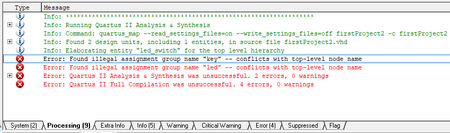
How to fix the follow errors was appeared after pin assingment (in Pin Planner window) and project compilation: 1) "Error: Found illegal assignment group name "key" -- conflicts with top-level node name"; 2) "Error: Found illegal assignment group name "led" -- conflicts with top-level node name". The errors in Processing tab: Top-level VHDL: library ieee; use ieee.std_logic_1164.all; entity led_switch is port( key:in std_logic_vector(9 downto 0); led:out std_logic_vector(9 downto 0)); end led_switch; architecture myArc of led_switch is signal Y: std_logic_vector(9 downto 0); begin process(key,Y) begin Y(0) <= key(0); Y(1) <= key(1); Y(2) <= key(2); Y(3) <= key(3); Y(4) <= key(4); Y(5) <= key(5); Y(6) <= key(6); Y(7) <= key(7); Y(8) <= key(8); Y(9) <= key(9); led <= Y; end process; end myArc; Pin Planner window: Also, I did assignments' export in .QSF file: QSF file (google drive) I work in Quartus II 9.0 (Build 132 02/25/2009 SJ Web Edition) and use the device Cyclone III (EP3C16F484C6). What I tried to do already: 1) I attempted to change name of key group (named as "key[9..0]" by default now) on "keyGroup" in Pin Planner window, but after name chaging all the group's pins disappeared (to do it visible again need to execute the command "Refresh" in the View tab of Pin Planner window); 2) Also, I renamed "key" group in "keyGroup" and "led" in "ledGroup". It was did in exported assignments' QSF file. After that, was imported changed QSF file in Quartus, but it did not change situation – the same errors remaided. But, as soon as I exported changed QSF file, I imported it and got original (before groups' name changing) file. This may indicate the QSF file wasn't exported actually...Solved951Views0likes1CommentRe: Can I synthesize HDL, obtained as a result of DPC++ compilation, in Vivado for Xilinx FPGA?
I know that DPC++ allows, using a single syntax, to obtain cross-platform code targeting many devices with different architectures (for example, CPU, GPU, FPGA). But my question concerned the possibility and feasibility of using DPC++ and oneAPI for programming Xilinx FPGA.1.5KViews0likes0CommentsRe: Can I synthesize HDL, obtained as a result of DPC++ compilation, in Vivado for Xilinx FPGA?
I solved the issue myself. I cannot do comparasion of those HLS tool because those are under agreements what don't allow use output (HDL) of the tools of someone provider to programm FPGA another provider. My short interpretation of Intel agreement: output files of icpx compiler can be used only for programming Intel FPGA. Intel agreement cite: "Your use of Intel Corporation's design tools, logic functions and other software and tools, and its AMPP partner logic functions, and any output files any of the foregoing (including device programming or simulation files), and any associated documentation or information are expressly subject to the terms and conditions of the Altera Program License Subscription Agreement, Intel MegaCore Function License Agreement, or other applicable license agreement, including, without limitation, that your use is for the sole purpose of programming logic devices manufactured by Intel and sold by Intel or its authorized distributors". Source of Intel agreement: commentaries in first lines of HDL files obtained using icpx compiler on oneAPI platform. My short interpretation of Xilinx agreement: you cannot use Xilinx software to develop projects for devices other than Xilinx devices. Xilinx agreement cite: "4. Restrictions. (a) Special Use Restrictions. No right is granted hereunder to use the Software or any Bitstream generated by use of the Software to program or develop designs for non-Xilinx Devices". Source of Xilinx agreement: https://download.amd.com/docnav/documents/eula/end-user-license-agreement_2016.2.pdf. Although, it's interesting that Vivado HLS output (HDL) can be used for succefull pragramming Intel FPGA. Source: https://support.xilinx.com/s/question/0D52E00006hpUOMSA2/transfer-the-hls-generated-veriloghdl-to-alteras-fpga?language=en_US.1.5KViews0likes0CommentsCan I synthesize HDL, obtained as a result of DPC++ compilation, in Vivado for Xilinx FPGA?
I'm comparing two ways to get HDL from C++: 1) first, transform C++ to DPC++ and then apply icpx compiler; 2) using of Vivado HLS enviroment. The comparison criteria of methods are some characteristics from the full compilation report in Vivado (for example, number of resources involved or delays on the paths). But recently I found out that DPC++ is intended for Intel devices. And now I want to understand whether it makes sense to try to synthesize HDL, obtained as a result of DPC++ compilation, in Vivado for Xilinx FPGA, or is this obviously impossible or will it result in an extremely ineffective use of FPGA resources? Can the 1st method be winning according to any criterion?Solved1.7KViews0likes6CommentsMany errors while SYCL-code compilation for FPGA on local system
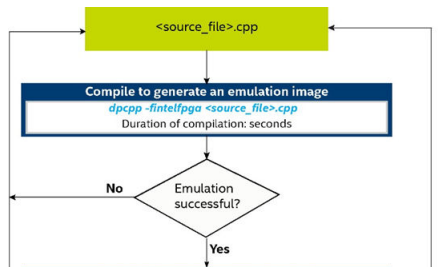
I have installed on my local system (with OS Windows) oneAPI Base Toolkit. Compilation was executed in Intel oneAPI command prompt for IA32 for Visual Studio 2022. Compilation flow was provided considered to FPGA Flow: https://www.intel.com/content/dam/develop/external/us/en/documents/oneapiprogrammingguide-8.pdf (page 32-33). I stucked in the start of flow (with command "dpcpp -fintelfpga <source_file>.cpp"): Source code of compiling file (oneAPI sample "vector-add-buffers.cpp"): //============================================================== // Vector Add is the equivalent of a Hello, World! sample for data parallel // programs. Building and running the sample verifies that your development // environment is setup correctly and demonstrates the use of the core features // of SYCL. This sample runs on both CPU and GPU (or FPGA). When run, it // computes on both the CPU and offload device, then compares results. If the // code executes on both CPU and offload device, the device name and a success // message are displayed. And, your development environment is setup correctly! // // For comprehensive instructions regarding SYCL Programming, go to // https://software.intel.com/en-us/oneapi-programming-guide and search based on // relevant terms noted in the comments. // // SYCL material used in the code sample: // • A one dimensional array of data. // • A device queue, buffer, accessor, and kernel. //============================================================== // Copyright © Intel Corporation // // SPDX-License-Identifier: MIT // ============================================================= #include <sycl/sycl.hpp> #include <vector> #include <iostream> #include <string> #if FPGA || FPGA_EMULATOR #include <sycl/ext/intel/fpga_extensions.hpp> #endif using namespace sycl; // num_repetitions: How many times to repeat the kernel invocation size_t num_repetitions = 1; // Vector type and data size for this example. size_t vector_size = 10000; typedef std::vector<int> IntVector; // Create an exception handler for asynchronous SYCL exceptions static auto exception_handler = [](sycl::exception_list e_list) { for (std::exception_ptr const &e : e_list) { try { std::rethrow_exception(e); } catch (std::exception const &e) { #if _DEBUG std::cout << "Failure" << std::endl; #endif std::terminate(); } } }; //************************************ // Vector add in SYCL on device: returns sum in 4th parameter "sum_parallel". //************************************ void VectorAdd(queue &q, const IntVector &a_vector, const IntVector &b_vector, IntVector &sum_parallel) { // Create the range object for the vectors managed by the buffer. range<1> num_items{a_vector.size()}; // Create buffers that hold the data shared between the host and the devices. // The buffer destructor is responsible to copy the data back to host when it // goes out of scope. buffer a_buf(a_vector); buffer b_buf(b_vector); buffer sum_buf(sum_parallel.data(), num_items); for (size_t i = 0; i < num_repetitions; i++ ) { // Submit a command group to the queue by a lambda function that contains the // data access permission and device computation (kernel). q.submit([&](handler &h) { // Create an accessor for each buffer with access permission: read, write or // read/write. The accessor is a mean to access the memory in the buffer. accessor a(a_buf, h, read_only); accessor b(b_buf, h, read_only); // The sum_accessor is used to store (with write permission) the sum data. accessor sum(sum_buf, h, write_only, no_init); // Use parallel_for to run vector addition in parallel on device. This // executes the kernel. // 1st parameter is the number of work items. // 2nd parameter is the kernel, a lambda that specifies what to do per // work item. The parameter of the lambda is the work item id. // SYCL supports unnamed lambda kernel by default. h.parallel_for(num_items, [=](auto i) { sum[i] = a[i] + b[i]; }); }); }; // Wait until compute tasks on GPU done q.wait(); } //************************************ // Initialize the vector from 0 to vector_size - 1 //************************************ void InitializeVector(IntVector &a) { for (size_t i = 0; i < a.size(); i++) a.at(i) = i; } //************************************ // Demonstrate vector add both in sequential on CPU and in parallel on device. //************************************ int main(int argc, char* argv[]) { // Change num_repetitions if it was passed as argument if (argc > 2) num_repetitions = std::stoi(argv[2]); // Change vector_size if it was passed as argument if (argc > 1) vector_size = std::stoi(argv[1]); // Create device selector for the device of your interest. #if FPGA_EMULATOR // Intel extension: FPGA emulator selector on systems without FPGA card. ext::intel::fpga_emulator_selector d_selector; #elif FPGA // Intel extension: FPGA selector on systems with FPGA card. ext::intel::fpga_selector d_selector; #else // The default device selector will select the most performant device. auto d_selector{default_selector_v}; #endif // Create vector objects with "vector_size" to store the input and output data. IntVector a, b, sum_sequential, sum_parallel; a.resize(vector_size); b.resize(vector_size); sum_sequential.resize(vector_size); sum_parallel.resize(vector_size); // Initialize input vectors with values from 0 to vector_size - 1 InitializeVector(a); InitializeVector(b); try { queue q(d_selector, exception_handler); // Print out the device information used for the kernel code. std::cout << "Running on device: " << q.get_device().get_info<info::device::name>() << "\n"; std::cout << "Vector size: " << a.size() << "\n"; // Vector addition in SYCL VectorAdd(q, a, b, sum_parallel); } catch (exception const &e) { std::cout << "An exception is caught for vector add.\n"; std::terminate(); } // Compute the sum of two vectors in sequential for validation. for (size_t i = 0; i < sum_sequential.size(); i++) sum_sequential.at(i) = a.at(i) + b.at(i); // Verify that the two vectors are equal. for (size_t i = 0; i < sum_sequential.size(); i++) { if (sum_parallel.at(i) != sum_sequential.at(i)) { std::cout << "Vector add failed on device.\n"; return -1; } } int indices[]{0, 1, 2, (static_cast<int>(a.size()) - 1)}; constexpr size_t indices_size = sizeof(indices) / sizeof(int); // Print out the result of vector add. for (int i = 0; i < indices_size; i++) { int j = indices[i]; if (i == indices_size - 1) std::cout << "...\n"; std::cout << "[" << j << "]: " << a[j] << " + " << b[j] << " = " << sum_parallel[j] << "\n"; } a.clear(); b.clear(); sum_sequential.clear(); sum_parallel.clear(); std::cout << "Vector add successfully completed on device.\n"; return 0; } Compilation flow and part of output with many errors: Part of output in the end:Solved2KViews0likes3Comments