transceiver
114 Topics
Agilex5 o_tx_ready and o_rx_ready not asserting
I'm working on a design for a video router, and having trouble with the transceivers. I have the premium devkit to test run the setup. This board has ES silicon, A5ED065BB32AE6SR0. The design would implement 4 or 8 lanes of 12.5Gbps (later 17Gbps or faster), on the GTS XCVR, PCS Direct with IEEE_FLEXE_66 implementation. I followed the User Guide to implement the startup sequence (Reset_Sequencer is OK - it handshakes src_rst_req and src_rst_grant). Figure 65 was my guideline to develop the FSM to bring the Tx and Rx lane up and running. The issue I'm observing: The TX run-time reset sequence (UG Fig 56) completes: i_tx_reset asserted → o_tx_reset_ack asserts → i_tx_reset deasserted → o_tx_pll_locked asserts → src_rs_grant completes. But o_tx_ready never asserts (o_rx_ready likewise). As an extra measure against metastability, all status signals are 2-flop synchronized before use. When I hook up the Transceiver Toolkit, it brings the same channel up reliably. What additional condition gates o_tx_ready that isn't in Figure 56, or what should I look for to get the XCVR reliable up and running. After the initial 'bring_up_sequence, I'll run 4kb packets at 64/66bit to minimize overhead, hence the FLEXE_66. I'm kind of stuck164Views0likes6Comments
Queries on 46.6944 Gbps PAM4 F-Tile Configuration and Loopback Testing using Agilex7
Team, Quartus: Quartus Prime Pro 26.1.0 I am currently working on an Agilex 7 F-Tile transceiver configuration for a 46.6944 Gbps PAM4 application. Please find my query (Read file) as attached and provide advise.. Regards amolkumar419Views0likes15Comments
How to manual control the E-Tile transceiver's CDR mode of agilex 7
Hi, fpga chip : AGFB014R24B2E3VNL Issue : rx_set_locktodat and rx_set_locktoref doesn't present in E-Tile's Transceiver's CDR, and I didn't found the related avalon register to control this part in the E-Tile Transceiver PHY user guide Does E-Tile transceiver support this feature in Agilex 7 Device? If so, could you please share this part information? Best Regards, LambertSolved127Views0likes5Comments
Request about FPGA 10CL025YU256A7G
I wanted to ask you a question about the Altera 10CL025YU256A7G FPGA. We would like to implement a QSPI bus that could operate at a maximum frequency of 166 MHz in DDR mode and at a supply voltage of 3.3 V. In theory, the I/O pins of this FPGA should be able to operate at 200 MHz, so we believe this should be feasible: However, when running simulations with the FPGA acting as the driver, we are encountering some limitations at a 3.3 V supply voltage. While reviewing the FPGA's IBIS file, I noticed that for supply voltages below 3.3 V, the file provides several models that allow the drive strength and slew rate configurations to be adjusted. As an example, below are the available I/O models for a supply voltage of 1.8 V. The number following the letter 'd' indicates the current provided by the buffer (for example, d8 = 8 mA drive strength), while the letters at the end of the model indicate the slew-rate configuration ('s' = slow, 'm' = medium, 'f' = fast). ttl18_cio_d2 ttl18_cio_d4 ttl18_cio_d6 ttl18_cio_d8s ttl18_cio_d10s ttl18_cio_d12s ttl18_cio_d16s ttl18_cio_d8m ttl18_cio_d10m ttl18_cio_d12m ttl18_cio_d16m ttl18_cio_d8f ttl18_cio_d10f ttl18_cio_d12f ttl18_cio_d16f For a 3.3 V supply voltage, the IBIS file provides far fewer models. For TTL, there are two models, one with 4 mA drive strength and another with 8 mA, while for CMOS there is only one model with 2 mA drive strength: ttl33_cio_d4 ttl33_cio_d8 cmos33_cio_d2 This brings me to my question: are there any limitations on the output buffers when operating at a 3.3 V supply voltage? If not, do you have a more complete IBIS file with additional drive-strength and slew-rate models? What we are seeing in our simulations is that, at this supply voltage and a frequency of 166 MHz, the signal quality is somewhat poor from a signal-integrity perspective. The model that provides the best performance is ttl33_cio_d8, but we are seeing relatively slow rise/fall times (greater than 1 ns), which somewhat limits the maximum operating frequency. At lower supply voltages, the availability of models with higher drive strengths results in faster signal transitions, and the signal integrity looks better at the frequency we are targeting. Could you please confirm whether the 3.3 V I/O buffers have any inherent limitations in terms of drive strength or slew rate, and whether a more comprehensive IBIS model is available? Thank you in advance for your help. As additional information, I am attaching a screenshot of the DQS signal generated by the FPGA when operating at 120 MHz. As you can see, the signal already shows some degradation at this frequency: I generated this signal using the TTL33_CIO_D8 model, which provides the best results among the models available for a 3.3 V supply voltage. The other models provided in the IBIS file for 3.3 V have lower drive strength, and the resulting signal is even worse (TTL33_CIO_D4 and CMOS33_CIO_D2). As mentioned in my previous message, at lower supply voltages the IBIS file provides a wider range of models, including models with higher drive strength. This is the reason for our question: is the IBIS model for 3.3 V incomplete, or is there actually a limitation on the output buffer at this supply voltage?Solved147Views0likes3Comments
Introducing the Altera Community AI Responder — Beta
Altera is introducing the AI Responder, an assistant built into the Altera Community to help provide faster, context-aware guidance for Altera product questions. It uses relevant public Altera documentation and Knowledge Database content, with coverage continuing to expand. The AI Responder may provide source references and can hand off complex or out-of-scope questions to an Altera subject-matter expert. As a beta feature, responses may contain errors or omissions, so please review the sources and verify technical guidance against official Altera documentation before implementation. If the response does not fully address your question, add more context and tag ai_responder to continue the discussion. We welcome your feedback as we improve the Community experience.22Views0likes0Comments
Inconsistent Eyes with S10 E-tile Transceiver.
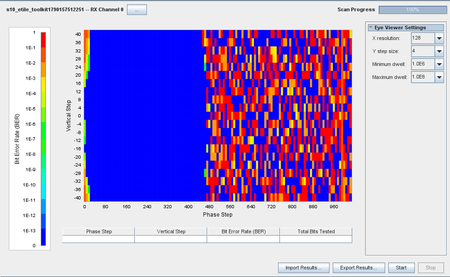
Hi Support and Community. Why am I obtaining eyes sticking to the left instead of the middle? Quartus Prime Pro 26.1 Stratix 10 TX SI Signal : NRZ @1.4Gbps Channel: External Loopback (Tx+ to Rx+ Rx- via single ended to differential converter, Tx- terminated with 50 Ohms) Eye h/w: ~90/~500 PMA: Settings are on default (after initial adaptation)117Views0likes2CommentsR-TILE PIPE DIRECT MODE SIMULATION PHY STATUS ISSUE IN RESET RELEASE SEQUENCE
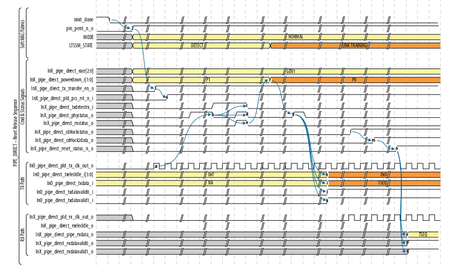
HI, I am currently working on r-tile pipe direct mode simulation in questasim. So, initially i have generated r-tile ip with configuration of pipe direct mode, 16x1. I have generated hdls using generate hdl option(enabling verilog,questasim). I have written pipe control fsm to provide control inputs to r-tile ip. Ref_clock1,ref_clock2 frequency is 100mhz. Reconfig_clock frequency is 100mhz. pipe_direct_pld_tx_clk_out_o from ip is 500mhz(validated in sim) So, i start with providing ninit_done using reset release ip. once nint_done goes low, i am providing pin_perst_n to high. then pin_perst_n_o goes high. After sometime, pipe_direct_pld_tx_clk_out_o becomes active. So, i am waiting for ln0_pipe_direct_tx_transfer_en_o to goes high. once this signal goes high, i will release ln0_pipe_direct_pld_pcs_rst_n_i to high. I am checking the phy signal to toggle. but from beginning itself it stays low, it never toggles. Along with this standard procedure, i tried 2 more possibilities i tried, After i released the ln0_pipe_direct_pld_pcs_rst_n_i to high. I provided the ln0_pipe_direct_txdetectrx_i to high. No response from phy_status. After i released the ln0_pipe_direct_pld_pcs_rst_n_i to high. I provided the ln0_pipe_direct_txdetectrx_i , rx_standby to high. still No response from phy_status I am attaching some screenshots of waveforms. Kinly look into it and help me out. I am really stuck at midway..87Views0likes2Comments
Stratix 10 fPLL is cascade source mode doesn't lock
Hello everyone. I use fPLL cascading with Stratix 10 FPGA: fPLL in cascade source mode is connected to fPLL in transceiver mode. In my design reference clock for fPLL in cascade source mode is not stable after power-up and I apply user recalibration to it. But after user recalibration when reference clock is stable, fPLL doesn't set lock signal. After some investigation of the issue, I found that my design works fine with Quartus Pro 21.2 but doesn't work with newer versions like Quartus Pro 23.4/25.1/26.1. Is there any known issue about fPLL is cascade source mode? Any suggestions about how to overcome this issue are welcomed.844Views0likes19CommentsGuidance on Enabling USB Mode in F-Tile PMA Direct PHY IP – Quartus Prime 26.1
Hello, I am currently working on USB 3.x data-rate implementation using the F-Tile PMA Direct PHY IP in Quartus Prime for the Agilex 7 device. In earlier versions of the F-Tile PMA Direct PHY IP, the FGT PMA Configuration Rules parameter provided a USB mode. Selecting this mode enabled several USB-specific interfaces and features, including ports such as: fgt_rx_signal_detect_lfps fgt_tx_pma_elecidle Simplified TX Data Interface However, in the newer Quartus Prime versions, including Quartus Prime 26.1, the USB option appears to have been removed from the FGT PMA Configuration Rules parameter. Could you please guide me on how to enable or configure the F-Tile PMA Direct PHY IP in USB mode in Quartus Prime 26.1? In particular, I would like to know whether there is a supported Tcl command, configuration setting, or other method to enable the previously available USB PMA configuration. I would appreciate any guidance or documentation regarding the recommended procedure for enabling the USB-specific PMA configuration and associated ports in the latest IP version. Quartus Prime Version: 26.1 Regards, HMV5Views0likes0CommentsIO Standard for GTS Transceiver REFCLK
Hi, We use on the Agilex 5 and 3 Transceivers with AC coupling. Agilex 5 requires CML, HCSL in Agilex 5 datasheet. However, Agilex 5 Premium kit uses LVDS Clock for some Transceiver REFCLK. Is it possible to use LVDS as REFCLK for XCVRs when we use with AC Coupling ?Solved357Views0likes2Comments