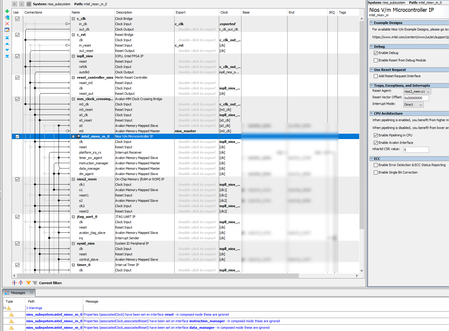
nios architecture
41 Topics
HyperRAM Hyperbus options for Agilex
In migrating a Xilinx design : We are looking to use a A5E A 007 B23B device with a NIOS-V or other RISCV soft core. Because we need to use the HSIO pins for ~ 20 pairs of LVDS, and the entireHSIO bank (96 wide) having to be at 1.3V to support LVDS mean that we cannot use the internal LPDDR4 memory controller. Please confirm my understanding - that although the 96 wide I/O bank can be split into two functional sub banks (2A, 2B etc) (to support say, LPDDR4(16 bit), and something else , that we CANNOT split the VCCIO-BANK between the two sub banks ? (to have 1.1V for LPDDR4 and 1.3V for LVDS) The projects do not need much memory- a 64 Mbit HyperRAM device hanging from 1.8V HVIO would do the job (perhaps max clock 125 MHz on HVIO ?) What instantiable cores do ALtera have in the war chest for HyperRAM? There is a 3rd party Hyperbus controller IP but we wont want to spend $10,000 on it, as moving from a cheaper Xilinx device to a less competitive Altera device is already a big job and we do not think it deserves having that much more money spent on it. (Efinix have a free Hyperbus core, Xilinx have a free Hyperbus core....) Regards Glen.Solved116Views0likes4Comments
Introducing the Altera Community AI Responder — Beta
Altera is introducing the AI Responder, an assistant built into the Altera Community to help provide faster, context-aware guidance for Altera product questions. It uses relevant public Altera documentation and Knowledge Database content, with coverage continuing to expand. The AI Responder may provide source references and can hand off complex or out-of-scope questions to an Altera subject-matter expert. As a beta feature, responses may contain errors or omissions, so please review the sources and verify technical guidance against official Altera documentation before implementation. If the response does not fully address your question, add more context and tag ai_responder to continue the discussion. We welcome your feedback as we improve the Community experience.18Views0likes0CommentsNIOS-V-64bit - why no double precision FPU ?
We need the 64 bit NIOS for several projects and must have a double precision FPU option. But the documentation so far lists only a single precision FPU Is this correct ? a 64 bit processor not having a (64 bit) double precision native FPU option seems unbeleiveable . It is about as strange as say, not having an 64 bit ALU. Altera- please explain ? page 3 : https://docs.altera.com/v/u/docs/759484/nios-v-processors-for-agilextm-5-fpgas-e-series-technology-brief Or please add this to the basic feature provision ? With thanks Glen. (Experienced Xilinx user consideriing migrating-defecting to Altera )Solved293Views0likes7Comments
Run-time errors using EMIF in Agilex 5 NIOS-V design
Hello, I am using Quartus Prime Pro 26.1.1, with the Agilex 5 development board (AXE5-Eagle). I am trying to run the NIOS-V code from the LPDDR4 memory, using JTAG to download/debug. The reset and exception vectors are set to the On-Chip RAM. I used the sample design provided for that board - AXE5 Eagle mipi_hdmi_mira220 and removed everything related to MIPI and HDMI. Added JTAG Uart IP. The resulting sample design is attached (mipi_hdmi_mira220.zip). In the software/ directory you can also see the FreeRTOS BSP I used. I created a simple FreeRTOS application that just prints some string to stdout. What I am seeing is - the RISC-V processor throws exceptions - one of the following - Misaligned Read Address, Misaligned Write Address or Invalid Instruction. This happens in alt_load_section(). If I execute step-by-step, no exception is thrown. But if I just run the application it fails. Is there something else that need to be added/updated/changed, in order to be able and execute code from LPDDR4 using the EMIF IP? I could not find any existing sample design, using NIOS-V and EMIF, with code execution from EMIF. Thank you, D.492Views0likes5CommentsLPDDR4 not available in NIOSV/g linker script - Agilex-5, Quartus 26.1 Pro
Hello, I have a simple design for Agilex 5, using NIOS V/g and EMIF IP with LPDDR4 memory. I have the NIOS V instruction and data manager ports connected to the EMIF IP. Design compiles Ok. But when I create a BSP, in the linker section, there is not a memory device for the LPDDR4. In this thread, a similar problem seems to be mentioned - issue-with-bsp-creation-for-nios-vm-using-lpddr4-on-agilex-5-quartus-24-1--24-3 Does it mean that Address Span Extender IP must be used in order to have the LPDDR4 show in the linker script section, as an available memory device?Solved361Views0likes7Comments
not able to use multiple niosV cores at the same time
when I run ultiple niosV cores at the same time im not able to acess each of them even though i am able to detect them , i am faced with even though detecting gives me and i am unable to use the cores likewise this is my file on platform designer274Views1like7Comments
Implementing many Nios® V cores on Agilex™ 7
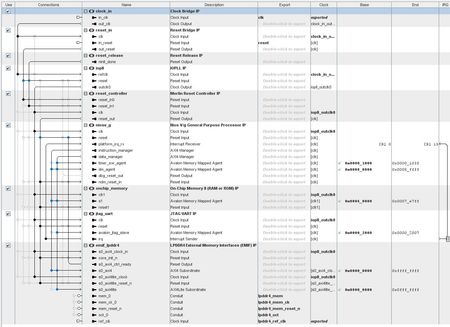
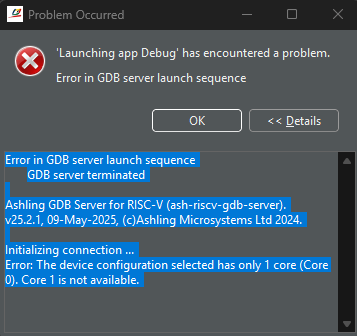
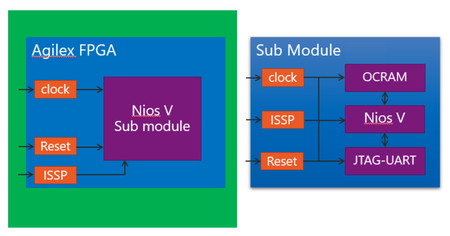
Table of Contents Introduction Environment Configuration (HW) Configuration (SW) Mass Implementation Multicore Debugging Conclusion Note: This article is an English translation of this Japanese article by Macnica. Please refer to the original article for updates. Introduction The attention to RISC-V has been increasing year by year, and it seems that many manufacturers are developing based on RISC-V. The Nios® V I use this time is also one of the RISC-V based processors, and it is a softcore processor developed by Intel. This article is an experimental article about implementing Nios® V to the limit on Agilex™ 7, thinking about doing something interesting with RISC-V. Environment This time, since we are using Intel FPGA and Nios® V, we will use the following: Intel® Quartus® Prime Pro Edition Software Version 22.2 for Windows Ashling* RiscFree* IDE for Intel® FPGAs We will use the following for Agilex™ 7: Agilex™ 7 FPGA F-Series Development Kit (P-Tile and E-Tile) Configuration (HW) This time, to implement many Nios® V, we have created a submodule with Nios® V, and are instancing that module in the top level. The configuration of the submodule includes: Nios® V/m processor On Chip RAM JTAG-UART These three are the minimum requirements for operation confirmation. The top level includes: CLK Reset Submodule (Nios® V) ISSP Reset You may not be familiar with ISSP, but understand that we are using HW logic with ISSP to toggle the Reset because the development kit used this time does not have a reset button for FPGA. The block diagram of this configuration is as follows. (Orange is Bridge, and purple is IP, color-coded.) In this configuration, the On chip RAM for Nios® V execution memory is generated with 128kByte. For details, please refer to the capture of the Platform Designer in "Mass Implementation". This time, since we will not perform a standalone operation confirmation, we have constructed it to only run the elf file in RAM with a debugger without considering detailed settings such as Reset Vector or Boot methods for each Nios® V. Configuration (SW) The software is a simple program that outputs to the JTAG console. Since we implement multiple Nios® V, it is better to write the program so that the outputs from different cores can be distinguished. Please refer to the final outputs at the end of section Multicore Debugging. Mass Implementation This configuration is created in Platform Designer. Since we only need to instance the submodules in the top level, we are lucky that the top level remains clean, although it took time to generate. First, let's check with only one Nios® V. As explained earlier, it appears that only one Nios® V submodule is implemented in the Platform Designer system. Below is the top level system diagram (the red frame is the Sub module). This is the Sub Module (the red frame is Nios® V/m processor). The compilation result is below. Even though we used 128kB Onchip RAM, it is still only 1% utilized. Next, let's try with 10 units. To make it easier later, we have created a submodule that implements 10 submodules and instance it in the top level. Below is the compilation result. Roughly, the RAM block usage is 1% per Sub module. Let's go bold and implement 100 units. We barely managed to implement it! It's okay to implement 100 units!! Although we think we can implement a few more, as the RAM resources are over 90%, we will settle with 100 units for now. Multicore Debugging Finally, I would like to write about debugging when implementing multiple units. For the Nios® V development environment, we use Ashling* RiscFree* IDE for Intel® FPGAs introduced in Chapter 2. It can be downloaded together with Intel® Quartus® installer, so please install it together. Here, I will omit the steps for launching Ashling* RiscFree* IDE for Intel® FPGAs and importing the project. The build process was referenced from the article below: Development Procedure for Nios® V Projects using Ashling* RiscFree* IDE for Intel® FPGAs After you have built the projects, first create a Debug configuration for each CPU. You can select which CPU to create for from the Core selection in the Debugger tab, as shown below. After setting and creating the Debug configuration for each CPU, group them with Launch Group to execute them simultaneously. This completes the Debug configuration. Next, prepare the console output destination. This time, due to screen display limitations, we will display the output in each Nios® V command shell. Launch the Nios® V command shell for each CPU and execute the following command: #juart-terminal -c <change for each CPU> -d <device number> -i <instance number> juart-terminal -c 1 -d 0 -i 0 With this command, each Command shell will be linked to the JTAG console. (The last number in Core selection corresponds to the argument of -i.) Select the Group created earlier and press Debug. By default, it will break at the start of the main function, so you can add breakpoints, check register and variable values for each source to debug. The execution result this time is shown below. We captured the situation where the JTAG console is running simultaneously. Conclusion This time, I implemented many Nios® V just for fun, but it took a lot of time for tasks such as compilation time and Platform Designer hierarchy design. It was quite difficult for an article started with a light heart. However, since I think there are few people who actually perform this configuration, I hope you will find the multicore debugging part helpful. Notices & Disclaimers Intel technologies may require enabled hardware, software or service activation. No product or component can be absolutely secure. Your costs and results may vary. © Intel Corporation. Intel, the Intel logo, and other Intel marks are trademarks of Intel Corporation or its subsidiaries. Other names and brands may be claimed as the property of others. The products described may contain design defects or errors known as errata which may cause the product to deviate from published specifications. Current characterized errata are available on request. Intel disclaims all express and implied warranties, including without limitation, the implied warranties of merchantability, fitness for a particular purpose, and non-infringement, as well as any warranty arising from course of performance, course of dealing, or usage in trade. Nios is a trademark of Intel Corporation or its subsidiaries.2.9KViews0likes2Comments
NIOS II "Verify failed" for on-chip memory 128k
Hello! I'm using a Cyclone 10LP FPGA 10CL055YU484I7G FPGA. I have a 11k size program for NIOS II. I have a large on chip RAM (because I have a larger program which I want to use later) of 128k. Everything compiles and links OK. But when I try to download the program I get a "Verify failed between address 0x20000 and 0x2FFFF". The 128K memory is located 0x20000 to 0x3FFFF If I reduce the RAM to 32K, for example, everything works great!!. The initialize memory content option is turned on for the memory The BOOT RAM starts at 0x00000 If I download a bigger program (117k), I still get the same error. Thanks253Views0likes3Comments
NIOS-V QSYS Warning Properties (associatedClock) have been set on
Hello, I have a really basic setup of a NIOS V system, but get Warnings in QSYS (using Quartus 25.1 Standard) about Properties of associatedClock: System: Warning: Warning: nios_subsystem.intel_niosv_m_0: Properties (associatedClock) have been set on interface reset - in composed mode these are ignored Warning: nios_subsystem.intel_niosv_m_0: Properties (associatedClock,associatedReset) have been set on interface instruction_manager - in composed mode these are ignored Warning: nios_subsystem.intel_niosv_m_0: Properties (associatedClock,associatedReset) have been set on interface data_manager - in composed mode these are ignored Questions: What is "composed mode" and how can I control it? There is no NIOS Parameter associated with it This appears in a basic setup simply by adding NIOS V to the system. How do I get rid of this warning? best regards FabianSolved264Views0likes4Comments