Get rid of Intel account
Can I get rid of my Intel account without loosing this one ? Since yesterday they have started spamming me with 100s of PDN notes that are somewhat relevant, maybe, but I can not even easily get to, even if I first get the code from the confirmation mail, then confirm the log-in on my authenticator, then supply my fingerprint. This Intel support is just a pain in the ....18Views0likes2CommentsHow can I use Quartus Pro 25.1 sopc-create-header-files tool to generate a jtag master header file?
I am an engineer in Terasic, I am writting a tutorial for Agilex 5. I use Quartus Pro 25.1, there is a sopc-create-header-files in \quartus\sopc_builder\bin path, I want to generate a header file in Windows system.however, I couldn't use it in Win10 system. I tried it in Nios V command Shell: even I used Windows WSL: or in Windows PowerShell: Thanks for your advice. Doreen63Views0likes6CommentsIntermittent DDM Errors
Hi Everyone, Beginning January 10, 2026, executing commands in the terminal or GUI of Quartus Prime Pro Edition software, Quartus Embedded Edition software, or select standalone tools may cause the software or tool to crash. This error affects: Quartus Prime Pro Software versions v23.3 through v25.3.1 Standalone Quartus Prime Pro Programmer v23.3 through v25.3.1 Standalone Quartus Prime Pro Embedded Edition v25.3 and 25.3.1 Standalone Quartus Prime Pro Power Thermal Analyzer v25.3 through v25.3.1 This issue is not observed in Quartus Prime Pro Edition versions 23.2 or prior or Quartus Prime Standard Edition. For more information, see this KDB: Why do I unexpectedly observe intermittent DDM Errors? | Altera Community Sue248Views1like5CommentsIssues with downloading
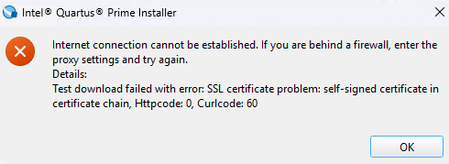
Im currently trying to download intel Quartus version 24.1 (recommended via the university), however im getting an error which ive added in the attachment below. I am on my home WiFi which is a private network and my laptop has no firewall or antivirus apart from windows defender active. Ive had this issue on multiple different internet connections and im wondering if anyone has any advice on how i can fix it.30Views0likes3CommentsLicensing ‘Know-How’ Guide
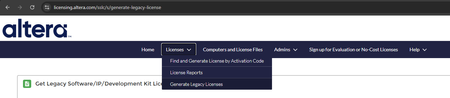
#sharing #debug #altera #alldevices #license Disclaimer: This article is provided as-is for educational purposes only, without warranty of any kind. Use the information at your own risk. Always verify implementations in your specific environment and consult official Altera documentation for production deployments. Introduction Licensing issues are one of the most common reasons FPGA tools fail to start. The good news is that most problems are configuration related and can be fixed quickly by following a simple, step-by-step approach. Sections 1: Start with the Error Message (Most Important!) Always look at the first licensing error message shown by the tool. This is usually the real issue. Any errors that appear later are usually caused by the first problem. Here’s are common error messages and what they usually mean: Invalid hostid → License does not match your machine ID Cannot find license file → Invalid or missing license path Unable to checkout a license → License not found, in use, or server issue 300: License version is outside the range of the contract → license file generated with blank FLEXlm error: Vendor daemon version is too old → daemon used mismatch or too old Cannot checkout uncounted license in Windows Terminal Services → Questa does not support remote desktop. Most common errors already have known fixes. Try searching the error message or key issue at: Altera Knowledge Base: https://community.altera.com/category/top/kb/knowledge-base Altera Community Forums: https://community.altera.com/category/forums For floating licenses, you can also check the FlexNet error code list: Error Code Descriptions Don’t try to fix everything at once. Fix the first error, then retry. In many cases, the rest will disappear automatically. 2: Check Your License (.dat) File Open the .dat license file using a text editor (for example, Notepad) and verify the following. i. Machine ID (NIC / HOST ID) The license is locked to a specific machine ID. Example in the license file: # Primary Machine ID-NIC ID 12AB34C56EF7 If the Host ID doesn’t match your machine ID, the license will not work. Helpful Tips 1: ----------------------------------------------------- START ----------------------------------------------------- Quartus software can automatically detect the Machine ID. To view this, go to Tools → License Setup, then check Local System Information and select one of the detected NIC IDs. ------------------------------------------------------ END ------------------------------------------------------ ii. License Type Licenses are set up differently, so confirm which type you have.Look for one of these lines: # Fixed Node License → Nodelocked license # Floating Server License → Floating license Nodelocked: Locked to one machine Floating: Served from a license server and shared Make sure you’re following the setup steps that match your license type. iii. Product License Summary Find the Product License Summary section and confirm it lists the tools/IP you’re planning to use. Examples: Quartus® Prime Software (Standard / Pro) Questa® FPGA Starter Edition (SWQUESTA) If a tool or IP is not listed here, it won’t be able to check out a license—even if the license file setup successfully. iv. License Expiration & Maintenance Licenses can look similar but behave very differently. We have: a. Perpetual License Has a Maintenance Expiration date You can use tool versions released before that date Example shown in license file: # Maintenance Expiration of 2026.06 # No license expiration date b. NonPerpetualLicense Has a hard expiration date License stops working after this date Example shown in license file: # License Expires 20Jun2026 Always doublecheck the license expiration & maintenance date before moving on. 3. Verify Environment Variables The tools use environment variables to find the license. If these are wrong, the tools may not find your license—or may use an old license file. Common environment variables: Different tools use different environment variables to locate the license. LM_LICENSE_FILE → Quartus® Prime SALT_LICENSE_SERVER → Questa* FPGA Edition Depending on the license type, they should point to: Nodelocked license: Full path to the .dat file Floating license: port@hostname Examples: LM_LICENSE_FILE=C:\licenses\license.dat LM_LICENSE_FILE=25000@licenseserver Next verify the environment variable. Open Command Prompt and run: echo %LM_LICENSE_FILE% If nothing is printed, the environment variable is either not set or the changes have not taken effect. If it is the latter, close and reopen the command prompt after making the changes. If the variable points to an incorrect location, update it accordingly. Note that outdated or incorrect environment variables are a very common source of issues. Helpful Tips 2: ----------------------------------------------------- START ----------------------------------------------------- There is a quick way to set using command line. Open Command Prompt and run: Windows: setx LM_LICENSE_FILE <path_to_license_file> Linux: setenv LM_LICENSE_FILE "<path_to_license_file>" ------------------------------------------------------ END ------------------------------------------------------ 4. Check the License Server (Floating Licenses Only) If you’re using a floating license, verify the server. On the client machine: Server hostname resolves correctly Network is working Firewall is not blocking the license port On the license server: License server process is running Vendor daemon is running Server log shows no fatal errors Licenses are available (not all checked out) If the server isn’t running properly, clients won’t be able to get licenses. 5. Scenario / Walkthrough i) A floating license setup walkthrough (Know-How: Set Up a Floating License) is available to guide you through the complete process of configuring a floating license. Know-How: Set Up a Floating License (Step-by‑Step Walkthrough) | Altera Community - 352000 ii) If you generate a license but do not receive the license email within 5 minutes, you can manually download the license file using the steps below: Log in to SSLC. Navigate to Computers and License Files. Click the Primary Computer ID. Go to the ENTITLEMENTS tab. Select the relevant license (for example, LR‑****). Click the license file link to download the license file. Example shown below: Conclusion Licensing issues are almost always setup or configuration problems. Following this guide step-by-step starting with the error message will resolve most issues. If you’re still stuck after trying all the steps, feel free to post your issue on the Altera Community Forum (https://community.altera.com/category/forums) for help. When posting, please try to include the following: i. Error Details The exact licensing error message, copied as is If there are multiple errors, include the first one shown ii. Tool Information Product name (example: Quartus/Questa) Tool version (example: Quartus Pro 25.3/ Questa Altera FPGA Edition 2025.2) Operating system (Windows or Linux, version if known) iii. License Information License type: Nodelocked (fixed)/ Floating (network) Purchased / Evaluation license If possible, a copy of the license file (.dat) iv. What You’ve Already Tried Steps you have already checked or attempted Any workaround that partially worked The more complete your post, the faster the community (and Altera support staff) can help. Additional Altera Support Webpages For further information related to licensing, you may check out Altera Licensing Webpages for the wholesome experiences to get your FPGA licensing product setup and running with minimal hassle: FPGA Licensing Support Center Quartus® Prime Software Licensing Questions and Answers Additionally, we have FPGA Software Download and Installation Support webpage: FPGA Software Download and Installation Support Self Service Licensing Center (SSLC) Issues For issue related to the SSLC, please contact Customer Service if you encounter any of the following: Can’t find a product in SSLC Errors when generating a license file Errors when renewing a license file Unable to generate a companion or temporary license Unable to update license users or delegate administrators Need to transfer license ownership between accounts Contact Altera Customer Service here: https://licensing.altera.com/sslc/s/contact-customer-service For account login issue, please mail to: loginsupport@altera.com License Purchase Inquiries For purchasing licenses, pricing questions, or commercial inquiries, please contact an Altera Authorized Distributor: https://www.altera.com/contact51Views0likes0CommentsKnow-How: Set Up a Floating License (Step-by‑Step Walkthrough)
#sharing #debug #altera #alldevices #license Disclaimer: This article is provided as-is for educational purposes only, without warranty of any kind. Use the information at your own risk. Always verify implementations in your specific environment and consult official Altera documentation for production deployments. Introduction This guide explains how to set up a floating license for Altera® FPGA tools. The instructions and screenshots are based mainly on the Windows* operating system, but the same concepts apply to Linux systems. Overview: What You Need Before Starting Before you begin, make sure you have the following: A valid floating license file (.dat) - For the examples below, this file will be referred to as float.dat. Access to the license server machine The license server’s hostname and NIC ID / Host ID Steps Step 1: Generate the Floating License File (SSLC) i. Log in to the Self Service Licensing Center (SSLC). ii. Select your product entitlement, for example: - Quartus Prime - Questa iii. Choose one of the following: - An existing computer with FLOAT license type - Or select + New Computer, in the Create Computer, choose FLOAT license type, and enter the license server NIC ID / Host ID 4. Generate and download the license file (.dat). Step 2: Edit License File i. Open the downloaded license file and update it based on the instructions provided in the User Guide Section 6.4.4.1: Setting Up a License File in the License Server: Altera Documentation and Resources Center Helpful Tips 1: ----------------------------------------------------- START ----------------------------------------------------- To find the license server hostname - Open a Command Prompt and run: hostname - Install only the latest license daemons. Remove all older versions, and keep only the most recent ones. Required daemons: FlexNet License Daemon for FPGA software (64‑bit) Includes: alterad (Altera daemon), lmgrd, lmtools, lmutil (These are used later in Step 3.) FlexNet License Daemon for Siemens ModelSim / Questa FPGA software (64‑bit) Includes: saltd (Siemens Advanced Licensing Toolkit Daemon) Download link: Flexlm License Daemons for FPGA Software | Altera *If you’re running a floating license server for Siemens licenses, you need to manually change the VENDOR daemon line in the license file from mgcld to saltd. It is optionally to put user-defined port numbers for the alterad and saltd daemons unless you have specific port numbers that allow firewall access. In this case, I left it empty. ------------------------------------------------------ END ------------------------------------------------------ ii. At the end of Step 2, your license should looks similar like below (Windows): Important to note: Use “” if there is space in the path. Step 3. Launching the Licensing Server The requisites to configure a new license server are: System administration (Administrator) privileges. A valid license.dat floating license file. (Linux only) To run the FLEXlm lmgrd license server manager, make sure that the /usr/tmp directory exists. There are two methods to launch the license server: a) Using the Command Line Interface (CLI) i) Open a Command Prompt (Windows) or Terminal (Linux). ii) Change to the directory where the lmgrd executable is located. iii) Start the license server by running command: lmgrd -c <license.dat> Example: lmgrd -c float.dat This command starts the license server using the specified license file. You will see a few windows pop up showing that the daemons are running. Helpful Tips 2: ----------------------------------------------------- START -----------------------------------------------------To make things easier - skipping the a) ii) step, you can add the path directory that contains lmgrd to your system’s Path environment variable. Once it’s added, you can run the lmgrd command directly from any directory in the Command Prompt. ------------------------------------------------------ END ------------------------------------------------------ iv) To verify the license status. Run: lmutil lmstat –c <license.dat> Example: lmutil lmstat –c float.dat How to Read the above info: Line Note License server status: 1234@<hostname> This contains the license server name needed for the license environment variable setup. It is displayed in the form of <port number>@<hostname> License file(s) on <hostname>: <License Path> : This showed which license file is being used. This is where you make sure the license file you are using is correct. <Hostname>: license server UP (MASTER) v11.19.6 This mean the license server is up successfully. Vendor daemon status (on <hostname>): This showed the vendor daemon status and the daemon version you are using. Make sure the version used is the latest version available. v) Stop the license server: lmutil lmdown -c <license.dat> Example: lmutil lmdown –c float.dat Helpful Tips 3: ----------------------------------------------------- START ----------------------------------------------------- The above command just display the overall status of the license. You can add -a option in the command to report out the verbose list of available licenses and its total numbers of seat, example: lmutil lmstat –a –c <license.dat> Example: lmutil lmstat –a –c float.dat To check a specific feature: lmutil lmstat –c <license.dat> -f <feature name> Example to check the Questa Altera FPGA Edition license: lmutil lmstat –c float.dat -f intelqsim View command options: lmutil lmstat -help ------------------------------------------------------ END ------------------------------------------------------ b) Using the Graphic User Interface (GUI) 1. Right‑click lmtools and select Run as Administrator. 2. In the Service / License File tab, select Configuration Using Services. 3. Switch to the Config Services tab and configure the required fields below: 4. Click Save Service. 5. Go to the Start / Stop / Reread tab and click Start Server to launch the service. 6. Click Stop Server to shut it down. Helpful Tips 4: ----------------------------------------------------- START ----------------------------------------------------- The GUI performs the same actions as the command line, but is easier to visualize. For debugging, the CLI provides more detailed output. If something fails, always check: - Server Status - Debug Log Diagnose license or feature issues using CLI: - lmutil lmdiag -c <license.dat> <feature_name> If using GUI, you can run diagnostics from the Server Diags tab. ------------------------------------------------------ END ------------------------------------------------------ Conclusion This guide provides a complete walkthrough for setting up a floating license server for Altera FPGA tools. Following these steps should help ensure a reliable and functional license environment.39Views0likes0CommentsQuesta 2 licenses?
I got a new work PC (WIndows 11) recently, so I downloaded Quartus Prime Lite 25.1. At the time, I also included Questa Altera Edition in the download. But I didn't try to use Questa. Last week, I read the directions on going to the SSLC and got a license so I could start using Questa. I got the license file, put it in a folder, and followed the directions to set it up in the Environment Variables. I then tried to use Questa and I'm getting the error "Unable to Checkout a license. Make sure your license file environment variable (SALT_LICENSE_SERVER) is set correctly and then run 'lmutil lmdiag' to diagnose the problem." So I dd that. It seems that I have two license files. One looks like it was set up automatically when I originally downloaded Quartus and Questa and the second that I got from the SSLC. Looking in the Environment Variables, under User variables for [my_user_name], there is a variable SALT_LICENSE_FILE with a value of C:/Users/[my_user_name]/questa_lic.dat. And under the System variables there is a variable called SALT_LICENSE_SERVER with a value of C:\[the_folder_I_setup]. I didn't set up the first environment variable. The second one is the one I entered according to the instructions on the SSLC. Looking at the first license file with a text editor, I see that it is using the MAC address of my laptop's wifi adapter. And looking at the second license file, I see that it is using the MAC address of my laptop's wired Ethernet adapter. I think I was on wifi when I originally downloaded everything. And I was wired when I got the license from the SSLC. What should I do? Which license file should it be using? Why are there two variables and two license files? Since the wifi and wired connections on any computer always have different MAC addresses, is it not possible to use Questa with both? In other words will I always have to be using one of these connections and not the other? That would stink. Thanks.68Views0likes6CommentsQuesta Starter License Not Generating (Blank Related Tab / No Email)
Hello, I am a university student trying to obtain a no-cost Questa Starter Edition license for my coursework. The SSLC successfully registers my request (I have generated License numbers L-597671 and L-597892) for my computer (NIC ID: C6EB20524153). However, the portal's backend is completely failing to generate the physical file for my account. The Related tab under the license details is completely empty. The Printable View is entirely blank. Generating via Activation Code just says 'will be sent to email', but no emails ever arrive. Because I am on a student account, I am blocked by the APS requirement from opening a direct support ticket. Could an Altera engineer please check my account and manually email or direct message me the .lic file so I can continue my studies?Solved52Views0likes3CommentsNo access to the Self Service Licensing Center (SSLC)
I have a Quartus license and tried to access the Self Service Licensing Center (SSLC), but when I log in with my account, I get a message saying that I do not have access to this site (I attached a screenshot). What should I do? When I sent a help message through the link on this page, I received an automatic email directing me to seek help through other channels, such as the Altera community forum.160Views2likes11Comments