installation & licensing
496 Topics
Questa-ModelSim UI scaling problems in Linux
Hello Has anybody been able to solve the issue of UI of Questa not scaling correctly on linux with wayland? I am using Ubuntu 26.04 with wayland and UI is just tiny, icons, are so small i cannot read any text. When opening a new project, file explorer is also tiny. Fonts i could change in the config file but icons, menus and everything else is just extremely small. Problem is even worse on high resolution displays. Regards, Haris755Views0likes14Comments
Quartus® Prime 90-Day Evaluation License + IPs
A Quartus® Prime 90-Day Evaluation License has been generated, but it does not cover the required Ethernet IP cores: Triple-Speed Ethernet – OpenCore Plus (00BD) Low Latency 10Gbps Ethernet MAC – OpenCore Plus (0119) Request: Can temporary/evaluation licenses be issued for these IP cores, and how can they be generated?88Views0likes5CommentsFree Licence for Max+PlusII
Hello to all, the ALTERA Support request to ask my question here in this forum, so I am here ;-) I tried to request a legacy Licence file form my old Max+PlusII (baseline 10.2) SW. I got the login, the page, but when I have to add my machine ID (which is based om the MAC address, for example) it always answers with invalid ID. How can I request a licence for this old SW (optimum an unlimited one ...) Greetings Chris OE3CPA254Views0likes7Comments
Introducing the Altera Community AI Responder — Beta
Altera is introducing the AI Responder, an assistant built into the Altera Community to help provide faster, context-aware guidance for Altera product questions. It uses relevant public Altera documentation and Knowledge Database content, with coverage continuing to expand. The AI Responder may provide source references and can hand off complex or out-of-scope questions to an Altera subject-matter expert. As a beta feature, responses may contain errors or omissions, so please review the sources and verify technical guidance against official Altera documentation before implementation. If the response does not fully address your question, add more context and tag ai_responder to continue the discussion. We welcome your feedback as we improve the Community experience.73Views0likes1CommentAltera SSLC License
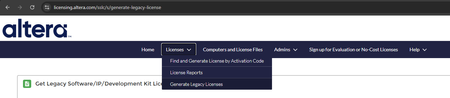
Hello, I am having issues with the Altera / Intel Self Service License Center. According to the help available online ,I should have several options in the "Licenses" menu, yet these ones are missing on my portal (Chrome, Edge, Safari: tried all latest browsers): New Licenses Licenses With Active Maintenance Licenses With Expired Maintenance All Licenses Legacy Licenses Employee and Evaluation License What is also missing seems to be the License Assistant. The blue chat button is nowhere to be found (and I tried all the pages on SSLC). https://docs.altera.com/r/docs/683472/26.1/altera-fpga-software-installation-and-licensing/using-the-altera-fpga-self-service-licensing-center https://docs.altera.com/r/docs/683472/26.1/altera-fpga-software-installation-and-licensing/viewing-licenses Is this a backend configuration issue? Could someone post screenshots of their SSLC, showing whether or not they have access to the hidden menus I am missing?561Views0likes20Comments
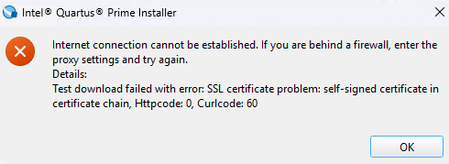
Quarus Prime Installer 24.1 - Error SSL Certificate, Curlcde : 60
Hello, I've got an error during the installation of quartus prime 24.1 : During somes mounths, I uses this solution I've found on the download page. It works great until a few days ago. There s an other solution t use the 24.1 installer now ?186Views0likes9Commentsgetting a licnese
Hello everyone, I just bought my DE10 standard board for my graduation project. Unfortunately, my university doesn't provide a license for the Quartus standard, and I need more than 90 days to finish the project. Is there any way to get a license as a student for free? My project is about an AI accelerator, so I need the standard version; the lite one isn't enough. Thank you,438Views1like6CommentsNumber of ports required for a floating license
I have added the server name and port to license.dat: SERVER servername mac address 10000 VENDOR alterad C:\FLEXlm\alterad.exe # VENDOR mgcld C:\FLEXlm\mgcld.exe USE_SERVER I have confirmed that port 10000 is open using Test-NetConnection. However, even when specifying "10000@servername" in the Quartus License Setup, the "Current license" is not recognized. The "Current license" is recognized if I temporarily open all ports on the server side, but I cannot keep all ports open permanently. Are there any other ports required besides port 10000? Example: Port 10001 is required SERVER servername mac address 10000 VENDOR alterad C:\FLEXlm\alterad.exe PORT=10001 # VENDOR mgcld C:\FLEXlm\mgcld.exe USE_SERVER Thank you for your assistance.225Views0likes8Comments