hld tools dsp builder
105 Topics
Internal Error: Sub-system: U2B2_CORE, File: /quartus/db/u2b2/u2b2_2wt_util.cpp, Line: 18
Description Due to a problem in the Quartus® Prime Pro Edition Software version 23.4.1 and version 24.1. You will see the Internal Error(IE) shown above when using the Primitive DSP Native Fixed Point DSP Agilex™ FPGA IP with the operation mode set to m18x18_full and the Enable 'ax/bx/cx/dx/ex/fx' input register: and the Enable 'ay/by/cy/dy/ey/fy' or 'scanin' input register: options set to different values. An IE will be observed if these options are not set to the same value, for example, if ena0 and ena1 are used. All 'input registers' must be set to the same setting value. Resolution When the Primitive DSP Native Fixed Point DSP Agilex™ FPGA IP with the operation mode set to m18x18_full, all 'input registers' must be set to the same setting value. This problem is fixed beginning with the Quartus® Prime Pro Edition Software version 24.3.88Views0likes0CommentsFatal Error: Segment Violation: faulting address=(nil), PC=0x7fffef9076bc : 0x7fffef9076bc: db_cdb_sgate!CDB_SGATE_NODE::get_string_hpath(std::__cxx11::basic_string, std::allocator
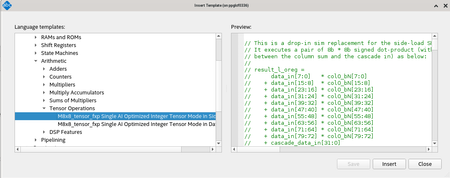
Description Due to a problem in the Quartus® Prime Pro Edition Software version 24.2, you might see the error message at Analysis & Synthesis stage when using the inference-flow for Tensor-Mode DSPs with RTL that has too many pipeline stages between the result of the intermediate multipliers and their column addition, but otherwise has the correct structure for a tensor-mode DSPs. Resolution To work around this problem, fix the RTL to match the actual tensor mode operation, refer to the templates that are included in the Quartus® Prime Pro Edition Software, as shown below: The problem has been fixed starting with Quartus® Prime Pro Edition software version 24.3.110Views0likes0CommentsWhy does the MATLAB* Help Window not open, show a blank window, or give a “No Internet Connection” error when I click on the Help icon inside DSP builder
Description The MATLAB* Help Window might not display the documentation content properly even when the computer has internet access. The user might experience the same issue when clicking on the MATLAB Help icon within the DSP Builder tool. Possible failure modes include: The Help link does not open a window at all. The Help content does not load and only shows a blank page. The "No Internet Connection" message is shown. Resolution Please take a look at the MATLAB web version documentation. For the MATLAB version R2021a - https://ww2.mathworks.cn/help/releases/R2021a/documentation-center.html For the MATLAB version R2021b - https://ww2.mathworks.cn/help/releases/R2021b/documentation-center.html For the MATLAB version R2022a - https://ww2.mathworks.cn/help/releases/R2022a/documentation-center.html For the MATLAB version R2022b - https://ww2.mathworks.cn/help/releases/R2022b/index.html For the MATLAB version R2023a - https://ww2.mathworks.cn/help/releases/R2023a/index.html For the MATLAB version R2023b - https://ww2.mathworks.cn/help/releases/R2023b/index.html For the MATLAB version R2024a - https://ww2.mathworks.cn/help/releases/R2024a/index.html For the latest MATLAB version - https://ww2.mathworks.cn/help/index.html101Views0likes0Comments'!isROM'. attempt to create uninitialised read-only memory in CDualMem::GenHDL at p4/ip/aion/src/mip_common/hw_dualmem.cpp:1900
Description Due to a problem in DSP Builder for FPGAs version 18.1 Update 2 and earlier, you may see this error when your design contains any HDL Import subsystems. Subsystems are processed alphabetically: the error occurs when an HDL Import subsystem is, alphabetically, the last subsystem in the design. Resolution To work around this problem, create a scheduled subsystem with no intenal hierarchy and a name that comes later alphabetically than the HDL Import subsystem. It is important that the workaround subsystem has no internal hierarchy because subsystems with internal hierarchy are renamed when the system hierarchy is flattened. This problem is scheduled to be fixed in a future release of DSP Builder for Intel® FPGAs.143Views0likes0CommentsWhy does the Quartus® Prime Pro Edition software fitter allow the use of more Digital Signal Processing (DSP) blocks than a virtual part should provide?
Description Due to a problem in the Quartus® Prime Pro software version 18.1, when targeting Stratix® 10 devices, the device selector may report a different number of DSP blocks available for your device. Resolution This problem is fixed beginning with the Intel® Quartus® Prime Pro Edition Software version 19.1158Views0likes0CommentsWhy do I get "ERROR: Detected x mismatches - stopping" during simulation using the Siemens* ModelSim* Simulator?
Description Due to a problem in the Siemens* ModelSim* Simulator v2021.2 and earlier, you may observe this error when simulating the Native Fixed-Point DSP Stratix® 10 FPGA IP Core if you run the "msim_setup.tcl" simulation script and use the "elab" option. Resolution To work around this problem use the "elab_debug" option or use “vsim -voptargs=+acc $elabcommand”. This problem is scheduled to be fixed in a future release of the Quartus® Prime Pro Edition Software.161Views0likes0CommentsError in (test/MegaCore Import) block: Block name is not valid. The name does not match Qsys naming requirements for variation files. Please ensure that the name is a valid identifier without leading or trailing underscore characters
Description Due to a problem in the DSP Builder for FPGAs, you may see this error when attempting to customize the “MegaCore Import” block from the "DSP Builder for FPGAs - Standard Blockset" library in Simulink. Resolution To work around this problem, rename the MegaCore Import block with a name that does not contain spaces. For example, the name “MegaCore_Import” will work correctly.102Views0likes0CommentsError(15360): DSP block WYSIWYG primitive "u0|a10_native_fixed_point_dsp_0|twentynm_mac_component" has unconnected port ACLR[0] -- port must be connected because corresponding register is used
Description Due to a problem in the Quartus® Prime Pro Edition Software version 20.3 and later, you may see this error when you are using the Arria® 10 Native Fixed Point DSP IP. The error happens because the user is enabling registers for "az" and "bz" but not using the "az" and "bz" ports. Resolution To avoid this error, disable the registers for "az" and "bz" in Data "z" Configuration if you are not using "az" and "bz" ports. This error is planned to be fixed in a future release of the Quartus® Prime Pro Edition Software.158Views0likes0CommentsError: (vlog-13067) ./../../src/altera_ldpc_pkg.sv(1.0): Syntax error, unexpected non-printable character with the hex value '0x8b'.
Description Due to a problem with the LDPC FPGA IP in Quartus® Prime Pro Edition Software version 17.1 targetting Stratix® 10, you may observe the above error when compiling the simulation design example generated by the IP configured with WiMedia 1.5 standard and encoder mode in Modelsim. Resolution To work around this problem, comment out the following lines in the msim_setup.tcl: 1. eval vlog -sv $USER_DEFINED_VERILOG_COMPILE_OPTIONS $USER_DEFINED_COMPILE_OPTIONS "$QSYS_SIMDIR/../src/altera_ldpc_pkg.sv" -work work 2. eval vlog -sv $USER_DEFINED_VERILOG_COMPILE_OPTIONS $USER_DEFINED_COMPILE_OPTIONS "$QSYS_SIMDIR/../src/altera_ldpc_wimedia_enc.sv" -work work206Views0likes0CommentsWhy is the simulation result of the "demo_cfr" in the DSP Builder for FPGAs incorrect?
Description Due to a problem with the DSP Builder for FPGAs in the Quartus® Prime Pro Edition Software v20.4, the .mdl simulink file only works for one specific device/speedgrade/clock target combination. The simulation results will be wrong with other combinations. Resolution To workaround this problem, replace the old .mdl simulink file in demo_cfr with the new demo_cfr.mdl file.152Views0likes0Comments