hld tools dsp builder
105 Topics
Fatal Error: Segment Violation: faulting address=(nil), PC=0x7fffef9076bc : 0x7fffef9076bc: db_cdb_sgate!CDB_SGATE_NODE::get_string_hpath(std::__cxx11::basic_string, std::allocator
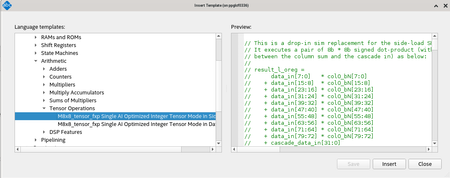
Description Due to a problem in the Quartus® Prime Pro Edition Software version 24.2, you might see the error message at Analysis & Synthesis stage when using the inference-flow for Tensor-Mode DSPs with RTL that has too many pipeline stages between the result of the intermediate multipliers and their column addition, but otherwise has the correct structure for a tensor-mode DSPs. Resolution To work around this problem, fix the RTL to match the actual tensor mode operation, refer to the templates that are included in the Quartus® Prime Pro Edition Software, as shown below: The problem has been fixed starting with Quartus® Prime Pro Edition software version 24.3.110Views0likes0CommentsWhy is the latency of my DSP block incorrect?
Description Due to a problem in the Quartus® II software version 13.0 SP1, you may see this problem if you synthesize your design using a 3rd party synthesis tool and use the DSP input registers. Resolution To work around this problem, download and install patch 1.dp5n from the links below. You must install the Quartus II software version 13.0 SP1 before installing this patch. Download the version 13.0 SP1 patch 1.dp5n for Windows (.exe) Download the version 13.0 SP1 patch 1.dp5n for Linux (.run) Download the Readme for the Quartus II software version 13.0 SP1 patch 1.dp5n (.txt) This problem is scheduled to be fixed in a future release of the Quartus II software.161Views0likes0CommentsWhere can I find the Fin Actuator design example in the Hardware In The Loop Whitepaper?
Description The following whitepaper mentions a fin actuator example design, but there are no instructions on where to find it: http://www.altera.com/literature/wp/wp-01208-hardware-in-the-loop.pdf Resolution The attached zip file has the fin actuator example discussed in the whitepaper. Fin Actuator Example174Views0likes0CommentsWhy are there seed dependent functional failures where the registers feeding into and from DSP blocks stuck in reset status when compiled in the Intel® Quartus® Prime Pro Edition Software v20.1?
Description Due to a problem in the Intel® Quartus® Prime Pro Edition Software v20.1, you might observe the registers surrounding DSP blocks stuck in reset status even after reset removal. This error might be seen on the Intel® Stratix® 10 and Intel Agilex® 7 devices. This is due to a DSP unpacking problem that is causing registers being created with incorrect reset polarity. Resolution This problem is fixed beginning with the Intel® Quartus® Prime Pro Edition Software v20.2. If you are still in the design phase of your project, and are using the Intel® Quartus® Prime Pro Edition Software v20.1 or earlier, but cannot move to the latest version: Download and install the Solution Patch from the given link below. Recompile your design with the Solution Patch installed. If you are targeting the Intel® Quartus® Prime Pro Edition Software v20.1 or earlier, and your project is finalized and in the production phase, follow steps 1 to 3 for an impact assessment on each individual compilation: Download and install the Screening Patch from the given link below. Recompile your design with the Screening Patch installed. a. If your design is affected, you will see the following warning in the Intel Quartus software compilation flow message window. Proceed with step 3. Warning (22057): Screening patch found a case where the DSP Register Unpacking might create incorrect logic. Install the solution patch to fix the issue, available in the knowledge database solution: https://www.intel.com/content/altera-www/global/en_us/index/support/support-resources/knowledge-base/tools/2020/why-are-there-function-failures-in-some-seeds-while-there-are-no.html b. If the above warning is not reported, no further action is required. 3. Download and install the Solution Patch from the given link below. Recompile your design with the Solution Patch installed. Screening Patch: Intel® Quartus® Prime Pro Edition Software version 20.1 Screening Patch 0.52 for Windows (.exe) Intel® Quartus® Prime Pro Edition Software version 20.1 Screening Patch 0.52 for Linux (.run) Readme for Intel® Quartus® Prime Pro Edition Software version 20.1 Screening Patch 0.52 (.txt) Solution Patch: Intel® Quartus® Prime Pro Edition Software version 20.1 Solution Patch 0.32 for Windows (.exe) Intel® Quartus® Prime Pro Edition Software version 20.1 Solution Patch 0.32 for Linux (.run) Readme for Intel® Quartus® Prime Pro Edition Software version 20.1 Solution Patch 0.32 (.txt) Note: Caution: Patch installation sequence for Screening Patch and Solution Patch matters – the latest installed patch overrides the previous patch. Do not install the screening patch after installing the solution patch. Ensure that ONLY the Screening Patch is installed during the screening step. You may then install the solution patch on top of the Screening Patch once your screening step is completed with specific warning messages reported. This problem is fixed beginning with the Intel® Quartus® Prime Pro Edition Software v20.2.157Views0likes0CommentsWhy is the simulation result of the "demo_cfr" in the DSP Builder for FPGAs incorrect?
Description Due to a problem with the DSP Builder for FPGAs in the Quartus® Prime Pro Edition Software v20.4, the .mdl simulink file only works for one specific device/speedgrade/clock target combination. The simulation results will be wrong with other combinations. Resolution To workaround this problem, replace the old .mdl simulink file in demo_cfr with the new demo_cfr.mdl file.152Views0likes0CommentsChainin and Chainout Ports in Arria 10 Native Fixed Point DSP IP Core Not Supported for m18x18_full Operation Mode.
Description When the Arria 10 Native Fixed Point DSP IP is configured to m18x18_full operation mode, the chainin and chainout ports are visible to users. However, these ports are disabled internally in m18x18_full operation mode. If you connect the chainin and chainout ports when the Arria 10 Native Fixed Point DSP IP is configured to m18x18_full operation mode, there will be no data transfer in and out to the DSP core. Resolution Leave the chainin and chainout ports unconnected when the Arria 10 Native Fixed Point DSP IP is configured to m18x18_full operation mode. This issue will be fixed in a future version of the Quartus II software.147Views0likes0CommentsWhy does MegaWizard report the multiplier output register option is no longer available when I upgrade my multiplier to Quartus 13.1?
Description The multiplier output register option is not available on 28nm ("V" series) devices. Resolution To resolve the error, disable the multiplier output register option and regenerate the core. If you wish to preserve the original latency introduced by the register, use the Pipelining tab to add a pipeline register with 1 clock latency. If an output register is desired, this can only be done for the adder output, on the Extra Modes tab.28Views0likes0Commentsjava.lang.UnsatisfiedLinkError: C:\altera\14.1\quartus\bin64\sld_utiljni.dll:
Description You may see this error when you change devices using the device icon in your DSP Builder design. The Quartus II software v14.1 needs Microsoft Visual C 2013; DSP Builder v14.1 needs Microsoft Visual C 2012. This problem affects DSP Builder v14.1 on Windows and users who install Altera Complete Design suite without administrator rights on PCs that don't already have Microsoft Visual C 2013. Resolution To work around this problem, install Microsoft Visual C 2013 from http://www.microsoft.com/en-gb/download/details.aspx?id=40784 This problem is scheduled to be fixed in a future version of DSP Builder117Views0likes0CommentsWarning: CONV_INTEGER: There is an 'U'|'X'|'W'|'Z'|'-' in an arithmetic operand, and it has been converted to 0.
Description You may get this warning when simulating some DSP Builder® designs under Modelsim®. These warning messages do not have any effect on your simulation results, and can be ignored. Resolution These warnings (and all others like them) can be suppressed by either of two methods: Suppress via Modelsim GUI: Open the Simulation dialog box (Options menu). Set the option Suppress Warnings from Synopsys Packages to On. Click OK. Search for the *_atb.do file in your project directories, look for the comment "Disable some warnings ...", and comment out a later line as follows: # Disable some warnings that occur at the very start of simulation quietly set StdArithNoWarnings 1 run 0ns # quietly set StdArithNoWarnings 0 run -all Related Articles ASSERT/WARNING from package ieee.STD_LOGIC_ARITH, Built-in function result set to 'X' due to a ('U', 'X', 'W', 'Z', '-') in an operand / Built-in function CONV_INTEGER/TO_INTEGER argument too large Warning: CONV_INTEGER: There is an 'U'|'X'|'W'|'Z'|'-' in an arithmetic operand, and it has been converted to 0! (ModelSim, VHDL Output File (.vho))238Views0likes0CommentsWhy does Matlab crash with DSP Builder version 12.0 SP1?
Description Due to a problem in the installer for the Quartus® II software version 12.0 SP1, Matlab may crash with an error message similar to: AppName: matlab.exe AppVer: 7.13.0.0 ModName: msvcr90.dll ModVer: 9.0.30729.6161 Offset: 0006ccd5 Resolution A patch is available to fix this problem for the Quartus II software version 12.0 SP1. See the related solution below titled Why do my IP functions not reflect updates for the Quartus II software version 12.0 SP1? to download and install this patch. This problem is fixed beginning with the Quartus II software version 12.0 SP2. Related Articles Why do my IP functions not reflect updates for the Quartus II software version 12.0 SP1? Why does Matlab crash when I try to generate a design using Altera’s DSP Builder blockset?131Views0likes0Comments