arm processor
62 Topics
Power management Agiilex 3/5 - Powerdown then HPS restart ?
I read in the power management section of (841346) Section 9 "Only power-off operations are supported, and they are done one time as a static option through boot mode user configuration. After power is turned off, the power manager does not support powering back on the CPU cores or L3 cache blocks." As I understand it = for a(partial ) power down , or power up of the HPS, the system needs to set some memory locations and then trigger a HPS restart and ther SDM has control then passes it to the FSBL. , then the FSBL can look at these locations and see what power mode it needs to come up or down as the system requires...... IE to change the power settings, there needs to be an HPS restart , or complete device configuration reload ? Perhaps put another way : In HPS boot-first mode : When a power CHANGE is required in the HPS domain, can the fabric stay running (assuming that there are no outstanding HPS<> fabric DMA requests or transactions pending across the fabric<>HPS bridge ) ? regards, glen.1View0likes1CommentAgilex 5/3 FreeRTOS SDK Release
Stable Version: v26.1.1 Quartus Version: 26.1.1 Supported devices: Agilex™ 3 and Agilex™ 5 Source: https://github.com/Ignitarium-Technology/freertos-socfpga Branch/Tag: v26.1.1 Release Date: October 9, 2026 Hello Everyone, A new version of the FreeRTOS SDK for Agilex 5/3 is now available. This release contains some fixes, along with UHS-1(SDR12/25/50) support for SD/eMMC. Visit the GitHub repository for instructions on how to get started. Features and Comments Feature Agilex3 Agilex5 Agilex3 SMP Agilex5 SMP Supported Features Limitations / Known Issues A55 boot Yes Yes Yes Yes Single-core boot, Dual-core SMP, Quad-core SMP (Agilex 5) A76 boot NA Yes NA Yes Single-core boot, Dual-core SMP, Quad-core SMP QSPI boot Yes Yes Yes Yes eMMC boot NT Yes NT Yes SD boot NT Yes NT Yes NAND boot No No No No Clock Manager Yes Yes Yes Yes API to get clock speed of different blocks Reset Manager Yes Yes Yes Yes Peripheral reset assert/de-assert DMA driver Yes Yes Yes Yes Memory-to-Memory, Memory-to-Peripheral and Peripheral-to-Memory GPIO driver Yes Yes Yes Yes Write, read and interrupt support Timer driver Yes Yes Yes Yes User-defined and free-running modes UART driver Yes Yes Yes Yes Full-duplex TX and RX I2C driver NT Yes NT Yes Master/Slave mode, standard and fast modes QSPI driver Yes Yes Yes Yes QSPI flash read/write/erase I3C driver NT Yes NT Yes Master mode, I3C and legacy I2C devices SPI driver NT Yes NT Yes Master/Slave mode write and read NAND driver No No No No SDM Mailbox driver Yes Yes Yes Yes SDM commands with SIP_SVC SMMU support Yes Yes Yes Yes Static identity mapping for cache coherency SDMMC driver Yes Yes Yes Yes Standard and HS HS, and UHS-I (SDR12/25/50) speeds, SDMMC and eMMC devices, FATFS support Ethernet stack Yes Yes Yes Yes TCP/IP, UDP, ICMP, DHCP, IPv4 and IPv6 USB 2.0 stack NT Yes NT Yes USB mass storage class Tested with a custom board and SOF USB 3.1 stack Yes Yes Yes Yes USB mass storage operation WDT driver Yes Yes Yes Yes Interrupt or reset on timer expiry EDAC support Yes Yes Yes Yes Error injection and detection for EMAC, USB and QSPI blocks OCRAM not supported IOSSM driver Yes Yes Yes Yes Error injection and detection Bridge driver Yes Yes Yes Yes Enable/Disable bridges Reboot Manager Yes Yes Yes Yes Warm/Cold reboot FPGA Manager Yes Yes Yes Yes FPGA configuration Legend: Yes: Feature available and tested No: Feature not available in SDK NA: Not applicable NT: Not tested Note: If you find any issues, please raise an issue on the GitHub repository.42Views2likes1Comment
Introducing the Altera Community AI Responder — Beta
Altera is introducing the AI Responder, an assistant built into the Altera Community to help provide faster, context-aware guidance for Altera product questions. It uses relevant public Altera documentation and Knowledge Database content, with coverage continuing to expand. The AI Responder may provide source references and can hand off complex or out-of-scope questions to an Altera subject-matter expert. As a beta feature, responses may contain errors or omissions, so please review the sources and verify technical guidance against official Altera documentation before implementation. If the response does not fully address your question, add more context and tag ai_responder to continue the discussion. We welcome your feedback as we improve the Community experience.19Views0likes0Comments
Store custom keys on SDM Agilex3
Hi I know it's possible to store encryption and siging keys on the SDM for fpga firmware decryption and authentication, but is it possible to store my own keys on it? I will use the key to decrypt my own software files on the HPS, so I need some way to send the ecrypted software to the SDM then the SDM will use the key to decrypt it and send it back. Is there any documentation or tutorial for this?552Views0likes13Comments
Release 26.1.1
Version: Release 26.1.1 PRO Quartus Build/TAG: B130/QPDS26.1.1_REL_GSRD_PR Release Date: August 17, 2026 Device Affected: Agilex™ 3, Agilex™ 5, Agilex™ 7, Startix® 10 Release Type: Major release/Binary release Binary Release Path: http://releases.rocketboards.org/2026.08/ Release Page: https://github.com/altera-fpga/gsrd-socfpga/releases/tag/QPDS26.1.1_REL_GSRD_PR Major Features Released Agilex™ 5 XEN Hypervisor 5 System Example Design https://altera-fpga.github.io/rel-26.1.1/virtualization/hypervisors/xen/ug-xen-agx5e-premium-065b/ , https://altera-fpga.github.io/rel-26.1.1/virtualization/hypervisors/xen/ug-xen-agx5e-premium-065a/ Agilex™ 5 RYO OPTE System Example Design Agilex™ 5 Quartus Reference Design using VDS Agilex™ 3 Time-Sensitive Networking (TSN): PHY configuration 2 (RGMII from FPGA HVIO) System Example Design Agilex™ 5 Performance Optimized Baseline SED support Agilex™ 5 DataMover / Bridge and Memory Benchmark System Example Design https://altera-fpga.github.io/rel-26.1.1/embedded-designs/agilex-5/e-series/premium-065a/data-mover/ug-data-mover-agx5e-premium-065a/ Agilex™ 3 support of FreeRTOS Agilex™ 5 Terasic DE25-Nano Board System Example Design103Views2likes0CommentsHow to Generate Altera HAL for HPS?
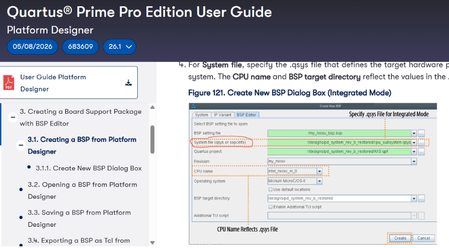
Hi, I am using Quartus 26.1 with the Agilex 5 Modular Development Kit (Device number: A5ED065BB32AE6SR0) and I have a few questions about BSP Generation for Hard Processor System (HPS). For reference I am following the Quartus Prime Pro Edition Version 26.1 User Guide. 1. How do I generate Altera HAL for HPS? When I use the BSP Editor in platform designer, I can only generate the system.h file that only has macros for EMIF, even though other peripherals are also connected to the HPS. How do I generate macros for the H2F bridges and HAL API Files for the HPS? 2. How do I input a SOPCINFO file into the BSP Editor? The Quartus Prime Pro Edition User Guide shows that I should be able to input SOPCINFO file as the system file (see above image) but Quartus only gives me the options of QSYS and IP file (see below image). Thank you for the help!Solved247Views0likes5CommentsUnstable fpga programming using HPS(Agilex3)
Hi I have a problem where the fpga programming sometime fail when using the overlay method described here under "Reconfiguring Core Fabric from Linux": https://altera-fpga.github.io/rel-25.3.1/embedded-designs/agilex-3/c-series/boot-examples/ug-linux-boot-agx3/#reconfiguring-core-fabric-from-u-boot Here I have first two successful attempt then it fail on the third: root@agilex3:~# rmdir /sys/kernel/config/device-tree/overlays/0 ; sleep 1 ; mkdir /sys/kernel/config/device-tree/overlays/0 ; cd /lib/firmware/ ; sleep 1; echo overlay.dtb >/sys/kernel/config/device-tree/overlays/0/path rmdir: '/sys/kernel/config/device-tree/overlays/0': No such file or directory [ 182.671913] fpga_manager fpga0: writing overlay.rbf to Stratix10 SOC FPGA Manager [ 184.865664] OF: overlay: WARNING: memory leak will occur if overlay removed, property: /fpga-region/firmware-name [ 184.876007] OF: overlay: WARNING: memory leak will occur if overlay removed, property: /fpga-region/config-complete-timeout-us root@agilex3:/lib/firmware# rmdir /sys/kernel/config/device-tree/overlays/0 ; sleep 1 ; mkdir /sys/kernel/config/device-tree/overlays/0 ; cd /lib/firmware/ ; sleep 1; echo overlay.dtb >/sys/kernel/config/device-tree/overlays/0/path [ 196.530735] fpga_manager fpga0: writing overlay.rbf to Stratix10 SOC FPGA Manager [ 198.659279] OF: overlay: WARNING: memory leak will occur if overlay removed, property: /fpga-region/firmware-name [ 198.669650] OF: overlay: WARNING: memory leak will occur if overlay removed, property: /fpga-region/config-complete-timeout-us root@agilex3:/lib/firmware# rmdir /sys/kernel/config/device-tree/overlays/0 ; sleep 1 ; mkdir /sys/kernel/config/device-tree/overlays/0 ; cd /lib/firmware/ ; sleep 1; echo overlay.dtb >/sys/kernel/config/device-tree/overlays/0/path [ 214.383163] fpga_manager fpga0: writing overlay.rbf to Stratix10 SOC FPGA Manager [ 217.508857] arm-smmu-v3 16000000.iommu: CMD_SYNC timeout at 0x00004405 [hwprod 0x00004408, hwcons 0x00004405] [ 217.509907] arm-smmu-v3 16000000.iommu: CMD_SYNC timeout at 0x00004407 [hwprod 0x00004408, hwcons 0x00004405] U-Boot SPL 2025.10 (May 18 2026 - 08:34:29 +0000) Reset state: Cold MPU 800000 kHz L4 Main 400000 kHz L4 sys free 100000 kHz L4 MP 200000 kHz L4 SP 100000 kHz SDMMC 200000 kHz init_mem_cal: Initial DDR calibration IO96B_0 succeed DDR: Calibration success is_mailbox_spec_compatible: IOSSM mailbox version: 1 LPDDR4: 1792 MiB ecc_interrupt_status: ECC error number detected on IO96B_0: 0 SDRAM-ECC: Initialized success Does anybody know how to debug and fix this? I'm using Quartus Prime Version 25.3.0 Build 109 Devboard: DK-A3W135BM16AEA: Agilex™ 3 FPGA and SoC C-Series Development KitSolved534Views0likes14CommentsAgilex 5/3 FreeRTOS SMP Support
Stable Version: v25.4 Quartus Version: 25.4 Supported devices: Agilex™ 3 and Agilex™ 5 Source : https://github.com/Ignitarium-Technology/freertos-socfpga Branch/Tag: v25.4-SMP Release Date: March 30, 2026 Hello Everyone, FreeRTOS port for A55/A76 HPS now supports SMP. visit the GitHub page for instructions on how to get started. Features and comments Features Agilex3 Agilex5 Agilex3 SMP Agilex5 SMP (A55 x 2 or A76 x 2) Supported features Limitations/ Known issues A55 boot Yes Yes Yes Yes Single core boot, Dual core SMP A76 boot NA Yes NA Yes Single core boot, Dual core SMP QSPI boot Yes Yes Yes Yes SD boot Yes Yes Yes Yes eMMC boot Yes Yes Yes Yes NAND boot No No No No Clk mngr driver Yes Yes Yes Yes API to get clock speed of different blocks Reset mngr driver Yes Yes Yes Yes Peripheral reset assert/de-assert DMA driver Yes Yes Yes Yes Memory to memory transfer Only support memory to memory GPIO driver Yes Yes Yes Yes Write, read and interrupt support Timer driver Yes Yes Yes Yes User defined and free running modes UART driver Yes Yes Yes Yes Full duplex Tx and Rx DMA not supported (Planned for future release I2C driver Yes Yes Yes Yes Master mode write and read Standard and fast modes DMA not supported (Planned for future release I3C driver Yes Yes Yes Yes Master mode write and read i3c and legacy i2c devices IBI not supported (Planned for future release) SPI driver Yes Yes Yes Yes Master mode write and read DMA is not supported QSPI driver Yes Yes Yes Yes QSPI flash read/write/erase NAND driver No No No No SDM mailbox driver Yes Yes Yes Yes SDM commands with SIP_SVC SMMU enable support Yes Yes Yes Yes Static identity mapping for cache coherency SDMMC driver Yes Yes Yes Yes standard and HS speeds SDMMC and eMMC devices Fat FS support Ethernet stack Yes Yes Yes Yes TCP/IP, UDP, ICMP and DHCP IPv4 and IPv6 support USB 2.0 stack NT Yes NT Yes USB mass storage class Tested with a custom board and SOF USB 3.1 stack NT Yes NT Yes USB mass storage operation WDT diver Yes Yes Yes Yes interrupt or reset on timer expiry EDAC support Yes Yes Yes Yes Error injection and detection for EMAC, USB and QSPI blocks OCRAM not supported IOSSM driver Yes Yes Yes Yes Error injection and detection Bridge driver NT Yes NT Yes Enable, Disable Reboot mngr Yes Yes Yes Yes Warm/Cold reboot FPGA manager Yes Yes Yes Yes FPGA configuration Yes: Feature available and tested, No: Feature not available in SDK, NA : Not applicable , NT: Not tested Note: If you find any issues, please raise an issue in the GitHub page. For more support/assistance visit our website .422Views2likes11Comments