agilex® 3 fpgas and socs
156 Topics
Why do I unexpectedly observe intermittent DDM Errors?
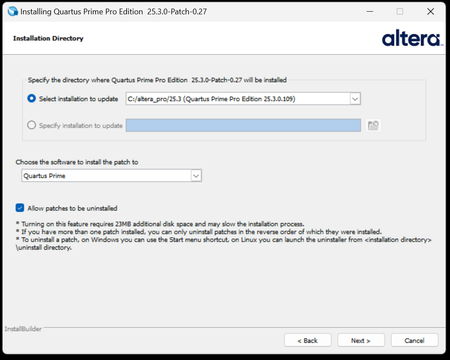
Description Beginning January 10, 2026, executing commands in the terminal or GUI of Quartus® Prime Pro Edition software, Quartus Embedded Edition software or select standalone tools may cause the software or tool to crash with an error similar to the crash signature shown below. This error affects: Quartus Prime Pro Software versions v22.1 through v25.3.1 Standalone Quartus Prime Pro Programmer v22.1 through v25.3.1 Standalone Quartus Prime Pro Embedded Edition v25.3 and v25.3.1 Standalone Quartus Prime Pro Power Thermal Analyzer v25.3 through v25.3.1 This issue is not observed in Quartus Prime Pro Edition versions 22.1 or prior or Quartus Prime Standard Edition. Crash Signature: Error (22912): Unhandled exception: Fatal Error: Assertion failed tools/cpp/ddm/ddm_assessor.cpp:53: DDM_T::verify_token(token) : Cannot identify the client from function assertion_error in tools/cpp/ddm_report/ddm_report_msg.cpp@465 *** Fatal Error: Program termination requested *** *** Below is the stack trace at the time the error occurred. *** The lines beginning "Err Handler" represent frames relating *** to generating this report. *** The point at which the error occurred is somewhere after these lines. *** There may be a few frames representing standard/library code *** before the Quartus frames begin. *** The search for the error should begin with the Quartus frames. *** Unwinder: libunwind *** Stack depth: 15 Quartus 0x24e67: err_terminator() + 0x1bc (ccl_err) Quartus 0xb036a: __cxxabiv1::__terminate(void (*)()) + 0xa (stdc++) Quartus 0xb03d5: (stdc++) Quartus 0xb0628: (stdc++) Quartus 0x1680d: void ddm_throw<DDM_RUNTIME_ERROR>(std::__cxx11::basic_string<char, std::char_traits<char>, std::allocator<char> > const&) + 0x26d (ddm_report) Quartus 0x13fae: DDM_REPORT::DDM_ASSERTION_HANDLER::assertion_error(std::__cxx11::basic_string<char, std::char_traits<char>, std::allocator<char> >) const + 0xde (ddm_report) Quartus 0x12a52: DDM_REPORT::ASSERTION_HANDLER::error(std::__cxx11::basic_string<char, std::char_traits<char>, std::allocator<char> >) + 0x72 (ddm_report) Quartus 0x13e64: DDM_REPORT::detail::assert_at_line(char const*, char const*, int, char const*, ...) + 0x1b4 (ddm_report) Quartus 0x205fb0: ddm_set_lassessor(DDM_T_ASSESSOR*, std::__cxx11::basic_string<char, std::char_traits<char>, std::allocator<char> > const&) + 0x60 (ddm) Quartus 0xf4445: DMS_MANAGER::DMS_MANAGER() + 0x5c5 (dni_dms) Quartus 0xf45b2: DMS_MANAGER::get() + 0x7a (dni_dms) Quartus 0xf6db4: _GLOBAL__sub_I_dms_manager.cpp + 0x58 (dni_dms) Quartus 0x647e: (ld-linux-x86-64) Quartus 0x6568: (ld-linux-x86-64) Quartus 0x202ca: (ld-linux-x86-64) Resolution To work around this problem: For Windows machines Download and unzip the Quartus Prime Pro version zip file that matches your Quartus Prime Pro version from this KDB. Double click on the executable ending in “windows.exe”. When the GUI pops up, press Next. Note that the GUI may look slightly different depending on the version of Quartus you are using. Accept the license agreement Specify the directory where the patch needs to be applied which may be a different location than Quartus install if you have standalone tools in a different directory from your Quartus Prime Pro software installation. Keep “Allow Patch to be uninstalled” selected. Select the software in which to install the patch: The patch will install in the directory of the software or tool you have selected. You will see an uninstall directory for the patch in your software or tool folder where patch is installed; it will contain an executable to uninstall the patch if required for any reason. To confirm patch is installed, you can run quartus_sh -v or corresponding version command for your tool via command line. Alternatively, you can Open Quartus in the GUI and select Help → About Quartus Prime in the main menu. If you are opening up a standalone tool you will navigate to Help-> About <tool_name>. For the Command Line Implementation of the patch in Windows, use the following command: <patch_filename.exe> --mode unattended --installdir <your_install_directory> --accept_eula 1 --patch_to [quartus|qprogrammer|qemb|pta] # An example to patch Quartus Prime Pro Edition Software v25.3: quartus-25.3-0.27-windows.exe --mode unattended --installdir /tmp/altera_pro/25.3 --accept_eula 1 # An example to patch the Standalone Programmer for Quartus Prime Pro Software v25.3: quartus-25.3-0.27-windows.exe --mode unattended --installdir /tmp/altera_pro/25.3 --accept_eula 1 --patch_to qprogrammer For Linux machines: Download and unzip the Quartus Prime Pro version zip file that matches your Quartus Prime Pro version from this KDB. Ensure you run chmod +x on the file ending with linux.run. Run in the command line: ./<installation_patch_run_file>. When GUI pops up, press Next. Note that the GUI may look slightly different depending on the version of Quartus you are using. Accept the license agreement Specify the directory where the patch needs to be applied which may be a different location than Quartus install if you have standalone tools in a different directory from your Quartus Prime Pro software installation. Keep “Allow Patch to be uninstalled” selected. Select the software in which to install the patch: The patch will install in the directory of the software or tool you have selected. You will see an uninstall directory for the patch in your software or tool folder where patch installed; it will contain an executable to uninstall the patch if required for any reason. To confirm patch is installed, you can run ./quartus_sh -v or corresponding version command for your tool via command line. Alternatively, you can Open Quartus in the GUI and select Help → About Quartus Prime in the main menu. If you are opening up a standalone tool you will navigate to Help-> About <tool_name>. For the Command Line Implementation of the patch in Linux, use the following command: ./<patch_filename.run> --mode unattended --installdir <your_install_directory> --accept_eula 1 --patch_to [quartus|qprogrammer|qemb|pta] # An example to patch Quartus Prime Pro Edition v25.3: ./quartus-25.3-0.27-linux.run --mode unattended --installdir /tmp/altera_pro/25.3 --accept_eula 1 # An example to patch the Standalone Programmer for Quartus Prime Pro Software v25.3: ./quartus-25.3-0.27-linux.run --mode unattended --installdir /tmp/altera_pro/25.3 --accept_eula 1 --patch_to qprogrammer This problem has been fixed in Quartus® Prime Pro Edition Software version 26.1. The below table lists the patches that are available and the associated patch number. The patch zip files are attached to the KDB below: Quartus Prime Pro Edition Version Patch Number 22.1 0.51 22.2 0.63 22.3 0.56 22.4 0.51 23.1 0.63 23.2 0.63 23.3 0.52 23.4 0.70 23.4.1 1.01 24.1 0.52 24.2 0.64 24.3 0.35 24.3.1 1.29 25.1 0.36 25.1.1 1.31 25.3 0.27 25.3.1 1.0214KViews5likes0CommentsWhy does the Nios® V/g processor become unstable when both CLIC and shadow registers are enabled?
Description Due to a problem in the Quartus® Pro/Standard Edition software version 26.1/25.1, Nios® V/g interrupt handling might be unstable when both CLIC mode and Shadow Register are enabled. This is because the Shadow Register CSR (msrfstatus) is not saved/restored during interrupt context saving under CLIC mode. Resolution To work around this problem in the Quartus® Prime Pro/Standard Edition Software version 26.1/25.1, follow these steps: Download the machine_trap.zip Extract to get the new machine_trap.S Search for the old machine_trap.S in your BSP project Replace with the new machine_trap.S file Rebuild your software Additional Information This problem is currently scheduled to be resolved in a future release of the Quartus® Prime Pro and Standard Edition Software.30Views0likes0CommentsError: CPU "intel_niosv_g_0" has no memories connected to its Avalon host(s)
Description Due to a problem in the Quartus® Pro Edition software version 26.1.1, you might see an error when generating a Nios® V BSP, when the AXI Address Span Extender IP is inserted between the Nios V processor and the memory device connected to the instruction and data buses of the Nios V. This is because the AXI Address Span Extender IP does not recognize the connected device as a memory device for the Nios V processor. Resolution To work around this problem in the Quartus® Prime Pro Edition Software version 26.1.1, follow these steps: 1. Open <QUARTUS_INSTALL_DIR>/ip/altera/merlin/axi_address_span_extender/axi_address_span_extender_hw.tcl 2. Go to around line 448, then delete the lines marked in red and add the lines marked in green as shown below. # this assignment allows this component to appear as a memory target in the Nios II linker script configuration GUI # it makes the memory map of our slave look like a valid linker target memory region # <<to be revisited in 13.0>> - #set_interface_assignment windowed_slave embeddedsw.configuration.isMemoryDevice 1 + set_interface_assignment $slave embeddedsw.configuration.isMemoryDevice 1 # # this assignment allows the macros of components attached to our master to appear in the Nios II system.h header # <<to be revisited in 13.0>> - #set_interface_assignment windowed_slave embeddedsw.configuration.affectsTransactionsOnMasters "expanded_master" + set_interface_assignment $slave embeddedsw.configuration.affectsTransactionsOnMasters $master Please do not include the leading "+" and "-" characters. 3. Regenerate your design in Platform Designer. Additional Information This problem is currently scheduled to be resolved in a future release of the Quartus® Prime Pro Edition Software. However, the updated statements are commented out by default. To apply the changes, remove the comment markers.14Views0likes0CommentsWhy don’t the new Nios® V/c processor features appear after upgrading the Nios® V/c Processor IP to Quartus® Prime Pro version 26.3?
Description In Quartus® Prime Pro Edition 26.3, the Nios® V/c processor IP is renamed from intel_niosv_c to niosv_c across all FPGA device families. Performing IP Upgrade from earlier Quartus® Prime project will retain the legacy intel_niosv_c in your project. For your information, This legacy intel_niosv_c IP remains at last updated back in Quartus® Prime Pro Edition 26.1.1. While new Nios® V/c processor IP feature are introduced into niosv_c IP starting from Quartus® Prime Pro Edition 26.3. In another words, auto-upgrade of intel_niosv_c to niosv_c in not supported by IP Upgrade. Thus, you may find those new Nios® V/c processor features (in niosv_c) is missing in intel_niosv_c. Resolution If new Nios® V/c processor features (such as Debug option) is required, re-instantiate the Nios® V/c processor in Quartus® Prime Pro version 26.3.31Views0likes0CommentsWhy does the bas_axi_mm_rlast signal of the GTS AXI MCDMA IP not asserted on the final beat of a read burst?
Description Due to a problem in the Quartus® Prime Pro Edition software version 26.3 and earlier, the GTS AXI Multichannel DMA IP might fail to assert bas_axi_mm_rlast on the final beat of a multi-beat AXI read burst or may assert it on an earlier beat. This problem occurs in the Bursting Slave (BAS) read-response path for multi-beat PCIe completion, potentially causing an AXI protocol violation or an incorrectly terminated read burst. Resolution This problem is scheduled to be fixed in a future release of the Quartus Prime Pro Edition software.45Views0likes0CommentsWhy is there D2H payload mismatch on GTS AXI MCDMA IP?
Description Due to a problem in the Quartus® Prime Pro Edition software version 26.3 and earlier, the GTS AXI Multichannel DMA IP for PCI Express* might transmit D2H data associated with the wrong queue on AXI-Stream TX interface. As a result, the Host may receive data at an incorrect destination address, potentially causing transaction mismatches. Resolution This problem is scheduled to be fixed in a future release of the Quartus Prime Pro Edition software.37Views0likes0CommentsWhy is the HPS I2C SCL clock frequency above 400 kHz in fast mode when using U-Boot?
Description When the HPS I2C controller is configured for fast mode (clock-frequency = <400000>) in U-Boot, the measured SCL frequency might exceed the 400 kHz maximum in the I2C specification (for example, 431 kHz) on SoC FPGA designs. This happens because the U-Boot DesignWare I2C driver (drivers/i2c/designware_i2c.c) calculates the SCL high and low counts from assumed SCL rise and fall times. When the device tree does not specify them, the driver assumes default 300 ns for both in fast mode. The driver subtracts the assumed rise time from the SCL period. If the board's actual SCL rise time is shorter than 300 ns, the unused part of that allowance shortens the period, and SCL runs faster than 400 kHz. The Linux DesignWare I2C driver uses a different calculation and different device tree properties, so the same device tree node can give different SCL frequencies in U-Boot and Linux. Resolution To set the SCL timing to match your board, follow these steps: Measure the SCL and SDA rise times (30%–70%) and fall times (70%–30%) on your board with an oscilloscope, in fast mode. In the U-Boot device tree, add the measured values to the HPS I2C node: &i2c0 { clock-frequency = <400000>; i2c-scl-rising-time-ns = <[measured tr]>; i2c-scl-falling-time-ns = <[measured tf]>; i2c-sda-hold-time-ns = <[required hold, default 300]>; }; For Linux, add the SDA fall time to the same node. The Linux driver uses i2c-sda-falling-time-ns for the SCL high count and i2c-scl-falling-time-ns for the SCL low count, and ignores i2c-scl-rising-time-ns: i2c-sda-falling-time-ns = <[measured tf]>; Rebuild U-Boot and the Linux device tree blob, then re-measure SCL in both U-Boot and Linux to confirm the frequency is at or below 400 kHz and that tLOW ≥ 1.3 µs and tHIGH ≥ 0.6 µs. Note these points when tuning: In U-Boot, enter the actual measured rise time. A larger i2c-scl-rising-time-ns value makes SCL faster, not slower. In U-Boot, i2c-scl-falling-time-ns changes only the high/low duty cycle, not the frequency. In Linux, larger fall-time values make SCL slower. Do not lower clock-frequency below 400000 in U-Boot to slow the bus. Any value below 400000 selects standard mode (100 kHz timing). snps,bus-capacitance-pf has no effect in fast mode. U-Boot ignores it, and Linux uses it only for high-speed mode (3.4 MHz). Additional Information Property U-Boot Linux clock-frequency Sets the target SCL period (default 100 kHz) Selects the speed mode only (default 400 kHz) i2c-scl-rising-time-ns Sets the SCL frequency (default 300 ns in fast mode, 1000 ns in standard mode) Ignored by the DesignWare driver i2c-scl-falling-time-ns Changes the duty cycle only (default 300 ns) Sets the SCL low count (default 300 ns) i2c-sda-falling-time-ns Ignored Sets the SCL high count (default 300 ns) i2c-sda-hold-time-ns Sets the SDA hold time (default 300 ns) Sets the SDA hold time (default: keeps the existing hardware value) snps,bus-capacitance-pf Ignored Used in high-speed mode (3.4 MHz) only31Views0likes0CommentsWhat are the issues in Nios® V processor for designs targeting Agilex® 27 FPGA device?
Description Due to a problem in the Quartus ® Prime Pro Edition software version 26.3, Nios® V Debug IP fails to execute dmcontrol.hartreset on a halted Nios® V processor. This is because there is a bug in Nios® V/c processor, when servicing dmcontrol.hartreset request while halted. If the processor is a running state, dmcontrol.hartreset can be executed successfully. Resolution To work around this problem in the Quartus ® Prime Pro Edition software version 26.3 (select one), Use dmcontrol.ndmreset to reset the processor at any states. Use dmcontrol.hartreset only when the processor is at running state. This problem is currently scheduled to be resolved in a future release of the Quartus ® Prime Pro Edition Software.47Views0likes0CommentsWhy does the EMIF Debug Toolkit report fixed channel 1 driver margin values for two channel memory designs?
Description Due to a problem in the Quartus® Prime Pro Edition Software version 26.1.1 and earlier, EMIF Debug Toolkit might report the same fixed driver margin values for every DQ pin of channel 1 when used with 2chx16 memory designs targeting Agilex® 3, Agilex® 5, and Agilex® 7 FPGA M-Series devices. The same behavior might also occur during Vref margining. Resolution Only the displayed values are affected. It does not impact the functionality of the hardware interface. This problem is scheduled to be fixed in a future release of the Quartus® Prime Pro Edition Software.48Views0likes0CommentsWhy do I get the error "Verilog HDL error at name_of_file.sv (XXX): Name_of_parameter is not declared under the prefix 'Name_of_interface'" when using nested interface instances with parameters in Quartus® Prime Pro 26.1 and earlier?
Description When using nested interface instances with parameters in Quartus® Prime Pro 26.1 and earlier, compilation may fail with the following error message: Verilog HDL error at name_of_file.sv (XXX): Name_of_parameter is not declared under the prefix "Name_of_interface" This issue can occur when a parameter is referenced through a nested interface hierarchy and is not correctly resolved during compilation. Resolution This issue has been fixed in Quartus® Prime Pro 26.1.1. If a patch for an earlier version is required, please contact Altera Support and reference patch ID QS-20872.44Views0likes0Comments