Cyclone IV GX project failed migration from 20.1 to 23.1std
I am currently facing an issue with the conversion of an Intel IP while migrating from Quartus version 20.1 to version 23.1std. Despite following the references {1} {2} and {3}, I have encountered the following error: Error: altgx_internal: error renaming "C:/intelfpga_lite/23.1std/quartus/../ip/altera/altera_pcie/altera_pcie_avmm/lib/altpcie_serdes_3cgx_x1d_gen1_08p.v.new" to "C:/intelfpga_lite/23.1std/quartus/../ip/altera/altera_pcie/altera_pcie_avmm/lib/altpcie_serdes_3cgx_x1d_gen1_08p.v": best guess at reason: permission denied while executing "file rename -force $temp $filename " (procedure "my_generation_callback" line 91) invoked from within "my_generation_callback" Error: altgx_internal: Generation callback did not provide a top level file (expected `add_file $output_dir/system_plus_pcie_altgx_internal.v|vhd|sv {SIMULATION SYNTHESIS}`) Error: Generation stopped, 636 or more modules remaining Error: qsys-generate failed with exit code 1: 3 Errors, 48 Warnings I have attempted various solutions, but none seem to resolve the issue. Your insights and guidance on how to address this problem would be highly appreciated. {1} https://community.intel.com/t5/Intel-Quartus-Prime-Software/Cyclone-IV-GX-project-failed-migration-from-18-1-to-20-1/m-p/1496532 {2} https://www.terasic.com.tw/wiki/Fix_Known_Issues_Quartus_QSYS_regenerating_error {3} https://community.intel.com/t5/FPGA-Intellectual-Property/Using-Quartus-19-1-and-Platform-Designer-on-Windows-I-get-an/td-p/6688522.2KViews0likes10Comments
PCIe Enumeration Failure for CXL IP
When attempting to validate the Agilex 7 R-Tile Compute Express Link (CXL) 1.1/2.0 IP (Type 2 and Type 3) using a CXL compatible host server, the host server is unable to complete PCIe bus enumeration. The host server stalls while attempting to complete PCIe bus enumeration. The stall never resolves after boot, and access to to the host is never granted. Depiction of the stall and its status code from the host server's perspective is provided as an attached PNG file titled: "pcie_enumeration_stall". Debugging Information: A PCIe Gen 5.0 reference design using the Altera R-Tile Avalon Streaming IP For PCI Express was used to validate that PCIe enumeration could complete fully without failure, and that the host server could exchange data with the FPGA. While running the CXL example design, the Quartus System Console's Link Logger indicates that the LTSSM state is in the "UP_L0" before the PCIe bus enumeration stall. The state may sometimes change when attempting to "Refresh" the status during the PCIe bus enumeration stall. The state may briefly enter recovery (UP_L0 -> REC_IDLE -> REC_RCVRCFG -> REC_RCSVLOCK -> REC_COMPLETE -> UP_L0). Depiction of the Quartus System Console's Link Logger when this occurs is provided as an attached PNG file titled: "ltssm_link_logger". While running the CXL example design, the Quartus System Console's Link Logger indicates that the advertised and negotiated link speeds and widths are both 32.0 GT and x16. Depiction of a CXL Type 3 Quartus System Console's Overview is provided as an attached PNG file titled: "cxl_ip_systemconsole_overview". Instead of generating the example design, the pre-compiled binary offered by Altera for Type 2 and Type 3 CXL IP designs was used and resulted in the exact same failures as shown above. CXL.mem transaction registers (M2S and S2M) are 0x00, indicating that the host server never progresses far enough to begin sending/receiving transactions/requests. Between the PCIe build that functions and the CXL build that does not function (stalls at enumeration), no server UEFI settings were changed. A CXL enable function was enabled for all tests. Several PCIe UEFI settings were changed in an attempt to resolve the enumeration stall, but none changed the outcome. Attempting to disable the CXL Compliance 2.0 and the HDM decoder registers both did not resolve the issue. The FPGA was powered and programmed before the server was launched. Two different CXL servers were tested and both resulted in the same behavior. The relevant PCIe and CXL settings from BIOS is provided as an attached PNG file titled: "cxl_server_settings". The CXL REFCLK was tested as both COMMON and SRIS/SRNS. Each test changed SW3 to use relevant onboard and connected based clocks. IP Settings: CXL IP settings are uploaded as PNG files titled: "cxl_ip_settings_N". The settings tested are the default provided settings as well as a version with a 300 MHz PLD clock (SRIS). Hardware Details: FPGA is connected to host server via PCIe Gen 5.0 x16 slot on Tile 14C. FPGA device is the Altera Agilex 7 FPGA I-Series Development Kit (Production 2x R-Tile & 1x F-Tile) (AGIB027R29A1E1VB) The DIMM provided with the development kit is slotted into DIMM Slot A. SW1 is set to 1000 (PCIe PRSNT x16). SW3 is set to 0110 for designs using the CXL/PCIe common clock and 0000 for designs using the CXL/PCIe onboard REFCLK (SRIS). Software Details: Quartus Prime Pro Edition v25.1 was used to generate the designs. R-Tile Altera FPGA IP for Compute Express Link (CXL) was generated with version 1.17.0. FPGA Design: The FPGA design is generated using the example design with the IP settings given above. A pre-compiled binary provided by Altera was also used to test instead of a generated design. Server details: SMC AS-1126HS-TN (CXL 2.0 via 4x PCIe gen5 x16 slots) CPU: 2x AMD EPYC 9135 (CXL 2.0) RAM: 4x Micron 64GB @ 6000 MT/s UEFI: AMI 1.7a 10/30/2025 Attachments: The system console debug register outputs are saved to CSV files attached to this post. These CSV files are taken from a CXL Type 3 reference design with PLD REFCLK at 300 MHz (SRIS). Questions: Can you provide guidance on how to obtain more information on the enumeration status other than the LTSSM register? Can you provide the UEFI/BIOS settings for PCIe/CXL that was used to test this IP as reference? Could the configuration space registers (DVSEC/HDM) or the TLP handling implemented in the CXL example design RTL create this PCIe enumeration failure? Can you provide guidance on what debug/status registers the CXL IP provides that could be relevant to this issue?190Views0likes4Comments
Agilex-7 AXI MCDMA for PCIe hang
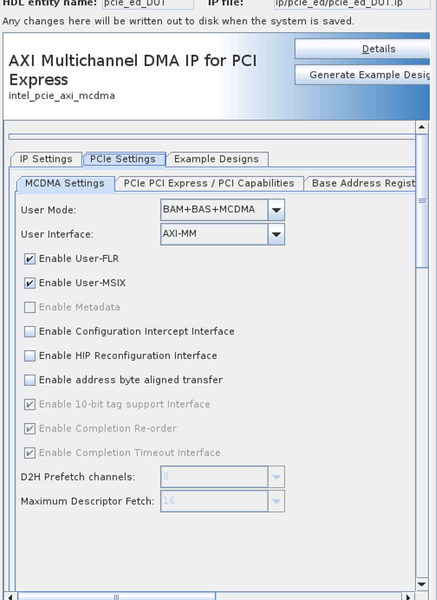
Hi! I'm working with AGIB023R18A1E1VC device and having issues with AXI Multichanned DMA IP for PCIe. Since I require a PCIe bridge, I configured the IP in MCDMA+BAS+BAM mode (PCIe Gen 4, 512-bit), generated an example design, and integrated the subsystem into my project. Although I do not use MCDMA, I rely heavily on the BAS and BAM functionality. The issue I’m seeing is that writing more than 448 bytes to the BAS causes the host to hang and subsequently reset. Notably, between the write transaction and the host reset, the FPGA internal logic is still able to write to the BAS, indicating no hang on the AXI bus. There are no issues with read transactions. We observe this issue not with only one card. At first we run into it in Q25.1 but still have it in Q25.3.1 If you need some captures from the signal tap or any additional details I may provide them. Thank you in advance! Mikhail.99Views0likes10Comments
Avalon-MM Cyclone V Hard IP for PCI Express Intel FPGA IP Soft Reset and Hard Reset
Dear Intel, Based on the forum info and datasheet it is allow to use soft reset rather than hard reset. In order to do so, changing <parameter name="force_src" value="0" /> to <parameter name="force_src" value="1" /> Should basically turn the HRC to SRC. However during actual system test SRC stuck on driver loaded while HRC does not. According to the above background informations: 1: do SRC allowed in GEN1 PCIe 2: How to properly driven the reset signal under verilog possible example could be good. Thanks, BrianSolved76Views0likes9Comments
Cyclone 10GX PCIe / Raspberry Pi
Hi, We have a PCIe controller using the Cyclone 10Gx with the PCIe hard IP. It works when connected to a Windows system but it isn't getting detected when connected on a Raspberry Pi 5 or CM5 system. On the Pi, i see that the LTSSM transitions from Detect.Active to Polling.Active to Polling.Compliance to link down. I think this suggests that the Pi isn't detecting any device on the other end. I tried isolating the power on sequencing by hooking up an external power supply to the PCIe card, but it didn't help. Any guidance would be much appreciated. Thanks!72Views0likes8Comments
agilex 7 Platform Designer PIO addr width
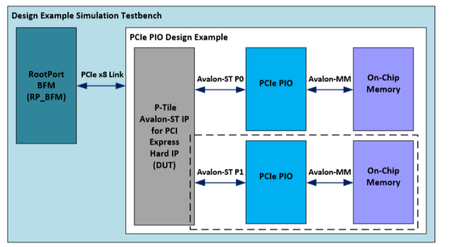
I am using the PIO example design of the P-Tile AVST PCIe IP on Intel Agilex 7. The original design maps a 16KB RAM to BAR0. Since my design requires a larger address space, I modified the PCIe IP's BAR configuration to increase BAR0 size to 2MB. However, I soon discovered that in the "PIO Design Example for PCI Express Gen4," the module converting AVST to AVMM only supports a 16KB address space after conversion. I then replaced it with the "PCIe PIO" IP core, but found that it can only access a 1MB region. What should I do?30Views0likes6CommentsAgilex-7 MSI-X missing om AXI MCDMA for PCIe
Hi! We are using AGIB023R18A1E1VC device and AXI MCDMA for PCIe IP core. We set it to MCDMA+BAS+BAM mode as we want to use MSI-X interrupts. Our driver register for example 2 MSI-X interrupts in Linux with no issues, after that FPGA logic sends request to user_msix interface and observes handshake. But then we see no interrupt happening in host, and interrupts counter stays at zero value. In lspci we see that MSI-X capability exists and the number of MSI-X vectors is not zero. Capabilities: [b0] MSI-X: Enable+ Count=53 Masked- Vector table: BAR=0 offset=00100000 PBA: BAR=0 offset=00180000 We use Q25.3.1. Could you please help us with understanding what may be wrong and why we don't see interrupts in our host system? Thank you in advance. Mikhail.49Views0likes7CommentsAgilex 7 R-Tile PIPE Direct Mode: Raw Rx Data Misalignment - Is Soft Word Alignment Needed?
Hello, I am designing a custom PCIe Logical PHY using Agilex 7 R-Tile in PIPE Direct Mode. My goal is to implement the PCS/MAC layer in soft logic (FPGA fabric). I have established a link with the Host, but I am unable to detect the COM symbol (K28.5). Instead, I observe the following two repeating patterns on the 10-bit RxData bus via Signal Tap: Observed Raw Data (Repeating 10-bit Hex values): Pattern A (RD-): 0x3E5, 0x142, 0x147, 0x267, 0x30E, 0x236, 0x156, 0x155, 0x155, ... Pattern B (RD+): 0x01D, 0x2BD, 0x2B8, 0x198, 0x0F1, 0x1C9, 0x151, 0x155, 0x155, ... My Analysis: The trailing 0x155 matches D10.2 (TS1 Link/Lane ID), which is symmetric (0101010101), so it looks correct even if bit-reversed. The header 0x3E5 (Pattern A) and 0x01D (Pattern B) do not match K28.5 directly. However, if I apply Bit Reversal and a 3-bit Shift to 0x3E5, it perfectly matches the K28.5 comma pattern. This strongly suggests the data is valid but is coming in as Raw, Bit-Reversed, and Misaligned bits. My Questions: In PIPE Direct Mode, is it standard behavior for the R-Tile Hard IP to bypass Word Alignment and output raw, unaligned data? Does this mean the user is strictly responsible for implementing Bit Reversal and a Soft Word Aligner (Bit Slip / Barrel Shifter) in the FPGA fabric to achieve Symbol Lock? Is there any IP parameter or configuration to enable Hard Word Alignment while keeping the PIPE Direct interface? I would appreciate any confirmation or advice from those experienced with R-Tile PIPE Direct mode. Thank you.25Views0likes1Commentagilex 7 Platform Designer PIO 2x8
I used the Platform Designer PIO 2x8 example to build my own setup, but when I run lspci on the computer, I can only see one device pcie1, and cannot see pcie0. My hardware connections should be fine - I have two clock signals, and it works with the pcie pio x16 example. Where might I have configured something incorrectly? The settings for pcie1 are basically the same as pci0. I'll post the parts that are different. What have I missed or what have I configured incorrectly?Solved91Views0likes8Comments