Forum Discussion

 New Contributor
Questa - license problem
I have installed Questa Altera Starter 25.2. It works at home. But when I open this software at the university compound, I get the following error and can’t use it –
“Unable to checkout a viewer license necessary for use of the Questa Altera Starter FPGA Edition graphical user interface. Vsim is closing.”
Please find attached the screenshot of the problem.
19 Replies
- RichardT_altera
Super Contributor
The error message indicates an invalid host, which means the Host ID in the license file does not match the Host ID of the machine.
Could you compare the Host ID of the target machine with the Host ID specified in the license file?
If the Host IDs do not match, the license will not work.
In that case, you will need to generate a new license file using the correct Host ID for the machine.
Regards,
Richard Tan Lisze
LiszeHi Richard
Thanks for your reply. Is it the Host ID in the "LR-155355_License.dat" ?
Where can I find the Host ID of my laptop?
Is that mean that it will be a unique Host ID in the license file for each computer?
How to generate a new license file?
Thank you.
- RichardT_altera
Yes, you can checkout the licensing know-how guide section 2: Check Your License (.dat) File, to understand how to check the NIC ID. (host ID)
https://community.altera.com/discussions/quartus-prime/licensing-%E2%80%98know-how%E2%80%99-guide/352017#community-352017-mcetoc_1jlgk8oh4_4
I have assumed the license file you used is a fixed node license. Correct me if I am wrong.Is that mean that it will be a unique Host ID in the license file for each computer?
> It depends on what software you are using. For Quartus software, the license will work if it is a companion licenses. FYI, a companion license grants license portability to a fixed product license. Each fixed product can be assigned to up to three computers: an office, a lab, and a home computer if all are only used by the same person.However, very important to note that the Questa – Altera FPGA Edition software does Not support companion licenses. So the answer is yes for Questa software.
How to generate a new license file?
> https://www.altera.com/design/guidance/software/modelsim
Regards,
Richard Tan
- RichardT_altera
Quartus Lite does not require a license file to run. However, your license setup should still be configured correctly. Ideally, in Quartus Standard or Pro Edition, you should see the licensed features listed in the Licensed AMPP/MegaCore Functions window.
Could you try running the following command and verify that the environment variable is set correctly?
echo %SALT_LICENSE_SERVER%
If the issue persists, please share:-A screenshot of your environment variable settings
-Your license file
Also, could you let me know which operating system you are using?
Regards,
Richard Tan- Lisze
In my folder C:\altera\25.1std, initially I already have a license file (LR-155355_License.dat) when I install Questa.
Yesterday I generated another license file (LR-176865_License.dat).
Attached are both license files, which I changed to .txt. Otherwise, I couldn't attach it here.
Thank you.
- RichardT_altera
Is 000EC6453655 your machine's NIC ID?
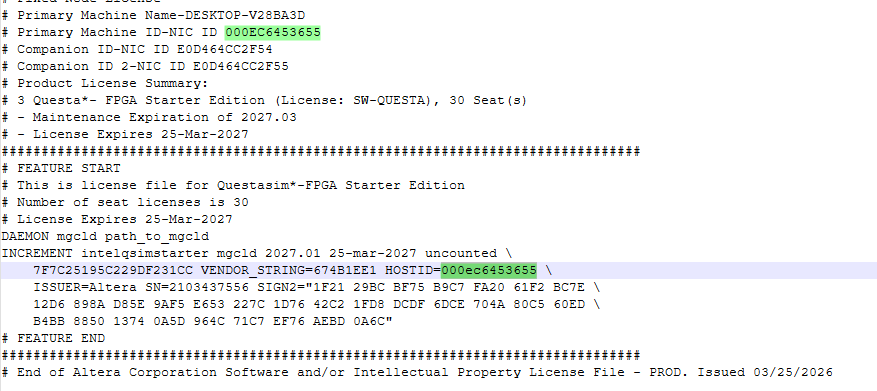
You can verify this by running the following command in a Command Prompt:
ipconfig/all
If 000EC6453655 is not listed as one of the physical MAC addresses, the license file will not work.
In that case, please try generating a new license file using the NIC ID E0D464CC2F54 (without any companion ID). Prior that, double check the NIC ID is valid.
Also, does the path specified in the environment variable have the necessary read/write permissions? As a test, you could try moving the license file to a different location, such as your Downloads folder, and update the environment variable accordingly.
Please let me know the results.
Regards,
Richard Tan
- Lisze
Alright, thank you.


