Forum Discussion

 New Contributor
Questa - license problem
 New Contributor
In my folder C:\altera\25.1std, initially I already have a license file (LR-155355_License.dat) when I install Questa.
Yesterday I generated another license file (LR-176865_License.dat).
Attached are both license files, which I changed to .txt. Otherwise, I couldn't attach it here.
Thank you.

 Super Contributor
Is 000EC6453655 your machine's NIC ID?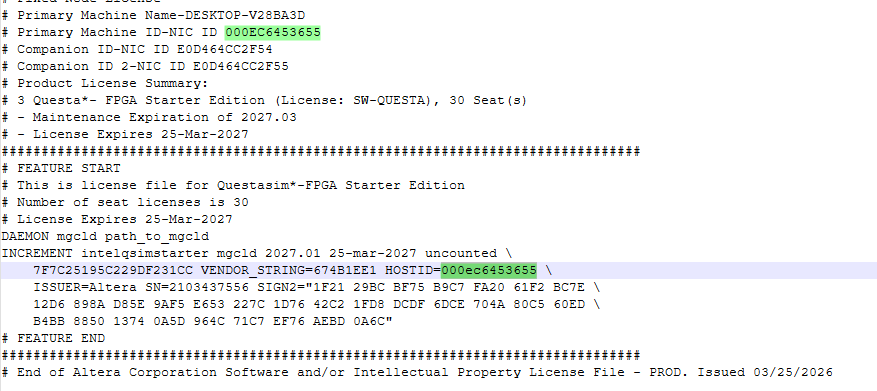
You can verify this by running the following command in a Command Prompt:
ipconfig/all
If 000EC6453655 is not listed as one of the physical MAC addresses, the license file will not work.
In that case, please try generating a new license file using the NIC ID E0D464CC2F54 (without any companion ID). Prior that, double check the NIC ID is valid.
Also, does the path specified in the environment variable have the necessary read/write permissions? As a test, you could try moving the license file to a different location, such as your Downloads folder, and update the environment variable accordingly.
Please let me know the results.
Regards,
Richard Tan
- Lisze1 month ago
After running ipconfig/all, 000EC6453655 is not listed as one of the physical MAC addresses.
Yesterday, I have tested the setx SALT_LICENSE_SERVER by putting the license file in different folder. But it didn't work.
I have generated a new license file (LR-177087), attached.
Then, in Command Prompt, I type
setx SALT_LICENSE_SERVER C:\licenses\flexlm\LR-177087_License.dat
Now I get this error when I open Questa:
I don't know how to check if the environment variable has the necessary read/write permissions
- RichardT_altera1 month ago
You can refer to this YouTube video for instructions on setting the environment variable using the GUI method.
At this point, I suspect one of the following:
-The environment variable is configured incorrectly.
-The path specified in the environment variable is invalid.
-The license file is not located in the specified path.Could you double-check these items and let me know the results? If the issue persists, please share a screenshot of the environment variable settings and the folder containing the license file.
https://www.youtube.com/watch?v=Z2k7ZBMZT3Y
Example:
Regards,
Richard Tan- Lisze1 month ago
Now I understand why Questa works when I use it at home. The previous license file matches my home NIC ID.
But at university, my laptop is connected to WiFi with a different MAC address. I'm working from home today. I will go back to uni next Monday, then I will try it out again to make sure the environment variable is configured correctly.
Thank you.


