Forum Discussion

 New Contributor
Quartus Prime Download
I am unable to download the Quartus Prime Std 23.1 application because of some internet issue. I checked the internet where it said that i can upload a ca certificate but i dont see any option to upload that i dont know how to download this. Any help here?
17 Replies
 umut_arrow
You can follow the below Knowledge Base article. It goes through resolving this with step-by-step instructions
Why does my Quartus® Prime Installation fail with certificate error: SSL certificate problem: unable to get local issuer certificate (curlcode 60)? | Altera Community - 351512 Shuna
ShunaI tried it but still i am getting the same error.
i tried it through the command prompt because it didnt have any option to do paste the certificate in the settings of the installer. I also tried installing the 25.1 version but in that i only get the Cyclone V devices and I dont get any other FPGA boards in-spite of downloading the devices during installation.
- RichardT_altera
Super Contributor
You do not need to upload the certificate. You only need to specify the full path to the cacert.pem certificate file, for example:
C:\Users\Downloads\cacert.pem
You may also refer to the forum thread below, which discusses a similar issue encountered by others.
https://community.altera.com/discussions/quartus-prime/unable-to-download-quartus/351334
Regards,
Richard Tan - Shuna
I did try that as well its still the same. I tried the same for the 25.1 version and i downloaded it but i am unable to get any devices. I am able to see only Cyclone V boards and nothing else. I also tried installing the devices separately. But in the device installer it said that those devices are already installed. I checked the device files and i seem to be missing some files. I will share the screenshot of those. I would appreciate any help.
The first one is the Cyclone V and the second one is Cyclone IV E. Can anyone please help me.
- RichardT_altera
Could you share a screenshot of what you see when opening the Quartus Standard 25.1 installer GUI?
- RichardT_altera
Could you share a screenshot of what you see when opening the Quartus Standard 25.1 installer GUI?
Regards,
Richard Tan
- Shuna
I also tried downloading the individual apps and using the device installer, i am unable to view those devices even after installing them separately. idk if the problem is with the files that i am downloading or is it something else
- Shuna
I tried installing from the .tar file but still i am unable to see the devices is it because of the trial version?
- RichardT_altera
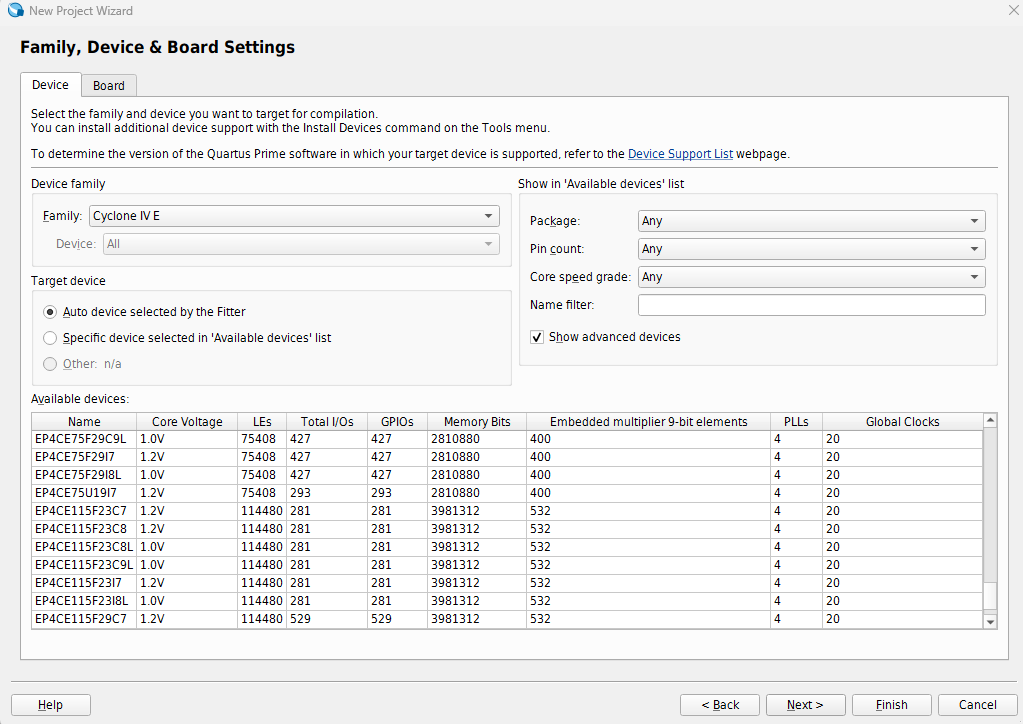
This should be the expected view.
- What do you mean by the trial version? Are you referring to an evaluation license? If so, it should not impact the device shown.
- What operating system are you using?
- Press Windows + R.
- Type winver.
- Press Enter.
Please provide a screenshot of the Windows Specifications window.
- Is this the only Quartus version installed on your machine? Do you have any other Quartus versions or editions installed?
- Please try installing Quartus in the default installation path and let me know the outcome.

Regards,
Richard Tan
- RichardT_altera
Any update on this?
Do you able to resolve the issue?
Regards,
Richard Tan


