Forum Discussion

Altera_Forum Honored Contributor
9 years agoHonored ContributorProblems downloading to NIOS II / Verification fails
Hello
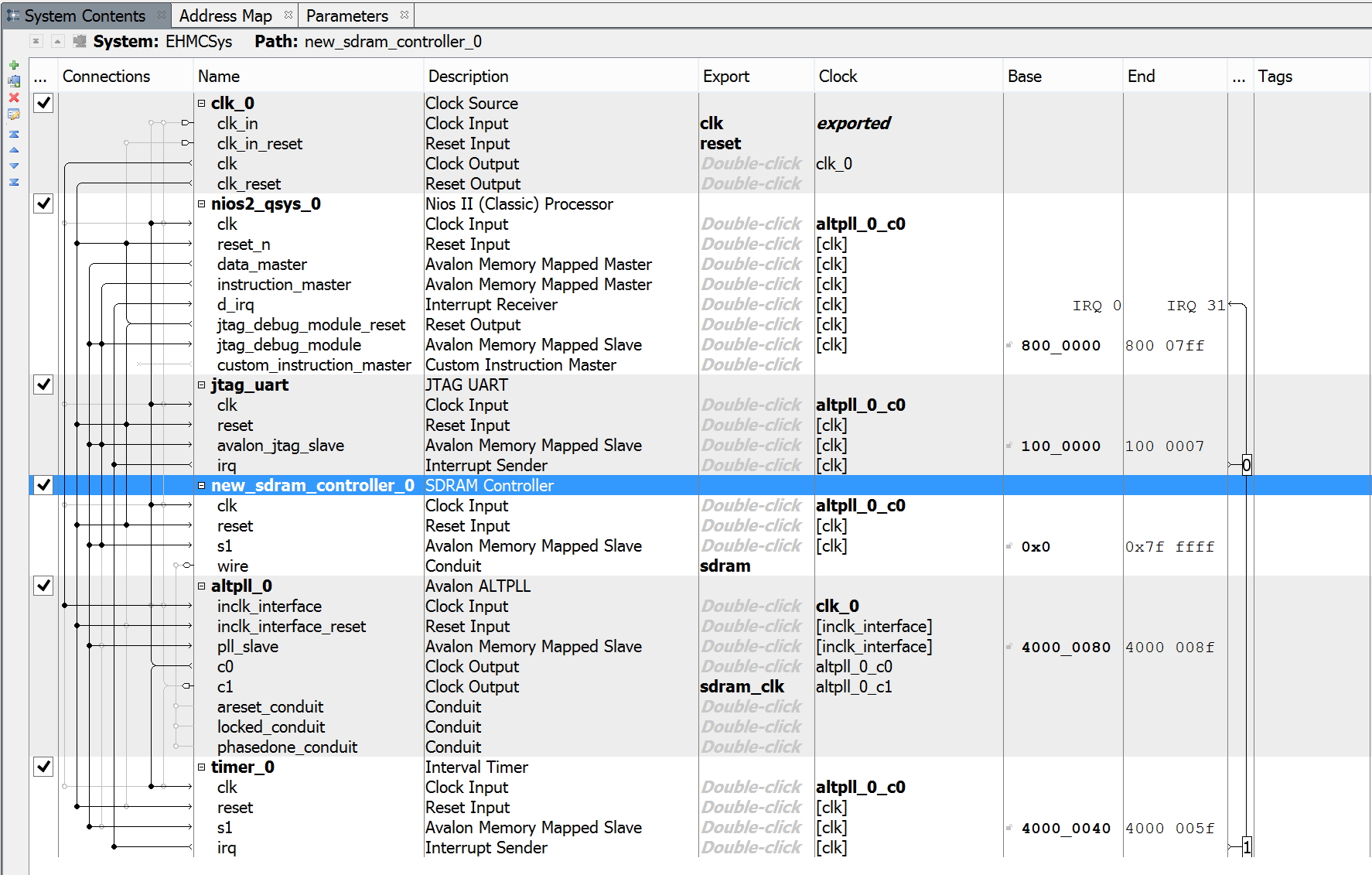
I am trying to interface the SD RAM on a DE0 board to a NIOS II. I have carefully followed the steps required to set up the SD RAM controller to use the IS42S16400J. Unfortunately when I try and down load my .elf file to the NIOS II processor, I get the following output in the console (briefly!): --- Quote Start --- 2 [main] bash 952 find_fast_cwd: WARNING: Couldn't compute FAST_CWD pointer. Please report this problem to the public mailing list [email protected] Using cable "USB-Blaster [USB-0]", device 1, instance 0x00 Resetting and pausing target processor: OK Initializing CPU cache (if present) OK Downloading 00000000 ( 0%) Downloading 000013D8 (99%) Downloaded 5KB in 1.5s (3.3KB/s) Verifying 00000000 ( 0%) Verify failed between address 0x0 and 0x13CF Leaving target processor paused --- Quote End --- I have searched various forums and seen that other people have had similar problems, but none of the solutions I found helped. I have attached some screen shots of my setup. Could someone please give some hints as to what the issue is please? Thanks in advance Andrew11 Replies
 Altera_Forum
Your images are too small, can you upload larger ones
- Altera_Forum--- Quote Start --- Your images are too small, can you upload larger ones --- Quote End --- Hi Pavel_47 Thank you for your reply. I have a link to my project https://www.dropbox.com/s/25kvh33zp6fc7s4/ehmcsys%20%282%29.zip?dl=0 if that helps. The images are screen shots fro quartus, and coocox so I can't make them any larger. Kind regards Andrew
- Altera_Forum
Hello Andrew,
Unfortunately I couldn't properly upgrade your project to my Altera Quartus Prime 15.1. Nevertheless I could open .qsys file. Here it: snapshot below. BTW, I didn't understand why you couldn't make image larger - simple screenshot grabber can do this job. Can you compare with yours: are there differences ? Other observations:- Qsys says that alt_pll doesn't support your Cyclon V device. Why not use simple PLL module from "Basic Functions"/"PLL"/"Altera PLL" ?
- I couldn't find wrapping top module (Verilog or VHDL) where you instantiate your qsys
- Also pin assignment is empty ... probably caused by problems during upgrade. Can you attach snapshot with pin assignment ?
- Altera_Forum
Hi Pavel
I have attached a zip file containing a csv for the pin assignments. I wasn't able to get a single screen shot, but I can upload several if needed. The device I'm using is a Cyclone III EP3C16F484C6 on a DE0 board. I'll compare your snapshot of you qsys filewhen I get home and let you know if I spot any differences. Thanks Andrew - Altera_Forum
Hmm...
The device that appears after project upgrading is 5CGXFC7C7F23C8, which is Cyclone V ... not Cyclone III. This .csv pin assignment file you exported from your project ... or it was just present in your board package. --- Quote Start --- I wasn't able to get a single screen shot, but I can upload several if needed. --- Quote End --- How did you proceed with snapshot ? What OS are you using ? - Altera_Forum
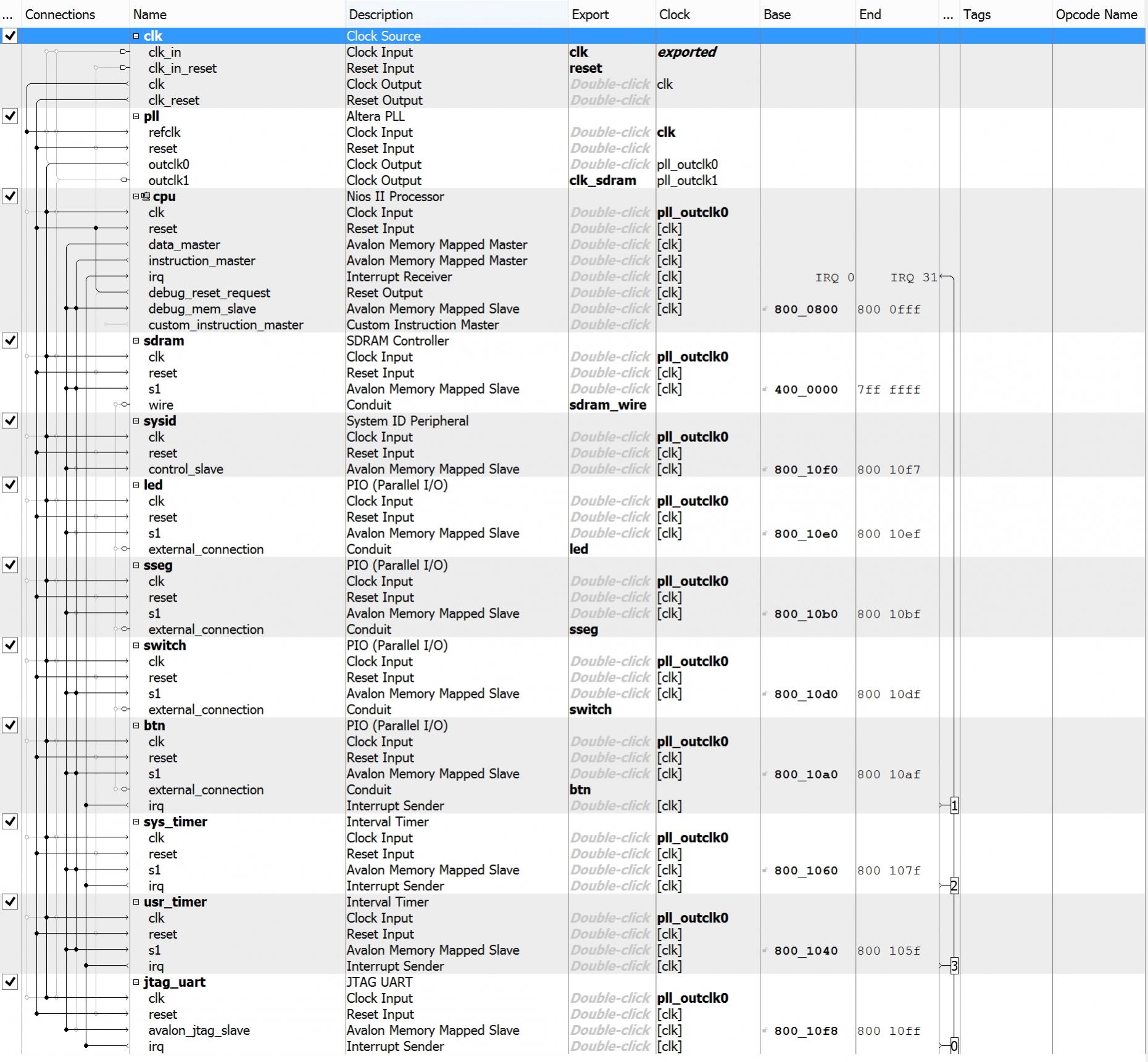
Here is screenshot of qsys of my project (similar to yours, but made on DE-1 SoC Cyclone V), that works.
https://www.alteraforum.com/forum/attachment.php?attachmentid=14000 - Altera_Forum
Hi Pavel
I did have a problem when using a newer version of Quartus (ie later than 13.1) in that it didn't support the device Im using. I'm using windows 10, so normally I would use the snip tool. The reason I wasn't able to do it for the pin assignments was the amount of scrren area I had, I wasn't able to get a full view of the assignments. I thought exporting a csv would be easier. I could have taken several screen shots instead, but I thought that would be more cumbersome. I have compared your design against mine, and all I can see which is different is that you have an irq line in the connections column. Is that because you're using a later version or Quartus? I've attached another view of my qsys design. It should be actual size from my screen. I can't find a way to make it bigger. Andrew - Altera_Forum
Hi, Andrew,
Ok, I it seems understood your problem with screenshots: I have 4K display and whole qsys diagram is visible, whereas on ordinary displays it's impossible. Concerning your main problem, I think you should ask Altera for support your device with your Quartus version. But before can you check some basic things: warning from compiler reports, especially from TimeQuest one .... as I didn't see a constraint file (.sdc extension) in your design folder. At least constraint on system clock must be present. Regards. P.S. Your new screenshot still illegible - Altera_Forum
Hi Pavel,
I'm not sure what's going wrong with my screenshots, I suspect that they are being scaled down in the upload. I'll check for the constraint files, and let you know what I find. Regards - Altera_Forum
Hi Pavel
I checked my project and saw that there were constrain files present. Maybe they got lost in the project upgrade on your system? I have sent a question to Altera about my problem so I'll let you know what response I get. Andrew