Forum Discussion

 Occasional Contributor
what's the main concern to set or not set associated clk and reset
In the component editor, it's required to fill the associated clk and reset.
As all the logic related to clk and reset already defined in the *.v design files, why should define once more here? Is there any issue if I leave it as none here?
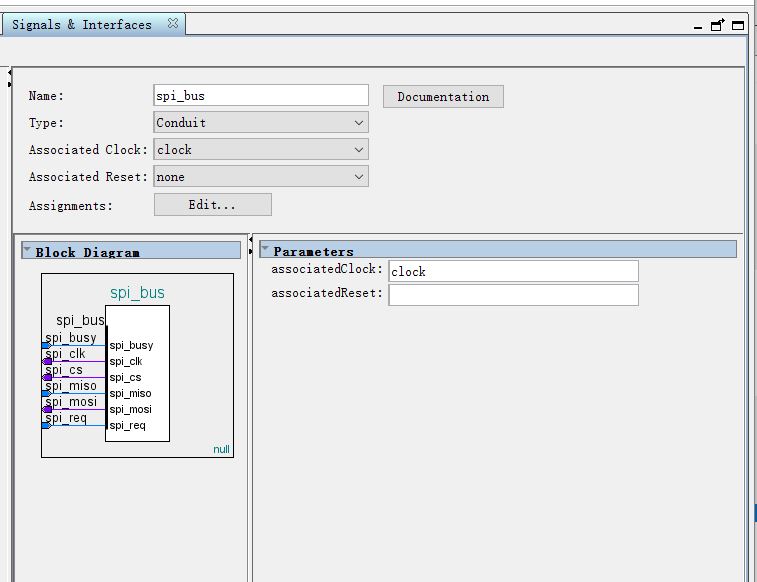
Let me take SPI bus for example.
spi_miso is an input signal . It's not linked to any reset signal.
But spi_cs, spi_mosi, spi_clk can be reset by signal reset_n;
So should I put reset_n as associatedreset for overall SPI_BUS conduit? If yes, what's the impact on spi_miso?
The Component Editor knows nothing about the functionality of your custom component. As such, you have to specify the standard interface signal roles of your top-level ports (clock, reset, etc.) and the associated clock and reset for each standard interface (Avalon, AXI).
For the example you mention, it sounds like those signals are making up a conduit instead of a standard interface, confirmed by your screen capture. As such, associated clock and reset are not required for this type of interface. I think you may see warnings if you use the component in a system, but they're just warnings, not errors. You can set associated clock and reset since the Component Editor gives you the option, but I don't think it will cause any issues if you don't.
#iwork4intel
7 Replies
 sstrell
Super Contributor
The Component Editor knows nothing about the functionality of your custom component. As such, you have to specify the standard interface signal roles of your top-level ports (clock, reset, etc.) and the associated clock and reset for each standard interface (Avalon, AXI).
For the example you mention, it sounds like those signals are making up a conduit instead of a standard interface, confirmed by your screen capture. As such, associated clock and reset are not required for this type of interface. I think you may see warnings if you use the component in a system, but they're just warnings, not errors. You can set associated clock and reset since the Component Editor gives you the option, but I don't think it will cause any issues if you don't.
#iwork4intel
 EricMunYew_C_Intel
Frequent Contributor
Hi, Xiaoqiang
May I know which Quartus version and which particular SPI IP you use ?
Normally, you don't have to enter the clock and reset manually, you can do the reset and clock connections directly in Platform Designer.
Thanks.
Eric
 XQSHEN
Quartus Prime 18.0 standard.
I don't use your standard IP. It's defined by myself using component editor.
- EricMunYew_C_Intel
Hi, Xiaoqiang
The conduit is for you to define the external interface of your IP.
You can add another interface, for example Avalon slave to your IP.
In addition, you can add a clock input and a reset input to your IP. And then you can use them as associated clock and reset. The clock input and reset input here allow you to connect them in the Platform Designer.
Thanks.
Eric
- XQSHEN
Hello Eric,
I understand it's ok for standard interface such as Avalon-mm.
But my initial question is for external interface, and I am not sure clk and reset makes sense or not for such interface. Basically it's answered by your colleague. It's not needed.
Anyway, thank you very much for advice!
- EricMunYew_C_Intel
Hi, Xiaoqiang
The standard Avalon interface will not include the clock and reset. And therefore you need to add the clock and reset. The clock and reset allow you to connect to other external clock and reset blocks in Platform Designer.
If you have no more question, can I close the case ?
Thanks.
Eric
- XQSHEN
Thanks, I am ok to close it.