Forum Discussion

Altera_Forum Honored Contributor
12 years agoHonored ContributorUSB Blaster EEPROM Program for Cyclone IV Dev Kit
Hi,
I have accidentally erased the EEPROM on my CycloneIV development kit and now the computer sees the USB Blaster as USB Serial interface. I tried to reprogram by using FTDI - FT prog and usb_blaster_BLASTR01.xml file from the forum. When I tried to program, FTDI program gives two errors. First one: The current drawn from the USB port must be in the range 0 to 500mAmps. Second one: The maximum number of characters for the Manufacturer, Product Description and Serial Number is 46. It seems this XML code worked for DE1 users and I don't understand why it does not work with my board. Here is the XML code that I used: <?xml version="1.0" encoding="UTF-8" ?> - (http://www.alteraforum.com/forum/) <FT_EEPROM> - (http://www.alteraforum.com/forum/) <Chip_Details> <Type>FT232/245BM</Type> </Chip_Details> - (http://www.alteraforum.com/forum/) <USB_Device_Descriptor> <VID_PID>2</VID_PID> <idVendor>09FB</idVendor> <idProduct>6001</idProduct> <bcdUSB>USB 1.1</bcdUSB> </USB_Device_Descriptor> - (http://www.alteraforum.com/forum/) <USB_Config_Descriptor> - (http://www.alteraforum.com/forum/) <bmAttributes> <RemoteWakeupEnabled>false</RemoteWakeupEnabled> <SelfPowered>true</SelfPowered> <BusPowered>false</BusPowered> </bmAttributes> <IOpullDown>true</IOpullDown> <MaxPower>150</MaxPower> </USB_Config_Descriptor> - (http://www.alteraforum.com/forum/) <USB_String_Descriptors> <Manufacturer>Altera</Manufacturer> <Product_Description>USB-Blaster</Product_Description> <SerialNumber_Enabled>true</SerialNumber_Enabled> <SerialNumber>BLASTR01</SerialNumber> <SerialNumberPrefix>BL</SerialNumberPrefix> </USB_String_Descriptors> </FT_EEPROM> Thanks12 Replies
 Altera_Forum
When I programm the device, operation failed with message "The current drawn from the USB port must be in the range 0 to 500 mAmps."
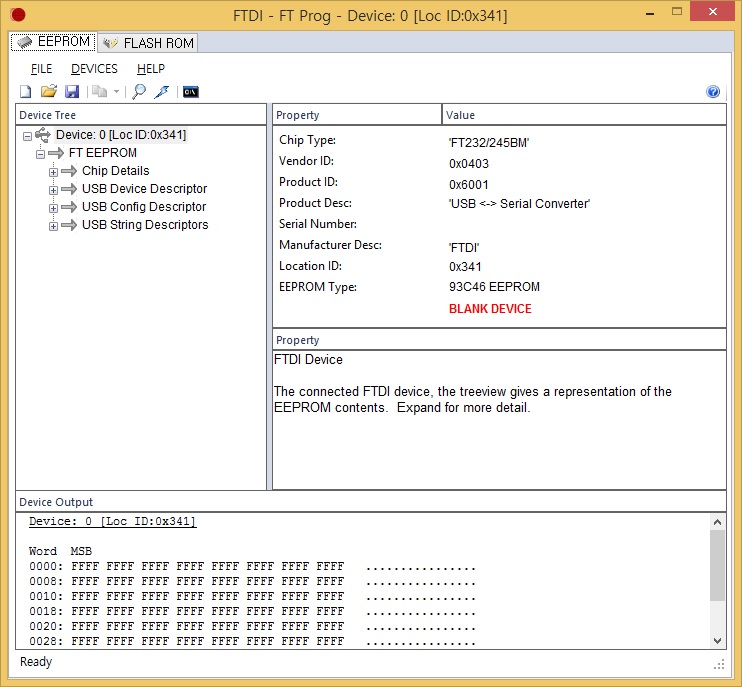
- Altera_Forum--- Quote Start --- My EEPROM is blank device. Chip Type: FT232/245BM Vendor ID: 0x0403 Product ID: 0x6001 Product Desc: USB <-> Serial Converter Manufacturer Desc: FTDI Location ID: 0x341 EEPROM Type: 93C46 EEPROM BLANK DEVICE --- Quote End --- You should be able to use FT245B_BLASTR01_xml.txt in the post above. Download the file, change the filename to FT245B_BLASTR01.xml, then in FT_PROG select the FT245 device, right click, apply template, and select the XML file. Then program it. Unplug and plug the device back in, and it should get detected as a USB-Blaster. Let me know if that works. Cheers, Dave
- Altera_Forum
- Altera_Forum
https://www.alteraforum.com/forum/attachment.php?attachmentid=10747
--- Quote Start --- Can you first just use FT_PROG to detect devices? What does the EEPROM content look like? Is it blank? --- Quote End --- My EEPROM is detected to blank device. All data is FFFF. I attached the screenshot. - Altera_Forum--- Quote Start --- I'm using Cyclone IV Transceiver Starter Kit and I got a same problem. I tried FT_Prog with your FT245B configutation but it fails with message "The current drawn from the USB port must be in the range 0 to 500 mAmps." This board uses FT245BL with external EEPROM (AT93C46DN-SH-B). Can you help me? --- Quote End --- Can you first just use FT_PROG to detect devices? What does the EEPROM content look like? Is it blank? I'll check to see if I have a board with an FT245BL on it tomorrow and if I do post the EEPROM contents, if I don't, I can probably make a template that should work. Cheers, Dave
- Altera_Forum
Hi Dave,
I'm using Cyclone IV Transceiver Starter Kit and I got a same problem. I tried FT_Prog with your FT245B configutation but it fails with message "The current drawn from the USB port must be in the range 0 to 500 mAmps." This board uses FT245BL with external EEPROM (AT93C46DN-SH-B). Can you help me? Thanks. - Altera_Forum
Emre,
In case it's not clear on your board - both Cyclone IV dev kits I have are fitted with FT245B devices. I suspect the one you have is too. If you still have problems post the details of the exact dev kit you have. Cheers Alex - Altera_Forum
Here are the XML files (renamed with .txt extensions to allow upload) for FT245B and FT245R devices. The XML files were created using FT_PROG 2.8.2.0
Cheers, Dave - Altera_Forum
Hi Emre,
--- Quote Start --- I use version 2.8.2.0 of FT Prog and the device manager says it is a USB <-> Serial interface. If you can post the appropriate XML file it will be great. If that doesnt work than I guess sometihng happened to EEPROM. --- Quote End --- That is not quite enough information for me to post the correct XML. What type of device does FT_PROG indicate is on your board? Actually, I'll just post configurations for both the FT245R and FT245B ... I'll fire up my laptop and check that it has the same version of FT_PROG and then upload the images ... back shortly. Cheers, Dave - Altera_Forum
Hi Dave,
I use version 2.8.2.0 of FT Prog and the device manager says it is a USB <-> Serial interface. If you can post the appropriate XML file it will be great. If that doesnt work than I guess sometihng happened to EEPROM. Thanks, Emre