Forum Discussion

 Occasional Contributor
HLS Compiler 24.1 error - aocl-clang.exe - dll entry point not found
 2 years ago
Thanks Noah. Please install Quartus 23.1lite, then add HLS as an 'upgrade', paying attention to step 3 of the Getting Started Guide. Make sure you remove/rename any version of HLS that exists in 23.1lite; I spoke with some people in engineering and the error you're seeing might appear if HLS 24.1 pro happens to pick up the libraries from HLS 23.1std.
 Occasional Contributor
Hello and thank you for your answers.
Checking the Quartus project creation as @BoonBengT_Altera suggested, Quartus would freeze everytime a project is created.
This was fixed, as inspired by @whitepau_altera 's suspicion, by unchecking the "Read Only" attribute from the intelFPGA_Lite folder.
However, the error in HLS example remains even when copying the example to a different folder.
Perhaps it is not due to permissions, since the error seems to occur when readign the .dll files anyways.
To answer your other questions:
C:\intelFPGA_lite\23.1std\hls is the installation path of HLS within the Quartus Lite folder. Below is a screenshot of the folder.
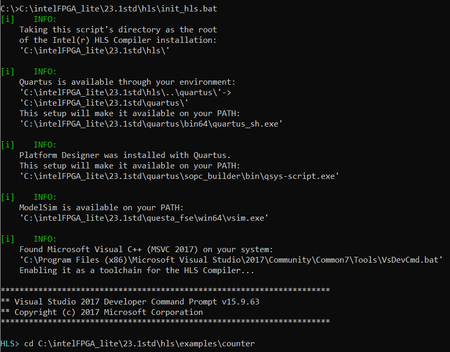
I assumed the combiled installation worked correctly, since running init_hls.bat seems to indicate that all dependencies (including Quartus) are found correctly.
As for Microsoft Visual Studio, I only have the 2017 version. I didn't know the redistributables were already included!
