high-level design tools
108 Topics
Introducing the Altera Community AI Responder — Beta
Altera is introducing the AI Responder, an assistant built into the Altera Community to help provide faster, context-aware guidance for Altera product questions. It uses relevant public Altera documentation and Knowledge Database content, with coverage continuing to expand. The AI Responder may provide source references and can hand off complex or out-of-scope questions to an Altera subject-matter expert. As a beta feature, responses may contain errors or omissions, so please review the sources and verify technical guidance against official Altera documentation before implementation. If the response does not fully address your question, add more context and tag ai_responder to continue the discussion. We welcome your feedback as we improve the Community experience.35Views0likes1CommentHLS Compiler 24.1 error - aocl-clang.exe - dll entry point not found
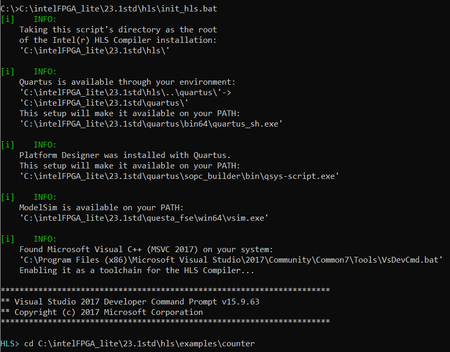
Good day, I recently installed HLS Compiler 24.1 together with Quartus Prime Lite 23.1std in order to do the first HLS tests. I installed Visual Studio 2017 Community and the latest version of Microsoft Visual C++ Redistributables (2015-2022). My OS is Windows 10 Home 10.0.19045 Trying to test an HLS example, I enter the Visual Studio console by launching the init_hls.bat file in C:\intelFPGA_lite\23.1std\hls. It seems to detect every dependency. Launching the build.bat of an example in test-x86-64 mode returns the following error, translated below the image: "The procedure entry point [...] could not be located in the dynamic link library [...]." This also happens for mathlib.dll, generationlib.dll and mip_common.dll. I tried deleting and reinstalling HLS Compiler and deleting and reinstalling MVC++ Redistributables. I also tried launchig build.bat in test-FPGA mode, changing the board from Arria10 to CycloneV, which returns the same error. Below are linked two threads that inquire about similar errors, but the original poster did not share if and how it was finally resolved. aocl-clang.exe - Entry Point Not Found - Intel Community HLS i++ compile failure for Quartus Prime 21.1.1 Lite - Intel Community Any suggestions on how to proceed? Thank you in advance, NoahSolved3.9KViews0likes14Comments
Deprecation Notice for FPGA Support Package for oneAPI DPC++/C++. What is the alternative?
Hi there, We recently began to port our HLS-C++ projects to oneAPI as the HLS-Compiler was no longer continued. Today I noticed the deprecation notice for "FPGA Support Package for Intel® oneAPI DPC++/C++ Compiler". See https://www.intel.com/content/www/us/en/developer/tools/oneapi/fpga.html . Hm. Looking at the Intel/Altera software page, it lists 4 HLS tools, of which two are the mentioned deprecated ones and the others are not suitable for continuation for our projects (no c++). So the questions are: * Is there a SYCL-for-FPGA-support in the future? * Is there a "HLS"ish C++-support planned in the future? (or other non-matlab languages) * What is the recommended High level approach for FPGA projects with an image processing background?Solved2.8KViews0likes7CommentsDoes the FPGA N3000 support OpenCL and OneApi?
I received an INTEL FPGA PAC N3000 card, and taking the opportunity, I decided to learn how to develop with SYCL and oneAPI. However, I ran into problems. I fully installed the FPGA PAC N3000 Acceleration Stacks v1.3.1 and also updated the board's BMC from D.1.0.12 to D.2.0.19. Then I started configuring oneAPI 2022 using intel-basekit and fpga-addon, but proper configuration requires bsp, and I couldn't find it anywhere. I also saw that on the website page for Quartus Prime Pro 19.2, which is installed with IAS 1.3.1, there's a tab with oneAPI and BSPs for boards. I looked at other versions, but I only found mentions of Arria 10-GX and Arria 10-SX. I'm not sure if this will help, but the log is from CentOS 7.6.1810. [root@node-fpga ~]# fpgainfo fme Board Management Controller, MAX10 NIOS FW version D.2.0.19 Board Management Controller, MAX10 Build version D.2.0.6 //****** FME ******// Object Id : 0xF300000 PCIe s:b:d.f : 0000:84:00.0 Device Id : 0x0b30 Numa Node : 1 Ports Num : 01 Bitstream Id : 0x23000110010309 Bitstream Version : 0.2.3 Pr Interface Id : f3c99413-5081-4aad-bced-07eb84a6d0bb Boot Page : user [root@node-fpga ~]# fpgainfo bmc Board Management Controller, MAX10 NIOS FW version D.2.0.19 Board Management Controller, MAX10 Build version D.2.0.6 //****** BMC SENSORS ******// Object Id : 0xF300000 PCIe s:b:d.f : 0000:84:00.0 Device Id : 0x0b30 Numa Node : 1 Ports Num : 01 Bitstream Id : 0x23000110010309 Bitstream Version : 0.2.3 Pr Interface Id : f3c99413-5081-4aad-bced-07eb84a6d0bb ( 1) Board Power : 59.65 Watts ( 2) 12V Backplane Current : 2.91 Amps ( 3) 12V Backplane Voltage : 11.92 Volts ( 4) 1.2V Voltage : 1.20 Volts ( 6) 1.8V Voltage : 1.80 Volts ( 8) 3.3V Voltage : 3.27 Volts (10) FPGA Core Voltage : 0.90 Volts (11) FPGA Core Current : 14.47 Amps (12) FPGA Core Temperature : 62.50 Celsius (13) Board Temperature : 42.00 Celsius (14) QSFP A Voltage : N/A (15) QSFP A Temperature : N/A (24) 12V AUX Current : 2.08 Amps (25) 12V AUX Voltage : 11.97 Volts (37) QSFP B Voltage : N/A (38) QSFP B Temperature : N/A (44) Retimer A Core Temperature : 63.00 Celsius (45) Retimer A Serdes Temperature : 64.00 Celsius (46) Retimer B Core Temperature : 0.00 Celsius (47) Retimer B Serdes Temperature : 0.00 Celsius [root@node-fpga ~]# aoc -list-boards Board list: pac_a10 (default) Board Package: /opt/intel/oneapi/compiler/2022.2.1/linux/lib/oclfpga/board/intel_a10gx_pac pac_s10 Board Package: /opt/intel/oneapi/compiler/2022.2.1/linux/lib/oclfpga/board/intel_s10sx_pac pac_s10_usm Board Package: /opt/intel/oneapi/compiler/2022.2.1/linux/lib/oclfpga/board/intel_s10sx_pac Memories: device, host [root@node-fpga ~]# aocl list-devices -------------------------------------------------------------------- Device Name: acl0 BSP Install Location: /opt/intel/oneapi/compiler/2022.2.1/linux/lib/oclfpga/board/intel_a10gx_pac Vendor: Intel Corp Physical Dev Name Status Information pac_f200000 Uninitialized OpenCL BSP not loaded. Must load BSP using command: 'aocl program <device_name> <aocx_file>' before running OpenCL programs using this device DIAGNOSTIC_PASSED -------------------------------------------------------------------- [root@node-fpga ~]# aocl initialize acl0 pac_a10 aocl initialize: Running initialize from /opt/intel/oneapi/compiler/2022.2.1/linux/lib/oclfpga/board/intel_a10gx_pac/linux64/libexec bitstream.c:391:validate_bitstream_metadata() **ERROR** : Interface ID check failed Error writing bitstream to FPGA: invalid parameter Error programming device aocl initialize: Program failed. [root@node-fpga ~]#76Views0likes0Comments
OneAPI Support for Agilex 5 and 7 Development Kits
Hello, I've recently acquired an Agilex 5 065B Modular development kit (https://www.intel.com/content/www/us/en/products/details/fpga/development-kits/agilex/a5e065b-modular.html) and an Agilex 7 I-Series development kit (https://www.intel.com/content/www/us/en/products/details/fpga/development-kits/agilex/agi027.html). I've been working through setting up the development environments for these boards, and would like to use the oneAPI HLS toolkit for them, if possible. So far, I've found a tutorial to create an accelerator support package for the Agilex 7 development kit that I have (https://ofs.github.io/ofs-2024.3-1/hw/common/user_guides/oneapi_asp/ug_oneapi_asp/). I'm planning to go through these steps shortly to setup my board for use with oneAPI, but I have yet to find any documentation for my Agilex 5 board. Is it possible to work with this Agilex 5 development kit using oneAPI, or is only the Quartus design flow supported at this time? Additionally, are there board support packages available (that I've just missed) - or soon to be available - for these cards if the HLS flow is an option? Thank you!1.8KViews0likes5CommentsAgilex 5 Precision DSP block simulations
Hi, I'm using the Precision DSP blocks in my Agilex 5 design; i have a floating point Add (FP_Add_native_DSP) and a floating point MAC (FP_MAC_native_DSP), but when i try and run simulations with these in place i'm seeing odd behavior: 1/ The adder is not doing an addition, the output is merely following one of the input pins. 2/ The MAC is giving an output but this does not match the output i'm seeing from a similar MAC targeted for the Arria 10 FPGA. The Arria 10 design is proven on silicon so i would have thought the simulation model for this is correct. The above is making me nervous and i'm seeking clarification that: 1/ There are indeed bugs in the simulations models - if so is there a patch available? 2/ The Floating Point DSP functions work correctly on the actual Agilex 5 silicon. I look forward to hearing from you. SimonSolved5.1KViews1like10Comments
HAL Kernel Version Mismatch Error During FPGA Emulation with vector-add Sample
Hello Intel FPGA team, I'm currently working on the vector-add example from the official oneAPI-samples repository, specifically from: DirectProgramming/DPC++/DenseLinearAlgebra/vector-add I’m encountering the following runtime error when I attempt to run the emulation build: Error output: ./vector-add-buffers.fpga_emu HAL Kern: Version mismatch! Expected 0xa0c00001 but read 0x4130 Hardware version ID differs from version expected by software. Either: a) Ensure your compiled design was generated by the same ACL build currently in use, OR b) The host can not communicate with the compiled kernel. vector-add-buffers.fpga_emu: /nfs/sc/disks/swip_hld_1/ops/SC/hld/nightly/2022.1/96.2/l64/work/acl/acl/source/57c9d2bcb46afcf445b5da2406c0e6d85be93ef3/src/acl_kernel_if.cpp:733: int acl_kernel_if_init(acl_kernel_if*, acl_bsp_io, acl_system_def_t*): Assertion `0' failed. make: *** [Makefile.fpga:35: run_emu] Error 1 Environment details: Board: DE10-Agilex BSP Path: /opt/intel/oneapi/intelfpgadpcpp/2021.4.0/board/de10_agilex oneAPI version: Installed multiple versions. Active: 2022.0.2 dpcpp path: /opt/intel/oneapi/compiler/2022.0.2/linux/bin/dpcpp OS: Ubuntu (detected as Rocky Linux during install attempts) What I have tried: Verified the AOCL_BOARD_PACKAGE_ROOT is correctly set. Recompiled the design using make clean && make fpga_emu. Ran aoc -list-board-packages to confirm the installed board. Ensured Quartus, BSP, and compiler are aligned. Despite that, I still encounter the HAL version mismatch. Request: Could someone guide me on how to: Resolve this version mismatch issue? Confirm the correct environment and runtime versions are in sync? Completely clean older/duplicate oneAPI installations if that’s the root cause? @intel @OneAPI @fpga @agilex7 @de10 @intel65.2KViews0likes3Comments
Modular approach for the NIOS ii processor intigration with main FPGA file
I am currently working on integrating the Nios II processor with the main VHDL file in Quartus Prime. So far, I’ve successfully implemented PWM signal generation by assigning a constant angle using the Nios II processor. My next goal is to make this system modular, so it can support N angles instead of just one. In my previous implementation, I used a single PIO (Parallel I/O) and assigned a base address to it. Now, I’d like to know: Is it possible to automatically assign addresses for multiple angles (i.e., for multiple PIOs corresponding to each angle)? If so, what’s the best approach to manage or generate these addresses dynamically in a modular way? I’ve also attached the files from my previous implementation for reference.Solved2.8KViews0likes4CommentsPCIe 4.0 Example for Agilex 7 M-Series
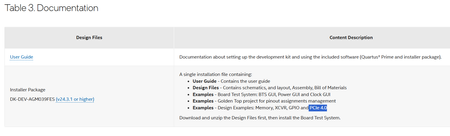
Hello, We purchased this Agilex 7 M-Series Dev Kit (https://www.intel.com/content/www/us/en/products/details/fpga/development-kits/agilex/agm039.html) for a project, and we're having trouble locating the design example for PCIe mentioned in the documentation. We could, however, identify an example in the documentation of the I-Series board, but the pin mapping is not straightforward. Could you please provide an example or documentation on configuring a basic design using the PCIe for the Agilex™ 7 FPGA M-Series Development Kit—HBM2e Edition (3x F-Tile & 1x R-Tile)? Also, is there any chance a BSP will be released for this dev kit? Thanks, Denisa1.7KViews0likes4Comments
Understanding FPGA AI Suite with Quartus
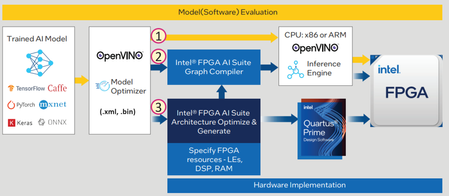
Hi, I am new to the FPGA AI Suite and would appreciate your help in better understanding it. Referring to the attached Intel pipeline, specifically the path involving Quartus: When Quartus is involved, is the OpenVINO runtime inference engine still required to run the application? I assume that IP files are imported into Quartus. Do these files contain the model topology and weights needed to run the application, or is Quartus solely used to configure the FPGA hardware, with the inference handled by the OpenVINO runtime (via FPGA AI Suite)? If I test the model using a deep learning framework and then use the FPGA AI Suite, how can I effectively collaborate with the FPGA developer? I hope my questions are clear. Best regards.Solved2.7KViews0likes1Comment