transceivers & basic functions
11 Topics
Error(22465): Refclk frequency of IP port '<pma_direct_multirate_ip_path>|tx_pll_refclk_link_xcvr0_prof0' (156.25 MHz) does not match the refclk frequency of system clock IP port '<ftile_refclk_sys_pll_clocks_ip_path>|out_fht_cmmpll_clk_0' (100.00 MHz)
Description Due to a bug in the Quartus® Prime Pro software version 26.1 and earlier. you may see an error similar to the above when compiling an PMA Direct PHY Multirate IP configured for F-Tile FHT channels on Agilex® 7 FPGA Devices. You may see this error even though the FHT frequencies in your PMA Direct PHY Multirate IP and F-Tile reference and System PLL Clocks IP are matched. The problem is caused by the Quartus Prime Pro software erroneously referencing a disabled FGT reference clock pin that is set to 100MHz by default in the F-Tile reference and System PLL Clocks IP. Resolution To work around this problem, you can enable the FGT REFCLK in the F-Tile reference and System PLL Clocks IP, change the frequency from 100MHz to match your design (156.25MHz in this case), and disable the FGT REFCLK again. This problem will be fixed in a future version of the Quartus Prime Pro software.43Views0likes0CommentsWhy does refclk_fgt_enabled_i in the F-Tile Reference and System PLL Clocks IP fail to assert even after in_refclk_fgt_i is active and stable and en_refclk_fgt_i is asserted?
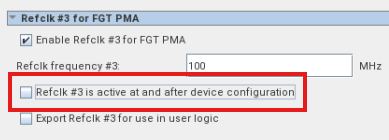
Description Due to a problem in the Quartus® Prime Pro Edition Software version 26.1.1 and earlier, you might observe refclk_fgt_enabled_i in the F-Tile Reference and System PLL clocks IP fail to lock. Background: When the FGT PMA reference clock source is not active at configuration, then you must unselect below parameter: And the F-Tile Reference and System PLL Clocks FPGA IP will expose below control and status signals for each FGT PMA: en_refclk_fgt_i refclk_fgt_enabled_i Expected behavior: For each FGT PMA, after its reference clock source #i is active, then we can drive en_refclk_fgt_i to get refclk_fgt_enabled_i asserted. Root Cause: During support logic generation, Quartus creates a shared AVMM arbiter for the F-Tile Reference and System PLL Clocks IP internal datapath AVMM master and the F-Tile protocol IP datapath AVMM masters. In certain corner cases, the internal datapath AVMM master of the F-Tile System PLL IP is connected to a different reconfiguration clock source than the one used by the F-Tile protocol IP datapath AVMM masters. This clock mismatch causes the shared AVMM arbiter to malfunction, resulting in failed datapath AVMM transactions. As a result, the F-Tile System PLL IP internal state machine cannot complete its initialization sequence, and refclk_fgt_enabled_i remains deasserted. Resolution To work around this problem, you can apply below methods: For Quartus® Prime Pro Edition Software version 25.1.1, apply patch 1.53. For other Quartus® Prime Pro Edition Software versions, disable the F-Tile protocol IP datapath AVMM interface. As a result, no shared AVMM arbiter is generated between the F-Tile protocol IP datapath AVMM masters and the internal datapath AVMM master of the F-Tile System PLL IP. This problem is scheduled to be resolved in a future release of the Quartus® Prime Installer Software.137Views0likes0CommentsWhy does the Quartus® Prime Pro Edition software version 26.1.1 report Error (25640) when an Agilex® 5 FPGA GTS regional reference clock drives 16 transceiver channels?
Description In the Quartus® Prime Pro Edition software version 26.1, an Agilex® 5 FPGA D-Series transceiver design may compile when a single GTS regional reference-clock pin drives 16 transceiver channels across four GTS quads. Starting with the Quartus Prime Pro Edition software version 26.1.1, the Fitter reports Error (25640) for the reference-clock input. The error indicates that the reference clock drives 16 transceiver channels, exceeding the allowed limit of 12 channels. The same user RTL, SDC, and pin assignments can therefore compile in version 26.1 and fail in version 26.1.1. Resolution This problem is scheduled to be fixed in a future release of the Quartus Prime Pro Edition software.241Views0likes0CommentsWhy do I see this warning message after enabled Transceiver Toolkit Debugging Features in GTS SDI II Serial Loopback Design Example?
Description Due to a problem in the Quartus® Prime Pro Edition software version 26.1.1, you will observe below. “warning check failed! > warning: no path is found satisfying assignment" “set_max_skew -from get_registers auto_fab_0|alt_sld_fab_0|alt_sld_fab_0|stfabric|h2t1_fifo|in_wr_ptr_gray -to get_registers auto_fab_0|alt_sld_fab_0|alt_sld_fab_0|stfabric|h2t1_fifo|write_crosser|sync.u|din_s1 -get_skew_value_from_clock_period src_clock_period -skew_value_multiplier 0.800 - This assignment will be ignored.” It happens when user enables the Transceiver Toolkit Debugging Features in GTS SDI II Serial Loopback Design Example. This problem happens due to the undefined path of the dc_fifo.sdc. Resolution This problem is scheduled to be fixed in a future release of Quartus Prime Pro Edition software.72Views0likes0Comments
Why is data packet loss due to CRC error observed in Agilex® 5 and Agilex® 3 TSN XCVR SGMII 1G mode?
Description Due to a problem in the Quartus® Prime Pro Edition Software version 25.1, when running the TSN - SGMII XCVR System for the Agilex® 5 FPGA E-Series Premium Development Kit, you may observe data packet loss in the TX direction for a 1G SGMII configuration with the TSN transceiver PHY. This issue is not seen with 10m,100m, and 2.5G configurations. Resolution To work around this problem, some changes in the software and hardware design files are required. Software Changes: 1. Change link.speed1000 parameter value from XGMAC_CONFIG_SS_1000_GMII to XGMAC_CONFIG_SS_2500_GMII in the following file. <user_path>/src/sw/agilex5_dk_a5e065bb32aes1-gsrd-rootfs/tmp/work-shared/agilex5_dk_a5e065bb32aes1/kernel-source/drivers/net/ethernet/stmicro/stmmac/dwxgmac2_core.c mac->link.speed10 = XGMAC_CONFIG_SS_10_MII; mac->link.speed100 = XGMAC_CONFIG_SS_100_MII; -mac->link.speed1000 = XGMAC_CONFIG_SS_1000_GMII; +mac->link.speed1000 = XGMAC_CONFIG_SS_2500_GMII; mac->link.speed2500 = XGMAC_CONFIG_SS_2500_GMII; Hardware Design Changes: 1. Replace the existing input with 2'b00 for the signals below in the file below: <user_path>/applications.fpga.soc.agilex5e-ed-tsn-config3/src/hw/ghrd_agilex5_top.v .phy_0_gmii8b_mac_speed_export (2'b00), ... .phy_0_xcvr_mode_export (2'b00), Additional Information There is no workaround currently, and there is no plan to fix this problem.189Views0likes0CommentsWhy is the manual lock to reference mode of the GTS transceivers in Agilex® 5 FPGA not working as expected?
Description Due to a problem in the Quartus® Prime Pro Edition software version 25.1.1 and earlier, the manual lock to reference mode of the GTS transceivers in Agilex® 5 FPGA does not work as expected. Resolution For a workaround, users will need to follow the following steps to enable the manual lock to reference mode to function properly. Write 0x1 to 0x818 [0] for Software Reset Controller(SRC) to ignore the CDR LTD status. Write 0x1 to both 0x91680 [24] and 0x91680 [28] for enabling LTR mode Write 0x1 to both 0x91580 [30] and 0x91580 [31] for enabling RX parallel data in manual LTR mode The manual LTR mode will only work when adaptation is set to manual. This problem is fixed beginning with the Quartus Prime Pro Edition software version 25.3.138Views0likes0CommentsWhy do I see link failure after a few resets when the GTS Transceiver PMA link is placed under internal serial loopback mode?
Description Due to a problem in the Quartus® Prime Pro Edition software version 25.1.1, if you are selecting either of the two below example designs and try to enable the internal serial loopback mode, you will see link failure, especially after one or multiple resets. The impacted example designs are: 1 x 1G PMA Direct Mode (System PLL Clocking) with Custom Cadence 1 x 3.125G PMA Direct Mode (System PLL Clocking) with Custom Cadence This is due to the default setting of the RX Equalizer parameters (VGA gain, DFE Tap 1, and High Frequency Boost) value in the example design are not compatible during the internal serial loopback mode. Resolution To overcome this problem, you can follow the section of the GTS Transceiver PHY user guide, section 3.14.2.2, to store and restore the RX Equalizer settings. The original RX equalizer parameter value can be restored after you disable the internal serial loopback for your GTS Transceiver PMA link. This problem is fixed beginning with the Quartus Prime Pro Edition software version 25.3.208Views0likes0CommentsWhy does the o_tx_pll_locked signal of the GTS transceivers show an asserted state when there is no input reference clock for Agilex® 5 FPGA devices in the Quartus® Prime Pro Edition Software version 24.1 and 24.2?
Description Due to a problem in the Quartus® Prime Pro Edition Software versions 24.1 and 24.2, the o_tx_pll_locked signal does not reflect the correct status of the TX PLLs in the GTS transceiver. This causes the o_tx_pll_locked signal to be incorrectly asserted without an input reference clock. Additionally, when a loss of reference clock occurs, the o_tx_pll_locked status signal will not go low. This deviates from the expected behavior described in section 3.8.9 of the GTS Transceiver PHY user guide. The only supported condition is ensuring the input reference clock is always present. Resolution This problem is fixed beginning with the Quartus Prime Pro Edition software version 25.3.1.124Views0likes0CommentsWhat are the valid bits of the reconfiguration address bus to specify the selected channel when enabling the "Share reconfiguration Interface" option for the Transceiver Native PHY Arria® 10 FPGA/Cyclone® 10 GX FPGA IP
Description Due to a problem in the Transceiver Native PHY Arria® 10 FPGA/Cyclone® 10 GX FPGA IP information window, when enabling the "Share reconfiguration Interface" option, there is an incorrect message that upper[n:9] address bits of the reconfiguration address bus specifies the selected channel. According to the Arria® 10 Transceiver PHY User Guide, when you turn on the "Share reconfiguration Interface" option, the Transceiver Native PHY IP presents a single Avalon memory-mapped interface slave interface for dynamic reconfiguration for all channels. In this configuration, the upper [N-1:10] bits of the reconfiguration address bus specify the selected channel. The channel numbers N are binary encoded. Address bits [9:0] provide the register offset address within the reconfiguration space for a channel. Resolution234Views0likes0CommentsHow do I enable the electrical idle feature in the E-Tile Transceiver Native PHY Agilex® 7 FPGA IP?
Description Due to a problem in the Quartus® Prime Pro Edition Software version 22.1 and earlier, this feature is currently not supported. Resolution The problem has been fixed starting with Quartus® Prime Pro Edition software version 24.3.211Views0likes0Comments