hps boot
106 Topics
Power management Agiilex 3/5 - Powerdown then HPS restart ?
I read in the power management section of (841346) Section 9 "Only power-off operations are supported, and they are done one time as a static option through boot mode user configuration. After power is turned off, the power manager does not support powering back on the CPU cores or L3 cache blocks." As I understand it = for a(partial ) power down , or power up of the HPS, the system needs to set some memory locations and then trigger a HPS restart and ther SDM has control then passes it to the FSBL. , then the FSBL can look at these locations and see what power mode it needs to come up or down as the system requires...... IE to change the power settings, there needs to be an HPS restart , or complete device configuration reload ? Perhaps put another way : In HPS boot-first mode : When a power CHANGE is required in the HPS domain, can the fabric stay running (assuming that there are no outstanding HPS<> fabric DMA requests or transactions pending across the fabric<>HPS bridge ) ? regards, glen.11Views0likes2CommentsAgilex 5/3 FreeRTOS SDK Release
Stable Version: v26.1.1 Quartus Version: 26.1.1 Supported devices: Agilex™ 3 and Agilex™ 5 Source: https://github.com/Ignitarium-Technology/freertos-socfpga Branch/Tag: v26.1.1 Release Date: October 9, 2026 Hello Everyone, A new version of the FreeRTOS SDK for Agilex 5/3 is now available. This release contains some fixes, along with UHS-1(SDR12/25/50) support for SD/eMMC. Visit the GitHub repository for instructions on how to get started. Features and Comments Feature Agilex3 Agilex5 Agilex3 SMP Agilex5 SMP Supported Features Limitations / Known Issues A55 boot Yes Yes Yes Yes Single-core boot, Dual-core SMP, Quad-core SMP (Agilex 5) A76 boot NA Yes NA Yes Single-core boot, Dual-core SMP, Quad-core SMP QSPI boot Yes Yes Yes Yes eMMC boot NT Yes NT Yes SD boot NT Yes NT Yes NAND boot No No No No Clock Manager Yes Yes Yes Yes API to get clock speed of different blocks Reset Manager Yes Yes Yes Yes Peripheral reset assert/de-assert DMA driver Yes Yes Yes Yes Memory-to-Memory, Memory-to-Peripheral and Peripheral-to-Memory GPIO driver Yes Yes Yes Yes Write, read and interrupt support Timer driver Yes Yes Yes Yes User-defined and free-running modes UART driver Yes Yes Yes Yes Full-duplex TX and RX I2C driver NT Yes NT Yes Master/Slave mode, standard and fast modes QSPI driver Yes Yes Yes Yes QSPI flash read/write/erase I3C driver NT Yes NT Yes Master mode, I3C and legacy I2C devices SPI driver NT Yes NT Yes Master/Slave mode write and read NAND driver No No No No SDM Mailbox driver Yes Yes Yes Yes SDM commands with SIP_SVC SMMU support Yes Yes Yes Yes Static identity mapping for cache coherency SDMMC driver Yes Yes Yes Yes Standard and HS HS, and UHS-I (SDR12/25/50) speeds, SDMMC and eMMC devices, FATFS support Ethernet stack Yes Yes Yes Yes TCP/IP, UDP, ICMP, DHCP, IPv4 and IPv6 USB 2.0 stack NT Yes NT Yes USB mass storage class Tested with a custom board and SOF USB 3.1 stack Yes Yes Yes Yes USB mass storage operation WDT driver Yes Yes Yes Yes Interrupt or reset on timer expiry EDAC support Yes Yes Yes Yes Error injection and detection for EMAC, USB and QSPI blocks OCRAM not supported IOSSM driver Yes Yes Yes Yes Error injection and detection Bridge driver Yes Yes Yes Yes Enable/Disable bridges Reboot Manager Yes Yes Yes Yes Warm/Cold reboot FPGA Manager Yes Yes Yes Yes FPGA configuration Legend: Yes: Feature available and tested No: Feature not available in SDK NA: Not applicable NT: Not tested Note: If you find any issues, please raise an issue on the GitHub repository.47Views2likes1Comment
Introducing the Altera Community AI Responder — Beta
Altera is introducing the AI Responder, an assistant built into the Altera Community to help provide faster, context-aware guidance for Altera product questions. It uses relevant public Altera documentation and Knowledge Database content, with coverage continuing to expand. The AI Responder may provide source references and can hand off complex or out-of-scope questions to an Altera subject-matter expert. As a beta feature, responses may contain errors or omissions, so please review the sources and verify technical guidance against official Altera documentation before implementation. If the response does not fully address your question, add more context and tag ai_responder to continue the discussion. We welcome your feedback as we improve the Community experience.23Views0likes0Comments
NAND flash issue with dual-core ARM® Cortex®-A9
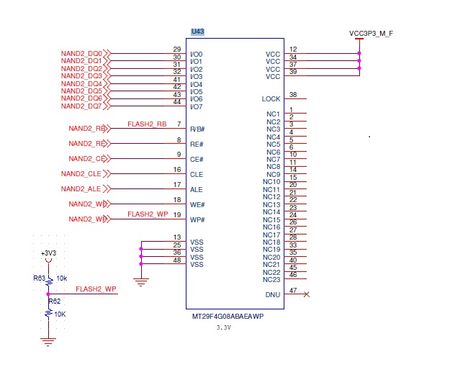
The 5CSEBA2U19I7SN SoC HPS NAND pins are connected to a 4Gb NAND flash memory chip (S34ML04G200TFI003). In this design, the active-low Write Protect pin (#WP) is connected to both a 10kΩ pull-up resistor (to 3.3V) and a 10kΩ pull-down resistor (to Ground). During booting or flashing, a few NAND flash chips do not work properly, and a few nand flashes have been permanently damaged. Is connecting the #WP pin to both a pull-up and a pull-down resistor a correct hardware approach for cyclone SOC HPS NAND configuration? Best Regards, Keshav217Views0likes4Comments
Agilex 7M RSU: Incorrect SPT Magic Number During Cold Boot on the Agilex 7M HBM2e board
We are investigating an intermittent RSU SPT detection issue on the Agilex 7M HBM2e board. The main observation is: Cold boot → automatic U-Boot boot → Linux rsu_client reports an invalid SPT magic number: Bad SPT1 magic number 0x577134E7 Bad SPT0 magic number 0x577134E7 No valid SPT0 or SPT1 found Cold boot → stop at U-Boot → wait → boot Linux The issue does not occur. Warm reboot The issue does not occur. We verified the SPT directly from U-Boot: sf probe SF: Detected mt25qu02g with page size 256 Bytes, erase size 64 KiB, total 256 MiB sf read 0x02000000 0x00f10000 0x40 SF: 64 bytes @ 0xf10000 Read: OK md.b 0x02000000 0x40 02000000: 27 34 71 57 01 00 00 00 07 00 00 00 e3 56 ee e0 ... The expected SPT magic is 0x57713427, stored as bytes 27 34 71 57. Linux identifies the same flash as: /sys/bus/spi/devices/spi0.0 modalias: spi:mt25qu02g driver: spi-nor and the device path confirms: /sys/devices/platform/soc/ff8d2000.spi/spi_master/spi0/spi0.0 U-Boot dm tree also shows: spi cadence_spi spi@ff8d2000 spi_flash jedec_spi_nor flash@0 Therefore, both U-Boot and Linux are using the Cadence QSPI controller at 0xFF8D2000. For Linux access, we tested /dev/mtd0 corresponding to the QSPI region starting at 0x00F10000. We tested reads using bs=4 as well as byte-wise reads. The results showed that the behavior depends on the read method, and byte-wise reads have shown inconsistent data, while other MTD read methods can return the expected SPT bytes. The Linux RSU driver/librsu nevertheless reports: Bad SPT0 magic number 0x577134E7 Bad SPT1 magic number 0x577134E7 We would like your guidance on the following: Since the QSPI flash is physically connected to the SDM on this board, what is the exact hardware/software path used by: U-Boot sf read Linux /dev/mtd0 librsu / stratix10-rsu Can the SDM/QSPI initialization or HPS-to-SDM handoff affect the Linux SPI-NOR read path during cold boot? Is any bridge, firewall, or QSPI initialization required before Linux accesses the QSPI flash/RSU SPT? Is there any known Agilex 7M issue involving QSPI/SDM initialization, Linux SPI-NOR, or RSU SPT access during cold boot? Our objective is to determine whether the SPT is actually being corrupted in flash or whether the incorrect magic number is caused by the Linux/RSU QSPI access path. To resolve this issue and ensure a reliable automated boot sequence, please provide: U-Boot Configuration: The recommended bootcommand settings or environment variables needed to initialize the RSU subsystem properly. Patches or Updates: Any official driver or SDM firmware patches available to fix this intermittent initialization error. We need a stable, automated boot workflow to proceed with our deployment validation. Thank you for your support and guidance on this issue. Thanks and Regards, M.Charan.129Views0likes2Comments
Release 26.1.1
Version: Release 26.1.1 PRO Quartus Build/TAG: B130/QPDS26.1.1_REL_GSRD_PR Release Date: August 17, 2026 Device Affected: Agilex™ 3, Agilex™ 5, Agilex™ 7, Startix® 10 Release Type: Major release/Binary release Binary Release Path: http://releases.rocketboards.org/2026.08/ Release Page: https://github.com/altera-fpga/gsrd-socfpga/releases/tag/QPDS26.1.1_REL_GSRD_PR Major Features Released Agilex™ 5 XEN Hypervisor 5 System Example Design https://altera-fpga.github.io/rel-26.1.1/virtualization/hypervisors/xen/ug-xen-agx5e-premium-065b/ , https://altera-fpga.github.io/rel-26.1.1/virtualization/hypervisors/xen/ug-xen-agx5e-premium-065a/ Agilex™ 5 RYO OPTE System Example Design Agilex™ 5 Quartus Reference Design using VDS Agilex™ 3 Time-Sensitive Networking (TSN): PHY configuration 2 (RGMII from FPGA HVIO) System Example Design Agilex™ 5 Performance Optimized Baseline SED support Agilex™ 5 DataMover / Bridge and Memory Benchmark System Example Design https://altera-fpga.github.io/rel-26.1.1/embedded-designs/agilex-5/e-series/premium-065a/data-mover/ug-data-mover-agx5e-premium-065a/ Agilex™ 3 support of FreeRTOS Agilex™ 5 Terasic DE25-Nano Board System Example Design105Views2likes0Comments
2.5G Ethernet Reference Porting inquiries.
Hi, guys~ My customer wants to use the 2.5G Ethernet feature, but unfortunately, they purchased the Agilex5 Premium Kit instead of the Modular Kit. I am currently following the R&D guide with them, but the 88E2110 is not being recognized properly. Which parts should we check? First, I followed below link. And have built the Reference Design boot images. https://altera-fpga.github.io/rel-26.1/embedded-designs/agilex-5/e-series/modular-065b/tsn/sgmii_xcvr_3x2.5G/ug-tsn-sgmii-xcvr-3x2.5G-agilex5/ Second, I regenerated the hardware image after updating the Modular design pinout to match the Premium Kit specs. In the Premium schematic, the 88E2110 PHY reset pin is connected to the FPGA, but there was no control logic applied. So, I added logic to release the reset after 20 ms. Third, in the device tree, I enabled emac0 and disabled emac1 and emac2. Since the soft MDIO logic remains unchanged, the addresses shouldn't have changed. However, while the emac0 logs appear, the PHY is still not being recognized. Please refer to the attached boot log. Why did they use soft MDIO instead of the native EMAC0 MDIO? Is this a characteristic of 2.5G Ethernet?Solved202Views0likes5CommentsAgilex 3 Baremetal example
We need to be able to run the Agilex 3 as baremetal We tried to re-target this Agilx5 baremetal tutorial: Baremetal Hello World Example for Agilex™ 5 Premium To be used on Altera's Agilex 3 EVB : GitHub - altera-fpga/agilex3c-ed-gsrd: Altera Agilex 3 C-series GSRD · GitHub but this seems to be too great of a task for us - everything there is custom made for the Agilex 5 Please help.138Views0likes1Comment
Agilex 5E HPS and Linux
Hi. 1. Is there a simple method to run two Linux systems on HPS, i.e.: Linux 1 - 2xA55 and Linux 2 - 2xA76 with different sets of peripherals? 2. Is it possible to use one Ethernet port by these two Linux systems. 3. Is there a simple method for communication between these two Linux systems?567Views0likes8CommentsHPS First Boot Configuration for Agilex 7
Dear Community, I'm developing a design using Agilex 7 on Quartus Pro 24.2. I'm a bit confused on the parameter settings I need for the HPS (and its EMIF) and my Quartus project settings in order to have HPS-First boot (Called HPS Early Release in former Quartus versions). For that, I'd like to generate .core.rbf and .periph.rbf files. I tried generating the .rbf files in two different ways given below, none succeeded. #1) Having the below pfg command in a text file and sourcing it in my .qsf --convert --hps -o bitstream_compression=on output_files/ProjectName.sof output_files/ProjectName.rbf #2) Using the Programming File Generator tool of Quartus I can generate .sof programming file, but converting that to .rbf fails with the following error when I did either given above. "sof is incomplete. Hps is present but bootloader information is missing". When doing case #2, I even add a bootloader .hex file that I could find on Rocketboards' webpage. Could anyone support me to have an HPS-first boot on Agilex 7 ? Thanks in advance!231Views0likes7Comments