compilation
263 Topics
Serial Lite IV - Rx Simulation Issues
Hello, I'm having trouble with the RX in side when simulating the F-Tile Serial Lite IV example design. Enviroment: - Quartus Prime Pro Edition 26.1, Windows - Questa Altera FPGA Edition-64 2025.3, installed with Quartus 26.1, with its precompiled device libraries - Device AGMF039R47A1E1VC (Agilex 7 M-Series) - F-Tile Serial Lite IV IP: FGT, NRZ, 8 lanes, 18.0048 Gbps, RS-FEC enabled, FULL streaming mode, PMA reference clock 180.048 MHz, System PLL 562.65 MHz - Example design generated from the IP parameter editor (Generate Example Design). Problem 1 : the generated run_mentor.tcl cannot compile the device libraries. run_mentor.tcl sets QUARTUS_SIM_LIB_DIR to $QUARTUS_ROOTDIR/eda/sim_lib2, DEVICES_SIM_LIB_DIR to $QUARTUS_ROOTDIR/../devices/sim_lib2 and ENABLE_QE_LIBRARY_COMPILATION to true. Both folders exist, but dev_com fails with vlog-7 (Failed to open design unit file) on the first file of every device library : quartus/eda/sim_lib2 : 220model.v, sgate.v, altera_primitives.v, altera_mf.v, altera_lnsim.sv, tennm_atoms.sv, tennm_hssi_atoms.sv, ctfb_hssi_atoms.sv, ctr_hssi_atoms.sv devices/sim_lib2 : tennm_fm_hps.sv, tennm_fp8_noc.sv, tennm_revb_io96.sv, tennm_revb_io96_iopll.sv ,ctfb_hssi_atoms_ncrypt.sv and ctfb_hssi_atoms2_ncrypt.sv, which the script also compiles, are not present anywhere in the installation. The only ctfb_hssi_atoms file installed is questa_fe/intel/verilog/src/ctfb_hssi_atoms.sv. Problem 2 : with the precompiled libraries the rx never comes up To get past problem 1, the two sim_lib2 lines were removed from run_mentor.tcl and ENABLE_QE_LIBRARY_COMPILATION was set to false, so the design binds to the precompiled Questa Altera FPGA Edition libraries. The macros in USER_DEFINED_VERILOG_COMPILE_OPTIONS were left as generated. Compilation and elaboration then succeed, and : - Phy TX Lanes Stable and Phy EHIP ready assert at 58,215 ns, TX link_up at 58,223 ns. - rx_pcs_fec_phy_reset_n is released at about 200 ns together with the TX, and rx_reset_ack asserts during the reset and clears after the release. - rx_cdr_lock stays 0 on all 8 lanes and rx_link_up never asserts : the testbench stays at "Waiting for RX Link Up". The run was stopped at 126.5 us, 68 us after TX link up. The reference logs in UG-20325 show RX link up 20 to 28 us after TX link up. - The F-tile model reports a single lane state change per lane, "State change from S0, R0, W0 TO S2, R0, W0", finished at 3,625 ns, and nothing after that. - The simulation runs at about 5 hours of wall-clock time for 126.5 us. Our own design, which uses the same IP, behaves identically on this installation. Questions 1. Where should the files that run_mentor.tcl expects in quartus/eda/sim_lib2 and devices/sim_lib2 come from ? Is an installation component missing ? 2. Is the example design supported with the precompiled Questa Altera FPGA Edition libraries ? If so, what does the FGT RX need to reach rx_cdr_lock ? 3. Is this a known issue in 26.1, and is there a patch or a workaround ?Solved145Views0likes8Comments
Unable to generate Agilex 5 bitstream with Quartus Prime Pro 25.1.0.129
I am running Quartus Prime Pro version 25.1.0.129 on a fresh Ubuntu 26.04.1 LTS install; I installed Quartus using the "individual files" method (see download page for reference) where I only downloaded device support for Agilex 5 and Agilex common. I was able to successfully run synth+PnR on a trivial design (`assign LED = ~BTN`) for the Terasic DE25-Standard devkit . I used the device code "A5ED013BB32AE4SR1" which I copied verbatim from the `golden_top.qsf` file distributed as part of the DE25-standard resources CD on Terasic's website. However, when running `quartus_asm` I get this error: Critical Warning(18636): Compilation Report contains advance information. Specifications for device A5ED013BB32AE4SR1 are subject to change. Contact Intel for information on availability. No programming file will be generated. I came across this KB article that proposes a fix for this exact problem and supplies a patch that seems to modify the file `$QUARTUS_ROOT/quartus/linux64/quartus.ini` to include some "dev_password" fields; a comment in that file confirms that there is a password for the "A5ED013BB32A_R1 OPN". However, even with this patch applied (I can confirm Quartus is using the correct ini file from the logs which say "Using INI file ..."), I still get the same error. For reasons that are highly specific to my setup it is not easy to upgrade (please just believe me on this one); the KB article mentions 25.1.1 and not 25.1, but the docs also say the same issue is present in 25.1.1. Is the only way to fix this upgrading to 25.1.1 or is there something else that might be wrong? Thanks in advance!Solved88Views0likes6Comments
Introducing the Altera Community AI Responder — Beta
Altera is introducing the AI Responder, an assistant built into the Altera Community to help provide faster, context-aware guidance for Altera product questions. It uses relevant public Altera documentation and Knowledge Database content, with coverage continuing to expand. The AI Responder may provide source references and can hand off complex or out-of-scope questions to an Altera subject-matter expert. As a beta feature, responses may contain errors or omissions, so please review the sources and verify technical guidance against official Altera documentation before implementation. If the response does not fully address your question, add more context and tag ai_responder to continue the discussion. We welcome your feedback as we improve the Community experience.73Views0likes1CommentQuartus crashes on long carry chain in Agilex 5 FPGAs
We try to manually place a carry chain in the Agilex 5 FPGAs which consists of more than 40 LABs. When we place this carry chain using set_location_assignment, Quartus crashes during the placement phase whenever the carry chain is longer than 40 LABs. Is it expected that the carry chain cannot be made longer than 40 LABs in the Agilex 5 FPGAs? Crash was observed on Quartus 25.3 and Quartus 26.1 for the devices A5ED065BB32AE4S and A5ED013BB32AE4SCS. Internal Error: Sub-system: FLABS, File: /quartus/fitter/flabs/flabs_util.cpp, Line: 96 p_to_fill->next == FLABS_OPEN251Views0likes5Commentsdcfifo problem
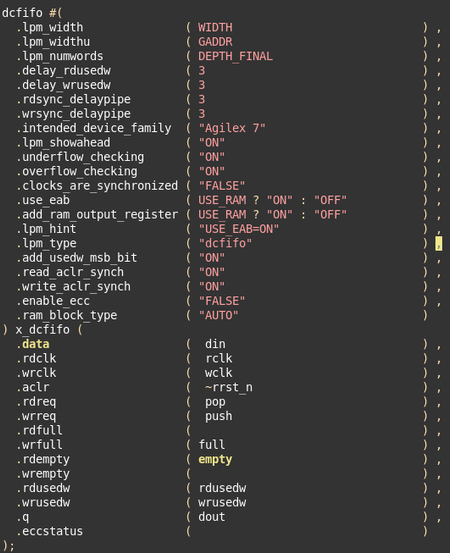
In our project, we instantiate the parameterizable DCFIFO primitive provided by Altera. The design passes simulation verification without issues; however, mismatches occur between written and read data from the DCFIFO by signalTAP during board-level testing , which consequently causes driver loading failures. fpga device:agilex7 with quartus pro25.3 dcfifo wr_clk: 450M dcfifo rd_clk: 416M the instantiate example: is there better suggestion?201Views0likes10Comments
Synthesis error
I generated HDL file from qsys and did the compilation in Quartus. Following error log was found: Error(13224): Verilog HDL or VHDL error at altpcieav_256_rp_rxm_rdwr.sv(287): index 3 is out of range [31:5] for 'addr' Error(13224): Verilog HDL or VHDL error at altpcieav_256_rp_rxm_rdwr.sv(287): index 3 is out of range [31:5] for 'addr' Error(13224): Verilog HDL or VHDL error at altpcieav_256_rp_rxm_rdwr.sv(287): index 3 is out of range [31:5] for 'addr' Error(13224): Verilog HDL or VHDL error at altpcieav_256_rp_rxm_rdwr.sv(287): index 3 is out of range [31:5] for 'addr' Error(13224): Verilog HDL or VHDL error at altpcieav_256_rp_rxm_txctrl.sv(196): index 4 is out of range [1:0] for 'tx_data' Error(13224): Verilog HDL or VHDL error at altpcieav_256_rp_txs.sv(196): index 95 is out of range [65:0] for 'rx_fifo_data' Error(13224): Verilog HDL or VHDL error at altpcieav_256_rp_app.sv(597): index 257 is out of range [71:0] for 'rx_fifo_dataq' Error(16851): Verilog HDL error at udh_en0.sv(127): formal port avs0 of type avlmm_ifc' from library 'function_enet_20 does not match with actual type avlmm_ifc' from library 'ast2avmm_pcie_bridge_hw_191 Error(16851): Verilog HDL error at udh_en0.sv(125): formal port avs1 of type avlmm_ifc' from library 'function_enet_20 does not match with actual type avlmm_ifc' from library 'ast2avmm_pcie_bridge_hw_191 Error(16851): Verilog HDL error at udh_en0.sv(123): formal port avs2 of type avlmm_ifc' from library 'function_enet_20 does not match with actual type avlmm_ifc' from library 'ast2avmm_pcie_bridge_hw_191 Error(16851): Verilog HDL error at udh_en0.sv(122): formal port avs3 of type avlmm_ifc' from library 'function_enet_20 does not match with actual type avlmm_ifc' from library 'ast2avmm_pcie_bridge_hw_191 Error(16851): Verilog HDL error at udh_en0.sv(121): formal port avm0 of type avlmm_ifc' from library 'function_enet_20 does not match with actual type avlmm_ifc' from library 'ast2avmm_pcie_bridge_hw_191 Error(16851): Verilog HDL error at udh_en0.sv(119): formal port mdio_r of type mdio_ifc' from library 'function_enet_20 does not match with actual type mdio_ifc' from library 'altera_work Error(16851): Verilog HDL error at udh_en0.sv(120): formal port mdio_s of type mdio_ifc' from library 'function_enet_20 does not match with actual type mdio_ifc' from library 'altera_work Error(16851): Verilog HDL error at udh_en0.sv(118): formal port mdio_t of type mdio_ifc' from library 'function_enet_20 does not match with actual type mdio_ifc' from library 'altera_work Error(16851): Verilog HDL error at hssl_i.sv(130): formal port avs of type avlmm_ifc' from library 'function_hssl_20 does not match with actual type avlmm_ifc' from library 'ast2avmm_pcie_bridge_hw_191 Error(16851): Verilog HDL error at hssl_i.sv(127): formal port avm0 of type avlmm_ifc' from library 'function_hssl_20 does not match with actual type avlmm_ifc' from library 'ast2avmm_pcie_bridge_hw_191 Error(16851): Verilog HDL error at hssl_i.sv(128): formal port gmii_r of type gmii_ifc' from library 'function_hssl_20 does not match with actual type gmii_ifc' from library 'function_enet_20 Error(16851): Verilog HDL error at hssl_i.sv(129): formal port gmii_s of type gmii_ifc' from library 'function_hssl_20 does not match with actual type gmii_ifc' from library 'function_enet_20 Error(16851): Verilog HDL error at hssl_i.sv(131): formal port gmii_t of type gmii_ifc' from library 'function_hssl_20 does not match with actual type gmii_ifc' from library 'function_enet_20 Error(16851): Verilog HDL error at hssl_i.sv(125): formal port mdio_r of type mdio_ifc' from library 'function_hssl_20 does not match with actual type mdio_ifc' from library 'altera_work Error(16851): Verilog HDL error at hssl_i.sv(126): formal port mdio_s of type mdio_ifc' from library 'function_hssl_20 does not match with actual type mdio_ifc' from library 'altera_work Error(16851): Verilog HDL error at hssl_i.sv(124): formal port mdio_t of type mdio_ifc' from library 'function_hssl_20 does not match with actual type mdio_ifc' from library 'altera_work Error(16851): Verilog HDL error at qsgmii2gmii_0.sv(380): formal port gmii0 of type gmii_ifc' from library 'QSGMII_to_GMII_Bridge_10 does not match with actual type gmii_ifc' from library 'function_enet_20 Error(16851): Verilog HDL error at qsgmii2gmii_0.sv(382): formal port gmii1 of type gmii_ifc' from library 'QSGMII_to_GMII_Bridge_10 does not match with actual type gmii_ifc' from library 'function_enet_20 Error(16851): Verilog HDL error at qsgmii2gmii_0.sv(377): formal port gmii2 of type gmii_ifc' from library 'QSGMII_to_GMII_Bridge_10 does not match with actual type gmii_ifc' from library 'function_enet_20 Error(16851): Verilog HDL error at qsgmii2gmii_0.sv(378): formal port gmii3 of type gmii_ifc' from library 'QSGMII_to_GMII_Bridge_10 does not match with actual type gmii_ifc' from library 'function_enet_20 Error(16851): Verilog HDL error at qsgmii2gmii_0.sv(374): formal port gmii4 of type gmii_ifc' from library 'QSGMII_to_GMII_Bridge_10 does not match with actual type gmii_ifc' from library 'function_enet_20 Error(16851): Verilog HDL error at qsgmii2gmii_0.sv(376): formal port gmii5 of type gmii_ifc' from library 'QSGMII_to_GMII_Bridge_10 does not match with actual type gmii_ifc' from library 'function_enet_20 Error(16851): Verilog HDL error at qsgmii2gmii_0.sv(372): formal port gmii6 of type gmii_ifc' from library 'QSGMII_to_GMII_Bridge_10 does not match with actual type gmii_ifc' from library 'function_enet_20 Error(16851): Verilog HDL error at qsgmii2gmii_0.sv(373): formal port gmii7 of type gmii_ifc' from library 'QSGMII_to_GMII_Bridge_10 does not match with actual type gmii_ifc' from library 'function_enet_20 Error(16851): Verilog HDL error at qsgmii2gmii_0.sv(370): formal port gmii8 of type gmii_ifc' from library 'QSGMII_to_GMII_Bridge_10 does not match with actual type gmii_ifc' from library 'function_enet_20 Error(16851): Verilog HDL error at qsgmii2gmii_0.sv(371): formal port gmii9 of type gmii_ifc' from library 'QSGMII_to_GMII_Bridge_10 does not match with actual type gmii_ifc' from library 'function_enet_20 Error(16851): Verilog HDL error at qsgmii2gmii_0.sv(366): formal port gmii10 of type gmii_ifc' from library 'QSGMII_to_GMII_Bridge_10 does not match with actual type gmii_ifc' from library 'function_enet_20 Error(16851): Verilog HDL error at qsgmii2gmii_0.sv(367): formal port gmii11 of type gmii_ifc' from library 'QSGMII_to_GMII_Bridge_10 does not match with actual type gmii_ifc' from library 'function_enet_20 Error(16851): Verilog HDL error at qsgmii2gmii_0.sv(391): formal port avs0 of type avlmm_ifc' from library 'QSGMII_to_GMII_Bridge_10 does not match with actual type avlmm_ifc' from library 'ast2avmm_pcie_bridge_hw_191 Error(16851): Verilog HDL error at qsgmii2gmii_0.sv(390): formal port avs1 of type avlmm_ifc' from library 'QSGMII_to_GMII_Bridge_10 does not match with actual type avlmm_ifc' from library 'ast2avmm_pcie_bridge_hw_191 Error(16851): Verilog HDL error at qsgmii2gmii_0.sv(387): formal port avs2 of type avlmm_ifc' from library 'QSGMII_to_GMII_Bridge_10 does not match with actual type avlmm_ifc' from library 'ast2avmm_pcie_bridge_hw_191 Error(16851): Verilog HDL error at qsgmii2gmii_0.sv(386): formal port avs3 of type avlmm_ifc' from library 'QSGMII_to_GMII_Bridge_10 does not match with actual type avlmm_ifc' from library 'ast2avmm_pcie_bridge_hw_191 Error(16851): Verilog HDL error at qsgmii2gmii_0.sv(389): formal port avs4 of type avlmm_ifc' from library 'QSGMII_to_GMII_Bridge_10 does not match with actual type avlmm_ifc' from library 'ast2avmm_pcie_bridge_hw_191 Error(16851): Verilog HDL error at qsgmii2gmii_0.sv(388): formal port avs5 of type avlmm_ifc' from library 'QSGMII_to_GMII_Bridge_10 does not match with actual type avlmm_ifc' from library 'ast2avmm_pcie_bridge_hw_191 Error(16851): Verilog HDL error at qsgmii2gmii_0.sv(383): formal port avs6 of type avlmm_ifc' from library 'QSGMII_to_GMII_Bridge_10 does not match with actual type avlmm_ifc' from library 'ast2avmm_pcie_bridge_hw_191 Error(16186): Can't elaborate top-level user hierarchy Error: Flow failed: Error: Quartus Prime Synthesis was unsuccessful. 65 errors, 191 warnings Error: Peak virtual memory: 1041 megabytes Error: Processing ended: Wed Sep 23 11:02:52 2026 Error: Elapsed time: 00:01:58 Error: System process ID: 23412 Error(293001): Quartus Prime Full Compilation was unsuccessful. 67 errors, 191 warnings It seems the instantiated avlmm(for instance) is trying to map to the same module in altera_work which gneerates this error. How do i solve it?193Views0likes6CommentsHow to organize a shared cache for qsys systems?
I have written a system to generate command lines and scripts/templates for various EDA tools. This will let me share the same same design across different implementations. The designs typically reside in a git (or some other VC) repository. For Altera IP's only the *.ip is kept in the git repository. The cache tag is generated from a hash of the content of the *.ip and the Quartus version used as this uniquely defines a single *.ip file. The build script will copy the '*.ip' file and run qsys-generate in the $cache/$tag location which will be added to the IP_FILE in the tcl build script. The next time the same Quartus version and same *.ip file is used it's referenced by the IP_FILE variable. This works pretty well. Putting the *.qsys itself into a similar structure works too. But distributing the *.ip and *.qsys children of the parent.qsys in the same cache seem to be problematic as the parent.qsys logicalView XML tag seem to contain a partial relative sub-path. Is there a way to make sure that only references to the child.ip or child.qsys will be present in the parent.qsys so that it can be located by the full absolute path specified in the IP_FILE? Also how are *_hw.tcl files located and what type of references and relations between these and their respective *.ip and/or *.qsys files are stored in these files? Or is the only solution to copy the full tree structure of the qsys into the cache and hash its full content? BTW I'm using Linux only.111Views0likes2Comments
Quartus Prime Lite 25.1 - Issue with the Verilog generate loops
Hi! I believe, this is the same issue mentioned here, or at least its sibling. Long story short, here is a snippet from the IEEE Std 1364™-2005 standard, page 185: module addergen1 (co, sum, a, b, ci); parameter SIZE = 4; output [SIZE-1:0] sum; output co; input [SIZE-1:0] a, b; input ci; wire [SIZE :0] c; wire [SIZE-1:0] t [1:3]; genvar i; assign c[0] = ci; // Hierarchical gate instance names are: // xor gates: bit[0].g1 bit[1].g1 bit[2].g1 bit[3].g1 // bit[0].g2 bit[1].g2 bit[2].g2 bit[3].g2 // and gates: bit[0].g3 bit[1].g3 bit[2].g3 bit[3].g3 // bit[0].g4 bit[1].g4 bit[2].g4 bit[3].g4 // or gates: bit[0].g5 bit[1].g5 bit[2].g5 bit[3].g5 // Generated instances are connected with // multidimensional nets t[1][3:0] t[2][3:0] t[3][3:0] // (12 nets total) for(i=0; i<SIZE; i=i+1) begin:bit xor g1 ( t[1][i], a[i], b[i]); xor g2 ( sum[i], t[1][i], c[i]); and g3 ( t[2][i], a[i], b[i]); and g4 ( t[3][i], t[1][i], c[i]); or g5 ( c[i+1], t[2][i], t[3][i]); end assign co = c[SIZE]; endmodule Quartus Prime 25.1std.0 Build 1129 10/21/2025 SC Lite Edition reports the error 10170 when attempting to compile this module: Error (10170): Verilog HDL syntax error at main.v(22) near text: "for"; expecting "endmodule". Check for and fix any syntax errors that appear immediately before or at the specified keyword. The Intel FPGA Knowledge Database contains many articles with specific details on how to resolve this error. Visit the Knowledge Database at https://www.altera.com/support/support-resources/knowledge-base/search.html and search for this specific error message number. Error (10170): Verilog HDL syntax error at main.v(23) near text: ")"; expecting ";". Check for and fix any syntax errors that appear immediately before or at the specified keyword. The Intel FPGA Knowledge Database contains many articles with specific details on how to resolve this error. Visit the Knowledge Database at https://www.altera.com/support/support-resources/knowledge-base/search.html and search for this specific error message number. Error (10170): Verilog HDL syntax error at main.v(28) near text: "end"; expecting "endmodule". Check for and fix any syntax errors that appear immediately before or at the specified keyword. The Intel FPGA Knowledge Database contains many articles with specific details on how to resolve this error. Visit the Knowledge Database at https://www.altera.com/support/support-resources/knowledge-base/search.html and search for this specific error message number. Error (10112): Ignored design unit "addergen1" at main.v(1) due to previous errors It accepts it, though, if to embrace the generating loop into "generate/endgenerate" framing. The Verilog version in the project settings is "Verilog-2001". Changing it to "System Verilog" has no impact on the behavior. ========== For comparison, I fed this exact snippet to the Questa Altera Starter FPGA Edition-64 2025.2 and it had no problems with it. ========== So my question is: "What is the root cause of this misbehaving?". Am I understanding the standard wrong? Ot is it some peculiarity of the Quartus itself? Thanks in advance!Solved428Views0likes2CommentsError ID 18694: Still not resolved ???
I have a LVDS SERDES TX IP in bank 2J of a Cyclone 10 GX device. I have a shared clock input pin in bank 3B. The current Cyclone 10 GX Core Fabric and IO manual, section 5.6.6.3, states that this clock pin on bank 3B could be used as reference clock for the bank 2J SERDES TX IOPLL, when promoted. I did promote that clock to GLOBAL. I get error message ID 18694, which states that this connection is forbidden to be used. This problem has been discussed here over several years. Could it be true that there still is no other solution to that problem than to revert to QPP 18.0 ??? If so, I find that rather ridiculous, since I am very satisfied with rather low clock rates, just a very few hundred MHz, so there is no concern about jitter. After all, that reference clock for a TX SERDES has to come from somewhere, and I could have a large number of TX SERDES within my design. So some shared clock clearly is reasonably required. Any workaround is highly appreciated. Thanks and best regards John P.S. I read that there does exist some secret, magic escape to that. In view of the clear unsuitability of blocking that route, please let me have that code.Solved1.9KViews0likes19Comments