board debug
324 Topics
Cannot program cyclone IV with USB blaster
Hello, I have an Altera Cyclone IV EP4CE6E22C8N board which supports programming via JTAG USB, and so I have a USB blaster revision C and connected it to the JTAG port and installed the drivers for it through the Quartus Prime installer, but unfortunately every time I try to use the programmer with it plugged in, it hangs for a while then prints an error saying "Attempted to access JTAG server -- internal error code 82 occurred", running jtagconfig also says: "Error when scanning hardware - Server error", device manager also shows only USB blaster when as far as I know it should also be showing additional entries such as JTAG interface? I tried different drivers but to the same effect, reinstalling quartus prime and all the drivers, no luck. I also tried running a windows 7 VM and installing quartus prime and the programmer drivers on there in case it was a compatibility issue, but the same happens, server says "server error" and the programmer hangs. I looked in event viewer and the driver appears to be outputting errors: I have also tried to install the drivers manually through the quartus prime 23 install directory. I'm really not sure what to do anymore, hoping someone with more experience can help. Thank you! I am running Windows 11, X86 of course.Solved3.2KViews0likes8Comments
Arria 10 boot from MT25QU01G device failure
Hello , I have a development board which consists of two arria 10 devices that retrieve the configuration from a MICRON MT25QU01G device . Although through the usb blaster seems that i can access the memory using JTAG and SFL and successfully write data in the memory , when the two arria devices boot it seems that there is a configuration error. As referred to the datasheet the first arria is configured in active serial configuration scheme by selecting the appropriate MSEL pins while the other in passive serial . I have also tied the nCONFIG, nSTATUS , DCLK , (AS_DATA_0 and AS_DATA_1) and CONF DONE as referred in pin connection and guidelines. Do you know why the FPGAs are not configured properly ? Regards Manolis758Views0likes2Comments
Cyclone V SoC custom board preloader boot sdram test issue
Dear Intel FAE and ALL, This is Brian and having issue on maximum 2GB DDR3 boot sanity test. There is a warning like these: "SDRAM: Running EMIF Diagnostic Test ...Iteration 1734:, expect 0x20a69210 from address 0x20a69213, read 0x20a69210 insteadFailed" But w/o the SDRAM test on preloader, the system can boot into distro and passed memtester. Do the preloader have any bug on the memory size of the SDRAM? It do show a 2048M size message. memtester log: ``` brian@brian:~$ sudo memtester 1900M memtester version 4.3.0 (32-bit) Copyright (C) 2001-2012 Charles Cazabon. Licensed under the GNU General Public License version 2 (only). pagesize is 4096 pagesizemask is 0xfffff000 want 1900MB (1992294400 bytes) got 1900MB (1992294400 bytes), trying mlock ...locked. Loop 1: Stuck Address : ok Random Value : ok Compare XOR : ok Compare SUB : ok Compare MUL : ok Compare DIV : ok Compare OR : ok Compare AND : ok Sequential Increment: ok Solid Bits : ok Block Sequential : ok Checkerboard : ok Bit Spread : ok Bit Flip : ok Walking Ones : ok Walking Zeroes : ok 8-bit Writes : ok 16-bit Writes : ok Loop 2: Stuck Address : setting 3^C ```774Views0likes6CommentsCyclone V custom board VCCIO puzzling behavior
Dear Intel and all, I am working on Cyclone V soc 5CSEBA5U19C8N. There is a very puzzling VCCIO behavior. According to "Cyclone® V Device Family Pin Connection Guidelines PCG-01014-3.2". Any 3.0 below VCCIO must use a VCCPD with 2.5V. I am supplying VCCIO of bank 3B+4A with VCCPD 2.5V and the VCCIO is using 1.2V. However when measuring the VCCIO rail the voltage raised to almost 1.5V. Before the FPGA chip is applied the voltage rail is able to measure clean 1.2V which eliminates the DCDC issue. This is very puzzling, please FAE or Intel employee support. Thank youSolved5.5KViews0likes23Comments
STEP model for Cyclone 10 LP Evaluation Kit
Hello all, I downloaded the dev files for the Cyclone 10 LP evaluation kit and can see the layout and sch. all fine. Im wondering if anyone has a STEP file generated from the boards 3D model view? Or has an old enough Allegro install to generate one? Im trying to build an enclosure for the kit itself but need the STEP file for the mCAD side. Thanks, Jg360Views0likes1Comment
Conformal Coating over Stratix 10
I am developing a board around a Stratix 10 that will be conformal coated. Are there any limitations or masking requirements I should be mindful of with the Stratix 10? There is what appears to be a vent on the case which I am wary of coating over.472Views0likes2CommentsFitter failed with "Unknown DQ mode"
QuartusII 13.1 Windows 64 bit In the middle of Compile design, Fitter aborted with these signals, 100% Internal Error: Sub-system: FSAC, File: /quartus/fitter/fsac/fsac_titan_dqs_legality.cpp, Line: 822 Unknown DQ Mode Stack Trace: 0xae38: FSAC_COMPOSITE_IO_MGR::get_block_hierarchy_info + 0x9c28 0x3653b5: FSAC_TITAN_DQS_MGR::initialize + 0x1e5 0x3f9f: ftitan_execute + 0x191f 0x9462: ftitan_execute + 0x6de2 0x4851d: FITCC_EXPERT::fitter_preparation + 0x20d 0x4acf7: FITCC_EXPERT::invoke_fitter + 0x417 0x28ef: ftitan_execute + 0x26f 0xbab9: fmain_start + 0x7f9 0x1525: Legacy_fitter_Init + 0x4b5 0x2618: Legacy_fitter_Init + 0x15a8 0x2168: Legacy_fitter_Init + 0x10f8 0xf8a6: TclInvokeStringCommand + 0xc6 0x112a8: TclEvalObjvInternal + 0x328 0x121b5: TclEvalEx + 0x8d5 0x12d48: TclEvalObjEx + 0x2d8 0x1abbd: Tcl_EvalObjCmd + 0xfd 0x112a8: TclEvalObjvInternal + 0x328 0x56917: TclExecuteByteCode + 0xe47 0xa2376: TclObjInterpProcCore + 0x76 0x112a8: TclEvalObjvInternal + 0x328 0x56917: TclExecuteByteCode + 0xe47 0xa2376: TclObjInterpProcCore + 0x76 0x112a8: TclEvalObjvInternal + 0x328 0x121b5: TclEvalEx + 0x8d5 0x7c117: Tcl_FSEvalFileEx + 0x1d7 0x7a626: Tcl_EvalFile + 0x36 0xc1ff: qexe_ipc_progress_bar_name + 0x12bf 0x11dd6: qexe_get_command_line + 0x1556 0x150d5: qexe_run_tcl_option + 0x585 0x1e03d: qcu_run_tcl_option + 0xb8d 0x156ed: qexe_process_cmdline_arguments + 0x54d 0x15851: qexe_standard_main + 0xa1 0xa7f8: msg_exe_fini + 0x58 0xaf3c: msg_exe_fini + 0x79c 0x1f14: MEM_SEGMENT_INTERNAL::~MEM_SEGMENT_INTERNAL + 0x194 0xb8bf: msg_exe_main + 0x8f 0x1259c: BaseThreadInitThunk + 0x1c 0x5af77: RtlUserThreadStart + 0x27 End-trace Quartus II 64-Bit Version 13.1.0 Build 162 10/23/2013 SJ Full Version1.7KViews0likes6Comments
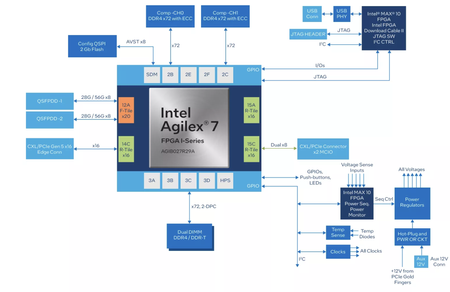
Agilex 7 I-Series Dev Kit: PIPE Direct for custom PCIe/CXL controller?
Hi Intel Community, I’m studying the R-tile Avalon® Streaming Intel® FPGA IP for PCI Express* User Guide and considering purchase of the Agilex™ 7 FPGA I-Series Development Kit (2× R-Tile, 1× F-Tile). My research goal is to bypass the hardened PCIe/CXL controller and expose the PIPE 5.x SerDes interface into the FPGA fabric, so that I can run a custom soft controller (own LTSSM, EQ, DLLP/TLP, later extend to CXL.io → CXL.mem with 64B FLITs). Before purchasing, I’d like to confirm: PIPE Direct availability Does the I-Series Dev Kit expose R-Tile PIPE Direct to the fabric (via EMIB), enabling a full soft PCIe/CXL controller? Any board-level constraints (e.g., octet-wide Gen5 base mode, per-lane Rate2:0/Powerdown1:0 controls)? Tool/flow support The User Guide notes that Quartus Pro 21.2 had no example/testbench for PIPE Direct. What is the current Quartus Pro version recommended? Are there any reference stubs or app notes for PIPE Direct (Tx/Rx wrapper, reset/clocking examples)? Root Port / Endpoint configs Any guidance on PERST#, equalization sequencing, retrain, refclk selection when not using the hardened controller? CXL hybrid approach If I start with CXL.io only, is it possible to use the hardened PCIe IP just for link/LTSSM while running custom DLL/TLP/CXL layers in soft logic? Or does any custom higher-layer implementation require going fully PIPE Direct? Board I/O Which ports (x16 edge connector, MCIO/SFF-TA-1016) are usable in PIPE Direct mode? Any pinout or kit-specific notes? specifically: if I connect through the edge connector (to a host system), can I still operate the R-Tile in PIPE Direct mode with my soft controller, or is PIPE Direct limited to MCIO breakout only? Validation environment (important) I have access to a CXL-capable host (Sapphire Rapids) but no PCIe/CXL protocol analyzer. Is it realistic to debug link training and equalization in PIPE Direct without an analyzer? If yes, what tools/flows are recommended (ILA debug, Quartus monitors, logging)? Would you recommend starting with two Agilex kits back-to-back instead of host-only, given that I don’t have an analyzer? Are there any Intel or third-party reference setups for early CXL bring-up without protocol analyzers? I’d greatly appreciate any application notes, example projects, TCL scripts, or checklists to help with PIPE Direct bring-up. Thanks in advance!625Views0likes4Comments