board debug
283 Topics
Workaround for TCK frq. limitations on USB-Blaster I/II/III & Clones (fixing "JTAG chain broken")
Workaround for TCK frequency limitations on USB-Blaster I/II/III and clones (fixing "JTAG chain broken") Hi everyone, I'd like to share a practical workaround for a problem many of us run into when programming Altera FPGAs through test fixtures, level shifters or long ribbon cables. **The problem** In these setups, "JTAG chain broken" or "Unable to scan device chain" errors are common. They are usually caused by signal reflections and poor termination on custom boards and long extensions. Lowering the TCK frequency is the standard remedy, but the options are limited: - USB-Blaster I (and most low-cost clones) runs at a fixed TCK of about 6 MHz. Quartus offers no way to change it. - USB-Blaster II can be set to 6/16/24 MHz via `jtagconfig --setparam <cable> JtagClock <freq>`, but nothing below 6 MHz. In practice this setting is also unreliable: it is not persistent and can fall back to the 24 MHz default (see Altera KB: "Why does the TCK frequency setting of the USB-Blaster II download cable revert to the default value of 24 MHz after being changed?"). In our experience it is a constant source of trouble, especially in production where it has to be set again and again. For really marginal lines, 6 MHz is often still too fast. **The workaround** Disclosure: I'm the developer of the tool described below, so please take this as information from the vendor. Quintus Programmer (by Dution) drives the JTAG lines of the USB-Blaster in bit-bang mode instead of using the adapter's fixed shift clock. This lets you choose the TCK frequency freely, e.g. down to 100 kHz, with the same USB-Blaster I/II/III or clones you already have. With a lower TCK, programming and verification become stable again on long or poorly terminated lines without any hardware changes. The standard USB-Blaster driver stays in place, and Quintus only replaces the programming step. **Before reaching for software, check the hardware basics** The recommendations from the Altera Knowledge Base still apply and often fix the problem on their own: - TCK pull-down 1 kΩ to GND, TMS/TDI pull-up 10 kΩ to VCCIO - a small capacitor (10–22 pF) at TCK near the FPGA against ringing edges - a TCK buffer on long or noisy lines If the layout can't be changed, a lower TCK is a practical way out. More info: search for "Quintus Programmer Dution". Happy to answer technical questions here.172Views0likes2Comments
Introducing the Altera Community AI Responder — Beta
Altera is introducing the AI Responder, an assistant built into the Altera Community to help provide faster, context-aware guidance for Altera product questions. It uses relevant public Altera documentation and Knowledge Database content, with coverage continuing to expand. The AI Responder may provide source references and can hand off complex or out-of-scope questions to an Altera subject-matter expert. As a beta feature, responses may contain errors or omissions, so please review the sources and verify technical guidance against official Altera documentation before implementation. If the response does not fully address your question, add more context and tag ai_responder to continue the discussion. We welcome your feedback as we improve the Community experience.22Views0likes0Comments
Cyclone V GT Dev Kit - new units fail to boot from FPP
We have been using this development kit internally for many years, and on our last order 2 out of 3 units fail to boot using the Fast Passive Parallel (FPP) configuration scheme through the MAX V. We normally use our own custom MAX V bitstream, but the issue is present even with the factory MAX V image and the factory FPGA image/flash content. The MAX V appears to try loading the image (LED D6 flashing or statically lit, depending on the MAX V firmware version) for about 6 seconds before giving up and signaling an error (LED D5). On reception, one of the two faulty boards seemed to work, it was just taking a bit longer to boot than usual (presumably it took a few retries). It then got progressively worse: the boot started failing intermittently, and now it is almost impossible to get it to boot through FPP. The boards can still boot through Active Serial (AS), and the FPGA can properly read and write the main flash, so the issue seems to affect only the MAX V flash access / FPGA configuration. Following this thread, which reports the same issue: Cyclone VGT Dev Kit boards - some new boards failing to boot from NOR Flash | Altera Community - 353984 we tried reducing the MAX V utilization to improve timing. With this change one of the boards managed to boot a few times, but very rarely and not reliably. The affected boards are all rev. B and have serials: - 5CPCIE00100214 - 5CPCIE00100263 While debugging, I also noticed that the timing constraints do not follow the Parallel Flash Loader IP User Guide. For example, fpga_dclk should be a generated clock and used as the reference for the other constraints, and the set_output_delay on fpga_data does not respect the tDSU from the Cyclone V datasheet. That said, correcting these constraints did not improve the boot behavior. We are now stuck with two boards that can only boot from AS, which is a concern for future orders. Between this and the flash revision change to rev. B (where the PCB is actually labelled rev. A and the example designs are mixed and not clearly labelled), these boards are becoming difficult to work with. Since there is at least one other thread reporting the same behavior it looks less like an isolated fault and more like a recurring issue on recent production. Could someone from Altera confirm whether this is being tracked, and what the recommended action is for affected boards?Solved415Views1like13Comments
Agilex 7 R-Tile PIPE Direct endpoint receives Set_Slot_Power_Limit, but no Config TLPs
Hello, I am developing a custom PCIe endpoint using the Agilex 7 R-Tile PIPE Direct interface. The PHY is provided by the R-Tile IP, while the LTSSM, Data Link Layer, and TLP/DLLP handling are implemented in soft RTL. Environment FPGA: Agilex 7 AGIB027R29A Quartus Prime Pro 24.3.0 Build 212 R-Tile PIPE Direct mode PCIe Gen3 x8 Custom soft LTSSM and Data Link Layer Linux host with a commercial PC/root complex The FPGA is configured before a host cold boot The endpoint is not currently visible in lspci In a successful Signal Tap capture: The LTSSM reaches Gen3 L0. The Data Link Layer reaches DL_ACTIVE. InitFC1 and InitFC2 for Posted, Non-Posted, and Completion traffic are exchanged. We observe valid incoming TLP traffic with a correct LCRC. The host sends a Message TLP that appears to decode as Set_Slot_Power_Limit. No subsequent Configuration Type 0 Read TLP or other expected enumeration TLP is observed. The link later returns from L0 to Recovery.RcvrLock. Our understanding is that Set_Slot_Power_Limit is a posted Message TLP and should not require a Completion TLP from the endpoint. The endpoint should only acknowledge successful reception at the Data Link Layer. Please correct us if this interpretation is wrong. Questions Is receiving Set_Slot_Power_Limit before the first Configuration Read a normal root-port enumeration sequence? Does the endpoint need to respond to this Message TLP in any way other than sending a Data Link Layer ACK? If the ACK DLLP has an incorrect sequence number, CRC, or timing, could the root port stop sending further TLPs and eventually force the link into Recovery? Are there any R-Tile PIPE Direct-specific status or control signals that must be handled before the host starts Configuration transactions? Are there recommended R-Tile debug signals for determining why the root port stops after this message? Could an incorrect Flow Control advertisement—especially Completion Header/Data credits—cause this behavior even if InitFC2 completes? Are there known PERST#, cold-boot, or FPGA-configuration timing requirements for enumeration when using PIPE Direct mode? We are currently capturing the following signals: LTSSM state Data Link Layer state InitFC1/InitFC2 and UpdateFC status Received TLP Fmt/Type and complete header Received TLP sequence number LCRC result ACK/NAK request and transmitted ACK/NAK sequence number Replay timer/replay status RX block lock, CDR lock, and lane numbers Raw 1024-bit PIPE RX block data Any guidance on the expected transaction sequence after Set_Slot_Power_Limit, or additional signals that should be captured, would be greatly appreciated. Thank you.102Views0likes1Comment
R-tile CXL base hard IP example for the Agilex 7 M-series Dev Kit (DK_DEV_AGM039EA) does not work
We recently generated an R-tile CXL base hard IP example for the Agilex 7 M-series Dev Kit (DK DEV AGM039EA) with both Quartus Prime Pro 25.3.1 and 26.1. However, the CXL link is always down and stuck at Gen1 2.5Gbps. Do you have any suggestions, or is there a working CXL design example for this kit? We verified that the link functions perfectly with a PCIe Gen5/Gen4 example.We recently generated an R-tile CXL base hard IP example for the Agilex 7 M-series Dev Kit (DK DEV AGM039EA) with both Quartus Prime Pro 25.3.1 and 26.1. However, the CXL link is always down and stuck at Gen1 2.5Gbps. Do you have any suggestions, or is there a working CXL design example for this kit? We verified that the link functions perfectly with a PCIe Gen5/Gen4 example.99Views0likes2CommentsCyclone VGT Dev Kit boards - some new boards failing to boot from NOR Flash
We've been using these boards for years, having certified them for use in one of our products. In the last few months we have now received 5 of these boards and they fail to configure from NOR flash. These are all the new Rev B CVGT Dev Kit edition. Not all of the new RevB fail, but the fail rate is high, getting close to 50%. Yes, we know they changed to a Micron NOR flash for Rev B and rerouted some data lines, we are using the new RevB MAX5 files and have updated the Cyclone V NOR flash pins to match as well. I made some diagnostic changes to the MAX5 boot source (I set the PGM leds to count retries) and discovered that on the bad boards, the boot process goes through multiple configuration retries and eventually the watchdog timer fires, turns on the ERR (D5) red LED and stops. With the factory image they come with, there are also dozens of retries, then sometimes the boards fail, sometimes they boot up. With the slow speed that the NOR flash configuration runs at, there is no reason that it should ever fail and retry, and indeed on good boards they configure the first time every time with no retries. The first four we were able to send back to Altera (Via digikey where we bought them). We just got another bad one yesterday, this one from Mouser. Has anyone else seen this issue, and/or heard from Altera about this? Board link: https://docs.altera.com/r/docs/792833/current/cyclone-v-gt-fpga-development-kit-user-guide/kit-features682Views1like25CommentsARM DS5 debugger Access/Detection of CM55 on Agilex5 fpga device
Hi Team, We recently purchased license for the ARM DS5 IDE from Altera with License file contains note as NOTICE="For use with Intel or Altera devices only". I am using Arm Development studio IDE with version 2025.1-1. ALtera Agilex 5 FPGA device configured with custom soft macro based design which is only having ARM Cortex M55 processor cores with coresight debug IP . My question is whether ARM DS IDE will detect, access and debug the Cortex M55 cores which is in the fpga through the JTAG USB Blaster ? Please provide the detailed explanation Regards Suresh183Views0likes13Comments
Brand new USB-BLASTER 3 issues
A day ago I received a brand new and very expensive USB Blaster III from DigiKey with the following Serial Number: UB3000432 I have an issue using this device. The device is visible both in Win11 Device Manager and Quartus Prime Pro 26.1. After the device is properly connected to the PCB (I’ve tested 3 different boards) and powered on, the JTAG link is not established. All connections are correct, pinouts are aligned, and I even checked the conductivity of wires from board to Blaster module. I've managed to get this log from Quartus: !Error: JTAG chain problem detected !Error: No device detected. Detected 1's at TDI pin. The thing is that this same boards (chips) are visible to older USB Blaster in the same configuration. This was a sanity check. Am I missing something that is not documented in the user manual? Best regardsSolved298Views0likes8Comments
JTAG pins order for USB Blaster III - 1.27" header
USB Blaster III header has shrined in size relatively to the previous JTAG cables. I see that in addition, pinout order has changed(according to USB Blaster III user guide). So, if I want to place on a new board that I'm developing a matching connector(pitch=1.27") for USB Blaster III (without using the adapter board from the KIT), then I have to use new pinout order: 1-VCC_TRGET, 2-TMS, 3-GND, 4-TCK, 6-TDO, 7-nTRST, 8-TDI, 9-GND, 10-nPROCRST. This order is different then was used with previous JTAG cables. I couldn't find any reference schematic(also of EVAL KITs) that supports this new JTAG order. I will appreciate if anyone from the forum can confirm my observation. If it's possible that someone can answer me with an existing working reference design with 1.27" connector, I will appreciate it more.141Views0likes1CommentFitter error in A5ED043AB23AI2V Example design
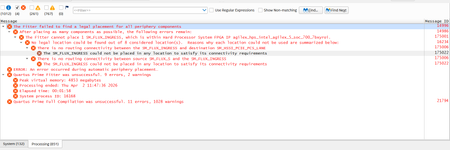
Hi, I have tried using the example design of the A5ED065BB32AE4SR0 development kit and modified the part number to A5ED043AB23AI2V. During compilation, I am encountering a fitter error when both PCIe and USB 3.1 are enabled together. However, I am able to compile successfully when using each interface individually. Could you please help me understand how to resolve this issue?171Views0likes6Comments